Choose invoice management software by starting with the way your business bills—not with a feature checklist. Map how invoices are created, sent, paid, followed up, and recorded; then decide whether standalone invoicing is enough or whether invoices should connect to accounting. Compare relevant plan limits, integrations, fees, and usability, and test a realistic invoice before subscribing.
Map how your business bills
Before comparing products, write down the work the software needs to handle. A solo consultant sending a few fixed-fee invoices has different needs from a retailer processing many orders or a firm billing monthly retainers.
As an Amazon Associate I earn from qualifying purchases.
- Volume and frequency: Estimate invoices per month and note seasonal peaks or expected growth.
- Customers and currencies: Record whether you bill individuals, businesses, or both, and whether you invoice in more than one currency.
- Billing model: Identify fixed fees, time and expenses, recurring retainers, subscriptions, or a mixture.
- Process: Trace the steps from estimate or quote through delivery, invoice, reminders, payment, and reconciliation.
- Existing systems: List the accounting, banking, CRM, ecommerce, time-tracking, inventory, and payment tools the invoice workflow must connect to.
This map turns vague preferences into requirements. It also helps distinguish a genuinely necessary feature from one that is merely attractive in a product demo.
Free tools Windows power users keep installed
One-click scans. No signup required.
Choose between standalone invoicing and accounting software
The central choice is whether invoicing should be a separate task or part of a broader financial system. A standalone invoicing tool can suit straightforward billing when bookkeeping and reporting are already handled elsewhere. An accounting platform with invoicing can reduce duplicate entry when you want invoices, expenses, payment records, reconciliation, and reports connected.
#1 Best Overall
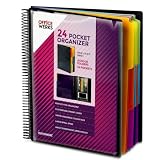
- FIND ANY PAPER IN SECONDS: Color-coded tabs and a blank label sheet let you sort up to 24 categories by class, client, or month, then flip straight to what you need. Write-and-erase tabs make relabeling instant when projects change.
- BUILT FOR A FULL SCHOOL YEAR: Tear-resistant covers, acid-free construction, and an oversized coil spine hold heavy paper loads without splitting or distorting. Two elastic straps lock everything shut so nothing slides out in a backpack or work bag.
- STANDARD PAGES SLIDE RIGHT IN: Each of the clear pockets fits 8.5 x 11 inch sheets without bending corners. Push papers all the way to the back edge and they stay flat every time you close the cover.
- REPLACES A BINDER AND NOTEBOOK: Works as a teacher binder, an IEP organizer for teachers, or a homeschool organization hub without hole-punching a single page. Slip syllabi, report cards, or lesson plans in and carry one item instead of three.
- EXTRAS ALREADY INCLUDED: A clear zippered utility pouch holds pens, note cards, and stencils. The customizable front cover has a non-glare overlay, and a clear back pocket lets you see loose items at a glance.
| Approach | May fit when | Check before choosing |
|---|---|---|
| Standalone invoicing | Billing is simple and accounting is managed in another system or by a bookkeeper. | How invoice and payment data transfers to accounting, whether the connection is native or through a connector, and whether manual entry remains. |
| Accounting platform with invoicing | You want billing connected to bookkeeping, expenses, reconciliation, or reporting. | Whether the invoicing features suit your billing model and are included in the plan you would use. |
These are product approaches, not rankings. For example, Xero describes its cloud accounting platform as including invoicing alongside reconciliation, expenses, and reporting; its guide describes FreshBooks as oriented toward service businesses and billable time. Those are vendor descriptions, so confirm current functions and plan eligibility directly. Xero’s invoicing guide
Prioritize the features your workflow needs
Core invoice controls
Most businesses should check whether a product lets them customize invoice details and payment terms, see invoice status, send reminders, accept suitable payment methods, and work from a mobile device if needed. Confirm that the invoice template supports fields required for your business and location; tax rules and required details vary by jurisdiction.
Recurring, time-based, and project billing
Recurring invoice generation can reduce repetitive work for retainers or subscriptions. Service businesses may need billable time and expenses, while professional-services teams may benefit from connecting invoices to projects. Check whether each capability is included in the plan under consideration rather than assuming it is available throughout a product.
Do these 3 things before closing this tab:
1Fix the driver behind crashes, sound loss and screen glitches2Clear out junk files and repair common Windows errors3Scan for outdated or missing drivers - takes under a minuteRank #2

- All-In-One Monthly Organizer: Keep all your important documents in one place with Sooez Accordion File Organizer. 13 pockets design works great for Monthly organizing and protecting all your important paperwork, bills, taxes, receipts, invoices and more. Perfect for letter size.
- Expandable Capacity: The accordion file folder can be stretched up to 12 inches. 13 pockets allow you to store more than 2000 sheets. No matter how many documents you need to store, this folder can accommodate your needs as it can be easily expanded according to your requirements.
- Efficient Organization & Easy Lookup: To enhance your file organization, we provide blank labels along with this folder. You can personalize them to suit your requirements, such as labeling sections by month for effortless file retrieval.
- Stable & Portable: Stand on its own on the desk and not easy to tip over. Designed with portability in mind, allowing you to effortlessly move it between your desk, cabinet, and any other preferred locations.
- Maximum Protection and Durability: Well made, made from durable wipe-clean polypropylene. Waterproof & sturdy. Tear-resistant plastic provides durable structure. Acid-free, PVC-free, and archival quality for safe storage. Adjustable snap closure helps keep contents secure. Use 2 additional front pockets for business cards, project title cards or notes.
Retail and higher-volume billing
Retail or ecommerce operators may need inventory or point-of-sale connections. Businesses sending many invoices may benefit from batch invoicing. In both cases, verify that the relevant workflow is supported and that any needed integration moves the right data without creating a new manual step.
Check integrations and where the data goes
A listed integration does not always mean a complete, automatic workflow. For every connection that matters, verify what records sync, whether the connection is native or supplied by a third-party connector, and whether data moves in both directions. Relevant connections may include accounting, bank feeds and reconciliation, CRM, ecommerce, time tracking, inventory, and payment gateways.
Salesforce, for example, emphasizes a native CRM-to-invoice workflow in its product guidance. That illustrates an integration-first approach, not independent evidence that it is the right fit for every business. Salesforce’s invoice software guide
Rank #3

- 26-POCKET MONTHLY FILE ORGANIZER: ABC life 26-pocket accordion file organizer is the perfect solution for filing taxes and sorting monthly family documents. Measuring 13" x 9.4" x 28", it is designed to store a massive volume of Letter/A4 size files for both home and office use.
- UNIQUE 2-IN-1 LIDDED & LID-FREE DESIGN: The smart lock-hole design lets you use this expandable file folder with the lid closed for covered storage or without the lid for quick access to your files. Expanding up to 28 inches and holding up to 4,500 sheets, it also features a sturdy self-standing structure that stays upright on your desk, even when fully loaded.
- EASY COLOR-CODED FILE ORGANIZATION: Designed with colorful inner pockets and large A-Z tabs, this accordion file organizer makes it easy to sort and identify documents at a glance. The clear alphabetical layout helps you quickly locate tax papers, bills, receipts, invoices, school records, and other important files in seconds.
- UPGRADED POCKET HEIGHT FOR CLEARER LABELS: The improved pocket design keeps papers from covering the index tabs, so labels stay visible and easy to read. This expandable file folder fits Letter and A4 size documents and helps organize tax records, bills, receipts, invoices, medical files, and other important paperwork more efficiently.
- SPACE-SAVING HOME FILE STORAGE: This accordion file organizer expands to hold a large volume of documents while collapsing down for compact storage when not in use. Ideal for home office organization, it helps keep paperwork neatly contained, reduce clutter, and make everyday filing easier and less stressful.
Map the data flow using a real scenario: create an invoice, record a payment, and check where both appear afterward. If staff must re-enter customer, invoice, or payment details, include that ongoing work in the comparison.
The Tool Desk
Outbyte Driver Updater FREEFix the driver behind crashes, sound loss and screen glitchesFind Drivers →Outbyte PC Repair FREERepair Windows errors before they cause bigger problemsFix Now →Compare total cost, plan limits, and growth
Do not compare subscription prices alone. Check the current official price for your country and the plan you need, then account for possible setup charges, payment-processing or transaction fees, user-based pricing, and the cost of upgrading. Also check caps on invoices, clients, users, currencies, or reporting features. A free or entry plan may be sufficient, but only if its limits match the actual workflow.
Pricing and plan features change. Stripe’s small-business guide recommends matching software to business size, budget, invoice volume, and integration needs while leaving room to grow. Stripe’s guide to choosing invoicing software
Rank #4

- High-efficiency Paper Organizer: 12 pockets, 6 dividers with 1/6-cut assorted tabs in bright colors, and 36 blank viewable sticky labels. Super handy for quick referencing. Perfect for categorizing and organizing projects, homework, assignments, or other important documents.
- Sturdy & Durable Spiral Binder: Made of sturdy polypropylene, tear-proof, water-resistant, archival safe, and PVC free. The bigger binder ring greatly improves its long-lasting performance, allowing you to insert more papers, lay flat and stay open.
- Large Capacity: Contains 12 pockets, each pocket can hold 30-40 sheets of paper. Total about 480 sheets, enough for you to organize and classify. An inner clear zipper pouch & back pocket for extra storage to hold small items, keep you more organized. Perfect for desktop filing and on-the-go use.
- Functional Designs: The additional pocket on the back of the cover is perfect for labels, calendars, and bills. Special stay put tabs inside of the folder, restrain the top corner of your papers slides out. Customizable front cover allows for complete customization of your folder with ease.
- Efficient Locating & Categorizing: Using extra 36 sticky labels customize your folder tabs, increase your efficiency in finding and locating files. You can also write on viewable tabs and erase when you need to change. Make workflow easier. Suitable for home, office and classroom.
Plan for plausible changes—more invoices, additional users, new currencies, integrations, or payment methods—without paying now for capabilities you have no use for. Check the upgrade path and the cost of moving to the next plan before committing.
Independent reader supportYour contribution helps us test, update, and keep practical guides available for everyone.Test a real billing task before subscribing
Use a trial or demo, if available, to test the workflow rather than relying on a feature list. Follow the same steps your business would use and inspect the customer-facing experience as well as the staff interface.
- Create an invoice that reflects a typical job or sale, including the details and terms you actually use.
- Customize it and send it through the delivery method your business expects to use.
- Review the recipient’s payment flow and confirm the available payment methods and any applicable charges.
- Check whether reminders, recurring generation, and invoice-status tracking work as needed.
- Record a payment and verify that the resulting data reaches the accounting or other systems in your workflow.
- Ask another person who will use the system to complete the same task and note any confusing steps.
This test can reveal missing fields, plan gates, awkward payment steps, or integration gaps before the software becomes part of routine billing.
Best Value

- Sleek Design with Fresh Colors: This cute folder features elegant pattern design and eye-catching colors, lending a splash of personality to the organization process. Choose the safe and modern black, or go for the fun colored one to brighten up your space.
- Upgraded Spine for Larger Capacity: This accordion folder with the expandable spine design is more stretchy to fit over 400 sheets without bulking up too much. Unlike regular spines that can easily get dented, our spine is made for quality and not easy to deform in transit.
- Keep Organized Easily: This expanding file folder makes sorting and organizing your papers a breeze. 13 pockets with tabs allow you to sort by subject or task, and colorful labels help you search and locate quickly.
- Made to Last: Reinforced plastic folders withstand tearing, flexible to stretch but firm enough to keep from getting deformed and creased. Snap closure increases its ease of use and access yet prevents your papers from slipping out.
- Portable & Lightweight: 13 x 9.5 inches. Fit A4/letter size. Not too big or small, perfect size to carry around. An alternative for a binder to fit perfectly in your backpack without making it bulky. Easily take your paperwork to a meeting or school.
Check tax, payment security, and recordkeeping locally
Invoice requirements, tax calculations, payment methods, and record-retention rules depend on where your business operates. Confirm those requirements with current official guidance for your jurisdiction instead of assuming a software template applies everywhere. The Australian Government’s accounting-software resource, for example, addresses Australian business records and is not a universal tax guide. Australian Government guidance on accounting software
For online payments, check the payment gateway’s security and compliance information; NerdWallet specifically advises checking that the gateway is PCI compliant. This is a selection check, not a certification of any named provider. NerdWallet’s 2026 invoicing and billing software guide
Match the software to the business, not the other way around
Freelancers and service firms may value time, expenses, and recurring billing; subscription businesses may prioritize recurring invoices and payment tracking; retail and ecommerce operators may care more about order, inventory, and payment connections. A business adding staff or increasing invoice volume should also look at user and volume limits and the practical cost of upgrading.
Quick wins for a faster PC:
Repair Windows errors before they cause bigger problemsFix Now →Fix the driver behind crashes, sound loss and screen glitchesFind Drivers →Clear out junk files and repair common Windows errorsFree Scan →There is no universal winner in these categories. Use your workflow map to narrow the options, verify current plan details and local requirements, and choose the least complicated system that handles the work reliably and connects to the records you need.
Quick Recap
Product prices and availability are accurate as of the date/time indicated and are subject to change. Any price and availability information displayed on Amazon at the time of purchase will apply.




