Recommended Free Tools
Choose a ceiling mount if your projector and screen will stay in a settled position and the ceiling can support a compatible, securely installed mount. Choose a floor stand or sturdy surface if you need to move or store the projector, or want to avoid permanent ceiling work. Either setup can work well: check your exact model’s manual, keep its vents clear, and aim it squarely at the screen.
Ceiling mount or stand: which fits your room?
| Factor | Ceiling mount | Floor stand or stable surface |
|---|---|---|
| Room layout | Best suited to a fixed projector and screen position when installation is feasible. | Useful for temporary setups or rooms where the layout changes. |
| Moving and storage | Generally remains installed in one position. | Easier to reposition or put away. A camera tripod is an option only for compatible projectors. |
| Support and safety | Needs a compatible mount, a ceiling that can carry the combined load, and secure installation. | Needs a level, stable surface or stand rated for the setup. |
| Alignment and airflow | Keep vents unobstructed and point the projector squarely at the screen. | Follow the same airflow and alignment checks; realign after moving the stand. |
| Cables and installation work | Fixed cable routing may be easier to plan, but installation can involve drilling and cable runs. | Cables may be visible, but placement is easier to change. |
This is a practical room-and-routine choice, not a proven performance ranking. XGIMI’s manufacturer-authored comparison recommends a ceiling mount for a stable, permanent setup and a floor stand for flexible arrangements; it does not establish an independent head-to-head test. XGIMI’s comparison frames its scenario matrix as a heuristic, not measured performance data.
As an Amazon Associate I earn from qualifying purchases.
What to check before choosing a mount or stand
Confirm the projector’s mounting options
Check the manual for your exact model before buying hardware. Projectors differ in attachment points, supported orientation, and mount requirements. A flat surface can be a valid placement, but ceiling suspension requires a compatible ceiling mount. Epson says to secure the projector to its ceiling fixing points; Fujifilm’s FP-Z6000 guidance calls for a specified ceiling mount and its included drop-prevention kit. Those details apply to the named models, not every projector. Epson projector placement guidance and Fujifilm FP-Z6000 installation overview.
Free tools Windows power users keep installed
One-click scans. No signup required.
Assess ceiling support and installation risk
Before an overhead installation, confirm that the ceiling and fixing method can support the projector and mounting hardware. Epson recommends qualified technicians for ceiling or wall installations and describes fall-prevention wire for high placements. Philips Projection’s NeoPix Easy 2+ support guidance likewise says to use a mount recommended by an installation professional, check that the ceiling can support the projector and mounting kit, and follow the mount instructions. These are manufacturer instructions; the specific hardware and fixing details must come from the relevant model and mount documentation. Epson guidance and Philips Projection NeoPix Easy 2+ support.
#1 Best Overall
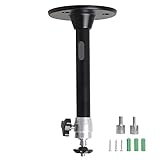
- Projector Holder Compatible with QKK,DR.J,DBPOWER,Anker,VANKYO,AAXA,Jinhoo,PVO,TMY,AuKing and Most Other Mini Projector
Use a tripod only when the model supports it
A camera tripod is not a universal substitute for a projector stand. LG’s guidance applies to projectors with a tripod docking point; it warns that an overlong bolt can damage the projector and advises a stable location with the tripod legs spread widely. It also notes that short-focal models do not support tripod use. Check your model’s user guide for compatibility and hardware requirements before attaching one. LG USA Support: LG Projector – How to Mount on a Tripod.
Set up either option safely
- Read the exact model’s manual. Confirm allowed placement and orientation, attachment points, hardware requirements, and the specified ventilation space.
- Choose a secure support. For a ceiling installation, use a compatible mount and secure the designated fixing points; consider qualified installation where the manufacturer recommends it. For a stand or surface, use a level, stable support suited to the setup.
- Keep ventilation openings clear. Leave the clearance specified for the model around and below the projector. A stand does not remove the need for airflow.
- Align the projector with the screen. Aim it squarely toward the screen, then recheck alignment if the stand or projector is moved.
- Check cable routing and stability. Plan fixed cable runs for a permanent mount; for a movable setup, make sure cables do not undermine the support or obstruct the projector.
Epson warns that incorrect ceiling installation can lead to a fall, damage, or injury. Its placement guidance says, “You must install a ceiling mount when suspending the projector from a ceiling.” Follow the instructions for your own model rather than applying another projector’s fixing details. Epson projector placement guidance.
Rank #2

- 【Note】The projector mount used in this projector mount should have the following conditions: 1. The wall where the mount is installed should be a hard solid wall, not a hollow and weak wall; 2. The projector has 3-4 screws holes to install screws; 3. The diameter of screw holes is 3 mm or 4 mm.
- 【Universal Projector Wall Mount Bracket】Newly Designed 3-In-1 retractable projector mounts from ceiling, including Flush Ceiling Installation; Telescoping Arm Ceiling Installation; Wall Installation. Compatible most projectors,Not compatible with mini projectors.
- 【STABILITY AND DURABILITY】This wall mount projector bracket, with solid construction made entirely of high grade steel, supporting projectors up to 40 lbs, wall-hanging 20 lbs. Projector mount wall keeping your expensive equipment safe and secure.
- 【EASY TO ADJUST】The projector holder is fully adjustable with +/- 30 degree tilt, +/-30 degree swivel, hitting all the right viewing angles. The projector ceiling mount adjustable height extends from 16.9" to 25.6" from the ceiling surface and 13.8" to 22.5" from the wall. Flush ceiling mount with a minimum length of 5 inches.
- 【EASY TO INSTALL】Projector mount ceiling adjustable is easy installation with quick release hooks that attach and detach by tightening and loosening mounting bolts. All necessary hardwares and instructions are provided for assembly. NOTE: This projector screen ceiling mount does NOT support the vaulted ceiling and regular drywall.
When a front-table setup makes sense
A sturdy, level surface is a straightforward choice for quick setup, portability, or a room where the projector is not permanently installed. Philips Projection describes front-table placement as common for quick setup and portability in its NeoPix Easy 2+ support article. Regardless of placement, keep vents clear and position the projector squarely toward the screen. Philips Projection NeoPix Easy 2+ support.
Quick wins for a faster PC:
Fix the driver behind crashes, sound loss and screen glitchesFind Drivers →Repair Windows errors before they cause bigger problemsFix Now →Scan for outdated or missing drivers - takes under a minuteDriver Scan →Quick Recap
Best Value

- Compatibility Note: Not compatible with Aurzen D1 MAX projector model
- Wide Projector Compatibility: Compatible with projectors from Aurzen, TMY, HAPPRUN, Yaber, Epson, and most other brands. Only for projectors featuring a centered 1/4-inch thread (off-center holes, M6/M8, or non- threads not supported) and weighing 5.5 lbs (2.5KG)
- Full Motion Adjustability 360 Rotation & 90 Tilt: Upgraded adjustable projector mount supports 360 rotation and 90 vertical tilt for optimal viewing angles in home theater or office setups
- Telescopic Pole Adjustable from 9" to 15": This telescoping projector mount extends from 9 to 15 inches, providing height flexibility for various ceiling projector mount installations
- Safe Weight Support Ceiling 2.5KG / Wall 1KG: Securely supports up to 2.5KG (5.5 lbs) when used as a ceiling bracket for projectors, and 1KG for wall installations. For safety, mount only on solid wood, brick, or concrete surfaces
Rank #4

- Universal Compatibility: Fits most projectors (Note: Length <13.7'', Width <8.6'') with standard mounting interfaces. Projector Wall Mount supports a maximum load of 10kg/22LBS, suitable for home, office, cinema and other scenarios, and is compatible with mainstream device sizes, no compatibility concerns
- Flexible Adjustment: Enables multi-dimensional adjustment of height and angle based on usage scenarios. Projector Ceiling Mount adapts to different room layouts, projector models and screen configurations for both ceiling and wall installation, no need to purchase additional mounts, reducing costs
- Easy Installation: Includes a detailed step-by-step manual and full set of installation hardware for beginners to finish assembly and installation quickly. After assembly, only fixing operations are needed to place the device stably, saving much installation time
- Tidy Cable Management: Ceiling Projector Mount Features a built-in cable storage structure to organize device connecting cables effectively, avoiding tangles. It keeps the installation space neat, reduces cable damage risks and improves device usage safety and environmental coordination
- Adjustable Length: This projector mount delivers flexible length settings to adapt to different room layouts. It features 14.17''–22.44'' adjustable range for ceiling installation and 22.05''–31.5'' adjustable range with tray for wall mounting. The adjustable bracket matches various projectors and screens without extra purchases
Rank #3
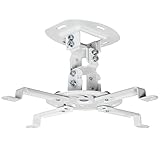
- Universal Projector Mount: Fits most projectors on the market, including mini projectors. Sturdy steel design supports up to 30 lbs (Please Note: Extension arms need to be removed for mini projectors)
- Compatibility: Distance between mounting holes on back of projector must be 5.25" to 12.5” with arms and 1.5" x 1.5" without arms. Not compatible with these models: Epson LS1100, 3010, 3200, 3700, 3800, 8350, 8500UB, 4010, Mitsubishi XL25U, or LG HU915QE
- Fully Adjustable: Features +15° to -15° tilt, +15° to -15° swivel, and 360° rotation. Hits all the right viewing angles so you and your guests can watch in comfort
- Low Profile: This mounting system holds your projector just 6” from the ceiling surface. The sleek powder-coated finish blends well with the majority of home and office environments
- Easy Installation: Quick release hooks attach and detach by tightening and loosening the mounting bolts. All hardware and instructions are provided for assembly
Product prices and availability are accurate as of the date/time indicated and are subject to change. Any price and availability information displayed on Amazon at the time of purchase will apply.




