For an offline, self-hosted RPG campaign, decide first what “offline” means for your group: no public internet during play, local-network play, or a computer with no network connection at all. Foundry Virtual Tabletop documents offline operation after online license validation; PlanarAlly’s official overview describes it as self-hostable and playable offline. Neither claim by itself establishes that every feature, rules system, or setup step will work without internet. Test the campaign workflow you need before committing.
Define what offline means for your table
These setups are different, and the distinction affects both software choice and preparation:
As an Amazon Associate I earn from qualifying purchases.
The Tool Desk
Outbyte PC Repair FREEClear out junk files and repair common Windows errorsFree Scan →Outbyte Driver Updater FREEFix the driver behind crashes, sound loss and screen glitchesFind Drivers →- No public internet during play: The GM and players connect over a local area network (LAN). A LAN is still a network, but it does not require an internet connection for people in the same location to communicate.
- No internet and no LAN: A single computer can still be used to prepare or run a game, but multiplayer access from separate devices requires some way for those devices to connect. “Offline” does not make a disconnected computer reachable by other players.
- Remote players: Players joining from outside the home need an internet-accessible host, which introduces networking, bandwidth, and uptime requirements. That is not a strict offline arrangement.
Also decide whether your requirement is about play only or the entire lifecycle. Foundry requires internet for initial license validation, so it does not meet a literal “never connect this computer to the internet” requirement without first resolving that activation step.
Compare the options that fit a self-hosted campaign
| Option | What is established | What to verify for your campaign |
|---|---|---|
| Foundry VTT on a desktop or laptop | It can run on the GM’s computer or another local computer, and campaign content is hosted locally. Foundry says it typically runs entirely offline after license validation. Installation Guide; Hosting Options Guide | Initial activation, support for your rules system and modules, local asset availability, and a backup/update plan. |
| Foundry VTT on a dedicated local server | Foundry documents headless Node.js hosting and gives minimum and recommended server requirements. Its supported Raspberry Pi list includes Pi 5, subject to OS and runtime compatibility. Minimum Requirements | Runtime and operating-system compatibility for your Foundry version, maintenance, memory headroom, and whether access is LAN-only or remote. |
| PlanarAlly | Its official product overview describes it as open-source, self-hostable, and playable offline. It lists lighting and vision, map layers, floors and locations, assets and templates, and build/play tools. PlanarAlly | Current rules-system support, installation and backup workflow, player access, and whether its tools match your group’s play style. The overview does not establish comparative ease or performance. |
| Hosted Foundry service | Foundry documents persistent cloud hosting as an alternative for remote access and avoiding local network setup. It relies on cloud hosting, so it does not meet a strict no-cloud requirement. Hosting Options Guide | Consider only if remote access matters more than keeping the host and campaign entirely local; check hosting costs and terms. |
These are different kinds of evidence, not a comparative test. Foundry’s documentation explains activation, networking, and server requirements in detail; PlanarAlly’s overview makes product-level claims. The sources do not establish a winner for ease, speed, or performance.
#1 Best Overall
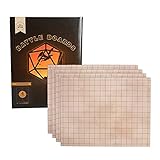
- BATTLE BOARDS: Each individual board is a 17 x 13" rectangle. There are 4 boards in a pack, which you can combine in any configuration to suit your encounter needs.
- DRY ERASE: Board surfaces are dry erase, ready for you to draw in obstacle elements or track movement as needed.
- SMART DESIGN: An easy to use 1" grid covers the front surface. The back of each board is a non-skid surface, preventing the boards from sliding around when there are accidental table bumps.
- FLEXIBLE: The All Purpose Setting boards look like parchment, ready for you to bring your game master imagination. Quickly transform this space from a busy town to a shady inn, or a creepy dungeon to an abandoned temple. The possibilities are endless.
- MAKES A GREAT GIFT: For the rpg gamer in your life. Get them a practical gift they will enjoy for years to come! (Or buy one for yourself and you'll be every player's favorite game master!) For the win!
Check what still depends on the internet
Foundry: activation and online conveniences
Foundry’s installation instructions say an internet connection is needed to validate the license key and accept the software license. After that, it can typically run entirely offline. Foundry Installation Guide
Offline operation does not make every feature local. Foundry’s FAQ identifies update checks, module and system search results, and public IP identification as functions that use external services. The FAQ says manually supplying a package manifest can still allow module installation, and that ordinary operation after activation is designed not to rely on external servers. Foundry FAQ
Quick wins for a faster PC:
Clear out junk files and repair common Windows errorsFree Scan →Fix the driver behind crashes, sound loss and screen glitchesFind Drivers →Repair Windows errors before they cause bigger problemsFix Now →Prepare before disconnecting: install the software and any rules systems or modules you need, make sure required campaign assets are on the host, and record any manual installation details. Foundry describes its license as a one-time purchase and says only the host needs a license for a group; check its current terms and price directly, because the price is not established here. Foundry FAQ
Rank #2

- Unmatched Gaming Experience: Our deluxe game mat set revolutionizes your RPG gameplay with a premium, foldable design for seamless play. Unlike cheap paper offerings, our mat ensures no creases or damage, thanks to its durable material. Includes 4 dry erase markers, an eraser, and dices, promising endless adventures without the hassle.
- All-in-one Dungeon Master Supplies: Dive into action with our double-sided maps offering 2 immersive designs (Square grid tiles & hex), enhancing your game with vivid, easily erasable terrains. Our unique travel box also serves as a carry case so you can play wherever, whenever.
- DnD Portability Redefined: Say goodbye to bulky setups. Our compact, travel-friendly kit fits easily into gaming bags, making it the perfect companion for adventures anywhere. Its lightweight design, including a spacious box for all accessories, ensures you are always ready to roll, regardless of the location.
- Superior Quality and Durability: Experience a flawless battleboard with our anti-slide, stain-resistant mats, designed for longevity. Our set stands out with high-quality laminate materials that prevent ghosting and staining, ensuring vibrant gameplay and easy cleanup. Ready for any adventure, our battleboard keep your focus on the game, not on the mess.
- Risk-free Guarantee: Committed to excellence, we offer a 90-day money-back guarantee, surpassing our competitors. Proudly designed in the USA, our kit is crafted for gamers by gamers, aiming to provide the best table top experience. Trust in our quality, and let your RPG adventures begin with confidence.
PlanarAlly: confirm the details for your use case
PlanarAlly’s product overview says it supports self-hosting and offline play, but that overview does not explain which setup steps or optional functions require connectivity. Check its current documentation and test the actual system, assets, and multiplayer arrangement you intend to use before relying on it without internet.
Choose where the host will run
Use an existing computer for the simplest local setup
For a LAN game, Foundry can run on the GM’s computer or another computer on the home network while players connect directly. The host application must remain running for players to access the world. Foundry Hosting Options Guide
This avoids configuring a separate server, but the GM’s device is occupied as the host during play. If it sleeps, shuts down, or loses the local network connection, players lose access until it is available again.
Rank #3

- Unmatched Gaming Experience: Our deluxe game mat set revolutionizes your RPG gameplay with a premium polymer material for seamless play. Unlike cheap paper offerings, our mat ensures no creases or damage, thanks to its durable quality. Include 4 dry erase markers, an eraser, and spray bottle, promising endless adventures without the hassle.
- All-in-one Dungeon Master Supplies: Dive into action, enhance your game with vivid, easily erasable terrains. Our unique travel tube also serves as a carry case to play whenever, wherever.
- DnD Portability Redefined: Say goodbye to bulky setups. Our compact, travel-friendly kit fits easily into gaming bags, making it the perfect companion for adventures anywhere. Its lightweight design, including a spacious tube for all accessories, ensures you are always ready to roll, regardless of the location.
- Superior Quality and Durability: Experience a flawless battleboard with our anti-slide, stain-resistant mats, designed for longevity. Our set stands out with high-quality laminate materials that prevent ghosting and staining, ensuring vibrant gameplay and easy cleanup. Ready for any adventure, our battleboard keep your focus on the game, not on the mess.
- Risk-free Guarantee: Committed to excellence, we are proudly designed in the small business. Our kit is crafted for gamers by gamers, aiming to provide the best table top experience. Trust in our quality, and let your RPG adventures begin with confidence.
Use a dedicated server when you want a separate, always-on host
Foundry lists these requirements for a dedicated server:
| Resource | Minimum | Recommended |
|---|---|---|
| CPU | 1 vCPU | 2 vCPUs |
| Storage | 1 GB | Not stated on the requirements page |
| Memory | 2 GB RAM | 4 GB RAM |
These are Foundry’s requirements, not a guarantee of performance; larger game systems and content-heavy modules can need more memory. The operating system must support glibc 2.28 or later, and the Node.js runtime must match the installed Foundry version. The installation guide specifies Node.js 22 for V13 and below and Node.js 24 for V14 and above; use the requirement for your version rather than treating Node 20+ as universal. The requirements page identifies Version 13.351, while the installation guide was updated January 16, 2026. Minimum Requirements; Installation Guide
Foundry lists Raspberry Pi 4 Model B, Pi 5, Compute Module 4, Compute Module 4 Lite, and Pi Keyboard 400 as supported models, subject to compatible operating-system, runtime, and glibc requirements. Older ARM systems may encounter a database-library/glibc issue. A Pi 5 is therefore an option for someone who specifically wants a compact host, not a requirement for self-hosting. Minimum Requirements
PC Slower Than It Used to Be?
A free scan shows the junk files, broken settings and background clutter dragging Windows down - then fixes them in one click.Free scan · Windows 10 & 11Crashes, No Sound, or Screen Glitches?
Random freezes, missing sound and display glitches usually trace back to one bad driver. Find and replace yours safely.Free scan · under a minuteRank #4

- Unmatched Gaming Experience: Our deluxe game mat set revolutionizes your RPG gameplay with a premium, portable design for seamless play. Unlike cheap paper offerings, our mat ensures no creases or damage, thanks to its durable material. Include 4 dry erase markers, an eraser, and spray bottle, promising endless adventures without the hassle.
- All-in-one Dungeon Master Supplies: Dive into action with 3 double-sided maps offering 6 immersive designs (Desert, Grassland, Cobblestone, Beach, Tundra, & Dungeon), enhancing your game with vivid, easily erasable terrains. Our unique travel tube also as serves as a carry case to play whenever, wherever.
- DnD Portability Redefined: Say goodbye to bulky setups. Our compact, travel-friendly kit fits easily into gaming bags, making it the perfect companion for adventures anywhere. Its lightweight design, including a spacious tube for all accessories, ensures you are always ready to roll, regardless of the location.
- Superior Quality and Durability: Experience a flawless battleboard with our anti-slide, stain-resistant mats, designed for longevity. Our set stands out with high-quality laminate materials that prevent ghosting and staining, ensuring vibrant gameplay and easy cleanup. Ready for any adventure, our battleboard keep your focus on the game, not on the mess.
- Risk-free Guarantee: Committed to excellence, we offer a 90-day money-back guarantee, surpassing our competitors. Proudly designed in the USA, our kit is crafted for gamers by gamers, aiming to provide the best table top experience. Trust in our quality, and let your RPG adventures begin with confidence.
Decide whether local play is enough
If everyone is in the same place, local-network play is usually the relevant setup: players connect to the host over the LAN, so public internet access is not required for the session. For Foundry, the host must be running and reachable on that network.
Remote internet players add another layer. Foundry documents IPv4 access through port forwarding and firewall rules; its default port is TCP 30000. Network address translation or ISP restrictions, including carrier-grade NAT (CGNAT), can prevent inbound connections even when the host is configured correctly. Foundry notes that IPv6 may avoid IPv4 port forwarding when both the host and players can connect over IPv6. Foundry Port Forwarding
Remote sessions also depend on the host’s upload speed and the size of multimedia assets. Foundry recommends 1.5 MB/s (12 Mbps) upload when serving image, video, or audio to internet-connected players. It says that careful asset optimization and S3 can make 6 Mbps workable, but initial loading may be very slow. These are vendor recommendations, not independent performance guarantees. Minimum Requirements
Best Value

- Unmatched Gaming Experience: Our deluxe game mat set revolutionizes your RPG gameplay with a premium, foldable design for seamless play. Unlike cheap paper offerings, our mat ensures no creases or damage, thanks to its durable material. Include 4 dry erase markers, an eraser, and reusable items, promising endless adventures without the hassle.
- All-in-one Dungeon Master Supplies: Dive into action with 2 double-sided maps offering 4 immersive designs (Tavern, Moss, Cobblestone, Dungeon), enhancing your game with vivid, easily erasable terrains. Our unique dry erase box design also serves as additional terrains for your gameplay (Castle, Grasslands, Distressed, Coliseum)
- DnD Portability Redefined: Say goodbye to bulky setups. Our compact, travel-friendly kit fits easily into gaming bags, making it the perfect companion for adventures anywhere. Its lightweight design, including a spacious box for all accessories, ensures you are always ready to roll, regardless of the location.
- Superior Quality and Durability: Experience a flawless battleboard with our anti-slide, stain-resistant mats, designed for longevity. Our set stands out with high-quality laminate materials that prevent ghosting and staining, ensuring vibrant gameplay and easy cleanup. Ready for any adventure, our battleboard keep your focus on the game, not on the mess.
- Risk-free Guarantee: Committed to excellence, we offer a 90-day money-back guarantee, surpassing our competitors. Proudly designed in the USA, our kit is crafted for gamers by gamers, aiming to provide the best table top experience. Trust in our quality, and let your RPG adventures begin with confidence.
Compare campaign fit, ownership, and maintenance
Before choosing, check these practical differences rather than relying on an offline label alone:
Free tools Windows power users keep installed
One-click scans. No signup required.
- Rules system and extensions: Verify that the exact system, modules, and tools your campaign needs are available and can be installed before play. Foundry’s search results use external services, so have the required packages ready if the host will be offline.
- Assets and data: Confirm where maps, tokens, audio, and world data are stored, whether they are available locally, and how to export or back them up. Self-hosting gives you control of the host machine, but it also makes you responsible for protecting its files.
- Setup and upkeep: A desktop host avoids a separate server; a dedicated host separates play from the GM’s computer but adds operating-system and runtime maintenance. The available sources do not support ranking either platform as easier or faster.
- Access pattern: Match the deployment to the table: one machine, LAN players, or remote players. A strict offline requirement rules out cloud hosting and public-internet access during play.
Foundry warns that a world migrated in a newer version may not launch in an older version; reversing a migration may require restoring a backup. Back up campaign data before version changes, and keep a copy separate from the live world. Installation Guide
Quick Recap
A practical selection process
- Write down the connectivity requirement. Specify whether you need no public internet during sessions, a LAN for local multiplayer, or a machine that must never connect online.
- List must-have campaign features. Name the game system, modules, map and vision tools, and assets you rely on. Check that they work in the platform you are considering.
- Choose a host location. Start with an existing computer for local play; choose a dedicated server only if keeping the host separate is worth the added maintenance.
- Test the whole session offline. After any required installation or activation, disconnect the host from the internet and test loading the world, using its rules tools and assets, and connecting players over the intended LAN.
- Make a recovery plan. Back up the world and configuration before upgrades, and confirm you can restore them before migrating campaign data.
- Test remote access separately if needed. Verify firewall and router settings, player reachability, and upload capacity; do not assume a successful LAN test proves internet access will work.
Product prices and availability are accurate as of the date/time indicated and are subject to change. Any price and availability information displayed on Amazon at the time of purchase will apply.




