What’s actually slowing this PC down?
Pick the symptom - the matching free tool is one click away.
Choose a STEM competition by checking eligibility and local access first, then matching the students’ interests and available time to the format. Before committing, confirm the current season’s rules, deadlines, costs, equipment, and adult support needs with the organizer—age bands, entry limits, and hardware can vary by location and edition.
Start with students, not the competition name
Make a short profile of the students who may participate. Record their grades and ages, location, interests, experience, and the team size you can realistically support. These details determine which programs are open to them and whether a team can be formed.
As an Amazon Associate I earn from qualifying purchases.
Eligibility may depend on more than age: rules can specify grade bands, citizenship or residence, full-time enrollment, school or chapter membership, state limits, or a qualifying route. For example, Toshiba/NSTA ExploraVision allows teams of two to four, assigns the grade category using the oldest teammate, and does not accept individual entries. Its rules also set citizenship, location, enrollment, and age conditions; check the current ExploraVision Rules & Requirements rather than assuming residence alone settles eligibility.
Quick wins for a faster PC:
Fix the driver behind crashes, sound loss and screen glitchesFind Drivers →Repair Windows errors before they cause bigger problemsFix Now →Scan for outdated or missing drivers - takes under a minuteDriver Scan →ExploraVision’s FAQ says teammates may attend different schools and live in different states. It also says permanent residents may participate but are not eligible for prizes. Read the full FAQ and rules for the applicable cycle: ExploraVision FAQ.
#1 Best Overall

- Entry-level Coding Robot Toy: mBot robot kit is an excellent educational robot toys, designed for learning electronics, robotics and computer programming in a simple and fun way. From Scratch to Arduino, this STEM projects for kids ages 8-12 helps kids to learn programming step by step via interactive software and learning resources
- Easy to Build: With clearly building instructions, this building kit can be easily built within 15 minutes. Kids will learn more about electronics, machinery, and robotics components through building mBot. You can also play this STEM projects for kids ages 8-12 as a remote control car with its multi-functions: line-follow, obstacle-avoidance and so on
- Rich Tutorials for Programming: With Offerring coding cards and lessons, children can easily use all fonctions of mBot and creat projects by themselves. Matched with 3 free Makeblock apps and mBlock software, kids can enjoy remote control, play programming games, and coding with mBot robot kit. Note that the remote controller needs a CR2025 battery(NOT INCLUDED), and the robot kit needs 4 AA batteries (NOT INCLUDED)
- Awesome Gift for Kids: Surprise your little Kids with super cool robotics kit and let them discover the secrets of programming and electronics. Being well packaged and metal material, this robot kit is a perfect learning and educational toy gift for boys and girls on Birthday, Children's Day, Christmas, Easter, Summer Camp Activities, Back To School, Home Fun Time
- Creative Robot with Add-on Packs: So many fun configuration with an open-source system, this programmable robot is compatible with rich add-on packs. mBot can be connected to 100+ electronic modules and 500+ parts from the Makeblock platform, compatible with LEGO parts
Choose the kind of work students want to do
Competitions can all be called STEM while asking students to do very different work. Decide whether the goal is a research-and-design project, a robot-building challenge, or a choice among many event disciplines.
Research and future-technology project: ExploraVision
ExploraVision asks teams to investigate existing technology and envision how it could develop. A submission includes a title, an abstract of up to 150 words, a description of up to 11 pages, a bibliography, and a technology launch flyer. Its categories are grades K–3, 4–6, 7–9, and 10–12, assigned according to the oldest student. A teacher or coach is required, and a mentor is optional.
Rank #2
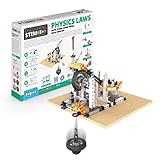
- KIDS EXPLORE the laws of motion and discover how they impact our daily lives.
- BUILD 6 incredible working models, including a rocket launcher, a crash test rig, a sharpening wheel and more. Get ready for a physics adventure with this STEM Project.
- UNLEASH your child's inner scientist with the easy-to-follow instructions, including 12 pages of theory, amazing facts, and fun experiments. And with a 4-page quiz section, kids can test their newfound knowledge and impress you with what they've learned.
- FOR KIDS 9 and up, the STEM building toy also comes with a cutting-edge, interactive 3D app that lets children build in virtual reality. And it's not just us who think this toy is amazing - it's been chosen as one of the 21 best STEM toys and gadgets to get kids interested in tech.
- WITH AWARD-WINNING components designed by Engino, complex scientific concepts are brought into clear focus for budding engineers and scientists. Make education fun with Engino, proudly made in Europe.
Judging considers creativity, scientific accuracy, communication, and the feasibility of the future vision. The official page identifies the current cycle’s rubric as 2026–2027; review it before choosing a project scope: ExploraVision judging and rubric. The stated deadline for this cycle is 8:00 p.m. ET on January 27, 2027, according to the official rules. Confirm the date and requirements on the organizer’s page in case they change.
Recommended Free Tools
Robotics and team challenge: FIRST LEGO League
FIRST LEGO League pairs robot missions with other judged elements, including research, robot design, and teamwork. FIRST’s U.S. page describes two 2026–27 editions, with different age ranges and technology. Founders Edition Explore is for ages 6–10, and Founders Edition Challenge is for ages 9–16, with Challenge ages varying by country; both use SPIKE technology. Future Edition lists U.S. bands of ages 5–7 for grades K–2 and ages 8–16 for grades 3–8, using LEGO Education Computer Science & AI kits. Check the FIRST LEGO League U.S. page and local organizer for the edition and age rules that apply to your team.
Rank #3
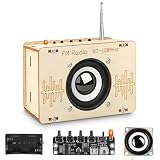
- Stimulating Curiosity and Learning: This engaging and challenging stem toys for boys age 8-12 encourages exploration of scientific concepts and circuit, discover how radio works. An excellent STEM kits for kids age 8-10, perfect for both educational and entertainment purposes.
- Great Gifts for Kids: This science kits for kids age 8-12 is an ideal gift for birthday, Christmas or any special occasion. Our radio kit automatically searches for radio programs in the 87-108 MHz frequency range, allowing you to tune in to your favorite stations with ease and the retractable antenna ensures that you can receive information anywhere. Its stylish design and practical features make it unique and the ideal gift idea for kids aged 8, 9, 10, 11, 12, 13, 14 and up.
- Premium Quality: These 3D wooden puzzle boasts precision laser pre-cut for smooth edge, each piece fits snugly together, it includes all the parts needed to assemble FM radio kits, aided by a mini screwdriver and detailed step-by-step instructions for easy construction.Powered by 2 AA batteries (not included).
- Unique Design: This building toys for boys age 8-12 and teens allows for coloring and decorating, ensuring each finished product is unique. Perfect for display in kids' bedrooms, playrooms, or study areas on desks, shelves, or display cabinets.
- Cultivate Creativity and Imagination: Assembling these toys for ages 8-13 promotes hand-eye coordination and unleash kid's imagination, making it a highly interactive activity that enhances physical and intellectual development. Whether you are a beginner or a seasoned enthusiast, you can easily get started and enjoy the process of creating your own creations!
For context only, FIRST reports 650,000 students across 77 countries for the 2024–2025 season on that page; those are not participation counts for 2026–27.
Many event choices: Technology Student Association
The Technology Student Association (TSA) offers multiple competitive events, so students can pursue different interests rather than all completing one shared project. Its middle-school guide for the 2026 and 2027 conferences includes Biotechnology, Coding, Robotics, STEM Animation, and Video Game Design, among other events. Rules and participation limits are event-specific. For instance, the guide lists Robotics as three teams of two to six members per state, and STEM Animation as three teams with at least two members per state.
Rank #4

- 4 INDIVIDUAL KITS INCLUDED: Perfect for group activities, family bonding, or classroom projects, this set includes 4 complete kits for endless fun and learning opportunities.
- HANDS-ON LEARNING FUN: Build your own robot! This STEM kit offers kids aged 8+ an exciting opportunity to learn about electrical circuits, robotics, mechanics, and engineering principles while assembling their robots.
- GREAT FOR STEM COMPETITIONS AND SCIENCE FAIRS: This kit is a fantastic tool for school projects, STEM challenges, and science exhibitions, helping kids stand out and succeed.
- INTERACTIVE & CREATIVE PLAY: Each robot is equipped with fun googly eyes and an electric motor, encouraging kids to engage in creative and interactive play while exploring STEM concepts.
- PERFECT GIFT IDEA: Whether it’s for a birthday, holiday, or a special occasion, this STEM kit makes a thoughtful and educational gift for boys and girls, sparking creativity and curiosity.
Those examples come from the TSA middle-school competitive events guide. Check the current guide and ask the school’s TSA advisor or state association about chapter membership, entry limits, and qualification. The high-school guide retrieved for this comparison covers 2025 and 2026, so it should not be treated as the current rulebook for a later conference: TSA high-school competitive events guide.
Windows Errors? Fix Them Before They Spread
Repair common Windows errors and clear accumulated junk for a smoother, more stable PC - no reinstall needed.Free scan · no reinstallCrashes, No Sound, or Screen Glitches?
Random freezes, missing sound and display glitches usually trace back to one bad driver. Find and replace yours safely.Free scan · under a minuteCompare the practical requirements
Once a format appeals to the students, compare the actual commitment. The figures below are examples tied to specific programs, regions, and seasons—not universal requirements or prices.
Best Value

- High-Density Polyurethane Foam Construction: The blanks are made of high-density polyurethane foam and are molded to exact standards so every student has an equal starting point for their dragster
- Lightweight Design: The mass of the Pitsco Fusion Blank is approximately equivalent to lightweight balsa wood blanks
- Single Kit Contents: Single Kit for building a CO2 Dragster. Additional CO2 cartridges are not included
- Educational Application: Suitable for school dragster projects or individual learning experiences
- CTSO Competition Compliant: Meets official Technology Student Association (TSA) specifications for CO2 dragster competitions and racing events
| Option | Team and eligibility snapshot | Work and judging | Cost, equipment, and access checks |
|---|---|---|---|
| ExploraVision | Teams of 2–4; categories K–3, 4–6, 7–9, and 10–12 based on oldest teammate. Eligibility also depends on rules for citizenship, location, enrollment, and age. | Research existing technology and propose a future vision. Submission includes an abstract, description, bibliography, and launch flyer; judged for creativity, scientific accuracy, communication, and feasibility. | Fee and equipment requirements are not stated on the cited rules page. Check current rules, school calendar, and teacher/coach availability. |
| FIRST LEGO League | Age bands vary by U.S. edition and country; verify with the local organizer. | Challenge combines Robot Game with Research, Robot Design, Core Values, Coaching, and Overall Performance evaluations, as described by the international partner. | The international partner lists Challenge team participation at €344 plus country-specific shipping and class participation at €739 plus shipping in Germany, Austria, and Switzerland. These are not global prices. That partner recommends SPIKE Prime for Challenge and lists EV3 and NXT as alternatives; verify the local season’s kit and registration before buying. |
| TSA | Middle-school event entry counts and team sizes vary by event and state; confirm current chapter and state rules. | Students select from event disciplines such as Coding, Robotics, STEM Animation, and Video Game Design. | Fees and equipment requirements are not stated in the cited event guide. Ask the advisor or state association about membership, entry limits, event access, and costs. |
The FIRST prices and hardware details in the table come from an international partner serving Germany, Austria, and Switzerland; they do not establish U.S. or worldwide pricing. That partner says Challenge registration opens annually in late April or early May and can run through October if regional spaces remain. Dates and capacity depend on the region, so check the local listing: FIRST LEGO League international partner season information.
For U.S. 2026–27 FIRST LEGO League, the edition matters when choosing hardware: FIRST describes SPIKE technology for Founders Edition and Computer Science & AI kits for Future Edition. Do not buy a kit based only on a general reference to FIRST LEGO League.
Check access, dates, and support before you commit
A program may fit students on paper but be impractical if the local event is full, a chapter is unavailable, or the school cannot support the schedule. Confirm these points with the organizer or local advisor before recruiting around a specific competition:
- Eligibility: age or grade band, citizenship or residence rules, enrollment, team size, and any school, chapter, or state requirements.
- Entry route and capacity: local event availability, qualifying requirements, team or event caps, and registration status.
- Calendar: registration window, submission deadline, event date, and the time needed for recruitment, research, building, practice, or travel.
- Full cost: registration, hardware, materials, replacement supplies, transportation, and the staff or volunteer time required.
- Equipment and safety: exact season and edition, required platform, safety rules, and whether suitable equipment is already available.
- Adult support: who will coach, supervise, help students stay on schedule, and communicate with the organizer.
Ask local organizers whether scholarships or loaner equipment are available, but do not include them in the plan until confirmed. Published costs and equipment lists for one country, partner, or season should not be generalized to another.
A six-step selection process
- Write down the student profile. List grades and ages, location, interests, experience, and likely team size.
- Pick the learning experience. Decide between building and coding, researching and presenting a designed project, or choosing among separate event disciplines.
- Verify local eligibility and entry. Check current rules, chapter or state membership, qualifying routes, event limits, registration status, and available slots.
- Work backward from the dates. Put deadlines and event dates on the school calendar, then allow time for recruiting, coaching, preparation, and travel.
- Build a complete budget and support plan. Include fees, equipment, consumables, transport, and adult capacity; ask about possible local assistance rather than assuming it exists.
- Read the current rules, rubric, and safety requirements. Confirm the precise season and edition before buying materials or choosing a project scope.
Use current rules as the final check
Competition formats and rules can change from season to season. Before enrollment or purchase, use the organizer’s current rulebook, rubric, and local event information to settle eligibility, deadlines, fees, hardware, and safety requirements. This is especially important where an official page describes multiple editions or where an event’s access depends on a local chapter or regional capacity.
Quick Recap
Product prices and availability are accurate as of the date/time indicated and are subject to change. Any price and availability information displayed on Amazon at the time of purchase will apply.




