Free tools Windows power users keep installed
One-click scans. No signup required.
There is no universally secure PLC for every water or wastewater facility. Choose a controller that meets the process and safety requirements, has verifiable security controls and a supported firmware lifecycle, fits the existing OT environment, and can be protected by the facility’s network and recovery design. A PLC purchase alone does not secure the system around it.
Start with the process, not a security-feature checklist
Programmable logic controllers (PLCs) are industrial computers used to monitor and control processes. Water and wastewater systems frequently use them within supervisory control and data acquisition (SCADA) systems. A controller used for pumping, chemical feed, treatment, alarms, or monitoring can have different availability, safety, and recovery requirements from another controller at the same site.
As an Amazon Associate I earn from qualifying purchases.
Before comparing models, establish what each controller does and what the consequences would be if its logic were changed without authorization, communications were lost, or operators could no longer see process conditions. Include effects on worker and public safety, water quality, service continuity, and time to restore operations. NIST’s final published OT-security guide, SP 800-82 Rev. 3, emphasizes tailoring security to OT’s distinct performance, reliability, and safety requirements rather than assuming one solution fits every installation.
Quick wins for a faster PC:
Clear out junk files and repair common Windows errorsFree Scan →Scan for outdated or missing drivers - takes under a minuteDriver Scan →Use that assessment to set minimum requirements. For a critical process, for example, the ability to recover a known-good configuration and the availability of a compatible replacement may matter as much as a particular authentication feature. Make any required safety, availability, and compatibility conditions pass/fail gates before applying weights to other criteria.
#1 Best Overall

- Powerful Processing with 600MHz ARM9 CPU: This device features a 600MHz ARM9 processor, equipped with integrated 8MB DDR2 memory and 16M NAND FLASH memory, achieving a download speed of 38.4KB for efficient performance
- Vivid Display with 4.3 Inch Screen: The product boasts a 4.3inch TFT LCD touch screen, offering a 480x272Px resolution, 260,000 colors, and a brightness of 400cd/m², making it easy to observe statuses with its backlit display
- Main Purpose: Primarily intended for use with various PLCs or intelligent controllers that have communication ports, this device is known for its low power consumption, fast operating speed, and
- Secure Use with High Safety Standards: Designed with safety in mind, the front panel complies with IP65 standards for flat panel installation, while the rear shell meets IP20 requirements, ensuring a secure setup
- Simplified Setup with Easy Installation: Installation is straightforward, thanks to a hole size of 130x80mm and the inclusion of screws and fixing accessories, enabling direct screen mounting
Inventory the system and its constraints
Document the existing environment before requesting quotes or evaluating a replacement. The controller is one part of a control system, and a technically capable PLC may still be a poor choice if it breaks required communications, engineering workflows, or support arrangements.
- Record the controller family, exact model, firmware version, I/O, communications protocols, and connected field devices.
- Map relationships with engineering software, HMI and SCADA systems, alarms, historians, and other controllers.
- Identify every programming, monitoring, and vendor or integrator access path, including paths used only for maintenance.
- Check the support and patch status of the controller, engineering software, and relevant connected components.
- Note process dependencies, required availability, current backups, spare hardware, and the people authorized to restore the system.
Keep this inventory current: CISA’s water-sector guidance calls for OT and IT asset inventories, while its PLC advisory stresses tracking device exposure, support, and patch status. An inventory also makes vendor claims about compatibility and security easier to verify against the equipment actually in service.
Compare shortlisted PLCs on evidence, not labels
Ask for documentation tied to the exact model and firmware under consideration. A broad statement that a product is “secure,” or a standards reference without scope, does not establish which controls are present, how they work, or whether they apply to the proposed configuration.
Rank #2

- -- PLC Type: Fully compatible with FX1S, 7 Input 5 Relay Output (24V pulse single). Have additional 4 Transistor Output: 2 for high speed pulse 100KHz & 2 for direction, can drive 2 servos or 2 steppers with pulse
- -- PLC software: Use GX Workers 2 or Developer (pls download from GX Workers 2 website, we only have Chinese version), support Command + T Ladder Diagram + SFC for programming
- -- HMI Software: YKBuilder V5.3/7.0 (Pls contact us, we will share it and the video instruction and guidelines). For HMI model: pls choose FE Serial, 280D
- -- Use the same Cable for download program from PC to PLC/HMI: Use the: mini port – USB cable, pls install HMI & PLC’s USB driver first, which we will share.
| Review area | What to establish | Evidence to request |
|---|---|---|
| Management access | How users authenticate before accessing management functions; whether permissions can be limited by role; and how credentials or default accounts are handled. | Model- and firmware-specific configuration guidance, supported authentication methods, and a demonstration or documented configuration path. |
| Logic and operating-mode changes | How access to modify logic, programs, or operating mode is authenticated and restricted to authorized users. | Documentation showing the controls for each relevant change path, including any dependency on engineering software or external equipment. |
| Unused features and services | Which services, features, or authentication methods can be disabled when not needed, and what functionality may be affected. | Configuration instructions and a list of relevant services and dependencies for the proposed firmware. |
| Events and monitoring | What logs or events the PLC can provide, what they record, and how those records can be collected by the facility’s monitoring systems. | Event or logging documentation, retention limits if stated, and integration requirements. |
| Vulnerability response | How vulnerabilities are reported to the manufacturer, how customers receive security notices, and how fixes are delivered. | Security-advisory history and notification process, vulnerability-reporting contact, patch process, and supported firmware branches. |
| Lifecycle and support | How long the model and its firmware are expected to be supported, and what happens at end of life or end of support. | Written lifecycle policy, applicable support dates or commitments, and access to engineering support. |
| Operational compatibility | Whether the proposed model and firmware work with required I/O, protocols, field devices, HMI/SCADA, and engineering tools. | Written compatibility confirmation and a documented account of any required upgrades, configuration changes, or exceptions. |
| Recovery | How logic and configuration are backed up and restored, and whether a compatible replacement controller is available for the process. | Backup and restore procedures, required software or files, and a proposed spare or cold-standby plan where needed. |
Confirm whether a security control is built into the PLC, provided by engineering software, or depends on a firewall, gateway, or other external device. CISA recommends authenticating access before device-state, logic, or program modification; disabling unused authentication methods or features; and restricting operating-mode changes to authorized users. Verify how a proposed device implements those controls rather than assuming every product handles them the same way.
Standards can help organize requirements, but are not a substitute for product-specific evidence. NIST SP 800-82 Rev. 3 discusses the ISA/IEC 62443 family, which includes general, policy and procedure, system, and component categories. If a vendor claims standards alignment or certification, ask which requirement, product scope, version, and configuration the claim covers, and verify certificate details with the issuing organization or vendor.
Check firmware support and vulnerability handling before purchase
Security depends partly on whether the manufacturer continues to support the exact controller and firmware. Ask the manufacturer to identify supported firmware branches, the process for publishing security notices, how customers are notified, how patches are released, and the applicable end-of-life and end-of-support policy. Clarify whether updates change compatibility with your engineering software, SCADA/HMI, communications, or field devices.
Rank #3

- -- PLC Type: Fully compatible with FX1S, 10 Transistor Input (NPN Type), 7 Relay Output. Have additional 4 Transistor Output: 2 for high speed pulse 100KHz & 2 for direction, can drive 2 servos or 2 steppers with pulse, built-in 2AD(0-10V) and 2DA(0-10V), also 2 NTC10K B3435 probe. Just read the address of AD DA NTC's will ok, 2 high speed input 100KHz X0 X1 to control encoder
- -- PLC software: Use GX Workers 2 or Developer (pls download from GX Workers 2 website, we only have Chinese version), support Command + T Ladder Diagram + SFC for programming
- -- HMI Software: YKBuilder V5.3 and Choose FE serial 380 model in HMI software. (Pls contact us, we will share it and the video instruction and guidelines), very easy to use, just create the buttun and set the address
- -- Use the same Cable for download program from PC to PLC/HMI: Use the: mini port – USB cable, pls install HMI & PLC’s USB driver first, which we will share.
Plan updates as controlled OT changes, not routine office-computer installs. Define who reviews advisories, how updates are evaluated against process and safety requirements, how testing and maintenance windows are arranged, and how to roll back or recover if an update causes problems. CISA recommends keeping PLCs updated with manufacturer patches and knowing their support and patch status; the facility still needs a safe process for deciding when and how to apply them.
Keep network boundaries and remote access in the design
Do not expose a PLC directly to the public internet. Define which systems may communicate with it, which protocols and management paths are needed, and where those connections can be restricted and monitored. Segment the control environment using suitable zones and boundaries, such as firewalls, gateways, or proxies, and avoid allowing general-purpose networks to reach controller management services unnecessarily.
If remote access is operationally necessary, put controlled access infrastructure in front of the PLC. CISA’s PLC advisory recommends a proxy, gateway, firewall, and/or VPN to control network access. A gateway or VPN can provide multifactor authentication even when a PLC cannot support it, but it must itself be maintained and secured. Use named accounts where feasible, least privilege, monitoring, and time-bounded vendor access when operationally practical; define who approves access and how it is ended.
Rank #4
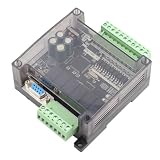
- STRONG ANTI-INTERFERENCE AND SPEED:This programmable logic controller uses industrial-grade 32-bit MCU with strong anti-interference and speed.
- STRONG ANTI-INTERFERENCE AND SPEED:This programmable logic controller uses industrial-grade 32-bit MCU with strong anti-interference and speed.
- chip, on-line download, on-line monitoring, automatic save when power off
- SUPPORT:Program written in ladder logic programming language, supports for GX-Developer, GX-work2, supports HMI connection
- HMI COMMUNICATION:Programming port the port for program upload, download and HMI communication
Network controls reduce direct exposure; they do not eliminate the need for PLC-level authentication, restricted programming access, supported firmware, and recovery planning. Treat the PLC and the access infrastructure as parts of one security design.
Independent reader supportYour contribution helps us test, update, and keep practical guides available for everyone.Plan backups, replacement, and safe recovery
Keep strong backups of controller logic and configuration, along with the engineering files and instructions needed by authorized staff to restore them. Test restoration rather than treating the existence of a backup file as proof that recovery will work. Protect backup copies from unauthorized change and make them accessible during an incident.
What’s actually slowing this PC down?
Pick the symptom - the matching free tool is one click away.
For critical processes, assess whether a compatible cold-standby or replacement controller is necessary and whether it can be obtained and configured in time to meet recovery requirements. CISA recommends tested logic and configuration backups and planning for cold-standby or similar replacement hardware. The right choice depends on process criticality, compatibility, and the facility’s recovery objectives.
Best Value

- 4 Relays - 1A, 28VAC, 24VDC
- 4 Digital Inputs - Non-Isolated Opto-Coupler | 4-26VDC
- Supports up to 16 Temperature/Humidity Sensors
- Receive Email/Text Alerts
- Requires 9-28VDC Power Supply (Sold Separately) or POE Switch (POE version only)
Use a documented procurement decision
Once safety, operational, and security minimums are clear, compare the shortlisted models using a weighted technical review. Give each requirement an owner and record the evidence, decision, and any exception. A useful decision record includes:
- Process role, availability and safety requirements, and compatibility findings.
- Model- and firmware-specific security evidence, including what depends on external systems.
- Support terms, vulnerability-notification and patch arrangements, and lifecycle dates.
- Network boundaries and approved management and remote-access paths.
- Backup, restoration, spare-hardware, and recovery responsibilities.
- Exceptions, residual risks, mitigations, and the vendor or integrator responsible for each configuration or support task.
Before deployment, test the selected configuration and any defensive changes through the facility’s change-management and safety procedures. CISA’s control-system guidance recommends impact analysis and risk assessment before defensive changes; a security measure that disrupts a process is not a successful implementation.
What the threat examples and guidance do—and do not—show
CISA reported that, beginning in November 2023, actors using the “CyberAv3ngers” persona targeted and compromised Israeli-made Unitronics Vision Series PLCs and HMIs. Its advisory includes water and wastewater facilities among affected sectors and recommends device hardening and broader protections. The incident illustrates why internet exposure, default credentials, remote programming access, and patch and support practices deserve attention. It does not establish that one PLC brand is categorically unsafe or that compromise is common across all water facilities.
Crashes, No Sound, or Screen Glitches?
Random freezes, missing sound and display glitches usually trace back to one bad driver. Find and replace yours safely.Free scan · under a minutePC Slower Than It Used to Be?
A free scan shows the junk files, broken settings and background clutter dragging Windows down - then fixes them in one click.Free scan · Windows 10 & 11The sources informing this decision framework do not provide a comparable authoritative incident-rate statistic for water-sector PLC compromise or a tested security ranking of PLC brands and models. NIST reported more than 3 million downloads of SP 800-82 since its initial release in 2006; that is a cumulative count of downloads of guidance, not a count of incidents or deployed PLCs.
For current guidance, NIST SP 800-82 Rev. 3 was published on September 28, 2023. As of October 3, 2026, NIST lists Rev. 4 as an initial public draft published September 21, 2026, with comments due November 30, 2026. The draft is not a final revision or a binding requirement. Use the published guidance and applicable obligations for your facility, and verify the latest status directly with NIST.
Make the choice site-specific
Select the PLC that satisfies the facility’s process and safety needs, has controls and lifecycle support substantiated for the exact model and firmware, and can be operated within a segmented, monitored, recoverable system. Ask manufacturers and integrators for written answers, test compatibility and recovery, and document exceptions and ownership. No general product label or standards reference can replace that site-specific engineering review.
Quick Recap
Product prices and availability are accurate as of the date/time indicated and are subject to change. Any price and availability information displayed on Amazon at the time of purchase will apply.




