The Tool Desk
Outbyte PC Repair FREEClear out junk files and repair common Windows errorsFree Scan →Outbyte Driver Updater FREEFix the driver behind crashes, sound loss and screen glitchesFind Drivers →To see how much space is left on a Samsung Galaxy phone or tablet, open Settings, go to Device care or Device maintenance, then tap Storage. The screen shows internal storage use and remaining space; an inserted, supported SD card may appear separately. Names and locations can vary by model, software version, and region.
Check available storage on a Samsung Galaxy
- Open Settings.
- Tap Device care or Device maintenance. If neither option appears, search Settings for “Storage” or look for Storage under Device care.
- Tap Storage. If figures or categories look greyed out at first, wait for the phone to finish calculating; Samsung notes this can take about a minute.
- Read the internal storage figures for used and available space. If a supported SD card is inserted, check for its separate figure, which Samsung says may appear at the bottom of the screen.
The menu path and labels are documented in Samsung UK’s storage guide, updated 4 August 2026. Exact screens can differ across Galaxy models and software versions.
As an Amazon Associate I earn from qualifying purchases.
What the capacity numbers mean
The advertised capacity in a phone’s specifications is not the same as the free space available for your files. The operating system and default apps use some of the internal storage, and updates can change how much remains. Samsung’s Galaxy S9+ manual explains that actual available capacity is lower than the specified capacity for those reasons; that manual is model-specific, but the distinction between total and free space is important whenever you check a device.
Free tools Windows power users keep installed
One-click scans. No signup required.
When an SD card can help
Not every Galaxy phone or tablet has a microSD slot, and supported capacity varies by exact model. Check the specifications for your particular device before buying a card; a card’s format capacity does not guarantee that your Galaxy supports that maximum.
#1 Best Overall

- Storage Capacity: 500 GB (gigabyte) of storage space.
- Compact Size: 2.5-inch form factor for portability.
- Multi-Platform Compatibility: Works seamlessly with PS4, Mac, phones (Andriods with USB C), and Xbox devices.
- High-Speed Data Transfer: USB 3.0/C for fast data transfer speeds.
- Sleek Design: Stylish and durable casing.
Samsung lists these microSD format ranges: microSD up to 2GB, microSDHC up to 32GB, and microSDXC over 32GB through 2TB. It recommends microSDXC for high-resolution video recording because of capacity and read/write speed. Those are format ranges, not a promise about compatibility with an individual phone. See Samsung’s compatibility and microSD guidance.
A card can provide a place for compatible files, but Samsung Android devices do not support adoptable storage: an SD card does not become part of internal storage. Moving ordinary files is also different from moving apps, and many apps cannot be transferred to a card.
Rank #2

- 【Multi Devices Organizer】: This product is a device organizer and does not come with charging ports. The stand holder works with most 6-port chargers. It can store five phones and one tablet at the same time. Not recommended for tablets larger than 10 inches.
- 【Light and Portable】: Durable and stable plastic separators hold your iPhone, tablet and smart phone in place, The external hard drive holder very easy to depatchable and carry(Not recommended if your tablet is larger than 10 inches ).
- 【Adjustable Size Tablet Organizer Stand】: As the thickness of your device, you can decide which baffle is left then you have enough space to place it. Save more space for your desk space , The ipad rack holder is a good choice for organizing multiple devices.
- 【Unique Design】: The multiple phone holder features a fashion boat design, when you put smart phone on the bow position, the bracket will not cover the screen of your device(Note: The organizer measures 5.70 "L x 3.74" W x 1.37 "H, with a device height of 0.98" H and adjustable minimum spacing of 0.70 "W. The weight is 90 grams.).
- 【What You Get】: 1 X UDOLI bracket stand ; 4 X narrow slat ; 2 X wide slat ; Satisfactory customer service, if you want any questions please email us and let us know, we will get back to you within 24 hours.
Move files to supported external storage
On compatible devices, Samsung’s My Files app can move or copy selected files to an inserted SD card or supported USB storage. The available destinations depend on the device and the external storage. Samsung also notes that encrypted music and other purchased content may not be movable to external storage.
- Open My Files and locate the files or folders you want to transfer.
- Select the items, then choose Move or Copy.
- Choose internal storage, an available SD card, or supported USB storage as the destination, then complete the transfer.
These steps apply to files managed in My Files; they do not move files into other apps such as Gallery. See Samsung’s My Files instructions for model-dependent details.
Rank #3
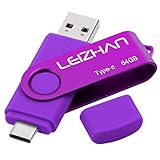
- Type C Pen drive is 64GB storage capacity. Dual Interface: USB 3.0 and Type-C (USB-A and USB-C ), quickly transfer data between your computers, OTG enabled USB Type-C smartphone & tablets, car audio system, consoles and more, it also compatible with Macs
- Photostick for Samsung Galaxy S10e, note 10, S10+, S10, S9+, S9, Note 9,Samsung Galaxy 8,Samsung Galaxy S8, Note 8, huawei P30, P20 ,P9, honor 8, Google Pixel 2/ 2XL Nexus 5X, Nexus 6P, Nokia N1, LG G5 G6, HTC U11, One Plus MacBook, New MacBooks, MacBook Pro, ChromeBook Pixel, Le 2PRO, Le MAX, MICROSOFT 950XL, and other TYPE C supported devices
- Our USB C Pen drive can help extra storage for your mobile device for photos, music, videos and other files.If it as a gift, you can storage some pictues,music,movies and good memory into it before you give this gift to them.Give them a big surprise
- High-speed USB 3.0 flash drive for fast data transfer, backwards compatible with USB 3.0 and USB 2.0. Important Note : all flash drives work with OTG-enabled smartphone, most Type C phone can connect flash drive automatically, some early version mobile (like S9+, S9, S8, Note 10, Note 9 and earlier) need to work with OTG adapter/USB connector
- Package Contents.64GB photo stick for Type-C phone,User Manual and our best wishes
Check whether an app can be moved
App transfer is limited to apps for which the device and app expose the option. Open Settings > Apps, select an app, tap Storage, and look for Change. If Change is available, follow the prompts to select the card. If it is absent, that app cannot be moved using this setting. Samsung notes that many apps cannot be transferred.
Independent reader supportYour contribution helps us test, update, and keep practical guides available for everyone.If the phone does not recognize an SD card
- Remove and reinsert the card, making sure it is seated correctly.
- Test the card in another compatible device to help determine whether the issue is with the card or the Galaxy.
- Format the card only if necessary and after backing up anything you need. Formatting erases its data.
- If the card remains unrecognized, it may be damaged and need replacement.
Samsung’s SD-card troubleshooting guidance covers these checks. Do not format a card before preserving its contents.
Quick Recap
Best Value

- 【Upgraded 6-in-1 Versatile Charging Station Organizer】MSTJRY multi device Charging Station features 6 smart USB ports and comes with 6 short mixed charging cables - perfect for powering phones, tablets, and more at once. Designed to charge and organize up to 6 devices simultaneously. This multiple charging station helps eliminate messy wires and multiple wall chargers, keeping your desk tidy and organized.
- 【Stable Charging Speed for 6 Devices - Powered by Smart Chip】Say goodbye to power sharing, even when charging multiple devices. MSTJRY’s advanced Smart-chip ensures a steady 2.4A output for each device, whether you're charging one phone or powering a whole family's devices at once. It intelligently adapts to each battery’s needs, protecting battery health while maintaining consistent charging speed. One charging dock, always reliable, always steady—no matter how many devices.
- 【Safety-First Design - For Worry-Free, Everyday Charging】Crafted with a flame-retardant ABS casing and soft anti-slip pads, this Phone charging station delivers stable, secure charging day after day. Built-in safeguards protected your devices from overheating, overvoltage, overcharge, and short circuits - 24/7. A dedicated power switch gives you quick, safe control. From busy homes to office desks, every detail is made to make charging safer and more dependable.
- 【Tidy Up Your Desk - Space-Saving, No More Mess】Messy desks, tangled cables, and scattered devices? Our family charging station layout with 7 removable dividers - including 2 extra-tall slots designed specifically for thick-case iPads and bulky tablets - lets you neatly dock every device upright, just like on a bookshelf. Whether at home, in the office, or on a kitchen counter, it turns into a clean, stable charging hub that’s as organized as it is efficient.
- 【Universal Compatibility - One Charger Station for All Your Devices】Our USB charging station includes 6 short cables: 2 Llghtnlng, 3 USB-C, and 1 Micro-USB, designed to support a wide range of devices, for iPhone 17/16/15/14 and more, iPad series, for Android phones Galaxy 24/23/22/21 series, tablets, headphones, e-readers, and other USB-powered devices. This tablet charging station powers nearly everything in your home or office.
Rank #4

- 50000mAh Portable Charger With Built In Cables: No More Tangled Wires! Charge ANY device instantly with built-in 4 cables (Type-C/IOS/Micro/USB-A)—plus 3 extra ports (1x Type-C, 2x USB-A). Perfect for iPhone 18/17/16/15/14/13/12/11 all series, iPad series, for Samsung s23/s22/s21/s20, Google Pixel and other Android smartphones, tablets,and more!
- 22.5W Ultra-Fast Charging : Come with the 3.0 QC3.0/4.0 intelligent fast charge technologies, our fast charging power bank powers up the iPhone 17 up to 65% in just 30 minutes. Its main feature in its automatically recognize and adapt to multiple charging device types, to ensure efficient and safe charging
- Charge 6 Devices at Once: Power Up Your Squad! 6 outputs and 2 input ports. allowing for efficient charging up to 6 devices at once, Ideal for travel, camping, or daily use—keep your phone, tablet, earbuds, and more juiced up simultaneously
- 50000mAh Massive Power : YILANS portable charger power bank, can charge your devices multiple times, provides ample power to keep your devices running longer, and never has to worry about running out of power on the go. And built-in security and premium battery chip, millisecond monitoring overcharge, overvoltage,overcurrent,short-circuit risk, second power-off in distress, fast charging doesn't hurt your devices
- Smart LED Display & Ultra-Portable: Real-time power % on the bright LED screen! Slim & lightweight (only 503g), fits in any bag, making it an essential accessory for travel Includes: 1* power bank, 1* USB-C cable and 1 * manual
Product prices and availability are accurate as of the date/time indicated and are subject to change. Any price and availability information displayed on Amazon at the time of purchase will apply.
Recommended Free Tools




