What’s actually slowing this PC down?
Pick the symptom - the matching free tool is one click away.
To capture an entire page with BackstopJS, set the scenario’s selectors to ["document"]. The document selector targets the full document; viewport captures only the configured screen area. BackstopJS defaults to document when selectors is omitted, but specifying it makes the full-page intent clear.
Configure a full-page scenario
A BackstopJS configuration needs at least one viewport and one or more scenarios. Each viewport has a label, width, and height; each scenario needs a label and URL. This CommonJS configuration captures the full page at a 1280 × 800 viewport:
As an Amazon Associate I earn from qualifying purchases.
module.exports = {
  id: "my-project",
  viewports: [
    { label: "desktop", width: 1280, height: 800 }
  ],
  scenarios: [
    {
      label: "home full page",
      url: "http://localhost:3000/",
      selectors: ["document"]
    }
  ]
};
Save the configuration in the location your BackstopJS project uses, replacing the example URL with the page you want to test. The BackstopJS project documentation describes document and viewport as its two special selectors.
Choose the capture target
selectors: ["document"]captures the entire document, including content beyond the initial screen.selectors: ["viewport"]captures only the currently configured viewport.
Use viewport dimensions that reflect the screen sizes relevant to your users. The viewport defines the browser screen size for the scenario; it does not limit a document capture to that height.
#1 Best Overall

- 16MP Sensor: Captures detailed photos with a CMOS sensor for everyday shooting
- Optical Zoom: 4x optical zoom with a 27mm wide angle lens for flexible framing indoors or outdoors
- Full HD Video: Records 1080p video for travel clips, family moments, or simple vlogging
- Memory Support: Works with Class 10 SD, SDHC, or SDXC cards up to 512GB
- LCD Screen and Battery: 2.7in LCD screen with 2 AA alkaline batteries for convenient on-the-go use
Wait for content before capture
A full-document target does not guarantee that all content has rendered when the screenshot is taken. For client-rendered or Ajax-driven pages, configure a readiness condition that reflects when the content you care about is available.
Use a ready selector
Set readySelector to a selector that appears when the required content is present. This is useful when the page exposes a stable element that signals readiness.
Rank #2

- 16MP Sensor: Captures detailed photos with a CMOS sensor for everyday shooting
- Optical Zoom: 5x optical zoom with a 28mm wide angle lens for flexible framing indoors or outdoors
- Full HD Video: Records 1080p video for travel clips, family moments, or simple vlogging
- Memory Support: Works with Class 10 SD, SDHC, or SDXC cards up to 512GB
- Rechargeable Battery: Included LB-012 lithium-ion battery charges in the camera over USB with the supplied adapter in about 2 hours; charge it for at least 4 hours before first use to maximize battery life
Use a ready event
Set readyEvent to a message your application logs after its required content is ready. The application must emit that message at the correct time; otherwise the event does not reliably indicate that the page is ready for comparison.
Use a delay only when appropriate
A scenario can use delay to pause for a specified duration. The guide gives one second as an example, not a universally suitable wait. A fixed delay may be too short on a slow run and unnecessarily long on a fast one, so prefer a meaningful readiness signal when available.
Rank #3

- Easily Maneuver Your View: Tired of struggling with hard-to-reach areas during inspections? This two-way articulating borescope effortlessly navigates tight and complex spaces with its flexible and maneuverable probe. Enjoy crystal-clear visual feedback that saves you both time and money. Whether for automotive maintenance or household inspections, this tool transforms your inspection journey, making the process faster and easier than ever.
- See Every Detail in Vivid Clarity: Experience the exceptional image quality of our 4.5-inch IPS LCD color screen, delivering sharp, high-resolution visuals. Whether you’re in bright sunlight or dim conditions, this display ensures you won’t miss a thing. Plus, with no app required, it's ready to go whenever you are!
- Master the Most Challenging Inspections: Equipped with a 5FT semi-rigid gooseneck cable, this borescope provides the ideal combination of flexibility and stability, allowing you to navigate tight, intricate spaces with ease. The cable retains its shape as you guide it, giving you precise control for thorough inspections. Designed for versatility, it adapts effortlessly to various environments, ensuring no detail goes unnoticed.
- Light Up the Darkest Corners: Equipped with built-in high-brightness LED lights on the camera probe, you’ll have the visibility you need even in the darkest environments. The adjustable illumination allows you to customize the brightness for every inspection, ensuring that no detail goes unnoticed in tight or confined spaces.
- Ergonomics Meet Efficiency: This borescope is thoughtfully designed for maximum comfort and usability. The centrally located articulating joystick allows for effortless one-handed operation with either hand. The photo button is conveniently positioned on the back, making it easy to capture images or videos during inspections. Lightweight and compact, this borescope ensures prolonged use without fatigue, perfect for on-the-go inspections.
Where practical, use known, stable data fixtures for dynamic pages. Predictable content makes a visual comparison more useful than simply masking every changing part of the page.
Prepare authenticated or interactive pages
Some pages need browser state or interaction before they reach the state you want to capture. BackstopJS documents scripts for this setup:
Rank #4

- 【4K UHD & 50MP High-Def Shooting with 180° Flip Screen】Capture stunning videos and stills in ultra HD with this digital camera’s 2.8″ flip screen for framing. Whether documenting family trips, everyday moments, or creating video content, it delivers clear images and smooth video.Ideal mini camera & vlog camera companion.
- 【16X Digital Zoom & Precise Autofocus】Get closer with 16X digital zoom and sharp autofocus on this point and shoot digital cameras camcorder. Even if you shoot from a distance, you can still take clear and beautiful photos. Whether shooting landscapes or portraits, this cameras for photography delivers crisp clarity every time.
- 【Portable & Multi-Functional Design】Our mini camera weighs just 0.6 lbs and serves as a video camera, camcorder, and action camera. Built-in flash, time-lapse, and slow-motion modes make it the ultimate kids camera on the go.Record the beautiful and happy life of children.
- 【Versatile for YouTube & Beyond】This vlog camera doubles as a webcam and supports Data line transfer for seamless sharing. Connect to PC for live streaming and video chats on youtube, making it the perfect digital camera for content creators.Whether you're recording a vlog on the go, filming a makeup tutorial, or capturing fun moments with friends, this camera has you covered.
- 【Complete Accessories & Service】The camera comes with a 1500mAh rechargeable battery, which can be used continuously for 4-5 hours. Accessories includes a lens cleaning cloth, Type-C cable, 32GB card, carrying case, and lanyard.. Enjoy an 18-month WARRANTY and responsive customer support. Your camara awaits—ready for every adventure!
onBeforeScriptcan prepare browser state, including cookies.onReadyScriptcan change the UI after readiness conditions, for example by clicking or hovering.- The default
onBeforescript can import cookie files.
Prepare only the state needed to reproduce the target consistently. For example, an authenticated account page may need a valid session cookie, while a menu comparison may need an interaction that opens the menu before capture.
Handle multiple matches and unstable regions
Capture all matching elements when needed
If a CSS selector matches multiple elements, BackstopJS captures the first match by default. Set selectorExpansion: true when you want it to capture every match. With expansion enabled, expect can validate the expected number of matches.
Best Value
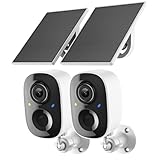
- Solar-Powered for Extended Battery Life: The wirless camera comes with a high-efficiency solar panel(wire length 59 inch), designed to provide a consistent supplemental power source under adequate sunlight. This significantly reduces the need for manual recharging and supports a more sustainable, low-maintenance surveillance experience. It's an ideal power solution for long-term,wire-free outdoor installation
- 2K UHD Clarity with Night Vision & 3x Zoom: This camera delivers crisp, detailed video day and night. It features standard infrared night vision for clear black-and-white footage in the dark, and a built-in spotlight mode that activates full-color night vision for more vivid details. The 3x digital zoom lets you focus on key areas like faces or license plates. (Compatible with 2.4GHz Wi-Fi networks only)
- Flexible Storage Options: Your event-triggered videos are securely backed up with cloud storage(3 day trial). For extended coverage, you can upgrade to premium cloud plans (subscription required) or insert a microSD card (up to 128GB, not included) for local recording of motion events
- Smart AI Detection & Instant Alerts: Receive prompt phone notifications when motion is detected. The basic motion detection works without any subscription. Can be individually set to recognize humans, so that all moving objects except for humans will not trigger detection
- Two-Way Audio & Real-Time Interaction: Built-in microphone and speaker let you communicate directly through the app. Greet visitors, deter unwanted guests, or check in on your family and pets from anywhere
Hide or remove dynamic content deliberately
Use hideSelectors to hide selected content while retaining its layout flow. Use removeSelectors to remove matching elements from the DOM before capture. These choices change what the visual comparison measures: hiding preserves space, while removal changes the document layout. Prefer stable test data when possible, and mask or remove a region only when that matches the purpose of the test.
Create and review visual baselines
- Configure the URL, viewport, readiness behavior, and
documentselector for the scenario. - Run
backstop referenceto create the reference images. - Run
backstop testto capture test images and generate the comparison report. - Review the visual report. Run
backstop approveonly when the changed images should become the accepted references.
Approval is a baseline update, not a fix for the page or a confirmation that every difference is harmless. Inspect changes before approving so an unintended regression does not become the new expected result.
Troubleshoot incomplete or noisy captures
- Only the visible screen appears: Confirm that the scenario uses
selectors: ["document"], not["viewport"]. - Content is missing near the bottom: Check whether the page renders that content asynchronously. Add an appropriate
readySelector,readyEvent, or measureddelay. - The page is in the wrong state: Prepare required cookies or browser state with
onBeforeScriptor the documented cookie import, and useonReadyScriptfor necessary interactions. - A selector captures only one of several elements: Enable
selectorExpansion: trueif the test should capture every match; useexpectto check the expected count. - Comparisons change on every run: Stabilize test data where practical. If dynamic content is irrelevant to the test, decide whether to hide it while preserving layout or remove it from the DOM.
- A baseline changed unexpectedly: Review the report before running
backstop approve; approval promotes the latest test images into the reference collection.
Or skip the browser setup
BackstopJS is suited to repeatable visual regression tests. If you need a screenshot from a single API request instead, ScreenshotNeo returns a screenshot or PDF from a URL. Its cleanup options accept cookie or consent banners and remove more than 60 known consent platforms, newsletter popups, and chat widgets before capture; each step can be turned off. Bot checks, blank pages, timeouts, failed loads, and cache hits are not billed, and responses identify the page verdict and billing status in headers. It also provides an MCP server for AI agents, with tools including take_screenshot, get_page_info, and capture_pdf.
Windows Errors? Fix Them Before They Spread
Repair common Windows errors and clear accumulated junk for a smoother, more stable PC - no reinstall needed.Free scan · no reinstallCrashes, No Sound, or Screen Glitches?
Random freezes, missing sound and display glitches usually trace back to one bad driver. Find and replace yours safely.Free scan · under a minuteExample cURL request (replace YOUR_API_KEY with your key):
curl -G "https://api.screenshotneo.com/v1/shot" -d access_key=YOUR_API_KEY --data-urlencode url=https://stripe.com -o shot.webpSee the ScreenshotNeo documentation for API details. The free plan includes 1,000 screenshots per month with no card; paid plans start at $5 for 3,000 screenshots. Sign up for free.
Quick Recap
Product prices and availability are accurate as of the date/time indicated and are subject to change. Any price and availability information displayed on Amazon at the time of purchase will apply.




