Build the assistant as a local pipeline: capture speech, transcribe it, retrieve relevant passages from a local document index, generate an answer with a local language model, then speak it through local text-to-speech. It is offline only when every runtime component and required asset stays on your hardware; downloading models, cloud speech services, remote updates, or telemetry can introduce network traffic.
How the assistant works
A voice assistant with retrieval-augmented generation (RAG) combines speech processing with document search. The speech components turn a spoken question into text and the generated answer back into audio. RAG supplies the language model with relevant passages from your own files instead of asking it to rely only on what it learned during training.
As an Amazon Associate I earn from qualifying purchases.
- Capture audio from a microphone.
- Optionally detect a wake word and identify when speech starts and ends.
- Transcribe speech to text with local speech-to-text (STT).
- Normalize the question if needed, then create a local embedding—a vector representation of its meaning.
- Search a local index for relevant document passages.
- Give the question and retrieved passages to a local language model (LLM) to generate an answer.
- Convert the answer to speech with local text-to-speech (TTS) and play it through a speaker.
Keep the stages modular. That makes it easier to replace a model or identify whether delay or errors come from transcription, retrieval, generation, or speech output. Home Assistant describes a voice pipeline built from wake-word detection, STT, intent handling, and TTS; for a custom document-answering assistant, retrieval and local LLM generation fit between transcription and speech synthesis. See Home Assistant’s Assist pipeline documentation and its guide to a fully local voice assistant.
What’s actually slowing this PC down?
Pick the symptom - the matching free tool is one click away.
What “offline” actually requires
A component being called “local” does not by itself prove that the complete system operates offline. Models and packages may need to be downloaded first, and software can have update checks or telemetry. A cloud speech endpoint or a remote model API makes the corresponding part of the interaction network-dependent.
#1 Best Overall

- [Crystal-Clear Voice Capture in Noisy Environments]: Powered by the advanced XMOS XVF3800 voice processor, this 360° circular 4-microphone array delivers exceptional far-field audio clarity up to 5 meters. With built-in AEC, adaptive beamforming, dereverberation, DoA, VAD, dynamic noise suppression, and 60dB AGC—ensuring your voice stands out even in loud, echo-filled, or reverberant environments.
- [360° Far-Field Voice Pickup up to 5 Meters]: Equipped with a circular array of 4 high-sensitivity digital MEMS microphones, the device captures sound from every direction with built-in Direction of Arrival (DoA) detection, enabling accurate voice recognition from up to 5 meters away — perfect for smart assistants, meeting rooms, robotics, and full-room smart home voice coverage.
- [Plug & Play USB – No Drivers Required]: Simply connect via USB and it works instantly as a standard plug-and-play USB microphone. Ships with USB audio firmware pre-installed — no additional MCU, no programming, no driver installation needed. Fully compatible with Windows, macOS, Linux, Raspberry Pi, and NVIDIA Jetson — ideal for developers, makers, and AI voice applications right out of the box.
- [Flexible Integration for AI, IoT & Voice Projects]: Supports two mutually exclusive, firmware-selectable modes — USB (default, plug-and-play) and I2S (via DFU reflash, requires external MCU like ESP32 or Arduino). Ideal for smart home, voice AI, conferencing, robotics, and custom embedded voice projects.
- [Enclosed Design for Easier Deployment]: Comes with a protective case featuring a programmable RGB LED ring for cleaner desktop installation and easier handling. Compared with the bare-board version, it's more convenient for prototyping, testing, demos, conference calls, and product evaluation — ready to use out of the box with no assembly required.
Download the models and software you intend to use while connected, then test the complete runtime with outbound network access blocked. Check that speech recognition, embedding generation, retrieval, LLM inference, and speech playback still work. Also review logs and firewall activity: a successful answer alone does not establish that nothing attempted to contact a remote service.
- Keep STT, embeddings, the vector index, the LLM, and TTS on local hardware.
- Store required model files and application assets locally before disconnecting.
- Check whether the software sends telemetry or performs network checks, and disable or block those requests where possible.
- Keep updates and new model downloads as explicit maintenance tasks rather than assuming they happen offline.
Home Assistant’s local-assistant guide describes a microphone, local STT, local processing, and local TTS. That is a product description of its setup, not proof that every custom combination of software and hardware has been independently verified to remain offline.
Build it in stages
1. Prove local model inference
Choose a local model runtime and download the answer model and embedding model while network access is available. Test a prompt and response on the intended host. Then block network access and repeat the test. This catches missing model files and remote dependencies before you add document processing or audio.
The Tool Desk
Outbyte Driver Updater FREEFix the driver behind crashes, sound loss and screen glitchesFind Drivers →Outbyte PC Repair FREERepair Windows errors before they cause bigger problemsFix Now →Rank #2

- 【Easy to Use】: This voice recognition sensor is compatible with micro:bit, Arduino Uno and ESP32, with detailed online Arduino IDE tutorials and Makecode tutorials. It supports plug-and-play through I2C and UART communication methods, allowing easy integration into projects.
- 【121 built-in fixed command words】: The offline voice recognition sensor comes with 121 built-in fixed command words, allowing for immediate use without any configuration, such as "Play music," "Open the door," "Turn on the light," and "Close the window". For instance, in an intelligent window system, when it starts to rain or thunder, there's no need for manual window operation. The offline voice recognition module can recognize the pre-set command word "close the window," triggering the automatic closing of the window to cope with sudden weather changes.
- 【Self-Learning Function+Adding 17 Custom Command Words】: This Offline Speech Recognition Module is equipped with a self-learning function and supports the addition of 17 custom command words. Any sound could be trained as a command, such as whistling, snapping, or even cat meows, which brings great flexibility to interactive audio projects. For instance automatic pet feeder. When a cat emits a meow, the offline voice recognition module can recognize the meow and trigger the feeder to automatically provide food for the cat.
- 【No network required】: This voice recognition sensor can be used without the need for a network connection, making it suitable for various settings. It provides fast response to specific command words and instructions. Moreover, the onboard MCU is equipped with voice recognition algorithms, ensuring that conversations are not recorded or uploaded to the cloud, thus ensuring greater privacy and security.
- 【Integrated Microphone and Speaker with Compact Size】: The offline voice module features an onboard speaker and microphone, providing a high level of integration that saves space and eliminates the need for complex wiring. With its compact size of only 49×32 mm, it is convenient for seamless integration into various applications.
Ollama’s April 8, 2024 article on embedding models explains how vectors can represent semantic meaning and gives mxbai-embed-large, nomic-embed-text, and all-minilm as examples. They are examples in that dated article, not a definitive current ranking or a guarantee that a particular model fits your hardware.
2. Ingest documents and build a local index
Extract readable text from the files you want the assistant to answer from. Keep provenance with every passage, such as its file name, page or section, and ingestion timestamp. Divide text into coherent chunks, embed each chunk locally, and store the vectors alongside the original text and metadata in a local database.
There is no universal parser, chunk size, overlap, or vector database established by the cited documentation. The right choices depend on the material: a manual with numbered steps, a collection of policies, and scanned pages may need different extraction and chunking approaches. Start with a small representative set and inspect what the parser actually extracted before indexing a large collection.
Rank #3
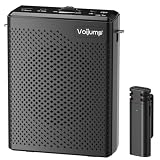
- 🎙Omnidirectional Sound Reception& Clear Sound Quality: Built-in intelligent active noise reduction chips, no matter in any noisy environment, our equipment can provide effective original sound recognition and clearly record every detail of sound. Addition, equipped with advanced High Density Spray-proof Sponge, reduce wind noise and clutter AI algorithm intelligent noise reduction module accurately filters all types of noise, has strong anti-interference ability and ensures sound quality
- 🔗Auto Connect & Bluetooth Speaker: Our wireless microphones and speaker are very easy to set up. You just simply turn on the receiver, then turn on the portable microphone, and the two parts will pair automatically. (Notes: if they don't match successfully, just turn off the device and try again). You also can connect to Bluetooth 5.3 for music playback, providing a relaxed and convenient audio experience.
- 🔊Essential for Teachers: This portable microphone and speaker is an ideal practical gift for educators who frequently deliver speeches or provide guidance to a large audience. Built in high fidelity audio technology, it ensures clear audio projection, allowing classrooms with over 100 students to hear your voice clearly and providing effective protection for your throat
- 🔋Long Battery Life & Wide Distance: Built-in upgrated 2200mAh rechargeable batteries, offering an extensive 10-12 hours of amplification on a full charge with only 3-4 hours charging time. While this wireless microphone delivers 6-8 hours using time on a full charge just 1-1.5 hours, and the accessible reception distance is 20 meters, which is enough for using it during the class
- 👜Lightweight & Portable: This voice amplifier and microphone are small in size and lightweight, and can be placed in the palm of the hand or in a bag for use anytime and anywhere, making them very portable. The voice amplifier is equipped with a clip on the back, which can be clipped onto clothes and pants without falling off. It also comes with a strap, making it comfortable to wear around the waist without causing any discomfort or burden
3. Test retrieval without voice
Ask representative questions directly against the index and inspect the passages returned. A relevant-sounding answer is not enough if the search selected the wrong section. Include exact names, codes, dates, and section references in your test set. If semantic similarity misses exact terms, add lexical search or metadata filters rather than expecting vector search alone to solve every query.
Free tools Windows power users keep installed
One-click scans. No signup required.
Ollama’s article establishes the basic approach—create embeddings and compare vectors to find semantically similar text—but does not promise that semantic search alone will retrieve the right passage for every kind of document or question.
4. Generate grounded answers
Pass the user’s question and a limited set of retrieved passages to the local LLM. In its instructions, tell the model to answer from those passages, say when the supplied context does not establish an answer, and retain source labels so the interface or spoken reply can identify the document. These instructions can improve the design but cannot guarantee that a model will never invent or misstate a fact.
Rank #4

- 【Room-Filling 15W Voice Amplification】 The upgraded B006 combines a high-output 15W speaker with a sensitive wireless lavalier microphone to deliver powerful, clear, and penetrating voice amplification. Help your audience hear every word clearly without repeatedly raising or straining your voice—ideal for classrooms, training sessions, tours, fitness instruction, meetings, speeches, and group presentations
- 【Breakthrough 2.4GHz Transmission—At Least 98FT Range】 The upgraded B006 breaks through the distance limitations of ordinary voice amplifiers with advanced 2.4GHz wireless technology, delivering fast pairing, low audio delay, stable transmission, and fewer interruptions while you move. The microphone and speaker stay reliably connected over a distance of at least 98 ft (30 m) in open areas, while Bluetooth music playback works simultaneously for smooth voice amplification and audio playback.
- 【Comfortable Clip-On Mic with One-Touch Mute】 Say goodbye to uncomfortable headset microphones that press against your ears or interfere with glasses and hairstyles. The lightweight lavalier microphone clips easily to your collar or clothing, keeping your hands free during long sessions. A built-in mute button lets you pause voice amplification instantly from the microphone without walking back to the speaker.
- 【Long-Lasting Battery Performance】 The rechargeable wireless microphone provides up to 15 hours of use, while the speaker delivers up to 7 hours of operation under specific testing conditions. The reliable battery performance supports extended classes, training sessions, tours, presentations, and events.
- 【Widely Used with Reliable Customer Support】 Compact, lightweight, and easy to carry, the B006 portable microphone and speaker system is ideal for teachers, trainers, coaches, tour guides, fitness instructors, presenters, meeting hosts, speeches, and outdoor activities. Customer satisfaction is important to us. If you encounter any product or operating issue, please contact us through Amazon, and our support team will work with you to provide a satisfactory solution.
Treat retrieved text as untrusted input, especially if the documents may contain instructions. Keep a clear distinction between system instructions and source passages. Make the initial assistant answer questions only; do not add actions or external tools until you have tested retrieval and grounding thoroughly.
5. Add speech after the text flow works
Connect local STT to the tested retrieval-and-generation path, then connect local TTS to its response. Home Assistant documents Speech-to-Phrase or Whisper for STT and Piper for TTS in its local voice assistant guide. The options suit different jobs:
| Component | Trade-off | Published performance example |
|---|---|---|
| Speech-to-Phrase | Fast, but recognizes a subset of supported Assist commands rather than arbitrary open-ended speech. | Home Assistant reports under one second on Home Assistant Green or Raspberry Pi 4. This is a vendor-published device example, not a guarantee for other setups. |
| Whisper | Supports open-ended transcription, but can demand more compute and take longer on modest hardware. | Home Assistant reports around 8 seconds per voice command on Raspberry Pi 4 and under one second on an Intel NUC. These are vendor-published examples, not independent benchmarks or predictions for arbitrary configurations. |
| Piper TTS | A local neural text-to-speech system; Home Assistant describes it as optimized for Raspberry Pi 4. | Home Assistant reports that a Raspberry Pi can generate 1.6 seconds of speech per second with a medium-quality model. The cited setup details are unspecified, so treat this as indicative rather than promised performance. |
The timings above are not directly comparable end-to-end benchmarks: they describe different components and devices. Measure your own complete pipeline with the models and workload you plan to use.
Best Value

- Please note!!! This product requires a 3.7V MX1.25 lithium battery for operation, which is not included. Please purchase it separately.
- High-Performance MCU: The board is equipped with the ESP32-S3R8 module, featuring a powerful Xtensa 32-bit LX7 dual-core processor that operates at up to 240MHz, ensuring efficient processing for various smart applications.
- Wireless Connectivity: With built-in support for 2.4GHz Wi-Fi (802.11 b/g/n) and Bluetooth 5 (LE), the ESP32-S3-AUDIO-Board offers robust wireless capabilities, facilitated by the onboard antenna for seamless communication and connectivity.
- Advanced Voice Interaction: The dual microphone array is designed with noise reduction and echo cancellation features, enabling accurate speech recognition and responsive near/far-field wake-up functionality, perfect for voice-activated applications.
- Dynamic Lighting Effects: Equipped with 7x programmable surround RGB LEDs, the board allows the creation of vibrant and colorful lighting effects, enhancing user interaction and visual appeal for projects.
6. Add wake-word detection and a satellite last
A satellite is the microphone-and-speaker endpoint that handles audio capture and playback, and may also run wake-word detection. Home Assistant documents a Linux computer with a USB microphone or speakerphone as one approach, and names the M5Stack ATOM Echo Development Kit as another option. Choose microphone placement and hardware for your room, speaking distance, background noise, and echo rather than assuming one device suits every space.
Home Assistant’s documentation says openWakeWord is English-only. Its wake-word pages explain the Home Assistant approach to wake words and how to enable a wake word. In Home Assistant’s documented microphone-satellite arrangement, audio is streamed to the host for wake-word checking. Account for that audio path when deciding where processing should happen and what your privacy requirements are.
Independent reader supportYour contribution helps us test, update, and keep practical guides available for everyone.Choose hardware by measuring the whole workload
Decide on the host after selecting the STT, embedding, and LLM models you intend to run. Measure the result on representative questions: hardware that handles a constrained recognizer and TTS may not run a larger local LLM responsively. The cited examples do not establish that a Raspberry Pi can comfortably run every current local RAG stack.
Quick wins for a faster PC:
Repair Windows errors before they cause bigger problemsFix Now →Scan for outdated or missing drivers - takes under a minuteDriver Scan →Clear out junk files and repair common Windows errorsFree Scan →- Compute host: Compare model compatibility, available RAM and accelerator resources, power use, noise, upgrade path, and measured end-to-end latency. A Raspberry Pi-class computer may suit some speech tasks; a more capable host may improve open-ended transcription or LLM response time. Benchmark rather than assuming.
- Microphone and speaker: Use equipment suited to the room and distance. A USB microphone or speakerphone is one documented category, not a universal product recommendation. Test for room noise, echo, and speaker feedback.
- Model and index maintenance: Record which embedding model created the index. Changing embedding models generally requires rebuilding that index so stored document vectors and query vectors remain compatible.
- Satellite placement: If the satellite streams audio to a host for wake-word checking, include that connection in your privacy and network design.
Evaluate accuracy, latency, and privacy separately
Track latency at each stage instead of timing only the full spoken answer. Useful checkpoints include end-of-speech detection, transcription, embedding, retrieval, time to the first generated token, completion of the answer, and TTS playback. This helps identify whether a slow response comes from speech processing, search, model generation, or audio output.
Use two different evaluation sets. For speech recognition, include the accents, languages, room noise, and speaking styles expected in actual use. For RAG, use representative questions with known answers as well as questions whose answers are absent from the index. For each RAG test, record whether the correct passage was retrieved, whether the answer stayed within the available evidence, and whether the source label was correct.
- Test exact identifiers and dates as well as paraphrased questions.
- Inspect the retrieved passages, not just the final answer.
- Include out-of-scope questions to see whether the assistant acknowledges missing evidence.
- Repeat tests with the network blocked and check for unexpected outbound requests.
Common design mistakes to avoid
- Calling the system offline because the LLM is local: STT, TTS, embeddings, model downloads, telemetry, and updates also affect whether the system depends on a network.
- Adding voice before validating retrieval: Audio makes failures harder to diagnose. Confirm that the index returns useful passages before introducing transcription and playback.
- Assuming an LLM searches files by itself: RAG requires text extraction, chunking, embeddings, an index, retrieval, and then answer generation. A language model alone does not search your document collection.
- Expecting semantic search to handle every exact match: Test identifiers, codes, and dates; add lexical or metadata-based retrieval where those matter.
- Trusting a prompt as a complete safeguard: Instructions to answer only from retrieved context help define intended behavior but do not eliminate hallucinations or risks from hostile text in documents.
- Choosing hardware from a single published timing: Component-level examples do not predict end-to-end latency for your models, documents, and audio setup.
Make offline operation a test, not an assumption
A practical build is complete only when it answers representative questions from the intended documents, speaks intelligibly at acceptable speed, identifies its sources, and continues working with network access blocked. Keep the pipeline modular, preserve document provenance, and use measured results from your own setup to decide whether to change a model, retrieval method, or host.
Quick Recap
Product prices and availability are accurate as of the date/time indicated and are subject to change. Any price and availability information displayed on Amazon at the time of purchase will apply.
Recommended Free Tools




