Build multilingual government search as a complete language-access service, not as an English search box with translated labels. Publish and maintain useful content in each supported language, index each language with suitable analysis, decide how queries can retrieve content in other languages, and make language selection accessible and consistent across the service journey. Then evaluate search quality and task completion separately for every language you serve.
Start with users, services and language coverage
Before choosing a search engine or translation workflow, identify the jurisdictions and public-service tasks the system must support. The applicable language-access duties depend on the jurisdiction; the reviewed government guidance does not establish one legal rule or language set for every government.

As an Amazon Associate I earn from qualifying purchases.
For each service, document which languages are supported, which content and transactions are available in each, who owns the content, and how often it must be reviewed. Be candid about gaps. A language selector cannot make search useful in a language if the index contains little, outdated or incomplete information in that language.
PC Slower Than It Used to Be?
A free scan shows the junk files, broken settings and background clutter dragging Windows down - then fixes them in one click.Free scan · Windows 10 & 11Crashes, No Sound, or Screen Glitches?
Random freezes, missing sound and display glitches usually trace back to one bad driver. Find and replace yours safely.Free scan · under a minuteDigital.gov presents multilingual digital content as a way to help people with limited English proficiency access government information and services. The United Nations offers an institutional example, not a universal checklist: its website standards call for content in the six UN official languages. The UN Department of Global Communications says, “Multilingualism should be incorporated from the very beginning of any website project and should not be considered a mere translation exercise.”
#1 Best Overall

- Record Book: the package includes 1 daily service record book with 80 sheets, offering ample space to meet daily logging needs; It's a practical tool for tracking appointments, managing tasks, and enhancing customer service efficiency
- Ideal Size: measuring 8.5 x 11 inches, this activity log notepad balances portability and capacity; With 80 pages, it's ideal for daily use in the automotive industry, serving as a reliable service record management tool for consistent tracking
- Nice Quality: crafted from quality paper, the activity log book features reliable coil binding for easy page turning and tear-out; Its structured layout provides ample space for detailed entries, supporting effective schedule planning
- Friendly Design: designed for convenience, the daily log book's coil binding allows effortless sheet removal whenever needed; The intuitive layout ensures quick access to logging sections, making daily activity recording simple and efficient
- Versatile Usage: the service log book is a helper for the automotive industry or individuals to record scheduled maintenance, the shop can use it to register the maintenance needs of different customers, individuals can use it to keep track of flat rate hours
Govern translated content and terminology
Keep language versions identifiable and connected to the same underlying service or content record. That lets the service team update related versions together, spot missing translations and present the right language version when a user changes language. Set ownership and review processes so changes to eligibility, deadlines, forms or service steps do not leave one language version stale.
Maintain translated service names, common resident vocabulary, acronyms and approved terms in a governed terminology collection. Include subject-matter and language review; literal translation may not match the words people use when looking for a service. ISO 12616-1:2021 covers fundamentals for bilingual and multilingual terminology collections, but its stated scope is low-complexity terminology work rather than sophisticated workflows involving multiple roles. The ISO listing records publication in September 2021 and says the standard is under systematic review, so check its current status before relying on it as a current policy reference.
Configure indexing for each language and script
Store language metadata with content and configure analysis for the language of each text field. An analyzer can tokenize and normalize text before matching; choices affect what counts as a match. Microsoft’s search documentation describes assigning different language analyzers to different string fields. GOV.UK’s search documentation describes analyzers and a synonym mechanism for related terms in the same language, including “vehicle tax” and “car tax.”
What’s actually slowing this PC down?
Pick the symptom - the matching free tool is one click away.
Rank #2
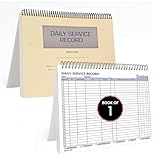
- AUTOMOTIVE SERVICE-FOCUSED DESIGN: Tailored for automotive services, this Daily Car Service Record Book supports technicians and service writers in auto service shops, service truck operations, and dealership departments by organizing repair appointments, job authorizations, and maintenance tracking with ease. A must-have record book for efficient workflow.
- COMPREHENSIVE LOGGING SOLUTION: With 100 structured 8.5" x 11" pages, this record book gives ample space to log customer information, auto service needs, and additional repair authorizations—ideal for managing detailed service jobs and customer records across various automotive services.
- BUILT FOR SHOP ENVIRONMENTS: Constructed from high-quality paper and spiral-bound for durability, it withstands daily use in busy auto service bays and service truck operations. This car service record book is easy to flip, write on, or remove pages as needed without tearing or shifting.
- USER-FRIENDLY RECORD KEEPING: Designed for quick and easy use, this record book includes fields for customer names, phone numbers, technician assignments, repair notes, and flat-rate hours—perfect for professional auto services environments where accuracy matters.
- PROFESSIONAL AND VERSATILE: Whether you're scheduling jobs for a service truck, documenting auto service tasks in an independent shop, or maintaining dealership records, this car service record book serves as both a daily planner and an essential automotive services tool for organized, professional work.
Do not treat one English analyzer, transliteration or broad accent folding as multilingual support. Test the actual languages, scripts and content in scope. Check tokenization, Unicode handling, normalization and whether the engine’s analyzers preserve distinctions that matter in each language. OpenSearch documents language analyzers and an ICU analyzer option for advanced Unicode support and complex-script segmentation; the ICU option requires a plugin. Product documentation describes capabilities, not a guarantee that any analyzer will work well for every language or corpus.
Choose how a query finds results in other languages
There is no single cross-language retrieval approach established by the reviewed government and technical sources. Choose deliberately, explain the behavior to users and test it against real public-service tasks.
| Approach | How it works | What to decide or test |
|---|---|---|
| Language-restricted search | Search returns content in the selected or detected language. | Test whether the language-specific index has enough current content to answer common tasks, and provide a clear route to change language. |
| Linked translations | A query can return a relevant version connected to the same service in another language. | Confirm that versions are genuinely equivalent and current, and identify the result’s language before the user opens it. |
| Query translation or cross-language retrieval | A query in one language is translated or otherwise matched against content in another language. | Validate translation quality, ranking and task success with speakers of the languages involved; label results when query and document languages differ. |
These are product choices, not a ranking of methods. The cited analyzer and synonym guidance addresses language-aware analysis and same-language synonyms; it does not establish which cross-language design will perform best for a particular service.
Rank #3

- Used Book in Good Condition
Make language navigation consistent across the journey
Make the language control easy to find and recognize, and preserve a user’s selection through the service journey where feasible. GOV.UK design-system research reports these as user needs and calls for consistent navigation across services. Its guidance also flags right-to-left scripts and regional differences in names, numbers and addresses. A language switch should lead to the corresponding service where one exists, not silently send someone to an unrelated page or back to a default language.
Translate screen-reader labels and link descriptions as well as visible control text. GOV.UK’s language-navigation component guidance describes a component introduced in August 2026 and marked as being in trial. Check its current status and implementation guidance before adopting it; trial status can change.
Mark language for assistive technology
Set the default language of each page in markup and identify passages or phrases in a different language. W3C explains that programmatic language identification helps browsers and assistive technologies apply suitable pronunciation and presentation rules. It is particularly important when content changes between left-to-right and right-to-left writing systems or alphabets.
Rank #4
WCAG 2.2 Success Criterion 3.1.2, Language of Parts, requires the human language of each passage or phrase to be programmatically determinable, with exceptions including proper names and technical terms. Treat language metadata as part of content production and quality assurance, not merely a search-index field.
Independent reader supportYour contribution helps us test, update, and keep practical guides available for everyone.Evaluate each language on its own
Build representative queries and public-service tasks with speakers of every language served. A single aggregate search score can conceal a weak language experience, so report results by language and inspect failures in context. The reviewed sources offer no universal pass threshold or benchmark.
- Measure whether users find the correct service and complete the intended task.
- Track relevance, ranking and zero-result frequency for representative queries in each language.
- Check content coverage and translation freshness, including high-consequence service details.
- Test language selection, persistence and navigation through a complete service journey.
- Review accessibility, including translated assistive-technology labels and correctly marked language changes.
- Record which language analyzer, terminology rules and content versions produced each result so teams can investigate differences.
Use findings to distinguish retrieval failures from content failures. A missing result may mean the query was analyzed poorly, a useful synonym is absent, the content was never translated, or the translated page is outdated. Each cause requires a different fix.
Best Value

- DIMENSIONS: Standard service call slip book measuring 5.5 x 8 inches, perfect for professional service documentation
- ORGANIZATION: Pre-printed format helps maintain clear, consistent records of service calls and work orders
- PRACTICAL DESIGN: Easy-to-write-on pages allow quick documentation of customer information and service details
- PROFESSIONAL FORMAT: Includes dedicated spaces for dates, customer details, service descriptions, and charges
- CONVENIENCE: Compact size fits easily in service vehicles and technician bags while maintaining professional appearance
Compare implementations on operational fit
When evaluating a search engine, platform or vendor, compare its behavior against the agency’s real languages, scripts, content and operating model—not a generic claim of multilingual support. Useful comparison criteria include:
- Language and script coverage, including analyzer behavior on the agency’s own content.
- Unicode normalization and tokenization controls for the scripts in scope.
- Support for local synonyms and approved terminology.
- Options for language filters, language-aware ranking and cross-language retrieval.
- Ability to link language versions of the same service and expose a result’s language.
- Accessibility of language controls and result metadata.
- Per-language monitoring, evaluation and an upgrade path that does not silently change search behavior.
- Staff effort required to maintain translated content, terminology and test sets.
Government multilingual search depends on both retrieval configuration and the content and language operations behind it. Choose a design only after the agency knows which services it can support in each language and how it will detect when that support falls behind.
Quick Recap
Product prices and availability are accurate as of the date/time indicated and are subject to change. Any price and availability information displayed on Amazon at the time of purchase will apply.
The Tool Desk
Outbyte PC Repair FREERepair Windows errors before they cause bigger problemsFix Now →Outbyte Driver Updater FREEScan for outdated or missing drivers - takes under a minuteDriver Scan →



