Google ADK defines and runs the agent, Gemma supplies the model, and Docker Model Runner serves models locally. But there is an important compatibility distinction: Docker’s documented ADK sample uses Gemma 3 4B, while Google’s Gemma 4 guidance describes Gemini API and self-hosted vLLM routes. The official material does not establish a complete, verified Gemma 4 + ADK + Docker Model Runner setup, so treat that exact combination as an integration to validate—not a guaranteed recipe.
What each part does
- Google ADK is the agent development framework. It defines the agent and its tools and provides ways to run it.
- Gemma 4 is the model family that generates responses and, where supported, can participate in tool use.
- Docker Model Runner (DMR) pulls, runs, and manages models locally and exposes an API for applications to use.
These components have separate responsibilities. A working agent depends not just on loading a model, but also on the ADK connector and the serving endpoint’s API and tool-call behavior.
As an Amazon Associate I earn from qualifying purchases.
Can ADK use Gemma 4 locally?
Google’s ADK Gemma guide documents Gemma 4 examples using the Gemini API or an OpenAI-compatible self-hosted vLLM endpoint. For the vLLM route, it describes LiteLLM for Python and LangChain4j for Java. It also says that an endpoint used for ADK tools needs compatible tool or function calling and reasoning parsers enabled.
The Tool Desk
Outbyte Driver Updater FREEScan for outdated or missing drivers - takes under a minuteDriver Scan →Outbyte PC Repair FREEClear out junk files and repair common Windows errorsFree Scan →Docker Model Runner is another local model-serving option, but the official documents do not show the full Gemma 4 connection to ADK through DMR. In particular, they do not confirm that a given Gemma 4 model identifier, DMR API behavior, ADK connector, and tool-call format work together unchanged. Verify those pieces for the versions you intend to use.
#1 Best Overall

- All-in-One AI Learning Lab Powered by Raspberry Pi & Multi-LLMs. Turn Raspberry Pi (5 / 4B / 3B+ / 3B / Zero 2W) into a complete AI learning lab with support for multi-LLMs like ChatGPT, Gemini, Grok, DeepSeek, Qwen, Doubao, and Ollama. Includes Pan-Tilt HAT,10-axis (10DOF) module, camera, and high-quality components. Learn AI through guided video lessons created with educator Paul McWhorter. (Raspberry Pi not included)
- Build Fun Multi-Modal AI Projects with Voice, Vision & Sensors. Combine sensors, breadboard circuits, Multi-LLMs, voice recognition, and camera vision to create engaging multi-modal AI projects. Learn STT and TTS through hands-on programming, turning abstract AI concepts into interactive projects you can see, hear, and control—perfect for AI beginners
- AI Vision Tracking with YOLO, OpenCV, MediaPipe & Pan-Tilt HAT. Create intelligent vision projects using OpenCV and MediaPipe to detect and track objects, colors, and human movements. The Pan-Tilt HAT allows your projects to actively follow targets, helping learners understand how AI vision and motion work together in real systems
- Fusion HAT+ Power System with Voice AI Interaction. The Fusion HAT+ provides power, safe shutdown, and simplified hardware control via a unified Python library. With the Fusion HAT+ featuring a built-in speaker and microphone, easily build AI voice interaction projects by combining Multi-LLMs with sensors and electronic components
- Step-by-Step Learning with Video Lessons & Technical Support. Includes a structured, project-based curriculum with clear documentation, sample code, and video tutorials created with Paul McWhorter. Backed by responsive technical support and an active community, this kit helps beginners confidently progress from Python basics to AI and interactive projects
What Docker’s ADK example actually demonstrates
Docker’s agentic AI tutorial includes an ADK Compose sample that runs ai/gemma3:4B-Q4_0 with a context size of 10,000. Docker states that this sample requires 3.5 GB of VRAM and 2.31 GB of storage. Those figures apply to that Gemma 3 4B example only; they are not Gemma 4 requirements.
The example is useful as a reference for the local ADK-and-Docker workflow. It is not evidence that substituting Gemma 4 will work identically or that tool use is compatible.
Rank #2

- 【POWERFUL ESP32‑S3 CONTROLLER】Built‑in Xtensa 32‑bit LX7 dual‑core processor, 512KB SRAM, 8MB PSRAM, 16MB Flash for stable AI voice computing and multitask processing.
- 【Preloaded Dual AI Platforms】Comespre-installed with complete Deepseek and OpenAI voice dialogue projects.Experience intelligent voice interaction instantly. (Note: OpenAI functionality requires your own API key.)
- 【STABLE WIRELESS & CLEAR AUDIO】Integrated 2.4GHz Wi‑Fi + Bluetooth 5 (LE); dedicated audio decoding module for natural, responsive voice interaction.
- 【USER‑FRIENDLY VISUAL & PLUG‑AND‑PLAY】2” TFT‑SPI color screen shows real‑time chat; modular design, no extra wiring, ready to use after setup.
- 【FULL LEARNING SUPPORT】45 programmable GPIOs, rich interfaces, online web tutorials, free technical support for beginners & developers.
How to approach a Gemma 4 and DMR integration
Use Docker’s Model Runner setup guide for the current enablement and CLI instructions. Docker documents setup through Docker Desktop or Docker Engine, and the docker model CLI for pulling, running, and managing models. The precise UI labels and runtime behavior can change, so follow the current guide rather than relying on an assumed menu path.
- Set up DMR. Enable Model Runner using the instructions for your Docker environment, then use the documented CLI workflow to pull and run a model.
- Confirm Gemma 4 is supported by your runtime. Check the model identifier and runtime support for the particular Gemma 4 variant you plan to serve. Do not assume that a Gemma 3 sample’s model name can simply be replaced.
- Connect ADK to the serving API. Configure the ADK model integration for the endpoint and API behavior DMR exposes. The available documentation does not provide an exact Gemma 4 plus DMR endpoint configuration to copy.
- Validate ordinary generation first. Confirm that the agent can reach the endpoint and receive a normal model response.
- Validate tool calls separately. Test an agent tool and confirm the model-serving stack returns tool calls in a format the ADK integration understands. Ordinary text generation alone does not show that agent tools work.
Choose a serving route based on the workflow
| Route | What the documentation establishes | What to weigh |
|---|---|---|
| Docker Model Runner locally | Docker documents local model setup and management; its ADK sample uses Gemma 3 4B. | Local operation and your machine’s capacity, plus compatibility of the selected model, API, ADK connector, and tool-call behavior. |
| Gemini API | Google’s ADK Gemma guide includes Gemma 4 examples using the Gemini API. | This is a documented Gemma 4 integration route, but it is not the same as serving the model locally through DMR. |
| Self-hosted vLLM | Google’s guide describes Gemma 4 through an OpenAI-compatible vLLM endpoint, with LiteLLM for Python or LangChain4j for Java. | Self-hosting requires operating the serving endpoint and enabling compatible tool/function calling and reasoning parsers for ADK tools. |
How much hardware does a local model need?
There is no single hardware figure for this stack: the model variant and execution framework affect what a machine needs. Google’s Gemma run guide presents local tools and development frameworks as different options, rather than prescribing one universal setup.
Rank #3

- VOICE AI & DISPLAY DEVELOPMENT KIT: Built-in dual microphones and speaker support voice interaction, combined with a 3.5" TFT display and DVP camera interface for AI-powered human–machine interaction projects.
- POWERFUL MCU & RICH INTERFACES: ARMv8-M (M33) MCU with WiFi 2.4GHz and Bluetooth LE 5.4, featuring 56 GPIOs, SPI, I2C, UART, I2S, USB, TF card, and camera interfaces for flexible hardware expansion.
- DEVELOPER RESOURCES AVAILABLE: Supports TuyaOS-based development. Hardware documentation, SDKs, and firmware examples are available for developers through the Tuya Developer Platform.
- DESIGNED FOR DEVELOPERS: Ideal for prototyping, evaluation, and embedded development. To access setup guides and sample projects, search: “T5AI-Board TuyaOS Developer Documentation”
- FOR IOT & SMART DEVICE PROJECTS: Suitable for smart home devices, voice control panels, AI terminals, and custom IoT solutions. This product is intended for development and testing purposes, not as a finished consumer device.
Use Docker’s 3.5 GB VRAM and 2.31 GB storage figures only for its Gemma 3 4B sample. An individual Docker Model Runner issue reports a failed attempt to load a Gemma 4 12B model because available GPU memory was insufficient; that report is an example, not a general minimum-spec benchmark. Hardware needs should be checked against the specific model, runtime, and machine.
Independent reader supportYour contribution helps us test, update, and keep practical guides available for everyone.Code-based ADK agents and Agent Config are different
ADK supports more than one authoring path. Google’s Agent Config guide describes creating and running a project through a web UI, terminal, or API server, and lists limitations including model-support restrictions. Check those restrictions if using Agent Config; do not assume they apply in the same way to every code-based ADK agent.
Quick Recap
Best Value
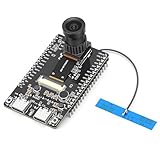
- 【Main Functions】BW21-CBV-Kit is a local AI vision recognition development board capable of independently running object recognition models
- 【Camera Specifications】Equipped with a 1920 x 1080 resolution, 2MP, 30fps wide-angle camera, a condenser microphone, and support for 2TB memory card storage
- 【Strong Communication Capabilities】Based on the RTL8735B chip, it supports dual-band 2.4GHz/5GHz WiFi and Bluetooth 5.1, providing high-performance wireless transmission capabilities for smoother image transmission
- 【Development Method】Utilizes the Arduino development approach, allowing you to easily implement your ideas, such as face recognition, gesture recognition, object recognition, component defect detection, people counting, pet recognition, etc
- 【Rich Interfaces】Two sets of 18-pin headers provide 30 programmable I/Os, facilitating project expansion. Combined with AI recognition, it unlocks limitless possibilities
Rank #4

- Complete Jetson Orin Nano Starter Kit: This jetson orin nano starter kit includes a 30-in-1 sensor board, 8MP camera, dual-servo gimbal, 128GB SD card, and essential accessories. It supports Avisual recognition and voice interaction, providing a complete AI application development experience
- 8MP AI Vision Camera with Gimbal: Equipped with an IMX219 8MP camera and dual-servo gimbal, the jetson orin nano development kit supports face tracking, object recognition, target tracking, and computer vision projects. Ideal for learning AI vision, edge computing, robotics, and intelligent automation applications
- 11.6-Inch HD Display & AI Voice Assistant: Features an 11.6-inch 1366×768 IPS screen, allowing users to develop and test projects without an external monitor. The built-in AI voice interaction system supports voice commands and intelligent conversations, creating a more engaging and interactive learning experience
- 30 Sensors and 38 Guided Python Tutorials: Features a 30-in-1 sensor board with temperature & humidity, ultrasonic ranging, gas, motion, and other commonly used sensors. Includes 38 guided Python tutorials covering sensor applications, embedded development, and AI visual recognition from beginner to advanced
- Portable All-in-One Design with Rich Expansion Options: The Jetson Orin Nano Dev Kit provides multiple expansion interfaces including I2C/UART/IO interfaces. A custom carrying case integrates all components, making it convenient for classroom teaching, laboratory projects, demonstrations, and mobile AI development
What to test before relying on the setup
- The exact Gemma 4 variant is available and runs in your DMR version.
- The model endpoint’s base URL and API behavior match the ADK integration you configure.
- Basic generation works from the agent.
- Tool/function calling works in the required format, with compatible parsers enabled where the serving implementation requires them.
- Behavior is acceptable on your operating system and hardware. A separate Docker Model Runner issue reports a Gemma 4 E2B reasoning-budget behavior on macOS; an open issue is an individual report, not proof of a universal defect or its current resolution.
Product prices and availability are accurate as of the date/time indicated and are subject to change. Any price and availability information displayed on Amazon at the time of purchase will apply.
Recommended Free Tools




