The Tool Desk
Outbyte Driver Updater FREEScan for outdated or missing drivers - takes under a minuteDriver Scan →Outbyte PC Repair FREERepair Windows errors before they cause bigger problemsFix Now →To back up browser data on Linux, first identify the profile the browser is actually using, then close the browser and copy that profile to a separate location. For Firefox, Mozilla recommends its built-in Backup tool for most users; for Chromium-based browsers, locate the active user-data directory because its path can vary by installation. A copied folder is not the same as account sync, and saved passwords may need separate checking after a move.
What a browser backup contains
Your browser program and your personal browser data are separate. Firefox stores information such as bookmarks, passwords and extensions in a profile folder. Chromium’s user-data directory contains profile data such as history, bookmarks and cookies, along with local installation state. What transfers through a complete copy or a sync service can differ, so identify the data you need before choosing a method.
- Bookmarks and browsing history
- Saved passwords and other sign-in data
- Extensions, settings and open tabs
- Cookies and site data
These are useful items to check, not a guarantee that every browser or backup method will preserve them all.
Choose a local copy, built-in backup or sync
| Method | Best suited to | Separate offline copy? |
|---|---|---|
| Firefox Backup tool | Most users, especially when moving to a new computer; Mozilla says it is easier and recommended for most users. | Use the tool’s backup destination; a separate copy exists only if you save one outside the original device. |
| Manual profile or user-data copy | Troubleshooting, a damaged browser, or recovering selected files. | Yes, if you copy the folder to a separate drive or location. |
| Account sync | Keeping selected data available across signed-in devices. | No; syncing to an account is not by itself a separate offline backup. |
For Chrome, Google lets signed-in users choose data to save to a Google Account. Its listed categories include bookmarks, passwords, extensions, web apps and settings; history and tabs require the relevant setting. When signed out, bookmarks and other information remain only on the device unless saved to the account. See Google’s Chrome sync guidance.
Do these 3 things before closing this tab:
1Scan for outdated or missing drivers - takes under a minute2Clear out junk files and repair common Windows errors3Fix the driver behind crashes, sound loss and screen glitches#1 Best Overall

- 【Plug-and-Play Expandability】 With no software to install, just plug it in and the drive is ready to use in Windows(For Mac,first format the drive and select the ExFat format.
- 【Fast Data Transfers 】The external hard drives with the USB 3.0 cable to provide super fast transfer speed. The theoretical read speed is as high as 110MB/s-133MB/s, and the write speed is as high as 103MB/s.
- 【High capacity in a small enclosure 】The small, lightweight design offers up to 500GB capacity, offering ample space for storing large files, multimedia content, and backups with ease. Weighing only 0.35 Lbs, it's easy to carry "
- 【Wide Compatibility】Supports PS4 5/xbox one/Windows/Linux/Mac and other operating systems, ensuring seamless integration with game consoles,various laptops and desktops .
- Important Notes for PS/Xbox Gaming Devices: You can play last-gen games (PS4 / Xbox One) directly from an external hard drive. However, to play current-gen games (PS5 / Xbox Series X|S), you must copy them to the console's internal SSD first. The external drive is great for keeping your library on hand, but it can't run the new games.
If you use an optional Chrome sync passphrase, you need it on new and already signed-in devices. Google also says some account features become unavailable with a passphrase, and changing it deletes passphrase-encrypted data from Google’s servers and signs devices out. Don’t change or reset it casually; consult Google’s current account instructions before doing so.
Find the active profile before copying
Firefox
If Firefox opens, go to Help → More Troubleshooting Information and find the Profile Folder (or Profile Directory) field. Use the button there to open the active folder. This is safer than assuming the default location: profile selection can depend on profiles.ini, startup arguments and environment variables.
Rank #2

- World’s First 6TB 2.5” Portable Hard Drive
- Slim durable design to help take your important files with you
- Vast capacities up to 6TB[1] to store your photos, videos, music, important documents and more
- Back up smarter with included device management software[2] with defense against ransomware
- Help secure your important files with password protection and hardware encryption
The default Linux profile root is ~/.mozilla/firefox; the default profile-local cache location is ~/.cache/mozilla/firefox. These defaults may not describe the active setup, and Mozilla notes legacy behavior for some Snap installations. See Mozilla’s Profiles Service documentation. If Firefox will not open, use Mozilla’s linked profile-discovery help rather than guessing which folder to recover.
Chromium and Chromium-based browsers
Find the user-data directory used by the installed browser, then identify the profile inside it—often a folder such as Default. Linux launchers can override the directory with --user-data-dir or CHROME_USER_DATA_DIR; when both are set, the command-line flag takes precedence. The Chromium Project explains these settings in its User Data Directory documentation.
PC Slower Than It Used to Be?
A free scan shows the junk files, broken settings and background clutter dragging Windows down - then fixes them in one click.Free scan · Windows 10 & 11Crashes, No Sound, or Screen Glitches?
Random freezes, missing sound and display glitches usually trace back to one bad driver. Find and replace yours safely.Free scan · under a minuteRank #3

- High-capacity external hard drive with up to 2TB of storage The ModusTech Facet portable external hard drive gives you dependable HDD storage in a slim 2.5-inch design. Multiple capacities available up to 2TB — back up photos, videos, music, documents, and game libraries with room to grow. A trusted external storage solution for everyday backup, media archives, and creative work.
- USB-C and USB 3.1 connectivity with included 2-in-1 cable The Facet ships with a USB-C to USB-C cable and tethered USB-A adapter, so this external hard drive connects to modern laptops, USB-C iPhones, tablets, and older USB-A computers without buying an extra cable. USB 3.1 Gen 1 (5Gbps) interface delivers real-world transfer speeds up to 100MB/s — fast enough to back up 50GB of files in about 8 minutes.
- Plug-and-play external hard drive for PC, Mac, and laptops Preformatted in exFAT and ready to use the moment you plug it in. The Facet works out of the box with Windows PCs, macOS Macs, MacBooks, Chromebooks, and laptops — no drivers, no software, no setup required. A true plug-and-play external hard drive built for everyday use across every major operating system.
- External hard drive for PS4, Xbox One, and Smart TV gaming The Facet is compatible with PlayStation 4, Xbox One, and Smart TVs with USB support. PS4 and Xbox One games run directly from the drive — plug it in, format through the console, and add to your storage. Also works with Smart TVs that support USB recording or external media playback.
- Slim, shock-resistant portable external hard drive — 160g At 2.5 inches and just 160g, this portable external hard drive is bus-powered through a single USB-C cable — no separate power adapter, no extra cables. Slim enough for a laptop bag, jacket pocket, or camera bag, with a shockresistant casing and faceted diamond-texture top panel that resists fingerprints and everyday wear. Backed by a 1-year limited warranty from ModusTech, a consumer electronics brand specializing in external storage.
Do not assume one universal path: the location can depend on the browser brand, distribution package, sandbox format or custom launcher. The Chromium documentation describes the directory structure and overrides, but does not provide a consumer restore recipe for every such installation.
Make a manual local backup
- Identify the active profile or user-data directory. Use the browser’s profile information where available; do not copy a similarly named but inactive folder.
- Exit the browser completely. Mozilla explicitly instructs Firefox users to close the browser before copying its profile.
- Copy the whole relevant folder to a separate location, such as a USB flash drive. Copying the full folder is more complete than selecting a few files when you need a general recovery copy.
- Label the copy clearly with the browser, profile, date and machine or user context, so it is not confused with another profile.
- Keep the original until you have checked the copy. Spot-check that expected files and folders are present and that the browser still opens from its original profile. This is a practical check, not a formal integrity test; Mozilla does not specify a checksum or universal validation procedure.
Restore Firefox from a copied profile
Quit Firefox before replacing files. Mozilla’s manual restore procedure depends on whether the backup and destination profile names match.
Rank #4

- Slim durable design to help take your important files with you
- Vast capacities up to 6TB[1] to store your photos, videos, music, important documents and more
- Back up smarter with included device management software[2] with defense against ransomware
- Help secure your important files with password protection and hardware encryption
- 3-year limited warranty
Replace a profile with the same name
If restoring over an existing profile folder, the folder name must match exactly—including its random eight-character portion. Copy the backed-up profile into the correct location and replace the existing contents only after confirming that this is the destination you intend to overwrite.
Restore to a differently named or new profile
- Create a new profile using Firefox Profile Manager, or use the profile Firefox created automatically on a newly installed system.
- Open the backup folder and copy its contents into the new profile directory, overwriting same-named files when prompted.
- Start Firefox and check that the expected bookmarks, settings and other important data are available.
Mozilla’s step-by-step guidance is in Manually back up and restore Firefox profile data (last updated May 1, 2026). Mozilla cautions that a complete profile is not always portable across operating systems because paths and versions differ. For a Linux-to-Windows move, copying only bookmarks or password files may be more appropriate than transplanting the entire profile; treat that as a separate migration.
Quick wins for a faster PC:
Clear out junk files and repair common Windows errorsFree Scan →Fix the driver behind crashes, sound loss and screen glitchesFind Drivers →Best Value
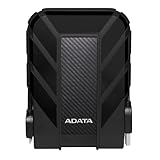
- Safe Data Storage: ADATA HD710 Pro External Hard Drive is a ruggedized hard drive built to keep your data secure for years to come in a travel-friendly design built for every adventure
- Military-Grade Toughness: Features durable, triple-layered construction with a USB 3.1 interface, an IP68 waterproof and IP6X dustproof design, and IP68 military-grade shock resistance (MIL-STD-810G 516.6)
- Built for Anyone: Ultra-fast data transfer capability makes this a great hard drive for gamers, students, and professionals; enough storage capacity for creatives and DIY PC users
- Easy Data Storage: Compatible with Linux, Mac, and PC, this external hard drive also features neat cable management for easy storage and a clean data solution
- About ADATA: ADATA means number 1 in data storage; we offer premium storage capacity, high speeds, and optimized durability, all while innovating and investing in a sustainable future
Restore or move Chromium data carefully
Start by confirming the user-data directory actually used by the installed browser and the profile within it. Close the browser fully before replacing or copying files. Because the correct path can vary across distributions, browser brands and sandboxed packages, verify the path against that specific installation rather than applying an assumed default. The Chromium Project’s directory documentation describes where profiles sit and how Linux overrides work, but does not establish a complete restore workflow for every package.
Check saved passwords separately
Chromium on Linux may store passwords using GNOME Libsecret, KWallet 4, KWallet 5, KWallet 6, or plain text. The selected option depends on the desktop environment, according to the Chromium Linux Password Storage documentation. That variability means a copied profile does not guarantee that saved credentials will work on another account or machine: verify password access after the move.
Quick Recap
Check the restore before relying on it
- Open the browser and confirm the intended profile is active.
- Check several bookmarks and, where relevant, history, extensions, settings and site data.
- Test access to saved passwords without exposing them in an untrusted environment.
- Keep the untouched original or backup until the restored browser has the data you need.
Product prices and availability are accurate as of the date/time indicated and are subject to change. Any price and availability information displayed on Amazon at the time of purchase will apply.




