To avoid bubbles and trapped dust, use a screen protector made for the Pixel 11 Pro XL, clean the display carefully, align the protector before exposing its adhesive, and apply it gradually. Follow the instructions included with your particular kit—especially if it uses an alignment tray or a peel-and-apply mechanism. Keeping the glass free of debris and air bubbles also matters for Pixel fingerprint unlocking.
Choose a protector that fits the Pixel 11 Pro XL
Check the packaging or product listing for an explicit Pixel 11 Pro XL fit. If you use fingerprint unlocking, consider a Made for Google-certified protector: Google says certified protectors are tested for Pixel compatibility. Google’s fingerprint-unlock guidance also warns that debris or air bubbles between the protector and display can affect sensing.
As an Amazon Associate I earn from qualifying purchases.
Google Store listings show examples of what an installation kit may include, but they do not establish that one brand installs better than another:
The Tool Desk
Outbyte Driver Updater FREEScan for outdated or missing drivers - takes under a minuteDriver Scan →Outbyte PC Repair FREERepair Windows errors before they cause bigger problemsFix Now →| Protector listing | Listed installation materials |
|---|---|
| Case-Mate Ultra Glass for Pixel 11 Pro XL | Installation frame, wet wipe, soft cloth, and dust-removal sticker. Google Store listing |
| Mous tempered glass for Pixel 11 Pro XL | Recycled-pulp applicator tray, cleaning kit, and instruction leaflet. Google Store listing |
| dbrand Prism for Pixel 11 Pro XL | Two protectors, two self-aligning trays, a cleaning kit, and a quick-start guide. Google Store listing |
Compare exact-device fit, certification, included dust-removal and cleaning supplies, and whether the application method feels manageable to you. Kit contents can differ, so check the listing and the instructions supplied with your protector.
#1 Best Overall

- Unbreakable 9H+ Glass, 2nd Screen of your : Unmatched shatterproofness and durability, it's designed specifically for the Google Pixel 11 Pro Fold screen. 9H+ Tempered Glass material is the core, which is widely used in aerospace and military for its ①Shatterproof ②Scratch & Wear Resistant ③Durability is 8-10 times superior to others. Thus, 9H+ Glass creates a 2nd tough screen for your Google Pixel 11 Pro Fold.
- Breakthrough Auto- Dusting & Adhesive - So Easy Installation: Includes everything you need with innovative automatic positioning, dust removal, and absorption technology, making the installation is just effortlessly easy in seconds. Anyone can be an expert in applying this Screen Protector 0 Bubbles or Imperfections. Plus, Whatever problems, you can send us information through Amazon's Message Center, We will provide you with satisfactory service within 24H.
- 100% fingerprint unlock support, ultra-clear naked-screen experience, smudge-free: Utilizing exclusive coating technology, it delivers up to 99.99% optical clarity for an optimal visual feast on your screen. Thanks to special Ferilin-Silk technology, it prevents smudges and reduces screen marks by up to 98%, keeping your Google Pixel 11 Pro Fold screen pristine. After installing the tempered glass screen protector, please re-register your fingerprint for an enhanced unlocking experience.
- Invisible Protection, Full Covers the Screen: Simulating screen design, Ferilinso envelops the screen's every curve with a reinforced 1:1 3D curved black edge, getting the most vulnerable screen edge fully covered. Also, it is visually invisible as it blends seamlessly with the screen! leaving no corners uncovered and preventing dust and scratches from invading, while also being suitable with 99.99% cases.
- Powerful Lens Protection: The lens of the new Google Pixel 11 Pro Fold cell phone stands out in particular, and to better protect the exposed lens, you are provided with 3 Pack high-quality lens protectors. It is made of Sapphire Material and 9H+Glass with unparalleled resistance to daily wear and tear and impact, providing military-grade protection. The high light transmittance sapphire material ensures that your photography maintains its true essence, vibrant colors and crisp details.
Prepare the display and work area
- Choose a clean, still, well-lit place and gather the kit before peeling any liner.
- Remove the case if it blocks access to the screen or interferes with the alignment frame.
- Wash and dry your hands. Clean the display with the kit’s wipe and cloth, then inspect it under angled light.
- Use the supplied dust-removal sticker to lift visible particles. Once clean, avoid touching the screen or the protector’s adhesive.
Apply the protector carefully
Use the instructions packaged with your exact protector if they differ from this general method. In particular, follow the kit’s directions for its tray, frame, adhesive liner, and any squeegee.
- Check the fit and orientation. Place the alignment frame or tray if supplied, and confirm the protector is oriented correctly before exposing the adhesive.
- Expose the adhesive as directed. Peel the liner according to the kit instructions; avoid touching the adhesive surface.
- Lower the protector gradually. Keep it aligned as it makes contact. Avoid dropping it crooked or sliding it across the display.
- Encourage air toward an edge. Press gently from the center outward, or use the included squeegee if the kit specifies one. Do not press hard enough to flex the glass or risk damaging the display.
- Inspect the result. Check under good light for trapped particles or air pockets and follow the manufacturer’s directions for any remaining issue.
Tell a bubble from trapped dust
An air pocket may move as you press gently toward an edge; a dust speck typically remains visible in the same spot beneath the protector. Do not assume every bubble can be removed or that a dust speck can be safely lifted out. Before lifting an edge, consult the protector’s instructions: lifting glass can damage it or let more debris reach the adhesive. If those instructions permit lifting, use their method and keep exposed adhesive away from dust.
Rank #2

- Tempered Glass Display Protection: High-hardness tempered glass gives screen coverage against impact and scratches for your phone display
- 9H+ Surface Hardness for Scratch Resistance: Resists scratches from keys, coins, and daily wear — keeping your screen looking new through everyday use
- Crystal Clear with 100% Optical Clarity: Engineered to deliver the same vivid colors and sharpness as your bare screen — independently lab-tested at 100% clarity for true visibility
- Original Touch Experience Preserved: Specially crafted adhesive for seamless, responsive touch — no lag, no resistance, no difference
- Full Sensor Compatibility: Optically tuned to pass through Pixel’s in-display fingerprint sensor without interference. At-a-Glance, and edge gestures preserved at original brightness
If fingerprint unlocking is unreliable
Google advises avoiding debris and air bubbles because anything trapped between the protector and display may affect fingerprint sensing. If scanning still has trouble and you cannot see dust or bubbles, Google recommends firmly pressing a flat object, such as a card, across the protector to help it stick and seal tiny gaps. See Google’s Pixel fingerprint-unlock guidance.
Crashes, No Sound, or Screen Glitches?
Random freezes, missing sound and display glitches usually trace back to one bad driver. Find and replace yours safely.Free scan · under a minutePC Slower Than It Used to Be?
A free scan shows the junk files, broken settings and background clutter dragging Windows down - then fixes them in one click.Free scan · Windows 10 & 11If the issue continues, check that the protector is the right model, has full contact with the display, and is compatible with Pixel fingerprint unlocking. Follow the protector maker’s instructions for any reapplication or curing step; adhesive behavior and edge fit vary by product.
Quick Recap
Best Value

- [Auto- Dusting Removal Installation] Includes everything you need with innovative automatic positioning, dust removal, and absorption technology, making the installation is just effortlessly easy in seconds. The installation tool is exclusively designed for the Google Pixel 11 Pro XL 6.8 inch, it will help you to install screen protectors without air Bubbles or imperfections, even if you don't have any experience.
- True 25° Privacy Protection: Most privacy protector on the market only gives 30° viewing, IMBZBK's Privacy Coatings made of new materials from Germany with Microlourver Optical Technology, It offers optimum 25° degree peep (Smaller viewing angles mean stronger privacy protection). The screen is only visible to persons directly in front of the screen, maximum protection For your privacy & sensitive information, even your friends or colleagues sitting next to you also can't See on Your messages.
- Military-Grade Shatterproof Protection: IMBZBK’s screen protector sets a new industry standard with Aerospace-Grade Glass and Nano-Ceramic Fusion technology, providing 10X stronger protection than standard 9H glass. Certified by international Military Standards and SGS, it offers 10X stronger protection against scratches, bumps, and drops. Rigorously tested with 220 lbs impacts, 10-foot drops, and 10,000+ scratches, it ensures your phone remains unscathed in any environment.
- Support Fingerprint Reader & Original Touch Sensitivity: Simply re-register your fingerprints after installation to ensure fast unlocking [IMPORTANT]. Engineered with exclusive high-transparency coating technology, this protector enhances light transmittance, preserving true colors, and exceptional clarity for an immersive viewing experience. The innovative 9th-gen oleophobic nano coating reduces fingerprints and oil residue by 98%, offering a smoother touch experience than original screen.
- with 3 Pack HD Camera Lens Protector: IMBZBK’s 9H+ tempered glass lens protector shields your camera from scratches, drops, and daily wear. With nano electrostatic adsorption, it installs easily without bubbles and stays firmly in place. The Anti-Fingerprint coating keeps the lens clean, while 99.99% light transmittance ensures crystal-clear photos. Support with night shooting, it preserves original image quality in any lighting. Keep your camera protected and pristine at all times.
Rank #4

- 1-Step Tray Installation: This innovative Pixel 11 Pro XL screen protector comes with an alignment tray for easy one-step setup. The dedicated tray blocks floating dust during application and ensures a fully bubble-free finish. It eliminates the hassle of repeated pasting and messy work, letting you complete installation effortlessly at home or on the go
- Full Edge-to-Edge Coverage: Precisely cut for the Google Pixel 11 Pro XL, this screen protector fits edge to edge perfectly with no exposed gaps. It effectively blocks dust, lint and minor impacts in daily use, solving the common issue of incomplete protection and gap dirt buildup. Whether you put the phone in your pocket or bag, the entire screen gets reliable all-round protection
- Military-Grade Protection: Premium 9H tempered glass effectively fends off scratches from keys, coins and other sharp everyday items. Built with military-grade shatterproof performance, it absorbs strong impacts from accidental drops and bumps. It safeguards your screen from damage and saves you from expensive replacement costs during daily carrying and outdoor activities
- Ultra HD High Clarity: Made of high-transmission glass material, this Google Pixel 11 Pro XL screen protector perfectly preserves the original screen color and brightness without haze or distortion. It restores true-to-life visual effects, bringing you a clear viewing experience. You can enjoy vivid images when browsing content, watching videos or playing mobile games all day long
- Ultra Sensitive Smooth Touch: This Pixel 11 Pro XL screen protector boasts outstanding touch sensitivity thanks to its well-crafted thin structure. It maintains the original touch experience of the phone screen, with no touch lag or unresponsive taps. You can type smoothly, scroll freely and operate games sensitively, just like using the bare phone
Rank #3
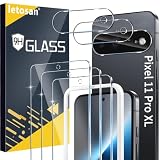
- 6 Pack: You will get 3 pack screen protectors and 3 pack camera lens protectors are both made of High-quality Tempered Glass for Google Pixel 11 Pro XL (6.8"). Unlock with ease using either Fingerprint or Face Recognition technology. Enjoy a natural, "True Touch" experience thanks to superior sensitivity
- It is 100% brand new, Precise laser cut full adhesive sticky tempered glass and will not fall off, exquisitely polished, 2.5D rounded edges technique makes curved edges of the film to perfectly fit curved corners and edges of the phone, 1.4 mm margin around the edge of the device to be compatible with MOST cases
- Upgrade 12FT Military Shockproof with edge strengthening design, with Ultra-high 9H hardness and 10X Stronger Scratch resistant for maximum resistance against impacts and scratches from objects.Easy Installation and Bubble-Free, Removing dust and aligning it with Mounting Frame properly before actual installation, One-touch ultra-light automatic adsorption installation, no foam at all
- Night shooting made easy: This camera lens protective film is custom designed for the Pixel 11 Pro XL 6.8 Inch display. It seamlessly integrates augmented reality technology for improved light transmittance and night shooting capabilities. this protector restores the original quality of photos and videos even when using the flash at night
- It adopts premium quality AGC glass materials, thus creating an oil-resistant, anti-fingerprint, Highly durable, and scratch-resistant surface that is easier to clean and protect against sweat effectively, and enhance the visibility of the screen and 99.99% HD clarity
Product prices and availability are accurate as of the date/time indicated and are subject to change. Any price and availability information displayed on Amazon at the time of purchase will apply.




