For a WooCommerce store, enable the built-in product reviews to collect feedback on individual product pages; you do not need a separate reviews plugin for that. If you want one page that gathers reviews from multiple products—or a standalone testimonials page for a business that does not use WooCommerce—you need a different display or collection workflow.
Choose the kind of reviews page you need
“Customer reviews page” can mean either reviews attached to products or a dedicated page containing reviews across your site. WooCommerce’s built-in reviews are product-specific and appear on product pages. A page-wide grid is a separate display need; for a non-store business, testimonials are a separate collection use case.
As an Amazon Associate I earn from qualifying purchases.
- Reviews on product pages: Use WooCommerce’s settings and each product’s review control.
- A page listing product reviews: Keep WooCommerce reviews enabled, then use a compatible plugin block or shortcode to display them on a page.
- Business testimonials without WooCommerce: Choose a plugin intended for collecting and displaying business reviews or testimonials.
Enable reviews on WooCommerce product pages
- In WordPress admin, go to WooCommerce > Settings > Products and enable product reviews.
- Choose whether to show a verified-owner label and whether reviews are limited to verified owners. Decide whether to enable star ratings and require a rating. These options let you balance open feedback against purchase verification and structured ratings.
- Save the settings. Reviews can then appear on product pages where reviews are enabled.
- To disable reviews for a particular product, edit that product and go to Product data > Advanced > Enable reviews, then turn the option off.
See WooCommerce’s Product Reviews documentation for the settings and review-management details; labels and available controls may vary with the installed version.
Quick wins for a faster PC:
Clear out junk files and repair common Windows errorsFree Scan →Scan for outdated or missing drivers - takes under a minuteDriver Scan →Repair Windows errors before they cause bigger problemsFix Now →Moderate and manage submitted reviews
Reviews may be subject to moderation, so a submission is not necessarily visible immediately. In the admin area, use Products > Reviews to review submissions. Depending on the review, you can approve or unapprove it, reply, edit it, mark it as spam, or move it to the trash. Set a moderation approach that suits your store before inviting customers to submit feedback.
#1 Best Overall

- ProsperQR’s user-friendly software makes getting reviews a breeze. Setup takes less than 60 seconds.
- Featuring both NFC & QR code, you can change your review page destination at anytime to fit your business needs.
- Great for all businesses, including: auto dealerships, nail salons, law firms, dental and medical practices, gyms, pet grooming and boarding, med spas, restaurants and cafes, and retail stores.
- Our specialist team is available around the clock to support ProsperQR customers. We typically respond in under a day.
- Your Google Review Stand purchase is yours to keep. There are no subscriptions and no monthly fees.
Show product reviews together on a separate page
WooCommerce’s product tabs are not the same as an all-reviews page. To display reviews across products on a WordPress page or post, the WordPress.org listing for Customer Reviews for WooCommerce documents both a Gutenberg block and the [cusrev_reviews_grid] shortcode.
- Install and configure the plugin, checking its compatibility with your installed WordPress and WooCommerce versions.
- Open the page or post where the review grid should appear.
- Use the plugin’s Gutenberg block, or insert
[cusrev_reviews_grid]into a shortcode block or other supported shortcode area. - Preview the page and confirm that the reviews shown, layout, and pagination work as intended on your site.
The block or shortcode provides a way to display product reviews on a page; it does not replace WooCommerce’s product-level review settings.
Rank #2
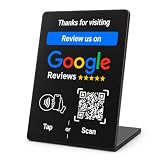
- NFC-Enabled Review Collection Stand: Customers tap their smartphone to access Google review page instantly. Suitable for restaurants, retail stores, and service businesses.
- Dual Functionality Technology: Features both NFC technology and QR code scanning capabilities. Compatible with iPhone and Android devices with no app download required for customer use
- Premium PVC Construction: Black square design with gloss finish and weather resistance for tables, countertops, and high-traffic business areas
- One-Time Purchase with No Subscription: Easy setup process with unlimited usage capability. Compact 3.9" square size fits smaller spaces and point-of-sale areas
- Durable Indoor and Outdoor Construction: Stable base design ensures secure placement in busy restaurant and retail environments with weather-resistant materials
Optionally request reviews after an order
WooCommerce documents a customer review-request workflow marked beta. It is disabled by default, and its availability and controls can change between versions. If it is present in your installation, go to WooCommerce > Settings > Advanced > Features and enable Customer review request (beta). This manages a “Review your order” page that customers reach from a review-request email.
The email is configured separately under WooCommerce > Settings > Emails > Review request. WooCommerce’s documentation says the email is disabled by default and that the default delay is seven days after an order is marked completed; check the settings in your own installation rather than assuming those defaults remain unchanged. The feature details are in the WooCommerce Product Reviews documentation.
Rank #3

- NFC Tap & QR Code Review Stand for Businesses: Designed with NFC tap technology and QR code scanning, this review stand allows customers to access a linked webpage by tapping an NFC-enabled smartphone or scanning the QR code.
- Dual Access with NFC and QR Code Technology: Combines NFC and QR code functions in one compact tabletop sign. Customers can use either method to quickly access digital content, making it suitable for offices, reception counters, restaurants, salons, and retail spaces.
- Compatible with iPhone & Android Smartphones: Works with NFC-enabled iPhone and Android devices. Customers can simply tap or scan using their smartphone to access the connected webpage without complicated steps.
- Simple Setup Without Additional Apps: The NFC and QR code system provides an easy way to share digital content. No customer app download is required to use the tap or scan function.
- Compact Business Counter Display Stand: The compact QR code sign fits easily on restaurant tables, salon counters, retail checkout areas, reception desks, and other business spaces. Its professional design keeps your counter organized while providing convenient digital access.
If you do not use WooCommerce
For a service business, portfolio, or other site that needs a standalone testimonials page, select a plugin designed for business reviews rather than enabling WooCommerce solely to collect testimonials. The WordPress.org listing for WP Customer Reviews describes Business and Product review types and a page use case for gathering reviews or testimonials.
That listing alone does not establish that the plugin is the best current choice or confirm compatibility with every WordPress setup. Before installing any reviews plugin, check its current compatibility information, update history, support, moderation options, and whether it can display reviews in the format you need.
Rank #4

- 🌟 GET MORE GOOGLE REVIEWS WITH A SIMPLE TAP OR SCAN: Turn happy customers into reviewers while they’re still at the counter. This Google review tap card stand helps customers open your review page instantly using NFC tap or the built-in QR code, making review collection effortless for restaurants, salons, retail stores, and front-desk businesses. Pay once, no monthly fees ever.
- 📊 PROFESSIONAL DISPLAY + LIVE STATISTICS DASHBOARD: This eye-catching stand looks better than a loose paper QR printout and is built to last on high-traffic counters. Track live statistics of visits and reviews through your TapFive dashboard so you know your investment is working. Also works as a QR code stand or Google review sign for counters, front desks, and checkout. Free replacement if anything goes wrong.
- ⚡ LIGHTNING-FAST NFC TAP + QR CODE — ALL PHONES, NO APP: Customers can tap with any NFC-compatible iPhone or Android, or scan the QR code sign if they prefer. No customer app download required. Our lightning-fast NFC technology works in seconds for fast in-person Google review collection. Also works as a Google review card, plate, or sticker alternative.
- ⏱️ EASY 30-SECOND SETUP — UPDATE YOUR LINK ANYTIME: Connect your Google Business review link through the free TapFive platform in about 30 seconds. Change your link anytime — new location, new Google profile, no new hardware needed. Manage multiple QR code stands from one dashboard. One-time purchase, not a subscription.
- 🏢 BUILT FOR CHECKOUT COUNTERS, RECEPTION DESKS & FRONT DESKS: Designed for the places where happy customer moments happen — checkout counters, reception areas, service desks, hostess stands, and retail registers. Ideal for restaurants, salons, med spas, dental offices, auto shops, and any local business that depends on online reviews. A review boost card your customers can’t miss.
When a basic review page needs more features
Start with the simplest workflow that fits the site. A basic WooCommerce store can accept product reviews without adding a separate feature-rich extension. If you need customer questions, photos, or videos as part of contributions, those are optional extension-level capabilities rather than prerequisites for a basic reviews page. WooCommerce describes these capabilities in its Product Reviews Pro documentation.
Free tools Windows power users keep installed
One-click scans. No signup required.
Before adding a plugin, decide whether you need product-linked reviews or business testimonials, product-page display or an all-reviews page, verified-purchase restrictions, moderation, reminders, or richer contribution types. Then confirm the plugin supports your installed WordPress and WooCommerce versions.
Quick Recap
Best Value

- NFC Tap & QR Code Review Stand for Businesses: Designed with NFC tap technology and QR code scanning, this review stand allows customers to access a linked webpage by tapping an NFC-enabled smartphone or scanning the QR code.
- Dual Access with NFC and QR Code Technology: This NFC Review Card Stand combines tap-to-connect and QR scanning functions in one compact design. Compatible with modern smartphones, it offers a simple way to share digital information at restaurants, salons, retail stores, cafes, and service counters.
- Compatible with iPhone & Android Smartphones: Works with NFC-enabled iPhone and Android devices. Customers can simply tap or scan using their smartphone to access the connected webpage without complicated steps.
- Simple Setup Without Additional Apps: The NFC and QR code system provides an easy way to share digital content. No customer app download is required to use the tap or scan function.
- Compact Business Counter Display Stand: The compact QR code sign fits easily on restaurant tables, salon counters, retail checkout areas, reception desks, and other business spaces. Its professional design keeps your counter organized while providing convenient digital access.
Product prices and availability are accurate as of the date/time indicated and are subject to change. Any price and availability information displayed on Amazon at the time of purchase will apply.




