To access DRM-protected content, sign in to the account entitled to the specific title and open it through the provider’s supported app, browser, or device. If it will not open, check that you are using the right account and access route, that the title is available there, and that your device and software are supported. In the United States, do not treat a playback problem or a purchased copy as general permission to bypass DRM.
What is the authorized way to open DRM-protected content?
DRM, or digital rights management, is used in different systems for books, video, games, software, and other content. There is no single app, device, or access method that works across all of them. The provider or seller determines which account, software, platforms, and license apply to a particular title.
As an Amazon Associate I earn from qualifying purchases.
- Identify the provider and title. Check where the content came from and which account holds the purchase, subscription, rental, loan, or other entitlement.
- Choose a provider-supported access route. Use the official app, browser reader, or playback software the provider lists. Confirm that the particular title works through that route.
- Check compatibility. Compare your device, operating system, app or browser, and software version with the provider’s current support information.
- Verify the entitlement and connection. Make sure you are signed in to the account associated with the content, that the title is still available to you, and that your connection is working.
- Follow the provider’s troubleshooting steps. If access still fails, contact the provider about account, purchase, or licensing issues rather than using a bypass tool.
Which access route should you use?
The right route depends on the provider and title. These are common authorized options, not guarantees that every service offers each one.
Free tools Windows power users keep installed
One-click scans. No signup required.
| Route | What to verify |
|---|---|
| Official app or playback software | That the provider supports your device and that the specific title is available in the app. |
| Browser reader or player | That the provider supports your browser and makes the title available through its web route. |
| Supported dedicated device | That the device supports the relevant service, account, and title. |
| Library or institutional access | That your library or institution provides access to the title and that you meet its sign-in and borrowing or use requirements. |
Example: Kindle books
Amazon says a Kindle device is not required: eligible books can be read using Kindle reading apps on supported devices or through Kindle for Web. Amazon also notes that not all Kindle titles are available in the browser reader. If a title is missing there, check whether Amazon supports it in a Kindle app or on an e-reader. This Kindle-specific guidance does not establish how other DRM systems work.
#1 Best Overall

- Enjoy Blu-ray Disc movies in Full HD as well as DVD discs
- Upscale your DVDs to near HD quality
- Easy set-up with included HDMI cord
- Boot up in less than a second with super quick start mode
- Keep things simple with the new user-friendly interface
Example: protected video
Google describes Widevine as its content-protection system for premium media and lists multiple services that use it. That illustrates why video playback depends on the particular service and its supported platform; it does not mean that all services using Widevine share the same device requirements or access rules.
What should you check when a title will not open?
- Account: Confirm that you are signed in to the account associated with the purchase, subscription, rental, loan, or institutional entitlement.
- Title availability: Check that the title is offered through the app, browser, or device you selected. Availability in one route does not establish availability in another.
- License or entitlement: Verify that the purchase or access period is active and that the provider still lists the title in your account or catalog.
- Compatibility: Check the provider’s current requirements for your device, operating system, app, browser, and software version.
- Connectivity and updates: Check your connection and install provider-recommended app or browser updates before retrying.
- Geography and account terms: Confirm that the title and access route are available in your country and under your account’s terms.
- Accessibility needs: Ask the provider about accessible editions or supported features such as captions, audio description, screen-reader support, or read-aloud options if the default route does not meet your needs.
If the provider does not support your preferred device or accessibility workflow, ask about an authorized alternative format, supported device, library or institutional route, or assistance from the provider. These options depend on the title and provider.
Rank #2
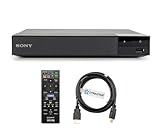
- REGION-FREE PLAYBACK FOR BLU-RAY & DVDS - NO RESTRICTIONS: Plays Blu-ray region A, B, & C; Plays standard DVDs from ANY REGIONS 0, 1, 2, 3, 4, 5, 6, 7, 8, giving you unlimited access to movies and shows worldwide
- BLU-RAY & DVD PLAYBACK - Make the most of your HDTV. Blu-ray disc playback delivers exceptional Full HD 1080p video performance along with stunning hi-definition sound. Sony Blu-ray players also play DVDs, so there is no need to replace your old DVD collection. Not only that, DVD Upscaling delivers exceptional image quality with 1080p up scaling via HDMI.
- FULL HD 1080P BLU-RAY PERFORMANCE WITH UPSCALING FOR NORMAL DVDS: Experience exceptional picture quality and immersive sound with Blu-ray disc playback, delivering Full HD 1080p resolution for a theater-like experience at home. Breathe new life into your DVD collection with 1080p upscaling, enhancing standard-definition content to near-HD clarity via HDMI.
- COMPACT, RELIABLE DESIGN: The Sony BDP-S1700 is sleek and space-saving, making it an ideal addition to your home entertainment setup
- DYNASTAR HDMI CABLE INCLUDED: This bundle includes a premium Dynastar 6FT HDMI cable for superior connectivity, a US power plug, region-switching instructions, and a remote control for easy setup and use. Dynastar is a Registered trademark of 220-electronics
Does owning a copy let you bypass DRM?
Not as a general rule in the United States. The U.S. Copyright Office’s DMCA overview says the law prohibits circumventing technological protection measures used to control access to copyrighted works. The law also addresses making, importing, offering, providing, or trafficking in certain circumvention technologies, products, services, devices, or components.
What’s actually slowing this PC down?
Pick the symptom - the matching free tool is one click away.
The Copyright Office describes a triennial rulemaking process that creates limited exemptions for specified classes of works and uses. Section 1201’s statutory text also addresses certain reverse engineering for interoperability by someone who lawfully obtained the right to use a computer program, subject to specific conditions. Neither the existence of that provision nor a particular exemption creates blanket permission to defeat DRM. The applicable text can depend on the work, user, purpose, and type of access control.
Rank #3

- REGION-FREE PLAYBACK FOR BLU-RAY & DVDS - NO RESTRICTIONS: Plays Blu-ray region A, B, & C; Plays standard DVDs from ANY REGIONS 0, 1, 2, 3, 4, 5, 6, 7, 8, giving you unlimited access to movies and shows worldwide
- BLU-RAY & DVD PLAYBACK - Make the most of your HDTV. Blu-ray disc playback delivers exceptional Full HD 1080p video performance along with stunning hi-definition sound. Sony Blu-ray players also play DVDs, so there is no need to replace your old DVD collection. Not only that, DVD Upscaling delivers exceptional image quality with 1080p up scaling via HDMI.
- FULL HD 1080P BLU-RAY PERFORMANCE WITH UPSCALING FOR NORMAL DVDS: Experience exceptional picture quality and immersive sound with Blu-ray disc playback, delivering Full HD 1080p resolution for a theater-like experience at home. Breathe new life into your DVD collection with 1080p upscaling, enhancing standard-definition content to near-HD clarity via HDMI.
- COMPACT, RELIABLE DESIGN: The Panasonic DMP-BD is sleek and space-saving, making it an ideal addition to your home entertainment setup
- HDMI CABLE INCLUDED: This bundle includes a premium Dynastar 6FT HDMI cable for superior connectivity, a USA power plug, region-switching instructions, and a remote control for easy setup and use. Dynastar is a Registered trademark of 220-electronics
The current regulation, 37 CFR § 201.40, sets out exemptions and their conditions. The U.S. Copyright Office’s 2027 triennial proceeding page says that cycle has begun. Because exemption status and wording can change, check the current regulation and proceeding materials before relying on an exemption for a specific use. This is general information about U.S. law, not individualized legal advice; laws elsewhere may differ.
Independent reader supportYour contribution helps us test, update, and keep practical guides available for everyone.How should you compare legitimate ways to access a title?
Before choosing among authorized routes, check the details with the provider rather than assuming one option has the same terms as another.
Quick Recap
Best Value
- REGION-FREE PLAYBACK FOR BLU-RAY & DVDS - NO RESTRICTIONS: Plays Blu-ray region A, B, & C; Plays standard DVDs from ANY REGIONS 0, 1, 2, 3, 4, 5, 6, 7, 8, giving you unlimited access to movies and shows worldwide
- BLU-RAY & DVD PLAYBACK - Make the most of your HDTV. Blu-ray disc playback delivers exceptional Full HD 1080p video performance along with stunning hi-definition sound. Sony Blu-ray players also play DVDs, so there is no need to replace your old DVD collection. Not only that, DVD Upscaling delivers exceptional image quality with 1080p up scaling via HDMI.
- FULL HD 1080P BLU-RAY PERFORMANCE WITH UPSCALING FOR NORMAL DVDS: Experience exceptional picture quality and immersive sound with Blu-ray disc playback, delivering Full HD 1080p resolution for a theater-like experience at home. Breathe new life into your DVD collection with 1080p upscaling, enhancing standard-definition content to near-HD clarity via HDMI
- COMPACT, RELIABLE DESIGN: The Sony BDP-S1700U is sleek and space-saving, making it an ideal addition to your home entertainment setup
- HDMI CABLE INCLUDED: This bundle includes a premium Dynastar 6FT HDMI cable for superior connectivity, a USA power plug, region-switching instructions, and a remote control for easy setup and use. Dynastar is a Registered trademark of 220-electronics
Rank #4

- Play Media from External Storage: Plug in an external hard drive to these compact DVD players for TVs to share your favorite movies, photos, and more on a large screen
- Multi-Connectivity DVD Blu Ray Player: HDMI-CEC and USB connectors; interfaces with multiple file formats in video (MKV/MP4) and audio (MP3/FLAC/ALAC/DSD/ WAV)
- Compact Size: Space-saving design allows this Bluray/DVD player for tv to fit neatly in narrow spaces and on thin racks. Dimensions: Approx. 9 5/8" W x 1 1/2"H x 6 7/8"D
- High-Quality Picture Resolution: With full HD support, BD84P-K Panasonic DVD players beautifully up-converts images to high-definition image quality (1080p) video, rendering your favorite movies in fine detail
- High-Resolution Audio Playback: Hear clear, superior audio from this Blu-Ray DVD player in action, adventure, dialogue, and music with Dolby Digital sound for DVDs, CDs, and compatible external files
- Title availability: Is the specific work supported by this route?
- Compatibility: Which operating systems, devices, apps, browsers, and software versions are supported?
- Access model: Is access through a purchase, subscription, rental, library loan, institutional entitlement, or another license?
- Offline use: Does the official service offer downloads, and what limits apply?
- Accessibility: Are the features or alternate formats you need available?
- Geography and account: Is the title available in your country, and is access tied to a particular account or entitlement?
Product prices and availability are accurate as of the date/time indicated and are subject to change. Any price and availability information displayed on Amazon at the time of purchase will apply.
The Tool Desk
Outbyte PC Repair FREEClear out junk files and repair common Windows errorsFree Scan →Outbyte Driver Updater FREEFix the driver behind crashes, sound loss and screen glitchesFind Drivers →



