An internet radio plays audio delivered as a stream over the internet, rather than tuning to a conventional radio-frequency broadcast. The station encodes its program and makes it available through a streaming server; the radio finds a station, connects to its stream, buffers and decodes the audio, then plays it. Wi-Fi is usually the radio’s connection to the home network, while a station directory helps you find streams—it does not ensure that a listing is live or compatible with your device.
What happens when you press Play?
- The station creates its program. Audio may come from a live studio or an automated playout system.
- An encoder prepares the audio. It compresses the program into a digital audio format, or codec, suitable for streaming.
- A server makes the stream available. The streaming server accepts connections from listeners and delivers the audio. Larger services may use content-delivery infrastructure to distribute it.
- Your radio connects to the internet. In a typical home setup, Wi-Fi links the radio to the router, which provides access to the internet. Some radios also support wired Ethernet.
- The radio finds the selected station. You might choose it from a directory or a saved preset. The directory provides the listing; the radio then connects to the station’s stream.
- The radio buffers, decodes and plays. A short buffer holds incoming data before playback to smooth brief delivery variations. The device decodes a format it supports and plays the sound. Stream metadata may also show a station name, artist or program information.
IEEE Technology Navigator describes the basic system as three components: “An internet radio service relies on three functional components: an encoder that converts audio into a compressed digital format, a streaming server that accepts listener connections and pushes the audio stream, and a client application that buffers and plays the audio stream.” In a dedicated radio, the client is the device’s playback software; in another setup, it may be an app.
As an Amazon Associate I earn from qualifying purchases.
What Wi-Fi does—and why buffering happens
Wi-Fi is the local wireless connection between the radio and your router. It is not the radio signal from the station: the radio still needs working internet access through the router to reach the station’s stream and, when applicable, a directory. A weak or unstable connection can interrupt delivery.
What’s actually slowing this PC down?
Pick the symptom - the matching free tool is one click away.
The buffer can absorb a brief slowdown, but it cannot keep playback going indefinitely if data arrives too slowly or the stream stops. If a radio repeatedly pauses or drops out, Naim’s troubleshooting guidance recommends checking that the connection is strong and stable, moving the device closer to the router, or trying Ethernet if the radio supports it. A dropout does not, by itself, prove that Wi-Fi is the cause; the stream, service or device may also be involved.
#1 Best Overall

- Listen to Thousands of Radio Stations from Around the World With Clear Reception - More than 25,000+ internet radio stations categorized by Location, Genre and Most Popular. Discover radio shows you love. Thousands of free rock, jazz, news and talk shows to choose from! All you need is a WiFi internet connection. Add your own favorite stations by submitting a valid URL to Skytune.
- Bluetooth receiving included so that you can send audio from a smartphone or tablet to the CC WiFi 3 Internet Radio. A 5dBi external antenna is included for best 2.4 Ghz Wi-Fi reception and distance within your home.
- Great Audio With Full Voice Clarity – Includes a line-out which can be used for remarkable results with an amplified speaker system or any AM, FM stereo receiver for superior audio. An adjustable equalizer (Line Out and Headphone) for advanced users centered at 105, 300, 850, 2400 and 6800 Hz plus an adjustable 3D setting for depth. Settings can be adjusted to your ear.
- Great Bedside Radio – It’s small and easy to use. Comes with a clock, dual alarm, sleep timer (15, 30, 45, 60, 120, 150, and 180 minutes) and stereo headphone jack. The included large sized remote control gives you quick access to preset stations. Presets: first 10 presets using the remote buttons, 100+ in sequence list.
- Additional Features – Adjustable Backlight, 5-volt AC adapter and USB to radio power cord included. Weight: 1 lbs. 2.6 oz. Size: 6.5” W x 3.9” H x 3.9” D. 2 Year limited warranty. U.S. based tech support.
What a station directory does
A directory is a station-discovery service. It organizes listings so you can browse or search, commonly by location, genre or language. For example, Naim describes its app as using a curated directory; the Sonoro STREAM SO-411 manual describes local-station listings, keyword search, location, popularity, and discovery by origin, genre and language.
The directory and the streaming server have separate jobs. A directory helps your radio locate a station listing; playback still depends on the radio reaching a working stream in a format and delivery method it can handle. Listings can become stale, and a station’s stream may be unavailable even while its entry remains visible. A directory entry is therefore not proof that a station is currently broadcasting online.
Rank #2

- All-in-One Internet Radio Component: Seamlessly access thousands of global stations via Wi-Fi or LAN, using Skytune, enjoy Podcasts, local FM radio, and stream music from your phone via Bluetooth (Requires external speakers or amplifier—no built-in speaker driver).
- HiFi Integration Ready: Easily connect to your home audio system with stereo line-out or optical output. No built-in speaker—designed as a pure tuner for audiophiles who want flexibility, or if you already have an amplifier or stereo systems to connect with.
- Smart Streaming & Playlist Control: Supports UPnP and DLNA for streaming music from networked PCs or NAS drives. Create and manage playlists or stream directly from your home server.
- Enhanced User Control: Comes with a full-function remote control and 3.2" color screen. Browse stations, set sleep timers, alarms, EQ sound modes, and manage your favorites. Option to display a clock while playing with adjustable dimmer settings.
- Multiple Playback Modes & Alarms: Supports alarm via favorite station, FM, or tone. Sleep timer, kitchen timer, podcast playback with resume function, and remote web control via Skytune website.
Codecs, protocols and station compatibility
A codec describes how audio is encoded. A streaming protocol describes how the stream is delivered to the player. IEEE Technology Navigator lists MP3, AAC+, Ogg Vorbis and Opus as examples of codecs used in internet radio, and describes delivery over HTTP using Icecast or SHOUTcast, or through HLS. These are examples of technologies used in the field, not a list of formats supported by every radio.
Quick wins for a faster PC:
Fix the driver behind crashes, sound loss and screen glitchesFind Drivers →Repair Windows errors before they cause bigger problemsFix Now →Scan for outdated or missing drivers - takes under a minuteDriver Scan →The Roberts STREAM 94i manual cautions that codec support alone does not guarantee that every station will play: the same codec may be delivered using different protocols, and variations in formats and tagging can affect compatibility. When checking a particular radio, compare its own documentation with the stations you want to hear:
Rank #3

- Connect the Grace Link to your traditional stereo or receiver to stream music and more; Total control with the Grace smartphone app, infra-red remote control, or the front panel controls via the 2.8-inch color display (no built in speaker)
- Supports 100,000 Internet radio stations and 100 presets; Built-in apps: Spotify Connect, Pandora, Amazon Music HD, Prime, and Unlimited, iHeartRadio, Radio.com, BBC, NPR, Sleep Sounds, Calm Radio, Shoutcast, Live365, Podcast, SiriusXM (subscription sold separately by SiriusXM), add your favorite station to your my stuff folder
- With Chromecast built-in, you can stream your favorite music from your phone, tablet, or laptop right to your favorite speakers or stereo system. Easily control your Grace Link with hundreds of apps you already know and love from your iPhone, iPad, Android phone or tablet
- Analog and pure digital outputs to connect to your favorite stereo or receiver; Analog inputs to stream your favorite CD or Turntable to any room of your home, to other Grace devices, or any brand Chromecast built-in speaker
- Supports Hi-Res files up to 24-bit/192kHz; Built in 5 band equalizer; Play audio from UPnP / DNLA media servers, Bluetooth 5.0 receiver to play from your phone or transmit to listen on headphones, RJ45 jack and built in dual band Wi-Fi; What's in the box: Grace Link, manual, Infra-red remote control and batteries, 12V 1A power adapter
- Which codecs and streaming protocols does the radio support?
- Which directory or internet-radio service does it use, and does it offer the stations you want?
- Does it connect over Wi-Fi, Ethernet or both?
- Can it display station and track information, and does it have useful presets?
- Does it include other radio modes or audio inputs you need?
These features vary by model. The Roberts and Sonoro manuals describe their respective devices, not every internet radio.
Why won’t an internet radio play a station?
Use the pattern of the problem to narrow it down. These checks can distinguish a connection issue from a station-specific or compatibility issue; they do not identify a cause with certainty.
Rank #4

- Internet wireless Wi-Fi radio: simply connect the radio to your internet network to access an extensive number of world’s radio channels, powerful and stereo output with rich sound.
- FM radio: Ordinary FM band without internet access. Can display radio texts if available.
- Bluetooth & UPnP/ DLNA Compatible: Play your preferred music or podcast using Bluetooth (such as Spotify or other audio streaming services) or UPnP/DLNA compatible device, also support Micro SD card.
- Personalize your favourite list up to 99 presets: Easy to manage favourites from FM and Internet radio in ONE list via 3 quick preset or remote control. Free to add new audio stream URL.
- Option to display the time when radio is playing, the backlight is adjustable, can be totally off / Multi-languages menu display / Remote control.
- No stations play: Check that the radio is connected to Wi-Fi and that the network has internet access. Try another known station. If playback repeatedly buffers, improve network stability or test Ethernet if available.
- Only one station fails: Try other stations. The station’s stream could be temporarily unavailable, its directory listing could be out of date, or its format or protocol could be incompatible with the radio. Check the device’s compatibility details before assuming the radio itself is faulty.
- The station plays, but the display is blank or incomplete: Track and program metadata may not be provided or exposed consistently. The Sonoro manual qualifies station information with “if available.”
- Playback pauses or drops out: Check signal strength, the radio’s distance from the router and the stability of the network. If supported, compare Wi-Fi with a wired Ethernet connection.
How internet radio differs from broadcast radio
Conventional broadcast radio delivers a radio-frequency signal for a receiver to tune in. Internet radio delivers digital audio through a network connection: the station encodes and serves the program, and the listener’s device connects to the stream. That makes internet access and stream compatibility part of the listening chain, alongside the radio itself.
Recommended Free Tools
Quick Recap
Best Value
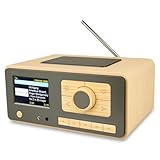
- UNLIMITED GLOBAL ENTERTAINMENT: Connect via WiFi (2.4GHz) to access thousands of radio stations and podcasts worldwide through Skytune. Easily search by region, genre, or talk show. Set you favorite region in Local Radio so that you can always access the internet radio station available in your local area with one click. Also supports standard FM reception with a telescopic antenna for offline listening.
- ADVANCED CONNECTIVITY & BLUETOOTH: Equipped with the latest Bluetooth V5.3 technology, this radio doubles as a high-quality wireless speaker, allowing you to stream music directly from your smartphone or tablet. It also supports UPnP/DLNA, letting you browse and stream audio files stored on your PC or network-connected devices. Features an external WiFi antenna socket for superior signal stability.
- STUNNING 3.5" COLOR DISPLAY & EASY CONTROL with BIG BUTTONS: Features a large, clear 3.5-inch color screen that displays station logos, song artist/title, and a big clock. Designed for ease of use with dual navigation knobs and 5 dedicated preset keys on the front panel for one-touch access to your favorite stations. Full-function remote control included.
- PERSONALIZED FAVORITES & WEB MANAGEMENT: Store up to 150 favorite stations in your "My Favorite" list. You can organize stations into custom categories (e.g., "Morning Mix," "My Jazz"). For power users, the radio supports web browser control via PC or smartphone to easily manage favorites, add custom URLs, and tune stations remotely.
- DUAL ALARM & SLEEP TIMER: Perfect for the bedroom or kitchen. Set two separate alarms with options to wake up to a Tone, My Favorite station, or FM Radio. Includes a Snooze function , a Sleep Timer (up to 180 mins) to fall asleep to music , and a dedicated Kitchen Timer for cooking countdowns.
Product prices and availability are accurate as of the date/time indicated and are subject to change. Any price and availability information displayed on Amazon at the time of purchase will apply.




