What’s actually slowing this PC down?
Pick the symptom - the matching free tool is one click away.
Short answer: New Outlook for Windows has no documented permanent “All Inboxes” folder as of August 16, 2026. Classic Outlook also lacks a standard merged Inbox, but you can search every mailbox with folder:inbox or create a classic Search Folder.
First identify which Outlook for Windows you have
Microsoft distributes two different Windows applications. The controls and available workarounds differ, so identify yours before following any instructions.
As an Amazon Associate I earn from qualifying purchases.
- New Outlook: a Settings gear appears in the upper-right corner, and the interface normally includes Home, View and Help.
- Classic Outlook: there is usually no Settings gear, and the traditional ribbon includes a File tab. You can also check File > Office Account.
Microsoft’s visual guide is at What version of Outlook do I have?. Labels can vary by build, language, update channel and administrator policy.
Recommended Free Tools
New Outlook for Windows: no persistent All Inboxes folder
New Outlook can add and manage Microsoft, work or school, Gmail, Yahoo, iCloud, IMAP and other accounts, subject to provider and protocol limitations. Microsoft documents managing those accounts in one application, but not a permanent folder that combines every Inbox. A Microsoft community response likewise says a unified Inbox is not currently supported; this status is current as of August 16, 2026.
#1 Best Overall

- Incredible Images: The Acer KB242Y G0bi 23.8" monitor with 1920 x 1080 Full HD resolution in a 16:9 aspect ratio presents stunning, high-quality images with excellent detail. The zero-frame design provides maximum visibility of the screen from edge-to-edge.
- Adaptive-Sync Support: Get fast refresh rates thanks to the Adaptive-Sync Support (FreeSync Compatible) product that matches the refresh rate of your monitor with your graphics card. The result is a smooth, tear-free experience in gaming and video playback applications.
- Responsive!!: Fast response time of 1ms enhances the experience. No matter the fast-moving action or any dramatic transitions will be all rendered smoothly without the annoying effects of smearing or ghosting. With up to 120Hz refresh rate speeds up the frames per second to deliver smooth 2D motion scenes.
- 23.8" Full HD (1920 x 1080) Widescreen IPS Monitor | Adaptive-Sync Support (FreeSync Compatible)
- Refresh Rate: Up to 120Hz | Response Time: 1ms VRB | Brightness: 250 nits | Pixel Pitch: 0.275mm
See Microsoft’s new Outlook overview and account setup instructions.
What you can do instead
- Expand each account in the folder list and open its Inbox separately.
- Right-click important Inbox folders and add them to Favorites when that option is available. Favorites pin folders for faster navigation; they do not merge messages into one list.
- Use the available search scope and predefined Search Folders for items such as unread, flagged, important, attachment-containing or categorized mail, where your account and build support them.
- Use Help > Feedback to request a genuine unified Inbox.
Adding another account does not automatically combine its messages with the accounts already configured.
Classic Outlook: quickly check every Inbox
Classic Outlook can search multiple mailboxes at once. This produces a results view, not a permanent Inbox folder.
- Open classic Outlook.
- Click the Search box above the message list.
- Open the search-scope menu, which may show Current Mailbox, Current Folder or similar choices.
- Select All Mailboxes.
- Enter
folder:inboxand press Enter. - Use the mailbox or account column to identify where each result came from.
The exact menu name depends on your Outlook build, account type and organization settings. Microsoft community guidance documents this as a classic Outlook workaround, not as an official unified-Inbox feature: All Mailboxes and Folder:inbox.
Rank #2

- CURVED FOR ENHANCED ENGAGEMENT: An immersive viewing experience with a curved monitor that wraps more closely around your field of vision; It creates a wider view, enhancing depth perception and minimizing peripheral distraction
- SMOOTH PERFORMANCE FOR SEAMLESS CONTENT: Stay in the action when playing games, watching videos, or working on creative projects; The 100Hz refresh rate reduces lag and motion blur so you don't miss a thing in fast-paced moments¹
- MORE GAMING POWER: Gain the edge with optimizable game settings; Color and image contrast can be adjusted to see scenes more vividly and spot enemies hiding in the dark; Game Mode adjusts any game to fill the screen so you can view every detail²
- KEEP IT EASY ON THE EYES: Care for your eyes and stay comfortable, even during long sessions; Advanced eye comfort technology certified by TÜV reduces eye strain by minimizing blue light and reducing irritating screen flicker²
- INCREASED VERSATILITY: Connect to more; Plug devices straight into your monitor for increased flexibility, making your computing environment even more convenient
If the query gives unexpected results
- With All Mailboxes still selected, try searching for
inbox. - Search each account’s Inbox separately to confirm synchronization.
- Folder syntax can behave differently with localized folder names, account backends and indexing states.
- A shared mailbox, archive or other store may not be included in the scope you selected.
Classic Outlook: save a recurring combined view with a Search Folder
A Search Folder is a virtual view. It displays messages that meet criteria without moving or duplicating the original messages.
- In the folder pane, expand Search Folders.
- Select New Search Folder.
- Choose Create a custom Search Folder, then select Choose.
- Name it, for example, All Inboxes.
- Select Browse and choose the Inbox folders from the accounts or mailboxes you want included.
- Set any criteria you need, then confirm the folder selections and save.
Custom Search Folders are an advanced classic-Outlook capability. They can target unread, flagged, important, attachment, sender and similar criteria, but the Browse dialog and available options vary by account and profile. Microsoft also documents that Search Folders cannot combine results from multiple Outlook Data Files (.pst): Use Search Folders to find messages or other Outlook items.
Because of those store and account limitations, do not assume every Inbox will appear in one Search Folder. Check that each required Inbox was selected and that criteria are not filtering messages out.
When “All Mailboxes” or the combined view is missing
You are using new Outlook
The All Mailboxes search scope and advanced custom Search Folders are classic-Outlook behavior. Confirm the app version before troubleshooting the command.
Rank #3

- CRISP CLARITY: This 27″ Philips V line monitor delivers crisp Full HD 1920x1080 visuals. Enjoy movies, shows and videos with remarkable detail
- INCREDIBLE CONTRAST: The VA panel produces brighter whites and deeper blacks. You get true-to-life images and more gradients with 16.7 million colors
- THE PERFECT VIEW: The 178/178 degree extra wide viewing angle prevents the shifting of colors when viewed from an offset angle, so you always get consistent colors
- WORK SEAMLESSLY: This sleek monitor is virtually bezel-free on three sides, so the screen looks even bigger for the viewer. This minimalistic design also allows for seamless multi-monitor setups that enhance your workflow and boost productivity
- A BETTER READING EXPERIENCE: For busy office workers, EasyRead mode provides a more paper-like experience for when viewing lengthy documents
The account is not synchronized
Restart Outlook, allow synchronization or indexing to finish, and test the account’s Inbox directly. An unsupported account type, disconnected provider or organization policy can also limit search.
You are searching the wrong store
Shared mailboxes, archives and separate data files may require their own search scope. Search Folders specifically cannot span multiple .pst files.
You cannot switch back to classic Outlook
In new Outlook, use the top-right toggle or the option to return to classic Outlook if displayed. Microsoft says the control may be unavailable because of account type, licensing, administrator policy or a standalone, one-time-purchase installation. See Switch to new Outlook for Windows and Toggle out of the new Outlook for Windows.
Do not confuse “Favorites” or “All Accounts” with All Inboxes
Online instructions may describe Outlook for Mac, Outlook mobile, Outlook on the web, Windows Mail or older interfaces. Those products can expose different navigation controls. In Windows Outlook, Favorites only pins individual folders, while “one app” means accounts are managed together—not that their Inbox messages are merged. Microsoft’s feature comparison is available at Feature comparison between new Outlook and classic Outlook.
Rank #4
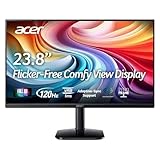
- Vibrant Images: Crisp, true-to-life colors come alive in Full HD 1080p resolution. Movies and games appear more real and dramatic, and small details and text are clear with 1920x1080 resolution in a 16:9 aspect ratio.
- Adaptive-Sync Support: Get fast refresh rates thanks to the Adaptive-Sync Support (FreeSync Compatible) product that matches the refresh rate of your monitor with your graphics card. The result is a smooth, tear-free experience in gaming and video playback applications.
- Up 120Hz Refresh Rate: The 120Hz refresh rate speeds up the frames per second to deliver an ultra-smooth 2D motion scene. With a rapid refresh rate of up to 120Hz, Acer Monitors shorten the time it takes for frame rendering, lower input lag and provide gamers an excellent in-game experience.
- Responsive!!: Fast response time of 1ms enhances the experience. Fast-moving action or any dramatic transitions will be rendered smoothly without the annoying effects of smearing or ghosting.
- ZeroFrame Design: With a KA242Y monitor, you’ll want to see as much of the display as possible. Get more real estate with the near bezel-less design, allowing you to see more and do more. The ZeroFrame design lets you place multiple monitors next to each other for a seamless, almost uninterrupted view.
Which option fits your situation?
| Outlook version | Persistent unified Inbox? | Best available method |
|---|---|---|
| New Outlook for Windows | No documented All Inboxes folder as of August 16, 2026 | Open account Inboxes separately; use Favorites and available searches |
| Classic Outlook for Windows | No standard merged Inbox folder | All Mailboxes search with folder:inbox; optionally create a Search Folder |
| Outlook for Mac, mobile or web | Behavior differs by product | Use that product’s own instructions; do not transfer Windows steps automatically |
Stay with new Outlook if its modern account support and interface matter more than a combined feed. Use classic Outlook when cross-mailbox searching is essential and your installation provides it. If one continuously updated chronological Inbox is non-negotiable, Outlook for Windows does not currently document that capability; evaluate another client separately for security, compatibility and pricing before changing products.
Frequently Asked Questions
Does adding multiple accounts to new Outlook create one Inbox?
No. Accounts can be managed in one application, but each account keeps its own Inbox and Microsoft does not document a persistent combined Inbox for new Outlook for Windows.
Is folder:inbox a permanent unified Inbox?
No. In classic Outlook it is a cross-mailbox search query; the results do not create a normal folder in the navigation pane.
Quick Recap
Product prices and availability are accurate as of the date/time indicated and are subject to change. Any price and availability information displayed on Amazon at the time of purchase will apply.




