Recommended Free Tools
Digital payment solutions can help a business accept more ways to pay, reduce checkout friction, and connect transactions with invoicing or accounting workflows. They can support growth by making it easier to sell across channels and giving operators clearer payment records—but adopting a payment service does not guarantee higher sales. The right setup depends on customers, sales channels, transaction types, fees, payout timing, integrations, and security responsibilities.
How can digital payments help a business grow?
Digital acceptance makes it possible to take payments online, in person, or through supported bank transfers and wallets. A business can serve customers who prefer different methods and sell beyond a single checkout channel. Where a provider integrates with invoicing, inventory, or financial reporting tools, transaction data may also reduce manual work and improve visibility into what has been paid and what remains outstanding. Visa outlines these acceptance and integration possibilities in its online payments guide.
As an Amazon Associate I earn from qualifying purchases.
Those are practical mechanisms, not a promise of growth. Survey results are self-reported and reflect different populations. In a spring 2026 U.S. Bank survey of 1,000 U.S. business owners whose firms had annual revenue of $25 million or less and two to 99 employees, 60% said their businesses used payment-processing solutions, while 53% reported using contactless payments, digital wallets, or peer-to-peer (P2P) solutions. U.S. Bank stated a margin of error of ±3.1%. These figures describe reported adoption, not the effect of adoption on revenue. See the 2026 Small Business Survey.
A Mastercard online survey fielded from March 3 to April 14, 2025, among 2,100 SMEs in 14 Latin American and Caribbean countries found that 85% of surveyed SMEs accepting digital payments said they helped increase sales, scale operations, and enhance security. That is a perceived benefit reported by respondents, not a causal estimate or a guarantee for an individual business. In the same regional survey, 83% said digital payments simplified bookkeeping. The findings are published by Mastercard.
#1 Best Overall

- With Square Terminal, you can ring up sales, accept payments, and print receipts, all with one device. Use it at the counter or ring up customers anywhere in your store.
- Accept all major credit and debit cards and pay one low rate with no hidden fees and no long-term contracts.
- Process chip cards in just two seconds.
- Get your money as soon as the next business day.
- Use it cordlessly with the built-in battery, designed to last all day.
For cash-flow planning, distinguish the payment method from when the merchant receives the money. A faster or instant payment rail may be useful for certain business-to-business transfers, but it does not mean that every card processor pays merchants instantly. In a 2024 Federal Reserve Financial Services survey summary, 92% of surveyed businesses identified B2B payments as a use case that could benefit from instant payments; 71% identified business-to-person and 40% account-to-account use cases. The summary notes that the publisher also markets payment services and that the survey is not independent academic research. It describes potential use cases, not guaranteed merchant settlement times. Read the Federal Reserve Financial Services summary.
Which payment methods should a small business accept?
Start with the ways customers actually want to pay, then match them to the sales channel and transaction. No single method is best for every business, and provider coverage varies. Visa’s guide describes cards, ACH bank transfers, digital wallets, and buy-now-pay-later (BNPL) options for online acceptance.
Rank #2

- Use the, easy-to-use, and customizable POS to get started.
- Accept contactless payments, chip cards, Apple Pay, and Google Pay from anywhere, with improved connectivity, extended battery life, and enhanced security. Pay one low rate for every tap or dip.
- No long-term commitments or contracts, no monthly fees- and with offline payments, keep taking payments for up to 24 hours.
- Safely and securely accepts payments anywhere. Plus, get data security, 24/7 fraud prevention, and payment-dispute management at no extra cost.
- Use the, easy-to-use, and customizable POS to get started.
- Cards: Widely used for online and in-person purchases. Compare acceptance coverage, processing costs, dispute handling, and the customer checkout experience.
- ACH transfers: Bank-to-bank payments that may cost less than card acceptance but can take longer. They may suit B2B or higher-ticket transactions when customers are comfortable with the process.
- Digital wallets: Can make mobile checkout more convenient for customers who use them. Confirm which wallets the provider supports and whether the flow works on the devices and channels your customers use.
- BNPL: Lets customers pay over time. It may broaden checkout options, but can change merchant costs and transaction handling; verify the specific economics and terms before enabling it.
For in-person sales, compare a conventional terminal or card reader with provider-supported Tap to Phone. Visa describes Tap to Phone as using an NFC-enabled smartphone as a contactless point of sale. A phone’s NFC capability alone does not establish that it can accept payments: support depends on the provider, country, operating system, and device model. Verify compatibility before buying hardware or relying on a phone-based setup. Visa reported that Tap to Phone grew 200% year over year worldwide in 2025 and that nearly 30% of Tap sellers were new small businesses; those are category-level figures, not a forecast for an individual merchant. Its SMB overview also reports that 60% of European SMBs accepted cards, including cards through a digital wallet, in 2025, up from 55% in 2020; 25% accepted digital wallets in 2025, up from 17% in 2023. These figures apply to European SMBs, not businesses everywhere.
How do you compare payment processors?
Map the whole payment journey—from customer checkout through payout, refunds, and reconciliation—before comparing providers. Review the following against your actual business model and location:
Rank #3

- 【Universal Compatibility】 - The MDB Payment Device to PC Converter is designed to connect a variety of MDB devices such as acceptors, bill receivers, and card readers effortlessly. It offers seamless integration with any vending equipment compliant with MDB specifications, ensuring versatility in your payment solutions.
- 【User-Friendly Interface】 - This USB adapter features a straightforward setup process. Simply connect it to your computer, and the adapter transforms MDB protocols into RS-232 serial protocols. This allows for easy communication between your vending machine and your PC, simplifying operations while providing reliable performance.
- 【Enhanced Control】 - With capabilities to control up to eight MDB-compatible devices simultaneously, this converter enhances your management efficiency. Whether you’re handling dispensers or bill acceptors, experience effective monitoring and command over your vending machine operations like never before.
- 【Robust Functionality】 - The MDB-PC USB converter supports a variety of interfaces, including cash interfaces (10H and 60H) and USD interfaces (40H). This broad support mechanism ensures compatibility across multiple configurations, making it an ideal solution for complex setups.
- 【Comprehensive Package】 - Each converter comes complete with required cables, a user guide, and a user agreement, providing everything you need for successful installation. Designed for easy implementation, enjoy a plug-and-play experience with reliable support for all essential MDB functions.
- Customer and channel fit: List the methods customers request, where they buy, and the transaction sizes and types you handle. Test the checkout on mobile and desktop. Keep it as short as practical and consider guest checkout where appropriate.
- Total cost: Ask for applicable processing, monthly, hardware, chargeback, cross-border, and other fees. Compare the costs for your typical transactions rather than relying on a headline rate, and confirm current pricing directly with the provider.
- Settlement and cash access: Check the payout schedule, possible holds, refund timing, and any conditions that delay funds. Separate the speed of a payment rail from the provider’s merchant payout schedule.
- Integrations and records: Verify whether invoicing, accounting, inventory, payroll, and reporting tools are included or require separate services. Confirm compatibility with your existing systems and test that transaction records reconcile correctly.
- Security and compliance: Ask how the service handles payment data, authentication, fraud controls, encryption or tokenization, and PCI DSS validation. Establish which tasks belong to the provider, the acquirer, and your business.
- Geography and support: Confirm the provider serves your business location, supports the currencies and sales channels you need, and offers suitable customer support. Check how you can export or retain transaction records if you change services.
Trust and security were prominent selection criteria in Mastercard’s 2025 survey of Latin American and Caribbean SMEs accepting digital payments: 88% ranked trust as a top priority, and 87% prioritized security features and support for multiple payment types. These are the priorities reported by that survey’s respondents, not a universal ranking for every market. A separate Mastercard-commissioned survey of more than 6,000 SMEs in 18 countries, summarized in September 2026, found that 89% wanted to adopt more digital tools and 78% said integrated tools were critical. In that same survey, 71% prioritized protection from cyber threats, while 37% said they used cybersecurity tools. Those figures describe reported priorities and adoption; they do not show that integration or a particular tool ensures security. See Mastercard’s Dreamonomics SME report summary.
Independent reader supportYour contribution helps us test, update, and keep practical guides available for everyone.What security and compliance duties come with accepting payments?
Payment acceptance creates responsibilities even when a provider handles parts of the transaction. Visa’s guide says businesses that accept cards must comply with the Payment Card Industry Data Security Standard (PCI DSS), regardless of size or transaction volume, while noting that the validation process may differ. Because that guide is an explainer rather than the standard itself, confirm your applicable requirements and validation path with your acquirer and the PCI Security Standards Council. Do not assume that using a processor transfers every obligation to it.
Rank #4

- Effortless payments and printing: Accept card payments and print payment receipts on the spot with the built-in 40 mm thermal printer.
- Faster sales processing: Use pre-set menus and catalogs to make transactions faster and smoother for you and your customers.
- Reliable and portable: Featuring a 6.5" HD touchscreen made from Corning Gorilla Glass and a powerful battery that lasts all day.
- Seamless connectivity: Stay connected with free mobile data and WiFi, ensuring uninterrupted transactions.
- Real-time payment tracking: Monitor payments and issue refunds right from your device, so you're always in control.
Ask the provider to explain controls such as address verification, card security-code checks, secure data transmission, and fraud monitoring, and clarify what your staff must do. Visa’s guide discusses address verification, CVV, and TLS, but the appropriate setup depends on the transaction flow and the parties involved. Make responsibilities explicit before launch and review them when your channels or payment methods change.
Do these 3 things before closing this tab:
1Scan for outdated or missing drivers - takes under a minute2Repair Windows errors before they cause bigger problems3Fix the driver behind crashes, sound loss and screen glitchesQuick Recap
Best Value
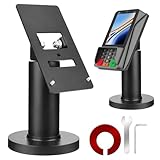
- Compatibility - This POS display stand is compatible for Pax A35, Pax S300. Note: Please carefully confirm the POS machine model before purchasing.
- Easy Installation - Installs quickly using the included type adhesive tape or can be permanently installed to any surface via a drilled hole and bolt mount. And can be removed by heating the area with a hairdryer and using string/thread to detach it if needed.
- Adjustable Card Terminal Mount - The 360-degree swivel allows cashiers to effortlessly turn the device left and right to assist customers without leaving their side, while the 65-degree tilt ensures the terminal is positioned at the optimal angle for various counter heights.
- Commercial Strength - Steel construction gives this universal POS stand durability for use as counter payment terminal in almost any setting.
- Perfect Height - The Pax A35 credit card payment machine stands' ideal height of 4.7" is designed for optimal counter alignment. It provides ample clearance for card insertion and can be adjusted using the tilt feature. Once the perfect tilt angle is set, secure it in place with the included Allen key and wrench to prevent unwanted movement.
How should a business put a new payment setup into practice?
- Document the current journey: Note how customers order, which payment methods they request, when funds arrive, and how staff handle refunds and reconcile transactions.
- Set requirements before choosing a provider: Record needed methods, channels, locations, currencies, typical transaction sizes, integrations, payout needs, and security responsibilities.
- Verify the offer in writing: Confirm fees, settlement schedules, holds, supported devices and methods, integration details, support arrangements, and compliance responsibilities with the provider or acquirer.
- Test the complete flow: Run test transactions on the channels customers use, including mobile and desktop if selling online. Check confirmation messages, refunds, payout records, and reconciliation against the business’s books.
- Review after launch: Monitor whether customers can use their preferred methods, whether checkout causes avoidable friction, and whether payouts and records match expectations. Adjust the configuration when evidence from actual operations calls for it.
Product prices and availability are accurate as of the date/time indicated and are subject to change. Any price and availability information displayed on Amazon at the time of purchase will apply.




