The Tool Desk
Outbyte Driver Updater FREEFix the driver behind crashes, sound loss and screen glitchesFind Drivers →Outbyte PC Repair FREERepair Windows errors before they cause bigger problemsFix Now →Home Assistant can tell whether a phone is at home, at work, or in another configured zone by combining location and network signals. GPS-based tracking can provide coordinates and zone membership; router, ping, and Bluetooth signals generally indicate network connection or proximity, not a location trail. For most arrival and departure automations, assign relevant trackers to a Person and use zone triggers.
What a Home Assistant device tracker does
A device_tracker is an entity provided by an integration, not a standalone tracking service you add by itself. The Companion App can provide a phone’s position, while router integrations can report whether devices are connected to the network. Different integrations therefore produce different kinds of presence information and may update at different times.
As an Amazon Associate I earn from qualifying purchases.
A tracker’s state may be a zone name, home, or not_home; it can also be unknown or unavailable. When position data is shared, coordinates and sometimes gps_accuracy may be available. Current tracker models use tracking_type to distinguish position from connection tracking and in_zones to list zones containing the device. The developer documentation dated June 15, 2026 says legacy trackers without these attributes are scheduled for removal in the first half of 2027; check current migration status before acting on that timeline (Home Assistant Developer Docs).
Free tools Windows power users keep installed
One-click scans. No signup required.
How GPS tracking works with the Companion App
After the Home Assistant Companion App is set up, it can create a device tracker for the phone. Depending on the phone’s operating system, permissions, and app settings, location updates may be triggered by entering or leaving a configured zone, opening or foregrounding the app, background fetch, significant location changes, a manual refresh, or a requested update. There is no single update interval that applies to every phone and configuration.
#1 Best Overall

- Premium GPS Tracker — The LandAirSea 54 GPS tracker provides accurate global location, real-time alerts, and geofencing. Easily attaches to vehicles, ATVs, golf carts, or other critical assets.
- Track Movements in Real-Time — Track and map (with Google Maps) in real-time on web-based software or our SilverCloud App. Location updates as fast as every 3 seconds with historical playback for up to 1 year.
- Powerful & Discreet — The motion-activated GPS tracker will sleep when not in motion for extended periods, preserving the battery life. The ultra-compact design and internal magnet create the ultimate discreet tracker.
- Lifetime Warranty — This GPS tracker is built to last. LandAirSea, a USA-based company and pioneer in GPS tracking offers a unconditional lifetime warranty that covers any manufacturing defects in the device encountered during normal use.
- Subscription Required — Affordable subscription plans are required for each device. Fees start as low as $9.95 a month for annual plans and $19.95 for monthly plans. No contracts, cancel anytime for a hassle-free experience.
Location sharing can be limited to fit your needs:
- Exact: sends GPS coordinates.
- Zone Name Only: sends the relevant zone name or
not_home, rather than exact coordinates. - Never or Disabled: sends neither coordinates nor zone information.
Location permission and the phone’s location settings are prerequisites for location sensors. The Companion App documentation says location data is sent to your Home Assistant instance directly or through Home Assistant Cloud according to the URLs you have configured, not through other servers or organizations. See the Companion App location documentation for the app’s settings and behavior.
How Home Assistant knows when a phone is home over Wi-Fi
A router integration reports the network’s view of a device: whether it is connected to the router or network. That is a connection signal, not geographic positioning. A connected device tracker is treated as being in its associated zone, normally Home unless that association has been changed. Router trackers commonly use home and not_home, although exact state behavior depends on the integration.
Rank #2

- ✅️ REAL-TIME TRACKING & PRECISE VEHICLE LOCATION: Powered by the Find My network, this GPS tracker for vehicles delivers fast, accurate location updates directly in the Find My app. See your vehicle’s precise location whether it is parked nearby, moving across town, or farther away, so you can stay connected wherever the road takes it.
- ✅️ NO SUBSCRIPTION, NO MONTHLY FEE, NO SIM CARD: Track your vehicle without contracts, cellular plans, SIM cards, or hidden fees. Pair the tracker with your iPhone and check location updates directly in Find My. One purchase, zero recurring costs. Works with iOS only and is not compatible with Android.
- ✅️ MINI HIDDEN MAGNETIC DESIGN: Measuring just 1.3 inches, this button-sized car tracker is easy to conceal inside or underneath your vehicle. The protective case features a strong built-in magnet that grips clean, flat metal surfaces securely—no drilling, wiring, tools, or complicated setup. Place it, hide it, and start tracking in seconds.
- ✅️ 365-DAY BATTERY & IP68 WATERPROOF PROTECTION: The replaceable CR2032 battery provides up to one full year of standby power, with no charging required and fewer battery changes. One spare battery is included. The sealed IP68 case helps protect against rain, splashes, dust, mud, and demanding outdoor conditions.
- ✅️ NEARBY SOUND & BUILT FOR VEHICLE OWNERS: When your vehicle is nearby, play a sound in the Find My app to locate it fast. Designed for discreet tracking of cars, motorcycles, bikes, trucks, trailers, and RVs—ideal for driveways, apartment parking lots, workplace parking, road trips, outdoor vehicle storage, and long-term vehicle storage, giving you greater peace of mind wherever your vehicle is parked or stored.
This approach can support straightforward home/away automations without sharing detailed phone location. It cannot tell you where someone is once they are away from the network, or provide a route or coordinates. Home Assistant’s presence detection guide describes router-connected devices as one way to detect who is home.
What’s actually slowing this PC down?
Pick the symptom - the matching free tool is one click away.
Ping is another network signal
The Ping integration sends ICMP echo requests to a configured host or IP address and reports reachability. It does not provide latitude or longitude. A phone may turn off Wi-Fi while idle, so a single ping tracker can miss an otherwise present phone; Ping can be combined with other trackers on a Person. Details are in the Ping (ICMP) integration documentation.
Rank #3

- No Subscription Required & No Monthly Fee & No SIM Card with Android & iPhone-This tracker doesn't need to insert a SIM card and doesn't use a paid APP, so you can get rid of the monthly fee completely. Able to be compatible with IOS and Android systems, you only need to download the matching APP to enjoy real-time positioning and other functions, suitable for most people.
- Easy to carry-Mini GPS tracker for vehicles is 1.3 inches in diameter and weighs only 0.5 ounces. Built-in upgraded powerful magnet, can be strongly adsorbed under the car, gas cap or bumper inside and other hidden locations, anti-vibration and anti-dislodgement. Whether it's for rental vehicle management, fleet tracking, or guarding your car, this tracker will be your first choice.
- No need to download an app-global coverage,and with universal support for iOS and Android, you can use the built-in “Find My” and “Works” features on iOS or Android to pair your device directly. Once pairing is complete, others will not be able to locate the device using their phones.Whether you want to track the vehicle, or want to monitor the family, or want to pay attention to the dog's movements, you can choose this GPS tracker, it will provide you with real-time positioning update location information, so that you are always in control of the location of the GPS tracker.
- Long Battery Life-Unlike other GPS trackers that need to be recharged in a timely manner after a few days or weeks, this tracker has an upgraded lithium battery with a battery life of up to 720day, so you can rest assured of smooth use without worrying about the power level of your GPS tracker. When the battery life runs out, you can always replace it with a new one.
- Finding Reminder-When this car detector is lost with your important items, you can find the location near the detector through APP positioning and turn on the GPS detector's alarm tone nearby, the GPS device will keep a regular ticking sound to help you find your lost items.
Bluetooth and proximity detection
Home Assistant’s Bluetooth integration supports local adapters and remote adapters. One remote option is an ESP32 running ESPHome, placed where additional Bluetooth coverage is needed; it relays nearby Bluetooth signals over Wi-Fi or Ethernet. Bluetooth can add a local proximity or connection signal for compatible devices and setups, but it is not a substitute for phone GPS coordinates. See the Bluetooth integration documentation for supported arrangements.
How GPS, Wi-Fi, ping, and Bluetooth compare
| Method | What it observes | Typical output | Useful for | Main limitation |
|---|---|---|---|---|
| Companion App GPS/position | Phone location | Coordinates, accuracy when supplied, and zone or name state | Zones beyond Home, such as work or school | Needs location permissions and suitable background behavior; update timing varies by operating system and trigger. |
| Router connection | Whether a device is connected to the network or router | Usually home/not_home or an associated zone |
Simple home/away presence | No exact coordinates; results depend on the router integration and device connection reporting. |
| Ping | ICMP reachability at a configured host or IP | Reachability/connection state | A local presence signal when a device answers ping | Phones may turn off Wi-Fi while idle, making a single ping signal unreliable. |
| Bluetooth adapter or proxy | Nearby Bluetooth signals | Proximity or connection data through compatible integrations | Adding local Bluetooth coverage | Requires compatible devices and suitable adapter or proxy placement; it is not GPS. |
Combine trackers with a Person
A Person entity represents an individual and can combine that person’s trackers, such as a phone’s position and a router’s connection state. Home Assistant applies a precedence rule: if any connection trackers are connected, it uses the most recently updated connected tracker. If none are connected but position trackers exist, it uses the most recently updated position tracker. Otherwise, it uses the latest tracker with a not_home state. This explains why a Person may show home even when a phone’s GPS tracker appears away: another assigned connection tracker may currently take precedence.
Rank #4
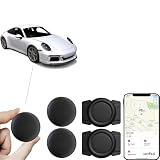
- 【Google Certified Car Tracker】This tracking tag set includes 2 tracking tags, 2 magnetic protective cases, and a user manual, with a standby time of up to 1 year. It syncs seamlessly with Google’s “Find My Device,” making it easy to track your car, keys, wallet, luggage, pets, or other items (compatible with Android 9 and later; not supported on iOS).
- 【Easy setup and privacy】The setup process is quick, taking only about 30 seconds. Turn on the location tag and Bluetooth, place it near your Android phone and the pairing window will automatically pop up. When using Google Find tracker, only you know where the item is located.
- 【Privacy & Security】Based on Google's encrypted search of my device network for Android smart tags, all over-the-air tag tracker data is encrypted end-to-end with no storage history, and double anonymization (device + cloud) prevents third-party access and ensures that only you control the location visibility, and that Google's systems can't access your data, so these Android tracker tags are a privacy-first solution.
- 【Wide Application】 Tracker can be used for cars, cats, wallets, backpacks, keys, suitcases. Bring convenience and peace of mind to your life and stop worrying about loss.
- 【After-Sales Service】For quality-related issues, we offer a 365-day direct replacement service. If you have any questions, please feel free to contact us—we’ll resolve your issue immediately!
If the Person state seems wrong, inspect which devices are assigned to that Person and compare their tracker states and update times. The Person integration documentation explains tracker assignment and state selection.
Choose the right trigger for an automation
Home Assistant recommends connecting tracked devices to Person entities and using zone triggers for presence automations. A zone trigger is appropriate when the event you care about is a person entering or leaving Home, work, school, or another configured zone. Use a state trigger on an individual tracker when the automation specifically depends on that tracker’s raw state.
Best Value

- 【6-in-1 AI Smart Protection with Triple-Alert System】 Go beyond basic hidden camera and bug detectors. This smart RF signal detector scans six threats: hidden cameras, WiFi bugs, GPS trackers, WiFi signals, magnetic fields, and Bluetooth spy devices. Ideal as a camera finder for travel and a privacy scanner for home.Its triple-alert system — flashing LEDs, strong vibration, and adjustable audio — ensures no threat goes unnoticed, even in noisy environments. Includes a flexible probe for tight spots and a gain antenna for stable signals.The privacy scanner for peace of mind.
- 【Specialized for Vehicle Security: flexible probe Magnetic GPS Tracker Detector】 Built with a high-precision magnetic sensor, this GPS tracker finder and bug detector quickly locates magnetic GPS trackers, GPS locators, and spy tracking devices hidden under vehicles, behind bumpers, or in personal items. Its flexible probe reaches tight spots like wheel wells and undercarriage gaps, so no hidden tracker goes undetected. Ideal for vehicle anti-spy sweeps, car bug sweeps. An essential car tracker finder for privacy protection.
- 【Lab-Certified Accuracy, Ultra-Wide Band & Lightning-Fast Scanning】 Co-developed with security experts and rigorously tested in FCC-certified laboratories. This RF detector and signal detector covers an ultra-wide frequency range from 1MHz to 10GHz, scans up to 2,000 times per second, and detects hidden camera, GPS tracker, wireless bug, and other spy threats from as close as 2 inches to as far as 50 feet. A professional bug sweeper and anti-spy device for thorough hidden device detection.
- 【Trusted by 500K+ Users Worldwide, The Choice of Professionals】 Join a global community of over 500,000 security-conscious individuals — including security experts, frequent business travelers, and government personnel. More than just a GPS tracker detector, bug detector, or RF signal detector, it’s an industry-recognized privacy shield and anti-spy sweeper designed to keep pace with evolving surveillance tactics. Your trusted partner for bug sweeps, hidden camera detection, and GPS locator finder needs.
- 【2-Year Warranty & Dedicated Support, A Confident Investment】 Backed by a full 2-year warranty on this professional-grade device. Receive prompt assistance from our dedicated support team, with responses guaranteed within 24 hours. We are committed to delivering long-term privacy security and ensuring your complete confidence with every purchase.
For example, a school-arrival notification should respond to the relevant Person entering the school zone. An automation that reacts to a particular router’s connection can instead watch that router tracker’s state. Avoid assuming GPS, router, ping, and Bluetooth trackers update on the same schedule: each integration and device can report differently. The official Device tracker documentation covers tracker behavior and the recommended Person-and-zone approach.
Choose a Home Assistant host separately
Presence tracking is provided by integrations and sensors, not by the computer that hosts Home Assistant. Home Assistant Green is one dedicated hardware option, but it is not a GPS tracker or presence sensor. The official hardware page also lists Raspberry Pi, Odroid, x86-64 computers, containers, and virtual machines as host options (Home Assistant Green; Home Assistant hardware).
Quick Recap
Product prices and availability are accurate as of the date/time indicated and are subject to change. Any price and availability information displayed on Amazon at the time of purchase will apply.
Recommended Free Tools




