The right health app depends on what your loved one wants help with: managing care through a provider, keeping track of medicines and health information, or sharing selected updates with you. If they agree to share access, use a setup with clear permissions rather than asking for their password. In England, that may mean asking their GP surgery about NHS App family and carer access; for Apple users, it may mean setting up Health sharing together.
Start with the task—and your loved one’s consent
Before choosing an app, agree on what would actually make day-to-day care easier. Is the goal to book appointments and request repeat prescriptions, remember medication times, keep a log of home measurements, or let you see selected health updates? These are different jobs, and one app may not cover all of them.
As an Amazon Associate I earn from qualifying purchases.
Your loved one should understand what information would be visible and be willing to set up sharing. If they feel pressured to share a health record, pause and help them contact their care provider for advice. The NHS warns that records can contain sensitive information and advises contacting the GP surgery if someone is pressuring the patient to share it.
For managing NHS care in England: ask about family and carer access
In England, a GP surgery can set up NHS App family and carer access for a trusted person. The surgery determines which features and information are available. Depending on the access granted, this may include appointments, repeat prescriptions, test results, and some or all of the person’s GP record. The NHS describes this as a way to help manage services when someone cannot use them themselves or is too unwell to manage their care. NHS guidance on using the NHS App for someone else
#1 Best Overall
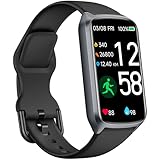
- 【24H Accurate Health Monitoring】Measure your Heart Rate, Blood Oxygen, Blood Pressure and Stress with this Fitness Tracker. Understand your physical state, especially for high-intensity or outdoor work such as high temperature, brainstorming, stay-up and get professional analysis on how to relax in a healthier and better way. Amzhero Fitness Tracker also analyzes sleep quality and score your sleep quality to help you adjust your sleep habits more tools
- 【25 Sports Modes & Fitness Tracker】Amzhero Fitness Tracker supports 14 sports such as walking, running, mountaineering, swimming, yoga, hiking, cycling, treadmill, etc . Accurately record all-day activities like steps, distance, calories burned, miles walked, active minutes and give professional analysis on improving your sports and daily habit
- 【Smart Life Partner with You】Check daily workout clearly on a 1.47'' HD bright color display. Create customized fitness schedules and goals, Get vibration alerts for all notifications, including phone calls, texts, and social media app alerts. Never miss a message with smart notifications delivered right to your wrist. You also can check real-time weather and change your music on the smartwatch
- 【15 Day Battery Life& 5ATM Waterproof】Fully charge for 2 hours, support 15 days standby time. Large capacity and low power consumption design offers longer endurance. Amzhero fitness watch is designed with 5ATM waterproof, you can wear it when washing hands, in the rain and swimming
- 【1-Year Warranty Promised & Wide Compatibility】Compatible with iPhone, Samsung etc., built-in BLE5.0 and 300mAh lithium-ion battery. Our free APP "Gloryfit" supports iOS 9.0 / Android 6.0 or above smartphones. If you have any questions, please don’t hesitate to contact us with any problem
This is authorized access arranged through the GP surgery—not a reason to sign in using the patient’s credentials. The NHS says: “Setting up family and carer access with your GP surgery is more secure than sharing your own NHS login or GP app or website accounts, because:” NHS guidance, reviewed 2 July 2026. The guidance says proxy access gives the patient more choice over what is shared, records the trusted person’s actions, and can be removed by contacting the surgery. Ask the surgery what access it can offer and how to change or withdraw it. NHS guidance on family and carer access
For medication reminders and selected updates: consider Apple Health
For someone using an Apple device, Health can organize health information and medication details, including a medication list, schedules, and reminders. Its health-sharing feature lets the user choose which categories to share with another person. After the recipient accepts, they can see the selected summary and future updates; the user can add or remove categories or stop sharing. Apple says medication-feature processing happens on device, and medication information can be shared with family, friends, and healthcare providers. Features may differ by jurisdiction and software version. Apple: Share your health data in Health Apple: Track your medications in Health
Set this up with the person being tracked so they can choose the categories and remain in control. Health sharing is for selected information; it is not the same as proxy access to a GP’s online services or medical record.
Quick wins for a faster PC:
Fix the driver behind crashes, sound loss and screen glitchesFind Drivers →Repair Windows errors before they cause bigger problemsFix Now →For provider-linked records: check what the local service supports
Some personal health record services connect to GP or hospital care. Depending on the local service, they may let a user view parts of a record, message professionals, or record information to share with a provider. In England, the GP surgery, integrated care board, or hospital chooses the supplier, so the available service and functions vary by location. NHS: Personal health records
Rank #2
![SAMSUNG Galaxy FIT 3 [2025, 40MM] 1.6' AMOLED Display | IP68 Water Resistant | 14 Days Battery Life | 100+ Watchfaces | 100+ Exercise Modes | International Model (Fast Charger Bundle, Black)](https://m.media-amazon.com/images/I/418RlYE+wfL._SL160_.jpg)
- Vibrant 1.6” AMOLED Display – Large, high-res screen with smooth touch for easy navigation
- 5ATM & IP68 Water Resistance – Swim-ready and dust-resistant for active lifestyles
- Up to 14 Days Battery Life – Powerful 208mAh battery for long-lasting performance
- 101+ Workout Modes with Auto Detection – Automatically tracks common workouts for seamless fitness tracking. Advanced Health Tracking – Includes sleep coaching, SpO2, heart rate, and snore detection
- International Model No Warranty in the US. ONLY compatible with Android devices. Samsung Pay - Not Supported. NOT compatible with iPhone or iOS devices.
Some services may accept manually entered home measurements, such as blood pressure or weight. That can help keep information together, but the NHS examples do not establish that a particular monitor automatically connects to a particular app. Check the provider’s instructions before buying equipment for app compatibility. NHS information about personal health records
Independent reader supportYour contribution helps us test, update, and keep practical guides available for everyone.Compare options by access, effort, and control
| Option | Useful for | Who controls access | Availability and limits |
|---|---|---|---|
| NHS App family and carer access | Helping manage appointments, prescriptions, test results, or GP record access | The GP surgery sets it up and determines the access level; access can be removed by contacting the surgery | England; access and features depend on the GP surgery |
| Apple Health | Medication lists, schedules and reminders, and sharing chosen health categories | The person sharing selects categories and can change them or stop sharing | Apple devices; features may vary by jurisdiction and software version |
| Provider-linked personal health record | Viewing available records, messaging professionals, or recording information for a provider | The service and available functions are determined by the local provider’s chosen supplier | England examples; availability and functions vary locally. Some entries may need to be entered manually |
Check privacy and usability before relying on an app
For any app, make sure the person understands what they are sharing and who can see or retain it. UK government health app assessment criteria include informed consent, clear explanations of data use and sharing, security, accessibility, and ease of use. These are UK assessment criteria, not a statement of law everywhere. UK government health app assessment criteria
- Permissions: Can the user choose what is shared, review it later, and withdraw access?
- Data handling: Who receives the information, how is it protected, and how long is it retained?
- Practical effort: Does the app connect to the relevant provider, or will someone need to enter readings and updates by hand?
- Accessibility: Can your loved one comfortably use the screens, reminders, and sharing controls?
- Fit for purpose: Does it solve the agreed task, rather than simply collecting more health information?
Do not use shared passwords as a shortcut. Choose access the patient has agreed to and can understand and control.
The Tool Desk
Outbyte PC Repair FREERepair Windows errors before they cause bigger problemsFix Now →Outbyte Driver Updater FREEScan for outdated or missing drivers - takes under a minuteDriver Scan →Quick Recap
Product prices and availability are accurate as of the date/time indicated and are subject to change. Any price and availability information displayed on Amazon at the time of purchase will apply.




