What’s actually slowing this PC down?
Pick the symptom - the matching free tool is one click away.
A head disk assembly (HDA) is the sealed mechanical core of a hard disk drive. It holds the spinning disk stack and the mechanisms that move the read/write heads across the disks. It is one part of the drive, not the whole drive: the electronics that control it sit on a separate circuit board.
What the term means
HDA stands for head disk assembly. You will also see it written as “head/disk assembly” or “head-disk assembly,” and all three refer to the same subsystem. Seagate’s M9TU product manual describes a hard drive as two main pieces: a mechanical HDA and a separate printed circuit board assembly (PCBA). The HDA handles the physical storage and movement; the PCBA handles control and signal electronics.
As an Amazon Associate I earn from qualifying purchases.
What an HDA contains
The exact layout varies by drive model. The Seagate M9TU manual, which covers a USB 3.0 drive family, lists these main parts of its HDA:
- Base casting and DC spindle motor assembly, which spins the disk stack.
- Disk-stack assembly, with the disks mounted on the spindle hub and held in place by a clamp.
- Head-stack assembly, which carries the heads and moves them.
- Rotary voice-coil motor assembly with actuator latch, which positions the head stack and holds it when the drive is idle.
A separate Seagate technical reference manual also labels a base, cover, gasket, filter, disk clamp and spacers, actuator magnet, and a preamplifier/flex-circuit assembly as HDA components. Those labels are useful for recognizing parts on a diagram, but the names and groupings differ between manuals and product generations.
#1 Best Overall

- [DRIVE COMPATIBILITY] Specifically designed for 7200.11 ST31000340AS 1TB and ST31500341AS 1.5TB HDDs with 4 platters and 8 heads. Ensures perfect fit and safe head replacement without damage to delicate components.
- [ENGINEERING] Features unique fixed holes, pins, and sockets that securely hold the head assembly during replacement. Allows safe access to disk areas and parking frames for professional-grade repairs.
- [MATERIAL QUALITY] Made from durable ABS plastic measuring 3.9x2x1.6cm (1.54x0.79x0.63 inches) that provides the perfect balance of strength and flexibility needed for delicate hard drive head replacements.
- [INCLUDED ACCESSORIES] Comes with 1 head comb tool, 2 pins, and 10 finger sleeves - everything needed for a complete head replacement procedure on compatible 3.5-inch hard drives.
- [PROFESSIONAL USE] Essential tool for data recovery specialists and HDD repair technicians working with 7200.11 series drives. Not suitable for other HDD models or brands.
Disk stack
The disk stack is the set of magnetic platters that store data. It is mounted on the spindle hub and rotates at a constant speed while the drive runs.
Head-stack assembly
The head-stack assembly includes an E-block with its coil, the read/write heads mounted on flexures, bearings, and a flexible circuit. The flexible circuit connects the heads to the PCBA and includes a preamplifier IC, which amplifies the very small signals the heads pick up.
Actuator
In the M9TU design, the actuator is a rotary voice-coil motor. Current in the coil pushes the head stack across the disk surface, so the heads can reach any track. The latch holds the actuator in a safe position when power is off.
Recommended Free Tools
Rank #2
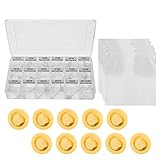
- [Widely Compatible Hard Disk Head Comb]: The magnetic head replacement tool suitable for SAS and SCSI of 2.5 in and 3.5 in. Full support of for thin plate thick plate series and for Corporation/for Corporation/for and other magnetic head inside the hard disk docking.
- HDD Head Comb Tool]: Factors such as computer type, hard disk type, number of disks, number of magnetic heads and magnetic head parking area(outer landing and inner landing) are fully considered. AND The unique fixed hole, pin, socket and other personalized design can not only completely fix the head, but also help the head safely and easily. Access to the disk area or parking frame to maximize the "head" for safe and shock is also enhanced.
- [Practical]: It can effectively ensure the absolute safety of the magnetic head assembly in the process of moving when the magnetic head of the hard disk is diagnosed to be out of order or the magnetic head assembly needs to be disassembled for other reason.
- [Good Performance Replacement Hard Disk Head Tool]: It has a well operated synchronization and consistency of physical head separation.
- [Quality Service]: This product has been professionally and strictly inspected and tested. We have a 24 hour online professional customer service team. If the product has any quality problems or you have any questions about this product, you can us at any time,we will try our best to solve your problem in time,please rest assured to buy.
How the parts work together
The disks rotate continuously, and the heads move to the right track on the surface that holds the data being read or written. Western Digital describes the heads as hovering just above the spinning platters, and adjusting position to read or alter the magnetic patterns on the disk. Because the heads never touch the surface during normal operation, a clean sealed environment matters: even small particles can interfere with that gap.
HDA versus the complete drive
People often use “hard drive” and “HDA” interchangeably, but they describe different levels of the product. The table below separates them.
| Item | Inside the HDA | Outside the HDA (on the PCBA or drive housing) |
|---|---|---|
| Storage media | Disk stack | Not applicable |
| Motion and positioning | Spindle motor, head stack, voice-coil actuator, latch | Control electronics that drive the motors |
| Read/write path | Heads, flexures, flexible circuit, preamplifier IC | Signal processing and interface electronics |
| Enclosure | Base and cover with gasket and seal | Circuit board and external housing parts |
When someone says a drive has failed “in the head,” they usually mean something inside the HDA. A failure of the circuit board is a different problem, and the two can have different symptoms and different repair options.
Rank #3

- [PRECISE HEAD CONTROL] Designed to help move and dismount the head assembly during HDD diagnostics and repair while maintaining alignment and improving handling safety for data recovery work.
- [PRACTICAL TOOL DESIGN] Built with fixing holes pins and sockets plus a wider support range to give technicians steadier control when working with delicate hard drive internal components.
- [CONFIGURATION AWARE FIT] Designed with consideration for hard disk type platter count head quantity and inner or outer parking area to better suit varied HDD repair and recovery tasks.
- [STABLE AND PROTECTIVE] Helps hold read write heads securely and guide them in and out of the platter area or mooring rack to reduce shock and support safer transfer operations.
- [8 PIECE RECOVERY KIT] Includes 8 hard drive head replacement tools and a storage box. ABS construction supports organized professional use during synchronized head segregation and recovery work.
Model examples: head and disk counts
The number of disks and heads is set by the drive design. The Seagate M9TU manual gives two examples from its own product family. These are model-specific figures, not standards for all hard drives.
The Tool Desk
Outbyte Driver Updater FREEScan for outdated or missing drivers - takes under a minuteDriver Scan →Outbyte PC Repair FREERepair Windows errors before they cause bigger problemsFix Now →| Drive model (from the M9TU manual) | Disks | Read/write heads |
|---|---|---|
| ST750LM023 | 3 | 6 |
| ST1000LM025 | 2 | 4 |
Each disk has two surfaces, and each surface needs its own head. That is why the head count is twice the disk count in both examples. Current drives from other product lines may use different counts, and the manual’s publication date was not established from the source pages, so check the manual for your exact model before relying on these numbers.
Why the HDA is sealed
The HDA is enclosed by a base and cover with a seal. The M9TU manual states that the assembly is built in a clean room, that its subassemblies “cannot be adjusted or field repaired,” and that opening or adjusting the cover and seals risks contamination. This warning comes from that manual and model family. It is not a universal statement about every manufacturer’s drives, but the general reasoning applies widely: dust inside the sealed space can damage the disk surfaces and the heads.
Rank #4

- Safe Operation ------ This Hard Drive Head Replacement Tool Set ensures optimal during head assembly removal and replacement, accidents.
- Secure Assembly ------ The unique design of the Hard Drive Head Comb features fixed holes and connectors to securely hold the head, eliminating dislodgement risks.
- Enhanced Stability ------ This Hard Disk Repair Tool facilitates and stable movement of the head, improving shock resistance and maximizing during operations.
- High Efficiency ------ This HDD Data Recovery Tool offers excellent synchronization for data retrieval and maintains consistent separation of magnetic heads for optimal performance.
- Versatile Compatibility ------ This set caters to a wide range of applications and , making it a user-friendly and practical choice for diverse hard drive repairs.
For practical purposes, this means an HDA is not a part a user can open, clean, or swap in the field without specialized equipment. If a drive is failing and the data matters, the safe route is to stop using the drive and consult a professional data recovery service rather than opening it.
Independent reader supportYour contribution helps us test, update, and keep practical guides available for everyone.Clicking, grinding, and what sound can tell you
Drive noise is a common way people first suspect HDA trouble. Seagate’s support guidance says a single hard click can occur as the heads park, which can be normal behavior. Persistent hard clicking, clunking, grinding, or scratching may point to physical damage. Grinding or scratching can put data at risk, and Seagate suggests considering data recovery services in that case.
Outdated Drivers Are Slowing You Down
One free scan finds every outdated or missing driver and matches the right update for your exact hardware.Free scan · exact hardware matchWindows Errors? Fix Them Before They Spread
Repair common Windows errors and clear accumulated junk for a smoother, more stable PC - no reinstall needed.Free scan · no reinstallSound alone cannot confirm that the HDA has failed. A click can come from several causes, and the same sound can mean different things depending on the drive. Seagate’s support page on this topic was reviewed through a search result rather than read in full because the page redirected during review, so check its current wording before quoting it in a repair or troubleshooting context.
Best Value
- Ensure Safety: This hard drive head replacement comb set guarantees maximum safety during the delicate process of removing and replacing head assemblies, reducing the risk of damage.
- Secure Fixation: Featuring a unique design with fixed holes, pins, and connectors, this tool ensures the head remains securely in place, preventing accidental dislodgement during operation.
- Enhanced Stability: The comb provides safe and convenient movement of the head in and out of the disk area or docking bay, improving shock resistance and maximizing operational safety for data recovery tasks.
- High Performance: The head repair tool ensures excellent synchronization for data recovery operations and promotes consistent physical separation of magnetic heads for optimal performance.
- Wide Compatibility: With its practical and versatile design, this replacement comb set is user-friendly and suitable for a wide range of applications, making it an essential tool for data recovery professionals.
Scope of the information here
The definition and the component descriptions above rest on manufacturer manuals, including Seagate’s M9TU product manual and a Seagate technical reference manual. Those documents describe specific drive models, and one is an older USB 3.0 product. Their part counts, interfaces, and specifications should not be treated as representative of today’s hard drives. No current teardown or current service manual for a newer model was used, so readers researching a particular drive should consult the manual for that exact model.
Use this article to understand what the term means and how an HDA is organized. For a specific drive, the model’s own documentation is the authority on its internal design and service options.
Quick Recap
Product prices and availability are accurate as of the date/time indicated and are subject to change. Any price and availability information displayed on Amazon at the time of purchase will apply.
Quick wins for a faster PC:
Scan for outdated or missing drivers - takes under a minuteDriver Scan →Repair Windows errors before they cause bigger problemsFix Now →Fix the driver behind crashes, sound loss and screen glitchesFind Drivers →



