Recommended Free Tools
A habit tracker app lets you define the repeated actions you want to keep, check them off as you complete them, and review whether you have been following through. The right app depends less on the length of its feature list than on four practical questions: which devices you use, whether you log by hand or automatically, whether you need offline use or sync between devices, and how comfortable you are storing routine data in an account.
Three apps show the main differences. OfflineHabit emphasizes simple checkbox logging that works offline, with optional sync after you sign in. Habitry stores data only on the device, with no account and no cloud sync. Habitify offers reminders, charts and streaks, plus optional connections to health, activity and focus services. The descriptions below come from the apps’ store listings as checked on 7 October 2026. They are not independent tests, and store pages change.

As an Amazon Associate I earn from qualifying purchases.
What a habit tracker app does
Most habit trackers follow the same loop: you create a habit, log it when it is done, and then look at streaks, progress views or charts to see your pattern. Some add reminders at set times. The store listings for the three apps described here all advertise some version of that loop. Listings describe what developers say their apps do; they do not show whether any app changes behavior over time.
PC Slower Than It Used to Be?
A free scan shows the junk files, broken settings and background clutter dragging Windows down - then fixes them in one click.Free scan · Windows 10 & 11Outdated Drivers Are Slowing You Down
One free scan finds every outdated or missing driver and matches the right update for your exact hardware.Free scan · exact hardware matchThree current examples at a glance
| App | Logging style | Storage and sync | Reminders and review tools | Integrations | Free tier |
|---|---|---|---|---|---|
| OfflineHabit | Manual checkbox logging | Works offline and stores data locally; optional sync after signing in | Reminders, streaks and progress | Not stated in the listing reviewed | Up to five habits |
| Habitry | Manual check-ins | Local storage only; no account and no cloud sync | Simple habit tracking; no further review tools stated | Not stated in the listing reviewed | First habit free |
| Habitify | Manual check-ins, with optional automatic logging through connected apps | Not stated in the listing reviewed | Reminders, charts, streaks and milestones | Optional health, activity and focus services | Not stated; the listing shows paid tiers only |
“Not stated” means the store listing reviewed did not describe that feature. It does not mean the app lacks it; check the current page before deciding.
#1 Best Overall

- Efficient Weekly Planning - Utilize the 52 Weeks Undated Planner to articulate and prioritize weekly goals and to-do lists. Assign specific tasks to each week for optimal efficiency while allowing flexibility without guilt if a week is missed.
- Elegant and Compact Design - Enjoy a thick cover with gold coil, offering a romantic and gentle aesthetic. The weekly planner notebook's perfect size at 6.1'' x 8.2'' ensures easy portability, making it convenient for daily use.
- Cultivate Healthy Life Habits - Undated weekly planners, weekly goals, To Do list, and habit tracker together for daily affairs. Track healthy habits for each week and use the checkbox as a visual reminder.
- Premium Paper Quality - Experience a smooth writing surface on thick, 100gsm paper that prevents bleed-through. The planner ensures a high-quality feel and enhances the overall writing experience.
- Versatile Usage - Ideal for managing daily affairs, cultivating healthy life habits, and maintaining overall progress. A quick glance provides a comprehensive overview of chores, making it the perfect companion for effective time planning.
Manual logging versus automatic logging
Manual logging is the default in all three apps. You tap a habit when you finish it. This is quick and keeps the record under your control, but it depends on remembering to log. Automatic logging through a connected service can reduce that work for activities a phone or wearable already tracks, such as walking or focus sessions. Habitify’s listings describe these optional connections. The trade-off is that each connection sends routine data to another service, so only enable the ones you will actually use.
Offline use, storage and sync
These three apps handle data in noticeably different ways, and this is the most important difference to check if you switch between devices or sometimes have no connection.
Rank #2
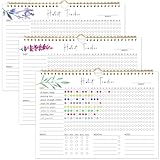
- 【Original Design】Our habit tracker is designed to help you build and maintain healthy habits. Whether you want to start new routines or break old ones, this tool keeps you on track. Use the undated calendar to tracker your exercise, diet, study habits, workout, and more
- 【Undated Monthly Journal】Begin using habit tracker calendar at any time of the year. Its undated layout allows you to start tracking your habits whenever you're ready, without wasting any pages. Our habit tracker journal is a simple tool that helps you to tracker your progress towards forming new habits over time
- 【Excellent layout】 This journal includes 12 pages, allowing you to track up to 11 daily, 5 weekly, and 5 monthly habits. By focusing on various aspects of your life, you can enhance your physical and mental well-being, improve relationships, and find better work-life balance
- 【Premium Material】Measuring 11.7 x 8.5 inches, the journal is made from premium paper, suitable for a variety of pens and markers without any ink bleed. It has sturdy twin-wire binding and includes hanging holes, so you can easily display it on your wall
- 【Perfect Gift】This habit tracker is an ideal gift for anyone looking to enhance their daily routine, boost productivity, and develop healthy habits—perfect for students, professionals, and anyone seeking self-improvement
Local-only storage (Habitry)
Habitry’s listing says it stores data locally, requires no account and has no cloud sync. That suits people who do not want an account, but it also means your habit history stays on one device. If you change phones, the listing does not describe a way to move your data within the app, so confirm any export or transfer option before you rely on it.
Do these 3 things before closing this tab:
1Scan for outdated or missing drivers - takes under a minute2Clear out junk files and repair common Windows errors3Fix the driver behind crashes, sound loss and screen glitchesOffline use with optional sync (OfflineHabit)
OfflineHabit’s listing says it works without a connection and keeps data on the device. Sync is optional and requires signing in. This combination works well if you want to log while offline but also keep history across devices. You will need to decide whether creating an account and syncing is acceptable for your routines.
Rank #3

- BUILD THE LIFE YOU’VE ALWAYS WANTED – Never underestimate the power of habits. They are the building blocks of our lives. Adopting new habits, and breaking old ones, is a challenging process. habit tracker journal helps you stay motivated and disciplined by forming habits that will last a lifetime. Get inspired by your daily progress and become your best self!
- PREMIUM PAPER & EASY TO USE - This habit planner measures 10 inches wide by 8 inches long and is made of thick 120gsm premium paper that will neither bleed through nor deteriorate with everyday use. The monthly habit tracker has a sturdy hanging hole so that you can hang it anywhere and easily see it every day.
- BECOME HEALTHIER, HAPPIER & MORE PRODUCTIVE – With this habit tracker planner, you will be able to focus on adopting new habits in all vital areas of your life, improve your mental and physical wellbeing, relationships, and work-life balance. The weekly habit tracker will also be an immense help if you want to take up new hobbies or learn new skills but can never find the time.
- WIDE APPLICATIONS FOR VARIOUS PLACES - Giving you goals that you can visually see and fill out the habit tracker calendar. You can draw, paint, or even use habit tracker stickers on it and make it your very own and unique piece of art on your wall or desk. For this habit tracker, you can hang it completely flat on the wall or desk, or else show one side.
- PERFECT GIFTS FOR VARIOUS PEOPLE: Whether for a busy professional, a student, or a fitness enthusiast, a habit tracking calendar can meet the needs of different individuals. It helps manage time, improve efficiency, and maintain health, making it a versatile gift for anyone with different interests.it helps them better organize their life, stay motivated, and make progress.
Pricing and what you pay for
Pricing models differ more than headline features. The figures below come from the US store listings checked on 7 October 2026. Google Play and the Apple App Store can show different prices in other countries, and prices can change.
- OfflineHabit (US Google Play listing): the free version covers up to five habits. Premium is listed at $2.99 per month or $19.99 per year.
- Habitry (listing; region not stated): the first habit is free. A one-time purchase of $3.99 unlocks unlimited tracking.
- Habitify (US Apple App Store listing): Plus is listed at $29.99 per year. Pro is listed at $8.99 per month, $49.99 per year, or $119.99 as a lifetime purchase.
A one-time payment, such as Habitry’s unlock or Habitify’s lifetime option, costs more up front but avoids a recurring charge. A subscription is cheaper to start but adds up over several years. Before subscribing, check on the store page which features each tier includes, because the listing reviewed does not spell out the difference between Plus and Pro.
Rank #4

- 52 Weeks Undated Planner : No preprinted fixed dates allow you to start planning at any week without wasting blank pages. You can pause recording and resume later freely, avoiding unnecessary page waste caused by interrupted use of dated planners.
- WEEKLY GOALS & FOCUS SETTING: Prioritize your core weekly objectives at the top of each page to clarify main tasks ahead of trivial affairs. This structure helps you cut down aimless busyness and keep your whole week’s work and life on track.
- DETAILED DAILY TO DO LIST: The page is divided into independent writing areas for Monday through Weekend. You can sort and record work assignments, study tasks and personal errands separately, so important schedules will not be forgotten or omitted.
- BUILT-IN HABIT TRACKER TABLE: Special grid area supports marking daily habit completion status, with columns for goal setting and weekly achievement statistics. It helps you intuitively track persistence progress without purchasing an extra separate habit journal.
- FLAT LAY SPIRAL BINDING: Double wire coil binding enables the planner to lie fully flat for smooth writing without flipping back. Compact lightweight body is easy to slip into backpacks and tote bags, suitable for office work, school study and travel arrangement.
Privacy and integrations
Store listings include developer-provided privacy disclosures. They describe what the developer says it collects; they are not independent audits of how the app behaves. Health and activity integrations are the main reason routine data may leave your device, so treat them as a separate decision.
- Read the app’s current privacy policy, not only the summary on the store page.
- Check whether the app needs an account, and whether syncing is optional or required.
- Enable health, activity or focus integrations only if you need them, and review their permissions in your device settings.
- Avoid storing sensitive routines, such as medical or mental-health habits, in any app until you have read its policy.
Reading a vendor’s usage claim
Habitify’s Apple App Store listing states that it has served more than 3 million people and recorded more than 20 million habits since 2016. This is the developer’s own figure, shown on its listing as of October 2026. It measures how many people have used the app, not whether those people kept their habits. It is not an independent effectiveness study, and it should not be read as evidence that the app builds lasting habits.
Platform support
Platform support is the first filter. Habitify’s US Apple listing requires iOS 16.2 or later for iPhone and lists support for additional Apple devices. Check the requirement on the store page for your exact device and operating system, because minimum versions change as apps are updated.
A paper alternative
If you prefer writing check-ins by hand, a paper habit tracker journal avoids accounts, subscriptions and permissions entirely. It has no reminders or automatic charts, so you review progress by reading the pages yourself. Paper works best for a small number of habits.
Quick Recap
How to choose
- Confirm that the app runs on the phone, tablet, watch or computer you actually use, and that your operating system version meets its requirement.
- Decide whether you want to tap habits off manually or connect a health, activity or focus service for automatic logging.
- Decide whether you need data on more than one device. If you do, look for optional sync with an account. If you do not, a local-only app may be enough.
- Count how many habits you want to track, then compare the free limit with the price of unlimited use. A one-time purchase and a subscription can cost very different amounts over a year.
- Read the privacy policy and only enable integrations you need.
- Use the free version for a few weeks with your real routines before you pay for anything.
p>
Product prices and availability are accurate as of the date/time indicated and are subject to change. Any price and availability information displayed on Amazon at the time of purchase will apply.
What’s actually slowing this PC down?
Pick the symptom - the matching free tool is one click away.




