If a GoPro is not showing up on a computer, start by turning the camera on, reconnecting the cable, and trying another cable and USB port. The detailed GoPro detection checklist available here is for MAX2 specifically, so menu steps and connection indicators can differ by model. If your goal is to retrieve footage, a compatible microSD card reader is a practical alternative that does not depend on the camera’s USB connection.
First, identify what is not working
Confirm the GoPro model, your computer’s operating system, and what you expect the USB connection to do: transfer files, charge the camera, or support another function. A camera that charges but does not appear as a file source has not necessarily established a usable file-transfer connection. GoPro’s published recognition sequence cited below is for MAX2; older model manuals describe different transfer workflows.
As an Amazon Associate I earn from qualifying purchases.
For MAX2, GoPro says to turn the camera on before connecting it and check for the USB symbol on the rear LCD. Treat that symbol as a model-specific confirmation, not a universal indicator for every GoPro.
Recommended Free Tools
Try these USB detection checks in order
- Power on before connecting. Turn on the camera, then connect it to the computer. On MAX2, look for the USB symbol on the rear LCD.
- Reseat the connection. Unplug the cable from both the camera and computer, then reconnect both ends firmly.
- Change the cable and port. Try another compatible cable and a different USB port on the computer. A cable that fits may not support data transfer; use one appropriate for your GoPro model.
- Restart and isolate the computer connection. Restart the computer and reconnect the camera. Test another device with the same cable and ports to help determine whether the cable or computer port is involved.
- Test another computer. If available, connect the GoPro to a different computer. If it works there, focus troubleshooting on the original computer’s USB connection or drivers.
- Check USB drivers. GoPro includes checking that USB port drivers are current among its MAX2 troubleshooting steps.
- Use model-specific advanced steps only afterward. GoPro’s MAX2 sequence lists a manual update and factory reset after the connection checks. Before either, find the instructions for your exact model; do not assume MAX2 menus or reset steps apply to another camera.
These steps follow GoPro’s MAX2 recognition checklist, published September 23, 2025. Its scope is MAX2, not all GoPro cameras.
#1 Best Overall

- Perfectly compatible:The charging cable for gopro hero 13/hero 12/hero 11/hero 10/hero 9/hero 8/hero 7 black/hero 7 silver/hero 7 white/lit hero/mission 1/hero 6/hero 5 /Gopro Max, Gopro Hero 2018, Gopro Hero 5 Session, Akaso, Dji osmo, Insta 360 Action cameras
- Quick Charging & Sync: You can enjoy the convenience of charging while synchronizing data for gopro hero 13/12/11/10/9/8/7/6/5/gopro max and more action camera..
- Reversible Connector: usb a to usb c cable user-friendly design lets you insert the phone and camera the right way, every time.
- Good Durability: Durable TPE coating, multi-layer shielding and heat-resistant alloy cable head ensure maximum performance with a rated 4100+ Bend Lifespan.
- What You Get: USB-A to USB-C 2.0 Cable (3.28ft) x 2(cable length 3.28FT including both ends).
If the camera connects but files do not appear
A connection indicator and access to files are separate questions. Check the workflow for the specific camera. For example, the HERO7 White manual says to connect using the included USB-C cable, power on the camera, and follow the Quik app’s on-screen instructions. The HERO4 Black manual describes connecting with the included cable and copying files. These are legacy model instructions; they do not establish current USB settings or app behavior for every GoPro or computer operating system.
GoPro’s HERO7 White manual and HERO4 Black manual document those model-specific approaches.
Rank #2

- ✅ USB A to Mini B: This is a USB 2.0 Type-A to USB mini-b male cable. the standard USB type A port connects your PC, Hub and USB Charger. another mini-B port can connect your devices with Mini USB 5-Pin connector.
- ✅ Fast Charging & Sync: this 1 meter mini USB cable can provide 3A(Max) current fast charging for devices, supports data transmission USB 2.0 speed up to 480Mbps(60M/s) with mini port.
- ✅ Durable & Reliable: the Ultra-durable PVC jacket has been bend tested over 10,000 times. Pure copper cable provides safer, more reliable charging. This cable's reinforced, specially designed connectors (longer than others) will never break and provide multiple protections for your cable.
- ✅ Wide Compatibility: usb mini b to usb cord is compatible with HERO 3+, Playstation-3 controller (also named PS3 controller cord ), MP3 players, Astro A40 / 50, HTC, Digital Cameras like Canon PowerShot ELPH / Rebel / EOS, Sat Navigation, compatible for Garmin GPS Receiver, Mic, Dash Cam, Ti-84 and other devices with Mini b 5 Pin connector.
- ✅ What You Get: 1 Pack x 3.3 feet USB A to Mini USB cable, with our 12-month product replacement warranty and lifetime 7*24h friendly technical support.
Copy footage with a microSD card reader
If the computer still does not recognize the camera—or you need the footage without resolving USB detection—remove the microSD card and use a compatible card reader or adapter. This bypasses the camera’s USB connection. Check that the reader supports your card and that its connector fits a port on your computer; some readers require a suitable adapter.
Do these 3 things before closing this tab:
1Fix the driver behind crashes, sound loss and screen glitches2Repair Windows errors before they cause bigger problems3Scan for outdated or missing drivers - takes under a minute- Turn off the camera and remove the microSD card according to its model’s instructions.
- Insert the card into a compatible reader or adapter, then connect it to the computer or place the adapter in an SD card slot.
- Open the card on the computer and copy the files you need to a location on the computer.
GoPro’s HERO7 White manual describes using a card reader or adapter to copy files, and the HERO4 Black manual lists a separately sold card reader as an alternative. This is a documented transfer route, not a guarantee that a damaged or incompatible card will be readable.
Rank #3
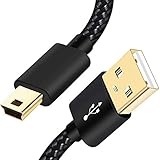
- SCOVEE Nylon braided mini usb cable connects your USB ready computer to a digital camera. This mini b cable is compatible with Canon PowerShot ELPH Rebel or other Mini-B portable device with a mini B 5-pin connector, such as an MP3 player,PDAs,old phone,Dash Cam Accessories,ps3 controller charger cord.
- Wide Compatibility: mini usb cable is compatible for GoPro HERO HD, HERO 3+,Fast Charger for Sony Playstation-3 controller (also named PS3 controller cord ), MP3 players,for Astro A40 50, Digital Cameras usb cable cord for Canon PowerShot ELPH Rebel EOS,Sat Navigation. Mini B cable for Garmin Nuvi Receiver, for Zoom Mic, Dash Cam,Ti-84 etc and other devices with Mini B 5 Pin connector.
- High Speed Transfer: This Type A Male to Mini B Cable data transfers speed up to 480 Mbps for USB 2.0 devices, the SCOVEE USB Mini B Cable is also backwards compliant with full-speed USB 1.1 (12 Mbps) and low-speed USB 1.0 (1.5 Mbps).
- Premium Connector and Cable Quality: Aluminum shell and nylon braided jacket build sturdy and durable mini usb cable, Corrosion-resistant bare copper conductors, gold-plated connector and nylon braid shielding keep the usb mini cable maximum conductivity and minimize data loss.
- What You Get: 1 Pack 6 feet Premium Nylon Braided Mini-USB Cable Cord. Color:Black. Length: 6ft SCOVEE USB Mini B cable, a perfect replacement.
Do not format the card before recovering files
GoPro’s MAX2 troubleshooting sequence uses a computer card adapter to check for an SD-card compatibility issue. If the card is recognized, its instructions say to download any files that can be recovered, then format the card, reinsert it in the camera, power on, and reconnect.
Formatting erases the card. Copy any recoverable footage before formatting, and do not format a card merely because the camera is missing from the computer. If a reader does not recognize the card, GoPro directs users to the card manufacturer for troubleshooting.
Quick Recap
Rank #4

- Cable for Gopro hero Cameras: This usb to mini usb cable fast charger is compatible with Gopro 3, HERO 3+,Hero 4 Black, Hero 4 Silver, Hero 3+ Black, Hero 3+ Silver, Hero 3 White, Hero 3 Black, Hero 3 Silver, Hero 2, Hero 1,HERO4: CHDBX-401, CHDBY-401, CHDHA-301, CHDHE-302, CHDHN-302, CHDHX-302, CHDHX-401, CHDHY-401, CHDSX-401, CHDSY-401,HD HERO original, HD HERO 960, 108 AWALC-001, ACARC-001 and More.
- Quick Charging and Sync: Up to 480 Mbps data transfers speed for USB 2.0 devices, the SCOVEE Mini-B Cable charger cord is designed for gopro hero camera with mini usb charging port.
- Perfect Connection: The stainless steel connector heads slot in your go pro hero 3 cameras easily and steadily, and won't get loose or fall out from your cameras.
- What You Get: 3 ft camera charger for gopro hero ( 1 pack ). SCOVEE go pro hero charger cable is is made of premium pure copper material, featuring lower resistivity and better electrical conductivity. This hero 4 charger is desinged for gopro hero 3,hero 3+,hero 2,hero 1 cameras.SCOVEE focus on researching and developing cameras accessories replacement.
Product prices and availability are accurate as of the date/time indicated and are subject to change. Any price and availability information displayed on Amazon at the time of purchase will apply.
Free tools Windows power users keep installed
One-click scans. No signup required.




