PC Slower Than It Used to Be?
A free scan shows the junk files, broken settings and background clutter dragging Windows down - then fixes them in one click.Free scan · Windows 10 & 11Crashes, No Sound, or Screen Glitches?
Random freezes, missing sound and display glitches usually trace back to one bad driver. Find and replace yours safely.Free scan · under a minuteTo make Google Translate the default for translating selected text, open Settings > Apps > Translate > Default Translation App on your iPhone or iPad, then choose Google Translate if it appears. You need current system software and the Google Translate app installed.
Set Google Translate as the default on iPhone
- Update iOS and install or update Google Translate.
- Open Settings.
- Tap Apps, then Translate.
- Tap Default Translation App.
- Select Google Translate, if it appears in the list. Apple’s iPhone guide documents this route.
Set Google Translate as the default on iPad
- Update iPadOS and install or update Google Translate.
- Open Settings.
- Tap Apps, then Translate.
- Tap Default Translation App.
- Select Google Translate, if it appears. Apple’s iPad guide gives the same settings path.
What this default setting changes
Apple describes the Translation default as the app used when translating selected text. It does not redirect every translation-related action or replace features you start inside Google Translate. Apple documents the default-app controls for the latest iOS and iPadOS versions, and its developer documentation says third-party default translation support is available on iOS and iPadOS 18.4 and later. Apple’s default-app guide explains the selected-text scope; Apple’s developer documentation covers provider support.
As an Amazon Associate I earn from qualifying purchases.
To use the default for selected text, select text in a supported app and tap Translate. If you do not see that action, open the additional actions menu. The available options can vary by translation app. Apple’s selected-text instructions describe this workflow.
Google Translate also has its own text, handwriting, photo, and speech workflows. Those are features of the Google Translate app, not functions controlled by Apple’s default-app choice; availability varies by language. Google says its app supports translation in over 200 languages, while noting that feature availability may vary. See the Google Translate App Store listing and Google Translate Help.
#1 Best Overall

- Support 164 Languages Worldwide: These translation earbuds are powered by advanced AI translation technology and support translation in 164 languages in real time, including English, Spanish, German, Italian, French, Japanese, Chinese, etc., covering 98% of the world's common languages. These AI translator earbuds allow you to instantly break language barriers, making them ideal for translation earbuds real time for going abroad, learning languages, international travel, business meetings, exhibitions, emergency translation, etc. Just download the APP and bind the device, and use it forever without subscription.
- Multi Scenario Translation Mode: Easily switch between different translation modes to optimize communication in various settings, ensuring seamless interaction whether you are traveling, meeting or communicating. In addition, you can also enjoy intuitive smart touch control, which allows you to easily manage music, calls, etc. with just one tap. Easily initiate voice and video calls with real-time translation to achieve global connectivity.
- 3-in-1 Real Time Smart Translation Ear Buds: These real-time translation earbuds combine AI real-time translation, video calls, phone calls, and high-quality music in one compact device. You can switch from translating conversations to enjoying music without changing devices, these wireless earbud translation devices are designed for productivity and convenience. High-fidelity music playback Immerse yourself in rich, balanced sound, enjoy deep bass and clear highs, suitable for work, travel, study, entertainment or daily life. Perfect for travelers, professionals and people who love music.
- 50H Playback Time & Gaming Mode: Whether you're listening to music, making calls, or using the translation function, these AI translation earbuds deliver clear audio. A single charge provides up to 50 hours of playback. Equipped with Bluetooth 5.4 audio technology and an ISAR architecture, they achieve high-quality, low-latency, and low-power audio transmission. Activating the gaming mode ensures a smooth, lag-free gaming experience. The low-latency design also optimizes real-time translation, improving its smoothness and eliminating stuttering. These open-back earbuds are suitable for everyday use, including gaming, watching movies, and listening to music.
- Find Earbuds & Touch Controls: These translation earbuds feature a built-in smart positioning chip. With the dedicated app, you can easily find your earbuds with a single tap. Do you often lose your small earbuds while traveling, on business trips, or just going out? You can track their location in real-time on a map and trigger a ringtone for quick location. Clear mobile navigation guidance is also provided (No monthly fees or subscriptions are required) You can customize the touch controls to your liking, You can independently edit the functions of each button, including volume adjustment, track switching, play/pause, and mode switching.
If Google Translate is not listed
- Check that iOS or iPadOS is up to date and that Google Translate is installed and updated.
- Return to Settings > Apps > Translate and check Default Translation App again.
- If Google Translate still is not offered, Apple says to contact the app’s developer when a desired default app is unavailable. Apple’s public guidance does not identify a single cause for every device; eligibility, app version, system version, or device configuration may matter.
If you cannot find Translate after selecting text, check the additional actions menu. Not every translation app offers the same selected-text actions.
Quick Recap
Rank #4

- Real-Time 160+-Language Translation Instant two-waytranslation between Mexican Spanish & English with 0.5s lowlatency, perfect for restaurant, retail, hotel and dailycommunication.Breaks language barriers at work and lifeseamlessly.
- As a portable Bluetooth omnidirectional microphone, it can connect to mobile phones, tablets, computers, etc. via Bluetooth for audio calls, essentially functioning as an external microphone and speaker for smart devices. After connecting to a mobile phone or tablet via Bluetooth, open the App for real-time bilingual practice.
- Al Language Tutor & Accent Adaptation Built-inAl speaking partner with native pronunciation correction.Supports Mexican Spanish slang and regional accents, helpingyou improve English/Spanish fluency for better careerdevelopment.
- Wearable & Hands-Free Design Lightweight wearable bodyfree your hands for work.Stable Bluetooth connection,longbattery life, ideal for long-hour service jobs and on-the-godaily use.
- Universal Communication Bridge Not only for Spanishspeakers to communicate with Americans, but also for Englishusers to talk with Hispanic colleagues and customers. A must-have tool for cross-cultural workplace and daily life.
Rank #3

- Supports 144 languages worldwide: This translation earpiece employs advanced AI translation technology, enabling real-time interpretation across 144 languages including English, Spanish, German, Italian, French, Japanese, and Chinese – covering 98% of the world's most commonly used languages. Instantly overcoming language barriers, this AI translation earpiece serves as the ideal real-time solution for overseas travel, language learning, international trips, business meetings, exhibition exchanges, and emergency translation scenarios. Simply download the app and pair your device for permanent use without subscription fees.
- Three-in-one real-time intelligent translation earbuds: A compact device integrating AI real-time translation, video calls, voice calls, and high-fidelity music playback. Seamlessly switch between translation conversations and music enjoyment without changing devices, designed for efficiency and convenience. High-fidelity music playback: Immerse yourself in rich, balanced sound quality, experiencing deep bass and crystal-clear treble. Perfect for work, travel, study, leisure, and daily life. Ideal for travellers, business professionals, and music enthusiasts.
- Multi-scenario Translation Modes: Effortlessly switch between translation modes to optimise communication across diverse settings—be it travel, meetings, or daily interactions. Intuitive touch controls allow one-touch management of music, calls, and more. Initiate voice or video calls with ease, enabling global connectivity through real-time translation.
- Up to 60 Hours of Musical Exploration: Powered by a lithium battery with enhanced Energy Lock technology, delivering an impressive 10 hours of continuous playback on a single charge. When music pauses, the enjoyment continues—the portable charging case provides an additional 50 hours of audio pleasure, totalling up to 60 hours of playtime. Equipped with fast-charging technology, a mere 5 minutes of charging grants 1 hour of immersive listening.
- Cutting-edge Bluetooth 5.4 connectivity: These open-fit wireless earbuds, equipped with advanced Bluetooth 5.4 technology, usher you into the future. Experience lightning-fast data transfer and stable connections with an effective range of up to 10 metres. Thanks to intelligent auto-connect functionality, enjoy seamless, zero-delay audio the moment you remove them from the charging case. Compatible with the vast majority of Bluetooth devices, including iOS and Android smartphones, tablets, and laptops.
Rank #2
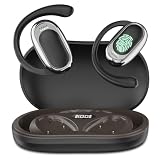
- [144 global languages supported] ANVOSED translation earbuds deliver bidirectional translation—covering 144 languages (Spanish, English, German, etc.) and diverse accents. Download the iOS/Android app for AI real-time translation—perfect for multilingual meetings, language classes, global travel, socializing & more.
- [Multiple translation modes] Fits business talks, classes, community interactions, global travel, and more—for professionals, students, travelers, and beyond. Best of all: free AI real-time translation, no subscriptions required.
- [HD Sound Quality] These translation earbuds serve up crisp, high-def audio—so every word comes through clearly, critical for accurate real-time translation. They pair automatically in seconds, with ultra-low latency to keep translation smooth and in sync.
- [Long Battery Life & Ergonomic Comfort] Designed for all-day wear, these over ear earbuds provide 24 hours of continuous use with audífonos traductores en tiempo real and a fast-charging case for extended battery life, The earbuds have touch control, supporting play/pause, song switching, volume adjustment, etc. The battery box has a power display, which is more convenient to use
- [AI Translation App] We have integrated multiple AI functions into this app, so its features are not limited to just the translation section. The app also includes functions such as converting meeting voice to text, recording and integrating these records. Our technical department is listening to the needs of users and continuously updating the app to add more features. All the above functions are completely free once you purchase this earbuds. Whether you purchase the earbuds or not, feel free to contact us directly—our customer service is available 24/7 to address your inquiries.
Product prices and availability are accurate as of the date/time indicated and are subject to change. Any price and availability information displayed on Amazon at the time of purchase will apply.




