Quick wins for a faster PC:
Repair Windows errors before they cause bigger problemsFix Now →Fix the driver behind crashes, sound loss and screen glitchesFind Drivers →A 2nd-generation Google Nest Protect must be replaced 10 years after its manufacture date, according to Google. Check the alarm’s individual “Replace by” date rather than counting from when you bought it. This is Google’s replacement requirement—not a published average of how long Nest Protect units actually function.
How long does a Nest Protect last?
Google says the 2nd-generation Nest Protect reaches the end of its service life 10 years from the date of manufacture. The limit applies to both battery-powered and wired versions. Google says the carbon monoxide sensor has a limited lifespan and the alarm should be replaced at expiration to maintain smoke and carbon monoxide protection. Google’s expiration guidance states that the 10-year rule is for 2nd-generation Protect. Its reviewed guidance does not establish the same interval for first-generation units.
As an Amazon Associate I earn from qualifying purchases.
The 10 years is a manufacturer’s replacement interval, not a measured average lifespan or a claim that every unit fails on the same day. Google’s cited help pages do not publish observed lifespan statistics or failure rates.
Do these 3 things before closing this tab:
1Repair Windows errors before they cause bigger problems2Fix the driver behind crashes, sound loss and screen glitches3Clear out junk files and repair common Windows errorsHow to find your Protect’s replacement date
Look for the “Replace by” date on the back of the alarm or in its app information:
#1 Best Overall

- Compatible with Google's Nest Protect Alarm
- Sends alerts to your phone if smoke and CO are detected through the First Alert app
- Interconnect so when one alarm sounds, all compatible alarms in the home sound
- Notifies when the batteries are low, eliminating late night chirps
- Voice alerts with Heads-Up warning tells you the type and location of danger in your home
- Nest app: Settings > Technical info.
- Google Home app: Settings > Device information > Technical information.
Google says expiration reminders through the app and email require the Protect to be connected to Wi-Fi and set up in the Nest or Google Home app. Reminders begin three months before expiration and can include app history indicators, email reminders, and on-device messages. The alarm still chirps after expiration even if it is not connected to an app. See Google’s guidance on when to replace Nest Protect.
Battery changes do not extend the alarm’s life
Battery charge and alarm expiration are separate. Replacing low batteries does not reset or change the manufacture-based “Replace by” date; an alarm that has reached that date needs replacement.
For an unexpired alarm that reports low batteries, Google specifies Energizer Ultimate Lithium AA (L91) cells. Battery-powered Protect uses six; wired Protect uses three backup cells. Google warns against alkaline and rechargeable batteries and against mixing battery types or old and new cells. For battery-powered models, Google says the alarm warns when roughly a year of battery life remains and escalates as charge falls. For wired models, backup batteries should last the Protect’s life if it has a consistent power source, but backup use and low-battery alerts still matter. These are Google’s battery guidelines, not an extension of the alarm’s service life. Details: Replace Nest Protect’s batteries.
Rank #2

- Real-Time Ring App Notifications: Home or away, get smoke or low battery warnings (no subscription required)
- Over 25% faster smoke detection (based on internal testing vs a leading competitor)
- Optional Ring subscription (sold separately) with 24/7 smoke monitoring for $5/month
- No Wiring Needed: Operates on 2-AA alkaline batteries (included) for simple use throughout your home
- Whole Home Smart Connectivity: Get mobile alerts for every Kidde alarm in your home through wire-free interconnectivity — when one alarm sounds, they all do. (Check the user guide for more information)
What the chirps and alerts mean
A chirp can indicate low batteries or expiration, so identify the pattern and check the app or alarm date rather than relying on chirping alone. Google describes the patterns this way:
- Low batteries: one chirp every 60 seconds.
- Expired Protect: a double chirp once a minute. Google says an expired unit no longer protects against smoke or carbon monoxide.
A yellow ring or message can indicate that expiration is approaching; confirm the date in the app. Google’s sound descriptions are listed in Nest Protect lights and sounds.
When a sensor alert means cleaning or replacement
Fire, flooding, solvents, aerosols, vehicle exhaust, and open flames can damage Protect sensors. If a smoke-chamber sensor-failure alert appears and there has been no major incident, Google advises cleaning the smoke chamber. If the alert continues afterward, replace the alarm. Follow Google’s sensor and expiration guidance.
Rank #3
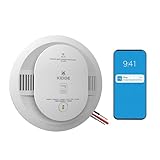
- Double the Detection: Alerts you to both smoke and carbon monoxide (CO)
- Real-Time Ring App Notifications: Home or away, get smoke, CO or low battery warnings (no subscription required)
- Over 25% faster smoke detection (based on internal testing vs a leading competitor)
- Optional Ring subscription (sold separately) with 24/7 smoke and CO monitoring for $5/month
- Whole Home Smart Connectivity: Get mobile alerts for every hardwired alarm in your home by adding just one Kidde smart detector; check the user guide for more information
Replacing an expired Nest Protect
Google identifies the First Alert Smart Smoke & Carbon Monoxide Alarm as a compatible replacement for 2nd-generation Nest Protect when used with the Google Home app. That compatibility claim does not establish that every First Alert model, wiring setup, or installation is suitable. Check the replacement alarm’s current installation instructions and the requirements that apply where you live. Google notes that regional requirements vary; its regional-use guidance is not a substitute for checking local fire-safety codes.
- Check the old Protect’s “Replace by” date and choose a replacement alarm that suits your detection, app, and installation needs.
- Have the new alarm ready to install after removing the expired one, so there is no gap in protection.
- If the Protect is wired, switch off power at the breaker before handling wiring, and follow the replacement alarm’s installation instructions.
Google’s replacement recommendation and expiration instructions are in Replace your Nest Protect after expiration.
Quick Recap
Product prices and availability are accurate as of the date/time indicated and are subject to change. Any price and availability information displayed on Amazon at the time of purchase will apply.




