Do these 3 things before closing this tab:
1Clear out junk files and repair common Windows errors2Scan for outdated or missing drivers - takes under a minute3Repair Windows errors before they cause bigger problemsGoogle’s Motion assist and Apple’s Vehicle Motion Cues both place moving visual markers at the edges of a screen to reflect vehicle movement, with the aim of helping reduce motion sickness while a passenger uses a device. Their controls and customization differ, but the official documentation reviewed does not establish that either works better.
What each feature does
Google calls its Android feature Motion assist, not a Pixel-only feature. It displays small bubbles along the screen edges that move in response to motion sensed by the phone, including turns, acceleration, and braking. Google says it can help reduce motion sickness when using an Android device as a passenger. Google’s Android Help describes the feature for Android devices generally.
As an Amazon Associate I earn from qualifying purchases.
Apple calls its feature Vehicle Motion Cues. Animated dots appear at the edges of the screen to represent vehicle movement; Apple describes them as onscreen cues that may help reduce motion sickness. Apple’s iPhone User Guide explains the iPhone controls and intended use.
Crashes, No Sound, or Screen Glitches?
Random freezes, missing sound and display glitches usually trace back to one bad driver. Find and replace yours safely.Free scan · under a minuteWindows Errors? Fix Them Before They Spread
Repair common Windows errors and clear accumulated junk for a smoother, more stable PC - no reinstall needed.Free scan · no reinstallHow the features compare
| Feature | Google Motion assist | Apple Vehicle Motion Cues |
|---|---|---|
| On-screen cue | Small edge bubbles that move with sensed turns, acceleration, and braking. (Google) | Animated dots at screen edges that represent vehicle movement. (Apple) |
| Documented device scope | Android 17 or higher with updated Google Play services; Google does not provide a Pixel model list on the help page. (Google) | iPhone setup is documented in the iPhone guide. Apple also lists iPad, Mac, and Apple Vision Pro on its accessibility features page. (iPhone guide; Apple accessibility) |
| Automatic control | Can start when a moving vehicle is detected; Google cautions that detection may not always work. (Google) | Set the feature to Automatic; the iPhone shows cues when it detects a ride in a car or other on-road vehicle and hides them when motion stops. (Apple) |
| Manual control | Use a Motion assist tile in Quick Settings. (Google) | Show or hide cues from Control Center; Apple also documents an optional shortcut. (Apple) |
| Appearance options | Adjust opacity, color theme, shape, and randomized appearance. (Google) | Adjust pattern, color, and visibility, including larger or more dots. Color saturation adjusts automatically to maintain contrast with the content behind the dots. (Apple) |
| Published comparative efficacy | No quantified head-to-head result is provided in the official pages reviewed. | |
The similar purpose and edge-of-screen presentation do not show that the two features use equivalent motion-detection or rendering systems; the cited documentation does not provide enough technical detail to compare those implementations.
#1 Best Overall

- Premium Material Construction: Motion sickness glasses are crafted from imported TPE material, which is soft, elastic, and durable. They boast strong antioxidant properties and long-lasting use. These glasses are foldable, removable, compact, and ultra-lightweight, making them suitable for travel. The unique design features a right-angled beam at the middle connection, preventing deformation and enhancing the fit
- Versatile Application: Motion sickness glasses can be used while driving, boating, riding, flying, playing high-altitude rotating games, or engaging in wearable video games. They effectively prevent sea sickness, car sickness, aircraft sickness, and other travel-related discomforts. The unique nose pad design ensures the glasses stay securely in place and are comfortable for all head sizes and shapes
- Simple Usage Instructions: If you feel dizzy while traveling by car, airplane, or at sea, focus on a stationary object like a book or cellphone and then wear these glasses for 10-14 minutes. This will alleviate your discomfort and help you feel better, with the effects continuing afterward. Once you no longer feel dizzy, you can remove the glasses
- Advanced Technology Design: These motion sickness glasses feature a lensless design with a liquid-filled circle. The liquid level adjusts according to vehicle movements, creating an artificial horizon in the user's vision that re-synchronizes the eyes with the balance system. This innovative technology is drug-free, side effect-free, and proven effective. Simple, safe, and natural, these glasses leverage advanced technology for reliable motion sickness relief
- Value Pack Contents: This package includes 2 pairs of Motion Sickness Glasses. Experience a healthier, simpler life on the go and avoid ruining your travel or cruise ship experience due to sea sickness
How to turn on Google Motion assist
- On an Android device running Android 17 or higher with updated Google Play services, open Settings, tap your profile, then All services.
- Under Personal & device safety, tap Motion assist. You can also search Settings for “Motion assist.”
- Turn on Start in a moving vehicle if you want it to activate automatically when a vehicle is detected.
- Add the Motion assist tile to Quick Settings if you want a manual way to show or hide the cues. Google recommends having that option because vehicle detection may not always work.
- In the feature settings, adjust opacity, color theme, shape, or randomized appearance to suit your preference.
How to turn on iPhone Vehicle Motion Cues
- Open Settings > Accessibility > Motion > Vehicle Motion Cues.
- Select a control option, including Automatic, to have cues appear when the iPhone detects a ride in a car or other on-road vehicle.
- To control the cues manually, open Control Center and tap the Vehicle Motion Cues button.
- Under Customize Appearance, adjust the pattern, color, and visibility. Apple says color saturation adjusts automatically to help maintain contrast with the content behind the dots.
Safety and what the evidence does not show
Apple says the cues work best when a passenger is seated facing forward. It also warns: “Vehicle Motion Cues should not be used while operating a moving vehicle and in other situations requiring attention to safety.” Use them only when doing so does not distract from driving or another safety-critical task.
Google frames Motion assist for passenger use and cautions that the device may not always detect when it is in a moving vehicle. A manual Quick Settings tile gives passengers a way to control it if automatic activation does not occur.
Rank #2
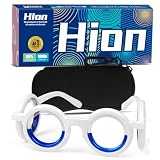
- Material: Motion sickness glasses are crafted from imported TPE material, which is soft, elastic, and durable. They boast strong antioxidant properties and long-lasting use. These glasses are foldable, removable, compact, and ultra-lightweight, making them perfect for travel. The unique design features a right-angled beam at the middle connection, preventing deformation and enhancing the fit
- Product Advantage: Motion sickness glasses can be used while driving, boating, riding, flying, playing high-altitude rotating games, or engaging in wearable video games. They effectively prevent sea sickness, car sickness, aircraft sickness, and other travel-related discomforts. The unique nose pad design ensures the glasses stay securely in place and are comfortable for all head sizes and shapes
- Usage: If you feel dizzy while traveling by car, airplane, or at sea, focus on a stationary object like a book or cellphone and then wear these glasses for 10-14 minutes. This will alleviate your discomfort and help you feel better, with the effects continuing afterward. Once you no longer feel dizzy, you can remove the glasses
- Black Technology: These motion sickness glasses feature a lensless design with a liquid-filled circle. The liquid level adjusts according to vehicle movements, creating an artificial horizon in the user's vision that re-synchronizes the eyes with the balance system. This innovative technology is drug-free, side effect-free, and proven effective. Simple, safe, and natural, these glasses leverage advanced "Black Technology" for reliable motion sickness relief
- Value Pack: This package includes 2 pairs of Motion Sickness Glasses. Experience a healthier, simpler life on the go and avoid ruining your travel or cruise ship experience due to sea sickness
Both companies use qualified language about potential help; neither feature is established by the cited pages as a treatment or guaranteed prevention for motion sickness. The official sources reviewed provide no quantified head-to-head efficacy result, so they support comparing controls and appearance—not naming a proven winner.
Quick wins for a faster PC:
Clear out junk files and repair common Windows errorsFree Scan →Scan for outdated or missing drivers - takes under a minuteDriver Scan →Quick Recap
Rank #4

- Advanced Visual Stabilization Technology: NEOISM Motion Sickness Glasses create a stabilized visual field through four liquid-filled rings. Featuring a lensless anti-glare design, these car sickness glasses generate an artificial horizon that realigns the conflict between your visual and balance systems. As a drug-free solution, they safely help motion sickness relief without side effects
- 95% Effective Motion Sickness Relief with Rapid Action: Find relief from motion sickness in just 10 to 15 minutes. NEOISM Motion Sickness Glasses are 95% effective in alleviating symptoms such as dizziness, nausea, and vomiting. Simply wear these car sickness glasses at the first sign of discomfort for a quick solution, helping you restore your balance and comfort swiftly
- Superior Comfort & Portability: NEOISM Motion Sickness Glasses are made from high-grade TPE material, offer enhanced softness and durability, ensuring all-day wearing comfort. The one-piece car sickness glasses design guarantees stability during use. As their fully foldable, these motion sickness glasses provide a ultimate portability choice of motion sickness and vertigo relief products on the go
- How to Get the Best Results: As essential road trip essentials products, simply wear these car sickness glasses at the onset of symptoms. Gaze steadily at a stationary object (e.g., horizon or a fixed point inside the vehicle) for 10–15 minutes. Ideal for motion sickness relief during road trips, flights, or sea travel—remove once symptoms subside or keep wearing for lasting comfort
- Don't Let Motion Sickness Ruin Your Moment! Ready for any journey—be it by car, plane, boat, or train. NEOISM motion sickness glasses prevent various forms of travel sickness like sea sickness, car sickness, air sickness etc., also a ideal solution for VR/3D dizziness. Whether you're on a road trip, cruise, or flight, keep the vertigo relief products to fully enjoy every adventure
Rank #3

- Advanced Visual Stabilization Technology: NEOISM Motion Sickness Glasses create a stabilized visual field through four liquid-filled rings. Featuring a lensless anti-glare design, these car sickness glasses generate an artificial horizon that realigns the conflict between your visual and balance systems. As a drug-free solution, they safely help motion sickness relief without side effects
- 95% Effective Motion Sickness Relief with Rapid Action: Find relief from motion sickness in just 10 to 15 minutes. NEOISM Motion Sickness Glasses are 95% effective in alleviating symptoms such as dizziness, nausea, and vomiting. Simply wear these car sickness glasses at the first sign of discomfort for a quick solution, helping you restore your balance and comfort swiftly
- Superior Comfort & Portability: NEOISM Motion Sickness Glasses are made from high-grade TPE material, offer enhanced softness and durability, ensuring all-day wearing comfort. The one-piece car sickness glasses design guarantees stability during use. As their fully foldable, these motion sickness glasses provide a ultimate portability choice of motion sickness and vertigo relief products on the go
- How to Get the Best Results: As essential road trip essentials products, simply wear these car sickness glasses at the onset of symptoms. Gaze steadily at a stationary object (e.g., horizon or a fixed point inside the vehicle) for 10–15 minutes. Ideal for motion sickness relief during road trips, flights, or sea travel—remove once symptoms subside or keep wearing for lasting comfort
- Don't Let Motion Sickness Ruin Your Moment! Ready for any journey—be it by car, plane, boat, or train. NEOISM motion sickness glasses prevent various forms of travel sickness like sea sickness, car sickness, air sickness etc., also a ideal solution for VR/3D dizziness. Whether you're on a road trip, cruise, or flight, keep the vertigo relief products to fully enjoy every adventure
Product prices and availability are accurate as of the date/time indicated and are subject to change. Any price and availability information displayed on Amazon at the time of purchase will apply.




