What’s actually slowing this PC down?
Pick the symptom - the matching free tool is one click away.
If @forge/react/jira will not resolve, do not change the import just because the build reports an error. Atlassian documents this path for CustomFieldEdit in Forge custom-field editing. The right fix depends on whether your failure happens during module resolution, when Forge renders the component, or inside React at runtime.
Is @forge/react/jira a valid import?
Yes, for the documented use: Atlassian’s Jira custom-field documentation and CustomFieldEdit reference show this import:
As an Amazon Associate I earn from qualifying purchases.
import { CustomFieldEdit } from '@forge/react/jira';CustomFieldEdit wraps a UI Kit custom-field editing experience. This is not a generic Jira React component path, so confirm that your implementation is a Forge custom-field UI Kit module before applying fixes aimed at this component. The import’s presence in Atlassian’s documentation does not prove that your project has the required package installed or that its build setup can resolve the subpath.
First identify where it fails
Keep the complete error and note which command or app action produced it. These symptoms point to different checks:
#1 Best Overall

- Used Book in Good Condition
| Failure | What to inspect first |
|---|---|
Build-time Module not found or Can't resolve |
Whether the package is installed in the project or workspace that owns the UI Kit entry point, and how that build resolves dependencies. |
| Build succeeds, but Forge reports an unknown component | Whether the component is rendered in the intended Forge custom-field module context; inspect the relevant manifest module. |
| A React hooks or rendering error at runtime | React dependencies and the runtime setup, alongside the full error. A missing or mismatched React dependency is only one possible explanation. |
Fix a build-time resolution error
- Check the owning package manifest. In the package that contains the UI Kit entry point, inspect
package.jsonfor@forge/react. In a monorepo, check the specific workspace rather than assuming a dependency in another package is available to it. - Check the lockfile and install from the right root. Confirm the lockfile reflects that package’s dependencies, then install using your package manager from the appropriate project or workspace root. Avoid adding a second copy or changing the import until you know which package the build is resolving.
- Re-run the same build command. If resolution still fails, capture the complete error and identify the bundler or resolver. The documentation confirms the intended import, but does not specify a minimum
@forge/reactversion or establish a universal fix for project-specific resolution failures.
If bundling works but Forge says the component is unknown
At that point, the import has passed the build; focus on where the component is used. Atlassian documents CustomFieldEdit for Forge custom-field editing with UI Kit components. Check that the manifest’s module and the rendered experience match that context. In one community response to an unknown-component report, a developer suggested checking the manifest module name and reported using jira:customField. Treat that as a diagnostic lead, not an exhaustive statement of compatibility: the community discussion does not establish that every unknown-component error has the same cause.
If the error points to React at runtime
Do not treat a hooks or rendering error as proof that @forge/react/jira is invalid. One developer reported resolving a React hooks/rendering issue in a Forge-created project by adding react: ^18.2.0 to package.json: the report. That is an anecdotal runtime fix, not an Atlassian-documented requirement or a fix for a build-time package-subpath resolution error. Compare it with your actual error and dependency setup before changing React dependencies.
Rank #2

- UNLIMITED CONNECTION: This true full size 61 key keyboard piano is made of premium material. The LCD display can simply and clearly displays the status of the functions being used. With audio input/output/microphone jack(with UDISK port),you can connect microphone and headphone(included), you will not interfere with others when practicing singing and playing late at night, fully enjoy the music
- TIMBRE AND RHYTHM: JIKADA 61-key electronic music keyboard has two built-in stereo speakers, provide 255 tones, 255 rhythms, 50 demo songs and 61 types of keyboard percussion and give you premium sounds and effects. With status memory function, you can save the tone, rhythm, tempo and other parameters to be changed during playing, for fast shifting
- 3 TEACHING MODES: JIKADA 61 light-up keys keyboard piano with 3 powerful teaching modes, lead you to step by step. And piano note stickers help you more easily to learn and memorize the music theory, musical notations and keys positions
- MULTI FUNCTIONS: This electronic keyboard has master volume/ accom volume/ tempo control, single-finger chords, fingered chords, sustain, vibrato, split, transposition, metronome, volume or transpose control. With record and playback function, and the playback function can also help the performer recall the performance effect and make targeted connections to improve the performance next time
- SUPER BUNDLE: Includes a keyboard (size: 36.4in * 13.4in * 3.5in), a x-shaped stand, a soft stool, headphones, a microphone, a music rest and a power adapter. And the stool can be folded for convenient storage and space-saving. This item is not intended for users under 12 years old
Check the documented component behavior
Once the component loads in the intended context, follow the current Jira custom-field documentation for the field experience you are implementing. It demonstrates submitting a new field value through view.submit(...) and describes CustomFieldEdit calling onSubmit on blur in that context. The dedicated reference labels the component a preview feature and documents onSubmit, hideActionButtons, disableSubmitOnBlur, and disableSubmitOnEnter. Check those current docs for the exact behavior applicable to your module and field context.
What to include when asking for a specific fix
There is not enough information in the import path alone to identify a project-specific cause. Include:
Quick Recap
Best Value
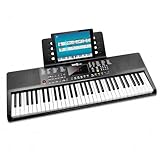
- Compact 61 key keyboard piano: space saving design with full learning features for beginners.
- 200 sounds and 200 rhythms: a wide palette for practice, play-along and creativity.
- Sustain and vibrato effects: plus record and playback to capture and review your progress.
- Learn faster: keynote stickers and Simply Piano lessons included.
- Ready to play: power supply and sheet music stand in the box.
Rank #4

- Oversized Large Print Keys: 4X larger than standard keyboard fonts, with bold and clear letters that are easy to identify at a glance. Perfect for the elderly, visually impaired users, office workers, and students, effectively reducing eye strain and typing errors.
- 7 Color Adjustable Backlight: Features 7 vibrant backlight colors and 3 brightness levels. Easily switch colors and adjust brightness to suit different lighting environments, making typing convenient day and night.
- Full Size Keyboard with Foldable Stand: 108-key full-size layout includes numeric keypad and function keys. Foldable stand raises the keyboard to a comfortable typing angle, reducing wrist fatigue and providing a premium typing experience even during long work hours.
- Plug and Play with Zero Latency: Simply connect the USB cable to your computer or laptop, no drivers or software required. Wired connection ensures stable data transmission, delivering instant response without any typing delay for smooth operation.
- Quiet Typing Design: Soft membrane key switches provide quiet keystrokes, allowing you to work or study without disturbing others. Perfect for office, library, or home use.
Rank #3
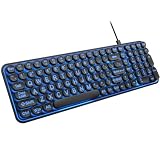
- 【Large Print Keyboard】: 4X larger than standard keyboard fonts, clear and easy to find when typing, and can help those who have trouble seeing keyboards. Perfect for seniors, the visually impaired, students, special needs departments and libraries, etc.
- 【7 Color Backlit Wired Keyboard】This lighted keyboard features 7 vibrant LED colors and 3 adjustable brightness levels, with easy-to-use backlight hotkeys. Evenly distributed lighting ensures clearly visible key displays, enabling effortless typing in dimly lit offices, at night, or in other low-light environments
- 【Retro Round Key Keyboard】Blends vintage aesthetics with modern typewriter functionality, featuring round keycaps, quiet typing keys, and a compact layout. Designed for smooth, comfortable use, this retro typewriter keyboard helps you stand out in the office. It can showcase its unique charm at home, school,studio, and office
- 【Plug and Play & Silent Click】This wired Backlit keyboard offers effortless setup with plug-and-play functionality—no drivers, power charging, or battery swaps required. Features quiet typing keys for noise-free use.
- 【12 Multimedia Hotkeys & Ergonomic Design】12 convenient multimedia hotkeys for control of music, volume, lock keyboard, email and more, greatly boosting your work and entertainment efficiency. Ergonomic key arrangement reduces wrist fatigue and discomfort during prolonged use.
- The full error text and whether it occurs during build, tunnel, deploy, or app rendering.
- The
@forge/reactand React dependency versions from the package that owns the UI Kit entry point. - Your package manager, workspace layout, and bundler or resolver.
- The relevant manifest module and whether the component is used in a Forge custom-field UI Kit experience.
- The command that reproduces the failure.
Product prices and availability are accurate as of the date/time indicated and are subject to change. Any price and availability information displayed on Amazon at the time of purchase will apply.




