To fix a firmware problem, identify the device’s exact model, hardware revision, and purchase region, then use only the manufacturer’s instructions and recovery method for that configuration. Firmware recovery is not universal: a router, printer, and PC can require different files, tools, and steps. If the device still boots, record the error and check the official support page before retrying; if the documented recovery path is unsupported or fails, stop and contact the manufacturer.
Before changing anything, identify the device and the failure
Write down the make, complete model number, hardware revision, and country or region where the device was purchased. Find the corresponding official regional support page. A firmware file for a different model or market can fail; TP-Link warns that cross-region firmware can also affect warranty coverage. See TP-Link’s router recovery guidance for its regional and model-specific cautions.
As an Amazon Associate I earn from qualifying purchases.
Record what happened before attempting another update: the exact error message, the stage at which it stopped, any LED pattern, whether the device starts, and whether it appears on a wired connection. Indicators and their meanings vary by model, so treat them as clues for that product rather than universal diagnostic codes.
Why firmware updates fail—and what not to assume
- Power was interrupted. A router or printer can be left with an incomplete update if it loses power or is turned off mid-process. That does not prove the device is permanently unusable; recovery options depend on its model. TP-Link describes power loss as a common cause of an unresponsive router, and Brother warns that interruption can leave a printer update incomplete.
- The file does not match. Model, hardware revision, and region matter. Do not try a similar-looking package or a file intended for another market.
- The recovery method is not supported. A procedure that works for one model may not exist for another, even within the same product line.
- The problem is with Windows rather than device firmware. A PC that will not start after an update may need Windows recovery tools, not a manual firmware flash. UEFI firmware settings are one option in Windows Recovery Environment, but they are distinct from OS repair actions.
Choose a recovery route that matches the device
There is no single safe flashing procedure for every product. Use the manufacturer’s page for the exact product and region, and check the required device state, file format, connection, and effect on settings or data before starting.
#1 Best Overall

- (User manual available if do as follow: click "AITRIP"(you can find "Sold by AITRIP" under Buy Now button), in the new page, click "Ask a question".)we will send you the manual asap)
- Test Clip Pin format: SOIC8 SOP8 matrix ,Programmer TL866 EZP2010 RT809H CH341A;Please confirm the chip voltage to avoid burning the chip.(This product only supports 3.3v 5V switching)
- SOIC8 SOP8 Clip DIP8 for in-circuit programming For EEPROM /25CXX/24CXX on ZIP USB;Serial port: Supports the USB to UART 12CSP port
- Test Clip Beryllium copper plating needle, without welding, can be directly inserted
- USB Programmer CH341A Series Burner Chip 24 EEPROM BIOS Writer 25 SPI Flash AE1185
| Device or case | Documented route | Important limit |
|---|---|---|
| Supported TP-Link routers | Some models use a firmware upload over Ethernet; certain Archer AX models have a separate rescue mode. | TP-Link says recovery is not available on every model. Follow the instructions for the exact revision and region. TP-Link recovery guidance. |
| Supported ASUS routers | ASUS points users to its Firmware Restoration utility for supported cases. | Utility support and the procedure are model-dependent. ASUS firmware-upgrade troubleshooting. |
| Brother printer update failure | Brother describes retrying an interrupted update by USB for the applicable printer. | Use the Downloads page and instructions for the specific printer model. Brother firmware update FAQ. |
| Windows startup or recovery issue | Windows Recovery Environment can offer Startup Repair, System Restore, update removal, or access to UEFI firmware settings. | Available options depend on the device and configuration. These are not interchangeable with a manufacturer firmware flash. Microsoft’s Windows Recovery Environment overview. |
Safe sequence for a failed firmware update
- Locate the official support page. Match the complete model, hardware revision, and purchase region. Do not use a firmware package from an unofficial download site or another regional product page.
- Read the model-specific recovery instructions from start to finish. Confirm whether the device must be powered on, in a rescue mode, or connected to a computer; check which file to download and whether the archive needs extraction.
- Prepare only the tools the instructions require. For example, TP-Link’s documented router recovery can require extracting the downloaded archive and connecting a computer to the router by Ethernet. That requirement is not universal. ASUS provides a separate utility for supported cases.
- Stabilize power and connection. Keep the device on stable power and do not turn it off or disconnect it during an update or recovery upload. Both TP-Link and Brother identify interruption as a cause of incomplete updates.
- Run the documented recovery once, carefully. Do not reuse button combinations, local addresses, or files from another model. Watch for the completion signal specified by the manufacturer.
- If the device remains unresponsive, stop. When the official procedure is unavailable for the model or does not work, contact the manufacturer or an authorized service provider rather than making repeated attempts with uncertain firmware.
For a Windows PC, separate startup repair from firmware recovery
If Windows fails to start, Windows Recovery Environment (Windows RE) provides operating-system recovery choices such as Startup Repair, System Restore, and uninstalling updates. It can also provide access to UEFI firmware settings. The right option depends on whether the issue is Windows startup, a recent OS update, or the PC’s firmware; changing UEFI settings is not the same as repairing Windows or reinstalling firmware. Microsoft explains the available Windows RE options in its recovery overview.
Some PCs support Connected System Recovery, but it is a destructive recovery route, not a routine firmware fix. Microsoft says it removes local files and personal data and repartitions storage. Use it only on a supported device when you need a working PC and do not need the local data; consult Microsoft’s Connected System Recovery information and the PC maker’s guidance before proceeding.
Rank #2

- 【Support 3.3V and 5V】: Supports 3.3V and 5V microcontrollers and circuit boards. The output voltage can be adjusted easily by the jumper cap!
- 【Easy to Use】: Applicable to WIN8.1 / 8/7 / XP 32-bit / 64-bit computer. It can be directly connected to the USB interface of the computer, which is very convenient to use. (Please note: this product is not suitable for WIN10)
- 【Easy to Program】: Programming interface is reserved, you can upgrade the downloader firmware by yourself. Programming software: AVR_fighter, PROGISP1.66, PROGISP1.67, PROGISP1.68, can also compile lower or higher software, programming is very convenient.
- 【Automatic Speed Regulation】: AUTOSPEED automatic speed control firmware, the downloader will automatically track the frequency of the chip to be programmed and automatically change the speed to achieve automatic speed control.
- 【10PIN to 6PIN Converter】: Equipped with standard ATMEL ISP10 to ISP6 port converter.
Check data and settings risks before recovery
A firmware recovery procedure may have a different effect from an operating-system recovery, factory reset, or system reinstall. Do not assume it preserves settings or files: check the exact manufacturer instructions for the action you are about to take. In particular, Connected System Recovery wipes local files and personal data, so it is unsuitable when preserving data on the PC matters. If files are important and the device will not boot, seek the manufacturer’s support before choosing a destructive recovery.
Advanced case: Secure Boot certificate servicing
Some Secure Boot certificate-update issues involve the behavior of the PC’s UEFI firmware, rather than a failed consumer-device firmware download. Microsoft’s March 2026 Secure Boot troubleshooting guide describes scenario-specific cases, including firmware that mishandles certificate databases. The correct response depends on the identified scenario and may involve an OEM firmware update or a particular recovery procedure. Do not treat this as a general explanation for ordinary update failures or change Secure Boot settings without guidance for the PC.
Quick Recap
Best Value

- This USBASP programmer has onboard ATMega8 chip. With power and programming two lights.
- Supports 5V and 3.3V power supply, the asp is the new version, with pin on JP2.
- This product can be used to update Ender 3 or Ender 3 Pro firmware.
- Programming interface is reserved, you can upgrade the downloader firmware by yourself.
- Applicable to WIN8.1 / 8/7 / XP 32-bit / 64-bit computer. It can be directly connected to the USB interface of the computer, which is very convenient to use.
Rank #4
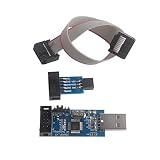
- This USBASP Programmer only supports WINDOWS system. It can be directly connected to the USB interface of the computer, which is very convenient to use. Driver installation is required to start the usb to isp.
- This USBASP Programmer is using onboard ATMega8 chip. With power and programming two lights, the target board suopports 5V and 3.3V power supply New self-adaptive automatic speed control, the asp is the new version, with pin on JP2.
- Reserved MOSI, MISO, RET, SCK, VCC, GND. 6PIN interface, user-friendly connection to the target board.
- Set PROGRAMMING programming interface, the user can upgrade the downloader firmware, programming is very convenient. This product can be used to update Ender 3 or Ender 3 Pro firmware
- The AVR USB ISP ASP Microcontroller documentation link cannot be displayed. If you need technical documentation, please click “Geekstory” to em-ail us.
Rank #3

- Main Chip:ATMega8A-AU.Support AVR and ASP chip.Support AT89S51/52 microcontroller.
- The output port is an ATMEL standard port. With overcurrent protection.Automatic speed control.With power and write indicator lamp.With USB power and target board support target voltage 5V, can choose by jumper cap connection.
- Autospeed autofocus firmware, the downloader will automatically track the chip frequency to be programmed, automatically change the speed, to achieve automatic speed control.
- Reserve MOSI, MISO,RET,SCK,VCC,GND. 6pin interface, user-friendly interface to connect the target board.
- Reserved programming interface, the user can upgrade the download firmware.
Product prices and availability are accurate as of the date/time indicated and are subject to change. Any price and availability information displayed on Amazon at the time of purchase will apply.




