Download an individual beatmap from osu!’s official beatmap listing as an .osz file, then open it to import it. For a batch, download an official beatmap pack, extract it, and import its .osz files. If a map does not appear in Song Selection, press F5 to reprocess beatmaps.
How do I download an individual osu! beatmap?
- Open the official beatmap listing and sign in.
- Search for the song or map you want, then use its download control. The individual beatmap downloads as an
.oszfile. - Open the downloaded file to import it, or move it into the
Songsdirectory under your osu! installation. - Go to Song Selection and confirm the map appears. If it does not, press F5 to reprocess beatmaps.
Players often call these “osu! songs,” but the downloadable file contains the playable beatmap associated with a song. osu!supporter is not required to download from the website; the supporter requirement applies to osu!direct.
As an Amazon Associate I earn from qualifying purchases.
How can I find the right map?
Search terms can match the song artist or title, difficulty creator or name, source, mapper tags, and user tags. For more targeted results, the official search guide documents comparison operators. Available filters vary among osu!web, osu!(stable), and osu!(lazer), so a filter described for one surface may not work on another. See the official beatmap search guide for the supported syntax and surface-specific details.
Which download route should I use?
| Route | Best for | Requirements and notes |
|---|---|---|
| Official website listing | Downloading one map or choosing from the web listing | Sign in and download the individual .osz file; osu!supporter is not required. |
| osu!direct in the game | Finding and downloading maps without leaving the client | Requires an osu!supporter tag and an internet connection. Choose DL NoVideo if you want to skip the video. Maps should load automatically; press F5 in Song Selection if one is missing. |
The official client and installation guide describes both website downloads and osu!direct.
#1 Best Overall

- 【O3C OSU SayoDevice Keyboard】This keyboard with 3 Hall magnetic linear switches, 1 knob, 1 screen! TYPE-C,USB 2.0 high-speed 8000HZ.
- 【Replaceable Switches】Supports any Hall magnetic Switches, with a simple click for calibration.
- 【IPS color Screen】With 0.96 inch IPS color screen,160*80 Resolution, visible key range and button counting.
- 【Custom Screen】The first line of text on the screen can be customized, such as writing your own ID.
- 【Custom Knob】The knob can also be set with any key, such as to scroll through the song list.
How do I download osu! beatmap packs?
Use the official beatmap packs listing to download multiple maps in an archive. Packs are compressed archives and may include videos. The listing is actively updated; its entries were dated 2026-10-06 when checked on 2026-10-07, so a fixed pack count can quickly become outdated.
Choose a pack category based on what you want, since categories represent different game modes, artists, events, or themes:
Rank #2
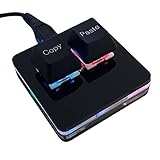
- 【Package Listing】 1*mini 2-key black keyboard 1*shaft-puller 1*5 feet long USB data cable 2*copy&paste keycaps(black and white)
- 【Copy Keyboard】For Windows User,this is Plug and Play, Out of the Box, no Software and Website Required for Copying and Pasting.
- 【Mac User Notice】 Before using, you need to connect the keyboard to the MAC computer, open the webpage link "SayoDevice. com", and manually configure the settings for the two buttons: Left Button=GUI(win)+C, Right Button=GUI(win)+V.
- 【Functions】 The default function is "Copy" and "Paste". You can also use other functions, such as Shortcut keys, Multi-step operation, Multi-key in one, Cut, Undo, Redo, Select all, Play, Pause, Volume, Switch song, Forward, Backward, Custom script, etc. You can control the light color and gradient mode of the case you want through the software or website.
- Standard: Ranked and Approved beatmaps.
- Featured Artist: maps associated with featured artists.
- Tournament: maps associated with tournaments.
- Project Loved: beatmaps in the Project Loved category.
- Spotlights: maps associated with Spotlights.
- Theme: maps grouped around a theme.
- Artist/Album: maps organized by artist or album.
After downloading a pack, extract the archive. Move its .osz files into the Songs directory, or drag them into a running osu! instance. If the imported maps are missing from Song Selection, press F5 to reprocess them. The official pack guide describes the archive and import process.
Recommended Free Tools
Why isn’t my downloaded beatmap showing up?
- The file has not been imported: Open the
.oszfile, or place it in theSongsdirectory under the osu! installation. - The game has not reprocessed it: From Song Selection, press F5.
- You downloaded a pack but did not extract it: Extract the archive first, then import the contained
.oszfiles. - You are using osu!direct: Confirm the client has an internet connection; osu!direct requires one. If the map is still absent after download, press F5.
Is it safe to download beatmaps from other sites?
Use the official beatmap listing or official packs page as the default source. The osu! wiki warns: “osu! cannot guarantee that files from unofficial sources are safe, up to date, or complete.”
Rank #3

- 3-Key Compact Form Factor - The smallest pad with flagship-level performance. XPAD MINI delivers everything essential from a high-performance gaming keyboard in a compact 3-key layout.
- Embedded LCD Display - Check profiles, keymaps, macro status, and settings directly from the built-in LCD.
- Ultra-Fast 100K Scan Rate - Scans inputs up to 100,00.1ms Ultra-Low Latency
- Pulsar gravity-S01 Magnetic switch - Pulsar Gravity-S01 Magnetic Switch features 0.01mm precision sensing across the full key travel range, enabling highly customizable actuation settings for faster response and greater control.
- Ambient Glow - Dual-button Featuring 16.8 million RGB colors, XPAD MINI illuminates both the key area and translucent upper housing, creating a soft ambient glow that enhances any setup. Customize colors and lighting effects through Bibimbap software to match your style.
If you need the osu! client itself, use the official osu! download page; downloading the game is separate from downloading beatmaps.
Quick Recap
Rank #4

- 【O3C OSU SayoDevice Keyboard】This keyboard with 3 Hall magnetic linear switches, 1 knob, 1 screen! TYPE-C,USB 2.0 high-speed 8000HZ.
- 【Replaceable Switches】Supports any Hall magnetic Switches, with a simple click for calibration.
- 【IPS color Screen】With 0.96 inch IPS color screen,160*80 Resolution, visible key range and button counting.
- 【Custom Screen】The first line of text on the screen can be customized, such as writing your own ID.
- 【Custom Knob】The knob can also be set with any key, such as to scroll through the song list.
Product prices and availability are accurate as of the date/time indicated and are subject to change. Any price and availability information displayed on Amazon at the time of purchase will apply.




