Play the games in this order: FINAL FANTASY VII REMAKE → FF7R EPISODE INTERmission → FINAL FANTASY VII REBIRTH → FINAL FANTASY VII REVELATION. INTERmission is a Yuffie-focused episode between the first and second games, not a fourth main trilogy entry. Save data does not generally carry a full character build from one game into the next: the documented transfers either move a Remake save from PS4 to PS5 or unlock specific bonuses in a later game.
What order should you play the Final Fantasy VII Remake games?
- FINAL FANTASY VII REMAKE — Start with the first game. Square Enix announced the project as a three-game series and later described Rebirth as its second installment (Square Enix’s 2022 trilogy announcement; 2024 developer interview).
- FF7R EPISODE INTERmission — Play this Yuffie episode after Remake and before Rebirth for its place in the story and character context.
- FINAL FANTASY VII REBIRTH — The second main game in the trilogy. Square Enix also presents it as a standalone adventure, so prior save data is not described as a prerequisite (Rebirth product page).
- FINAL FANTASY VII REVELATION — Square Enix’s official store identifies Revelation as the trilogy’s final chapter and lists June 3, 2026 as its release date (Revelation product page).
What is INTERmission, and is it included with Intergrade?
INTERmission is an additional episode starring Yuffie, associated with FINAL FANTASY VII REMAKE INTERGRADE, the enhanced edition of Remake. It belongs between Remake and Rebirth in this play order; it is not a separate main trilogy game. Square Enix describes Intergrade as featuring the episode (Intergrade announcement).

As an Amazon Associate I earn from qualifying purchases.
If you buy Intergrade, the episode is included in that edition. But the PS5 enhancement update for people who already own the PS4 Remake does not include INTERmission; Square Enix says the episode can be purchased separately. Intergrade availability and edition listings can vary by region and storefront. Square Enix lists a physical PS5 Standard Edition as well as digital editions for PS5 and PC in its edition information (Intergrade editions FAQ).
Quick wins for a faster PC:
Clear out junk files and repair common Windows errorsFree Scan →Scan for outdated or missing drivers - takes under a minuteDriver Scan →Repair Windows errors before they cause bigger problemsFix Now →What actually transfers between games?
“Save transfer” can mean either moving a playable save between versions of the same game or having a later game recognize an earlier save to grant a bonus. Square Enix documents both kinds of behavior, but the cited Rebirth and Revelation materials describe bonus eligibility—not importing the earlier campaign’s levels, equipment, or general progress.
Quick Recap
Best Value

- Immerse yourself in the city of Midgar like never before, with improved textures, lighting, and background environments
- Players can switch between two game modes: o "Graphics Mode" prioritises 4K high-resolution graphics o "Performance Mode" prioritises smooth action at 60 frames per second
- Capture and share your memorable moments from the game with a fully customisable “Photo Mode”
- Players can enjoy immersive battles by using the DualSense PlayStation 5 controller with its haptic feedback integration
Rank #4
Rank #3

- Those who pre-order any version of the game will receive the Chocobo Chick Summon Materia DLC at launch.
- Along with unforgettable characters and a powerful story, FINAL FANTASY VII REMAKE features a hybrid battle system that merges real-time action with strategic, command-based combat
- Playstation 4
Rank #2

- Immerse yourself in the city of Midgar like never before, with improved textures, lighting, and background environments
- Players can switch between two game modes: "Graphics Mode" prioritizes 4K high-resolution graphics; "Performance Mode" prioritizes smooth action at 60 frames per second
- Capture and share your memorable moments from the game with a fully customizable “Photo Mode”
- Players can enjoy immersive battles by using the DualSense PlayStation 5 controller with its haptic feedback integration
- Play the brand-new episode featuring Yuffie and experience new combat and gameplay additions
#1 Best Overall
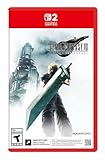
- The award-winning FINAL FANTASY VII REMAKE INTERGRADE* retells the original story up to the escape from Midgar, with breathtaking visuals, fast-paced gameplay, and additional story elements. This RPG delivers unforgettable characters, a powerful narrative, and a hybrid battle system that blends real-time action with strategic, command-based combat. It also includes FF7R EPISODE INTERmission, a side story starring Yuffie Kisaragi that offers a fresh perspective running in parallel to Cloud’s journey.
- STUNNING VISUALS - Explore Midgar like never before with stunning visuals and richly detailed environments that bring the city’s layered, industrial districts to life, all while staying true to the spirit of the original game.
- DYNAMIC COMBAT WITH STRATEGIC DEPTH -The innovative battle system combines strategic command-based gameplay with fast-paced action. Seamlessly switch between characters, harness the power of materia, summon iconic creatures, and unleash devastating limit breaks.
- ICONIC CHARACTERS, UNFORGETTABLE STORY - Follow Cloud Strife, an ex-SOLDIER turned mercenary, as he joins Avalanche to take on the Shinra Electric Power Company. Cloud and his allies Barret, Tifa, and Aerith are pulled into a battle that will decide the fate of the planet.
- EXPANDED CONTENT - FINAL FANTASY VII REMAKE INTERGRADE offers quests, mini-games, and missions set in expanded areas of Midgar. Encounter new characters and experience exciting content that adds even more depth to the story.
| Source and destination | What happens | Key condition |
|---|---|---|
| Remake on PS4 → Remake on PS5 | The PS4 save can be carried into the PS5 version. | Square Enix says the transfer can be done once. If you continue playing the PS4 version afterward, that newer progress does not automatically appear on PS5; the support instructions say to delete the PS5 version’s save and repeat the transfer (Square Enix Support FAQ). |
| Remake / INTERmission → Rebirth | Eligible saves unlock specific summon materia bonuses: Leviathan for Remake data and Ramuh for INTERmission data. | The relevant data must be saved on the PS5 system. Rebirth checks it after you select New Game or through the Bonuses menu (Square Enix Support rewards guide). |
| Intergrade / Rebirth → Revelation | The store page describes bonuses for qualifying same-platform saves. | Save location and account conditions apply. The store page also says some listed bonuses unlock by completing the main game even without save data; it does not describe carrying over a prior campaign’s full progression (Revelation product page). |
How to check Rebirth for save bonuses
- Make sure the eligible Remake or INTERmission save data is present on the PS5 system.
- In Rebirth, select New Game or open the Bonuses menu.
- Let the game check the data. The documented rewards are Leviathan summon materia for Remake data and Ramuh summon materia for INTERmission data—not a continuation of your previous character build (Square Enix Support rewards guide).
Which save-transfer question are you trying to answer?
- Moving PS4 Remake progress to PS5 Remake? Yes. That is a version-to-version save transfer, with the one-time behavior and repeat-transfer workaround described above.
- Carrying Remake progress into Rebirth? The cited official materials specify summon materia bonuses, not general campaign carryover.
- Using earlier saves in Revelation? The store page describes same-platform save eligibility for bonuses, subject to its save-location and account conditions.
- Playing Rebirth without earlier games or saves? Square Enix presents Rebirth as a standalone adventure; the cited bonus checks are not presented as requirements to play.
Product prices and availability are accurate as of the date/time indicated and are subject to change. Any price and availability information displayed on Amazon at the time of purchase will apply.




