What’s actually slowing this PC down?
Pick the symptom - the matching free tool is one click away.
In Final Fantasy IX, equipment does more than improve stats: it teaches abilities. Equip an item that grants an ability, keep it on while earning AP in battles, and check the Ability menu to track progress. Once mastered, that ability can be used without its teaching item. Balance learning against immediate gear upgrades, adjust Support Abilities for each situation, and explore beyond the story route as Chocobo abilities grow.
How equipment, abilities, and AP work
Some equipment contains abilities a character has not yet learned. While that item is equipped, the character can use its ability; winning battles with it equipped earns AP toward mastering the ability. The official FINAL FANTASY IX PC English Manual explains that the Ability menu shows AP progress. After mastery, the character can use the ability without keeping the teaching item equipped.

As an Amazon Associate I earn from qualifying purchases.
- When you get new gear, inspect its abilities before equipping, selling, or using it in synthesis.
- Equip an item if it teaches an ability you want the character to learn.
- Win battles with that item equipped; the ability’s AP progress will increase.
- Check the Ability menu to see how close the character is to mastery.
- After mastery, consider switching to gear that better suits the character or encounter.
This creates a real tradeoff: an item may be weaker for immediate needs yet valuable as a way to learn an ability. If a character is close to mastering something useful, keeping the item equipped can make sense. If a tougher fight calls for stronger equipment or a particular ability, switching is reasonable. The game’s PlayStation manual describes situational, selective, and broad ability-learning approaches rather than one mandatory method; it also advises checking ability and AP information before selling or synthesizing gear. The manual copy is hosted by a third party, but is the game’s original manual.
The Tool Desk
Outbyte PC Repair FREEClear out junk files and repair common Windows errorsFree Scan →Outbyte Driver Updater FREEFix the driver behind crashes, sound loss and screen glitchesFind Drivers →Action Abilities and Support Abilities do different jobs
Action Abilities are battle commands
Action Abilities appear as commands you choose during combat and generally cost MP, though the manual notes exceptions. An ability may be usable because its teaching item is equipped even before the character has mastered it. If an enemy presents a specific problem, inspect available commands and gear rather than assuming you must have mastered every useful ability first.
#1 Best Overall

- The Amazon Exclusive Edition includes a FINAL FANTASY VII REBIRTH PS5 controller skin (inside the case) featuring Cloud and Sephiroth. This PS5 controller skin provides full coverage without buttons or sensor interference.
- An Expansive World: As the party searches for Sephiroth, explore the beautiful, expansive regions of the world and open up new areas to discover through unique forms of transportation
- Deepen their relationships to unleash powerful team based combos
- An Evolved Battle System: Combine strategic thinking with thrilling action combat alongside your comrades, including newly added characters
- Beyond the Walls of Fate: In this standalone adventure for fans and newcomers, Cloud and his comrades venture across the planet, their fates unwritten, making each step outside the dystopian city of Midgar fresh and mysterious
Support Abilities are equipped passives
Support Abilities operate during battle rather than appearing as ordinary commands. They use magic stones, and stronger abilities can take more stones. Since the supply is limited by the character’s available stones, choosing one passive can mean leaving another unequipped. The PC manual recommends customizing these abilities for the situation: review the encounter and equip the effects that are most relevant, rather than treating one setup as right for every battle.
Set up the party and use position deliberately
Up to four party members can engage an enemy at once. You can change party positions through the menu’s Order option. The manual describes a clear back-row tradeoff: characters there deal less damage, but also take less damage. It is not a free defensive bonus, so choose position based on the character and the fight rather than moving everyone back automatically.
Rank #2
- All graphics fully remastered in HD, bringing the game to the latest console generation
- Renewed 3D models, including characters and backgrounds, enriching the visual experience
- Improved battle system providing a vastly smoother gameplay experience
- Fully voiced dialogue in both English and Japanese
- A newly arranged soundtrack from the original composer, Takeharu Ishimoto
For an unfamiliar enemy, the PlayStation manual suggests using Scan to examine weaknesses, then matching abilities to what you find. If the ability is not mastered yet, a suitable equipped item may still let the character use it. This is a practical way to make decisions without needing a fixed “best abilities” list; the manual does not establish one universal loadout.
Explore beyond the direct story route
Use Chocobo travel to look around
Chocobos let you travel across the world map without random enemy encounters while riding. Developing their abilities opens access to additional places, according to the PC manual. If you enjoy finding optional areas, follow Chocobo progression when it becomes available and revisit places as new travel capabilities let you reach more of the map.
Rank #3

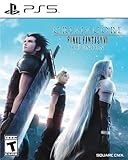
- Remaster of the original CRISIS CORE - FINAL FANTASY VII-, featuring a complete HD graphics overhaul, a remastered soundtrack, a reimagined UI, and an updated combat system.
- The story begins seven years before the events of FINAL FANTASY VII (1997) and follows Zack Fair, a young and ambitious Shinra SOLDIER operative. Zack is tasked with tracking down a missing SOLDIER 1st Class operative named Genesis Rhapsodos.
- But as his adventure unfolds, he discovers the dark secrets of Shinra's experiments and the monsters they create. The game features a number of characters from the FINAL FANTASY VII franchise such as Cloud, Sephiroth, Aerith and others.
Try optional minigames if they interest you
Square Enix lists Chocobo Hot and Cold, Jump Rope, and Tetra Master among the game’s minigames, and says minigames can provide special item rewards. They are diversions, not prerequisites for finishing the main adventure.
Tetra Master is a card game played on a 4-by-4 field, with five cards per player. Card arrows and placement can flip opposing cards; the field and cards in hand affect results. The manual’s basic advice includes protecting cards with arrowless edges against field boundaries and thinking ahead to a counterattack. You can explore the game at your own pace without needing to master Tetra Master to progress through the story.
Independent reader supportYour contribution helps us test, update, and keep practical guides available for everyone.Convenience options and platform notes
Square Enix’s North American FINAL FANTASY IX product page lists a Nintendo Switch version with high-definition movies and character models, autosave, and seven boosters, including high-speed and no-encounter modes. These options let you change the pace, but they are optional; you can leave them off and play normally. The page displays December 9, 2025 as the release date for that listing. Product availability and packaging can vary by region and change over time.
Quick wins for a faster PC:
Repair Windows errors before they cause bigger problemsFix Now →Fix the driver behind crashes, sound loss and screen glitchesFind Drivers →Clear out junk files and repair common Windows errorsFree Scan →Version details differ by platform. Square Enix’s February 13, 2019 announcement covered Nintendo Switch, Xbox One, and Windows 10 releases, while its version FAQ describes the iOS, Google Play, and Windows version as a PlayStation port with slightly altered controls and display, and lists boosters including high-speed and no-encounter. Check the listing for the specific platform and region you plan to use, since feature sets may differ.
Quick Recap
Best Value

- SQUARE ENIX
- Approx. H 3.9 x W 3.9 x D 2.8 inches (H 100 x W 100 x D 70 mm) (not including pedestal), base diameter 3.1 inches (80 mm), weight approx. 4.1 oz (1
- Lower body x 1, Dagger x 2, Replacement arm L x 1, Replacement arm R x 1
Product prices and availability are accurate as of the date/time indicated and are subject to change. Any price and availability information displayed on Amazon at the time of purchase will apply.




