Recommended Free Tools
A field management app helps teams coordinate work and capture information away from the office—but the term covers several distinct needs. Construction crews may need drawings and punch lists; service technicians may need dispatch and work orders; asset operators may need inspections, GIS data, and compliance records. Start by matching the app to the work your team actually does.
What is a field management app?
A field management app is mobile software for coordinating tasks and information for people working outside a traditional office. Depending on the product, it can give workers access to plans, assignments, forms, service records, equipment details, and reporting tools, while helping office staff track progress.
As an Amazon Associate I earn from qualifying purchases.
It is not one interchangeable software category. Construction field management, field service management, and asset inspection tools address different workflows. For example, Fieldwire describes its product as construction project management software that connects field and office, with task management, drawing access and annotation, punch lists, forms, reports, and offline mode. That is the vendor’s description of its product, not an independent assessment of performance. Fieldwire’s construction field management page
Free tools Windows power users keep installed
One-click scans. No signup required.
Which kind of field work do you need to manage?
Construction project coordination
Construction teams often need mobile access to current drawings, the ability to mark up plans, task assignment and status, punch lists, forms, and site reports. Fieldwire lists those capabilities and says its app supports iPhone, iPad, and Android. Confirm compatibility with the operating system and devices your crew will use before purchasing hardware. Fieldwire’s construction field management page
#1 Best Overall
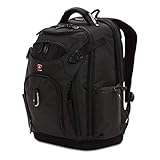
- Tech Backpack: The 19-inch laptop bag blends contemporary design with 60 innovative tool storage solutions to protect your tech and tools, keeping all your essentials neatly organized
- Effortless Tool Organization: This tool bag includes an essentials' organizer that keeps tools, power cords, chargers, and business cards neat and accessible
- Secure Storage: This innovative laptop black backpack features a padded compartment for a 15-inch laptop or tablet with a USB built-in port for charging
- Multiple Pockets: Add-a-bag trolley sleeve slides over carry-on luggage handles, a quick pocket allows for easy access to essentials, mesh side pockets accommodate water bottles, and a crush-resistant pocket keeps your glasses safe
- Comfortable to Carry: The laptop bag includes ergonomically contoured mesh shoulder straps, a wire-reinforced grab handle, airflow back padding, and an EVA molded bottom
Technician dispatch and service work
Service organizations should look for a workflow that connects scheduling and dispatch to service orders, technician activity, equipment or parts, time records, and billing. Acumatica describes workflows spanning scheduling, dispatch, service orders, technician activity, inventory, billing, and customer information. Acumatica’s field service management page
Other vendor examples emphasize particular steps in that process: FIELDBOSS lists mobile service tickets, equipment and material tracking, time tracking, purchase orders, and offline mode. Trimble Viewpoint Vista describes mobile work orders, electronic signatures, invoice routing, custom forms, a dispatch board, and a connection to its back-office accounting system. These are vendor-stated capabilities; verify that they match your actual procedures and system setup. FIELDBOSS’s mobile field service page Trimble Viewpoint Vista’s field service page
Rank #2
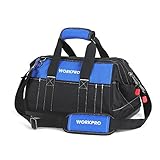
- Premium Materials & Construction: This tool bag is made from 600D polyester fabric that provides excellent durability and reliability. The double-layer fabric construction with fine stitching throughout the entire bag enhances its strength and durability for long-lasting use, helping prevent tears and damage during use
- Multi-Pockets & Large Interior Space: Our tool bag boasts 8 sturdy pockets inside, 13 exterior pockets and 8 belts for versatile storage of wrenches, pliers, screwdrivers and accessories. It will keep your gear organized and secure, no more digging through the bag to find that one plier. The bag is designed with large interior space which affords you retrieval of any tool. Size: 16" x 9" x 10"
- Wide Open Mouth & Double-Pull Zipper: This tool bag features wide open mouth with an internal metal frame and top double-pull zipper for easy organization and access. Just pull the zipper to open this bag smoothly and put in or take out your tools quickly when needed
- Abrasion-Resistant & Water-Proof Base: The hard water-proof molded base keeps the bag clean and dry, protects your tools in the bag from hard falls. No need to worry about your tools getting rusty and wet
- Comfortable Carrying Options: Our tool bag comes with the extra padded handle and adjustable shoulder strap which add extra comfort when carrying of heavy loads and allow for safe and secure transit for professional and homeowner use
Asset inspections and maintenance
Organizations responsible for facilities, infrastructure, or other assets may need inspection forms, work orders, service requests, location or GIS data, and compliance reporting. Trimble Unity Field describes these workflows along with offline access and synchronization when connectivity is available. Trimble Unity Field’s mobile app page
What to compare before choosing an app
Workflow fit
Trace a typical job from assignment to closeout. A construction crew’s core record may be a drawing-linked task; a service technician’s may be a work order; an asset operator’s may be an inspection tied to a location. Check that the app supports the records and handoffs your process requires, rather than relying on a broad “field management” label.
Rank #3

- Premium Tool Bag: Bring the essentials to the jobsite with our exclusive 15 Inch Tool Bag made to save you time and energy by keeping your tools organized and within quick reach
- Spacious Storage: Our tool bag is generously designed with 3 external pockets and a large main compartment for tool organization—perfect for stowing smaller handheld tools as well as other bulky items
- Durable Construction: Made from rugged, 600 denier polyester, this tool bag is water-resistant and features reinforced stitching throughout wear areas to ensure its long-term durability
- Always Secure: Designed with a spring-loaded opening, the technology provides wide-open, easy access with a quick and secure closure, making transporting your tools, equipment, and gear around the job simple
- Complete Your Setup: Keep your tools, equipment, and gear organized and get the job done faster with our innovative tool rigs, tool belts, and pouches that are designed exclusively for contractors, technicians, handymen, electricians, and more
Offline access and synchronization
Offline mode can matter at sites with poor or no connectivity, but the label alone does not tell you what remains usable. Ask the vendor which drawings, maps, work orders, forms, and attachments are available offline; whether users can create or edit records; what happens when several people change related information; and how changes sync after a connection returns. Trimble Unity Field describes offline access and synchronization when connectivity is available, while Fieldwire and FIELDBOSS also list offline capabilities. The exact offline behavior should be confirmed for the app and workflow you plan to deploy.
Field records and documentation
List the information workers must capture and the records the office must receive. Depending on the workflow, that can include photos, signatures, forms, labor or time, materials, equipment details, cost information, and completion reports. Check whether workers can enter these details on a phone or tablet and whether managers can review the resulting records in the systems they use.
Rank #4

- TOOL AND GEAR ACCESS: The Tool Station Pro Backpack unzips halfway for quick tool access or fully to convert into a convenient work station
- 27-POCKETS: Backpack features 18 interior pockets and 9 exterior pockets
- MOLDED BOTTOM: Durable wide bottom keeps backpack upright and protects contents against the elements
- USB PORT: External USB-C Port with 1.5-Foot cord offers a convenient way to charge devices inside and outside the backpack
- DURABLE AND WATER-RESISTANT: Water-resistant backpack is constructed with 1680d material to withstand tough job sites for long-lasting performance
Connections to office systems
Map required connections before selecting a product: accounting, ERP, inventory, customer records, GIS, or asset systems may be essential. A vendor’s statement that a product connects to a back-office system does not establish compatibility with every edition, configuration, or integration your organization uses. Ask what is supported, whether setup or additional services are required, and which data moves in each direction.
Quick wins for a faster PC:
Repair Windows errors before they cause bigger problemsFix Now →Scan for outdated or missing drivers - takes under a minuteDriver Scan →Clear out junk files and repair common Windows errorsFree Scan →Operational visibility
Confirm how dispatchers and managers see assignments, status changes, field updates, and completed work. A useful fit depends on whether the information arrives in time and in a form the office can act on—not just whether a mobile app can collect it.
Best Value

- 【SMART ORGANIZATION】Ytonet tool backpack opens wide for fast access and uses over 20+ tool compartments, 4 side holders, and 4 front utility pockets to separate hand tools, meters, cables, and supplies. This tool bag organizer keeps frequently used gear visible and within reach. Ideal for electricians, HVAC technicians, and maintenance crews. No more digging through one deep compartment.
- 【STABLE HARD BOTTOM】The hard base helps this heavy duty tool backpack stand upright while loading, resists everyday jobsite wear, and keeps stored gear off damp or dirty ground. An anti-slip surface adds stability when the electrician backpack is set down. Ideal for construction, workshop, and field service use. No more collapsed sides or unstable loading.
- 【1680D JOBSITE BUILD】Made with 1680D water-resistant fabric and reinforced stitching, this tool bag backpack is designed for repeated travel between vehicles, buildings, and work areas. A sturdy metal handle provides a balanced hand-carry option when the bag is packed. Ideal for contractors and service technicians who need a heavy duty tool bag for daily transport.
- 【LAPTOP AND SMALL-PART STORAGE】A rear compartment fits up to a 15.6inch laptop, while a water-resistant pocket helps separate sensitive items. Two included accessory pouches organize connectors, fasteners, and small parts. This tool backpack with laptop compartment works as an electrician tool backpack or technician backpack for network installation and mobile service.
- 【COMFORTABLE HANDS-FREE CARRY】Padded pressure-reducing shoulder straps, an ergonomic back panel, and breathable mesh help improve comfort during long walks and frequent stops. Use this construction backpack as a hands-free electrician tool bag or maintenance tool bag for electrical work, automotive repair, DIY projects, and field service.
How to evaluate a field management app
- Define the primary workflow. Choose the main use case—construction coordination, technician service, or asset inspection and maintenance—and document the steps from assignment through completion.
- List required records and users. Identify which roles need access and what each must view, edit, sign, photograph, or submit in the field.
- Test the mobile experience on intended devices. Verify supported operating systems and device requirements against the phones or tablets your team will use. Fieldwire lists iPhone, iPad, and Android; confirm current requirements directly with each vendor before standardizing hardware. Fieldwire’s construction field management page
- Walk through a realistic offline scenario. Use the actual drawings, forms, maps, or work orders workers need. Test edits without connectivity and confirm how and when they synchronize afterward.
- Validate integrations and reporting. Have the vendor explain how required customer, inventory, accounting, ERP, GIS, or asset data connects, and verify that the reports satisfy your operational and compliance needs.
- Check the full job lifecycle with field and office staff. Follow an assignment from dispatch or task creation through field updates, documentation, review, and closeout. Note where work would still require duplicate entry or another system.
What the available product examples establish—and what they do not
Official product pages provide examples of how the category divides: construction coordination in Fieldwire, mobile service workflows in FIELDBOSS and Acumatica, service management and work orders in Trimble Viewpoint Vista, and inspection and GIS-oriented field work in Trimble Unity Field. They describe vendor-stated features, not independently verified results or proof that one product is superior.
The reviewed product information does not establish a universal best app, comparative savings, reliability, ease of use, pricing, or current plan packaging. Treat those as questions to verify for your organization and the specific product edition under consideration.
Quick Recap
Product prices and availability are accurate as of the date/time indicated and are subject to change. Any price and availability information displayed on Amazon at the time of purchase will apply.




