If an Ethernet cable is stuck, first identify what is holding it: the RJ45 plug’s latch, a rubber boot covering the latch, or a device-specific port mechanism. Press an accessible latch and pull the plug straight out gently. If it does not release, stop—forcing it can damage the cable or port. Dell warns against using extra force and gives a special procedure for certain expandable laptop ports.
Identify what is stuck before pulling
An Ethernet plug is normally held in its socket by a small plastic latch, sometimes called a clip. Pressing that latch down releases the plug. Before trying again, look closely at the connector and port:
As an Amazon Associate I earn from qualifying purchases.
- The latch is intact and reachable: press it down while pulling the connector straight out gently.
- A rubber boot overlaps the latch: the boot may be riding over the clip and making it difficult to press. X-Rite documents this kind of interference with an RJ45 connector. Inspect the boot and latch rather than assuming the port is jammed: X-Rite’s note on rubber boots and cable removal.
- The latch is broken or missing: the plug may not release in the usual way. Do not pry harder; if gentle pressure does not free it, get help from the device maker or a repair technician.
- The port moves or has an unusual shape: check the manufacturer’s instructions for that specific device before applying pressure in any direction.
Try the safe removal steps
- Make the area easy to see. If practical, improve the lighting and support the device so you can inspect the plug and port without twisting the cable.
- Check the device instructions. Follow the guidance for the exact port design. For certain Dell laptops with expandable Ethernet ports, Dell instructs users to push the port downward while pressing the cable tab. The guide lists Latitude 7280, 5410, 7480, 7490, 5501 and Vostro 14 3440, 14 5468 and 15 5568; it was last modified April 18, 2026. Do not apply that downward motion to other RJ45 sockets unless their manufacturer directs you to: Dell’s instructions for its expandable Ethernet port.
- Press the latch and pull straight. If the tab is intact and accessible, press it down and gently withdraw the plug in line with the port. NetAlly’s general guidance is to press the clip down and pull straight out: NetAlly’s RJ45 port guidance.
- Stop if it resists. If the plug remains stuck with gentle pressure, do not increase force or keep repeating the attempt. Dell warns that extra force can damage the cable or port. Ask the device manufacturer or a repair technician to assess the connector.
Why one laptop port may need a different motion
Some laptops use an expandable Ethernet port rather than a fixed, conventional socket. Dell’s instructions for the listed models say to push that port downward while pressing the cable’s release tab; pulling upward can make removal harder. This is a model-specific procedure, not a general rule for Ethernet ports. If your device is not covered by that guide, use its own instructions.
Quick wins for a faster PC:
Repair Windows errors before they cause bigger problemsFix Now →Fix the driver behind crashes, sound loss and screen glitchesFind Drivers →What to do about a broken Ethernet latch
A replacement latch clip is a repair option for some patch cords after the cable has been removed. It attaches to the RJ45 connector to replace a missing latch; it is not an extraction tool and will not release a plug that is still stuck in a port.
#1 Best Overall

- Professional RJ45 Crimper: Ethernet crimping tool kit includes RJ45 Crimper Pass Through,20PCS CAT6 Pass-Thru Connectors, 20PCS Connector Covers, 1 x Wire Stripper and 1 x Network Cable Tester(9V Battery Not Included)
- All-In-One RJ45 Crimping Tool: Wire stripping, crimping, and cutting tool for paired-conductor data cables.Ideal for crimping 8 position modular plugs such as CAT5e, CAT6 and CAT6a connectors (including shielded) (not AMP)
- Wide Application: Designed for telephone lines, alarm cables, computer cables, intercom lines, speaker wires, and thermostat wiring Scanning Function - Find out working wire (network cables, phone lines, buried cable and even cable behind wall)
- Long Lasting: Made of heavy-duty steel, this RJ45 passthrough crimp tool delivers high torque without bending and is highly durable. The black oxide finish resists rust and corrosion, making it an excellent tool for cutting,stripping and crimping
- Good Workmanship: The blades are made of high quality steel blade, sharp and replaceable which maintains razor sharpness. This cat6 crimper is made of industrial steel and Polypropylene, it is durable and safe
Compatibility matters. Delock describes item 86421 as a 40-piece RJ45 repair-clip set in assorted colors, with perforations intended to fit different plugs: Delock’s product details. That is the vendor’s product description, not an independent fit test. VPI says its replacement clips do not fit cables with snagless boots, so check the cable design and the clip’s fit before using this type of repair: VPI’s compatibility information.
If the cable or connector is damaged beyond a suitable repair, replacing the cable may be more practical. Do not use a repair clip to compensate for damage to the device’s port.
Rank #2

- The 1/8" SwiftCatch Release Tool is required for releasing the cable from the SwiftCatch with the 1/8" VistaView Cable Railing kits.
- Tool slides into the SwiftCatch fitting and releases the cable from its grips.
- Recommended for installing 1/8" VistaView Cable Railing Assembly Kits.
When to hand it to a technician
Stop and seek help if the latch is inaccessible or broken, the cable will not release with gentle pressure, the port appears damaged or loose, or you cannot tell how a nonstandard port is meant to move. Manufacturer guidance supports gentle, model-specific removal; it does not establish one safe extraction method for every jammed or broken-latch situation. Redline’s AN-80i manual, for example, describes a light-pressure procedure with its own plastic removal tool and cautions against inserting it more than half an inch. That procedure is specific to that equipment, not a universal recommendation: Redline AN-80i Installation Guidelines (dated May 27, 2011).
Recommended Free Tools
Quick Recap
Best Value

- Fast, reliable RJ45 Crimp Tool for voice and data applications with Pass Through 50PCS RJ45 connector plug, 50PCS Covers Network/Phone cable tester, plier, Mini Cable Stripper (Replacement blades available)
- RJ45 Pass Through Crimp Tool - Reduce prep work time significantly with Pass Through technology
- Compact RJ45 Crimper - crimps and trims RJ45 Pass Through connectors onto paired-conductor cables (round STP/UTP cables)
- Wiring diagram on the tool helps eliminate rework and wasted materials
- Phone/Network Cable Tester - Network Cable Tester for cables with RJ45/RJ11/RJ12 Connector (9V battery not included); We can test our just finished cable in this tester, and we will quickly know whether this cable work or not
Rank #4

- [Applicable] Can be Untwist and Separator CAT5/CAT5e/CAT6/CAT7 Pairs FAST!
- [Advantages] Save time and reduce your finger pressure on large jobs.
- [Portable] Simple to Use & Easy to carry.
- Reduce damage to twisted pair during separation.
- Specially designed for fingers, it is more simple and comfortable to use.
Rank #3
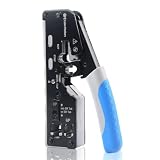
- All-In-One Cable Creator: Create professional-quality Ethernet cables with this Cat 8 Ethernet cable crimping tool. Use this shielded Cat6 crimp tool with bulk Ethernet cable and connectors to build custom-length patch cables for your network.
- Cut, Strip & Crimp in One Tool: This shielded RJ45 crimp tool pass through combines a wire cutter, wire stripper, and wire crimper for an all-in-one solution. The Cat6a shielded crimp tool makes it easy to create custom-length ethernet wire quickly and efficiently.
- Broad Ethernet Compatibility: This RJ45 pass through crimp tool works with Cat5, Cat6, Cat6A, Cat7, and Cat8 shielded Ethernet connectors. It is compatible with RJ11, RJ12, and RJ45 connectors and supports both pass-through connectors and standard RJ45 connectors. This RJ45 crimp tool features an adjustable switch to adjust the crimp type and a built-in crimping clip for shielded dovetail clips found on shielded cable.
- Pass-Through Simplicity: The Cat 8 crimping tool is optimized for pass-through connectors, simplifying wire termination and reducing errors. Just insert, pass through, and crimp with this shielded Cat6 crimp tool for reliable results every time.
- Rugged, Durable Design: This RJ45 crimp tool shielded is built with a durable metal frame for long-lasting performance. Ideal for IT professionals, network installers, and DIYers looking for a reliable Ethernet crimping tool for home or commercial networks.
Product prices and availability are accurate as of the date/time indicated and are subject to change. Any price and availability information displayed on Amazon at the time of purchase will apply.




