The Epomaker Glyph is a compact 75% keyboard built around a distinctive retro design: round keycaps, two displays, a rotary knob and a lever that doubles as Enter and Backspace. It also offers tri-mode connectivity and hot-swap switches. Whether it is a good fit depends less on its unusual looks than on how you value layout, switch feel, wireless use, battery behavior and typing posture.
What the Epomaker Glyph offers
EPOMAKER lists the Glyph as an 83-key, 75% ANSI US keyboard with a top-mount design, hot-swappable PCB, PBT round keycaps, TFT screen and customizable rotary knob. It connects over USB-C, 2.4GHz wireless or Bluetooth, and the manufacturer lists compatibility with Windows, Mac and Android. EPOMAKER describes its design as “Retro-typewriter” and advertises a five-layer acoustic construction. EPOMAKER Glyph product page
As an Amazon Associate I earn from qualifying purchases.
Tom’s Guide reports that the reviewed unit has dual displays and a lever that registers Enter when pushed up and Backspace when pulled down. The review lists dimensions of 13.66 × 8.14 × 2.24 inches and a weight of 2.59 pounds. Its reviewer described the sound as somewhere between “creamy and clacky”—a subjective impression, not a standardized measure. Tom’s Guide review
Crashes, No Sound, or Screen Glitches?
Random freezes, missing sound and display glitches usually trace back to one bad driver. Find and replace yours safely.Free scan · under a minutePC Slower Than It Used to Be?
A free scan shows the junk files, broken settings and background clutter dragging Windows down - then fixes them in one click.Free scan · Windows 10 & 11The unusual controls are central to the buying decision. The displays and knob may be useful if you want visible status or dedicated control at the keyboard; the lever and round caps make the Glyph more visually and physically distinctive than a conventional compact board. If you prefer a restrained look or familiar key shapes, those same features may be drawbacks.
#1 Best Overall

- 【Optimized 75% Compact Layout&Innovative Gasket Structure】The F75 redefines space efficiency with its 75% compact layout. This design integrates all the essential keys in a smaller footprint, making it perfect for streamlined desks and mobile setups without sacrificing functionality. Experience the pinnacle of comfort with the gasket structure. This advanced design ensures a flexible yet firm typing experience, reducing fatigue during prolonged use while maintaining a consistent and responsive key feel.
- 【Acoustic Mastery with Five-Layer Padding】The F75 boasts a five-layer sound and shock-absorbing internal design, including two layers of Poron foam, IXPE switch pad, PET sound enhancement pad and a bottom silicone pad. This sophisticated construction significantly reduces typing noise and resonance, delivering a tranquil and focused typing environment.
- 【Precision-Engineered 1.2mm PCB&Pre-Lubricated Mechanical Switches】At the heart of the F75 is a meticulously crafted 1.2mm single-key slotted PCB. This precision engineering ensures that each keystroke is registered with accuracy and stability, providing a satisfying and reliable typing experience. The FF75 also features factory-lubricated mechanical switches that offer a seamless and smooth actuation. This pre-lubrication process ensures a fluid, consistent keystroke right from the start.
- 【Three-Way Connectivity for Every Scenario&4000mAh Battery】Offering BT, 2.4GHz wireless, and wired USB connectivity, the F75 adapts to your specific needs. Whether it's for a clutter-free wireless setup or a stable wired connection, this keyboard is ready for any situation. Equipped with a large 4000mAh battery, the F75 delivers extended usage times. This generous battery capacity ensures that your keyboard is always ready for long work sessions or intense gaming marathons.
- 【Multimedia Control Knob&Full-Key Hot-Swap Functionality】Effortlessly fine-tune your media settings using the integrated multimedia control knob, adding a layer of convenience that ensures swift adjustments without disrupting your workflow. Dive into a realm of customization with the full-key hot-swappable sockets of the F75. This feature facilitates seamless switch replacements, accommodating your desired typing feel, whether it's for gaming, typing, or creative endeavors.
How the Glyph compares with the EPOMAKER G84
The G84 is a useful conventional comparison from the same manufacturer. It keeps a compact layout but uses a more familiar keycap profile and gasket mount. The figures below are manufacturer specifications; the G84 battery-life estimates are EPOMAKER claims, not independently tested runtime.
| Feature | EPOMAKER Glyph | EPOMAKER G84 |
|---|---|---|
| Layout | 83-key, 75% ANSI US, according to EPOMAKER | 84-key, 80% ANSI, according to EPOMAKER |
| Mount | Top mount, according to EPOMAKER | Gasket mount, according to EPOMAKER |
| Keycaps | Round PBT keycaps, according to EPOMAKER | Cherry-profile PBT double-shot keycaps, according to EPOMAKER |
| Connectivity | USB-C, 2.4GHz and Bluetooth, according to EPOMAKER | Cable, 2.4GHz and Bluetooth 5.0, according to EPOMAKER |
| Battery capacity | 8,000mAh, according to EPOMAKER | 4,000mAh, according to EPOMAKER |
| Battery-life claim | Not stated on the cited product page | 15 hours with backlight on or 400 hours with it off, according to EPOMAKER |
| Hot-swap | 3-pin or 5-pin switches, according to EPOMAKER | 3-pin or 5-pin switches, according to EPOMAKER |
Sources: EPOMAKER Glyph product page and EPOMAKER G84 product page.
The 75% and 80% labels indicate different compact layouts, but the percentage alone does not tell you exactly which keys are present or how easy they are to reach. Check the layout image and key map for the specific model, especially if you regularly use navigation keys or function-row shortcuts. The Glyph’s 83-key ANSI US layout and G84’s 84-key ANSI layout are not interchangeable just because their key counts are close.
What’s actually slowing this PC down?
Pick the symptom - the matching free tool is one click away.
Rank #2

- Compact Size, Function Core: With 80 programmable keys and a customizable screen, the F75 Max upgrades from its successful predecessor EPOMAKER X Aula F75 with equal reliability and incredible new functions. Revel in the convenience the volume knob offers and enjoy the Gif-showing screen that makes Backlight customization fun and easy. With connectivity, battery monitor and indicator lights combined in one, the F75 Max keyboard with TFT smart display will be your inseparable helper and productivity booster in gaming and life
- Stylish and Ergonomic: Say goodbye to wrist strain and finger fatigue, as this Cherry-profile keyboard becomes your ergonomic assistant in browsing the digital world. With the 2cm-low front height and a 2-stage adjustable kickstand, typing angle can be as high or low as your comfort calls for. The Gasket-Mount structure separates F75 Max’s PCB from its shell to rid the harsh bottom-out, while the flex-cut PC plate gives it extra flexibility for soft and soothing typing
- Satisfying Creamy Sound: Indulge in the creamy smooth melody of F75 MAX, composed by the rhythmic thud of every keystroke. Factory-lubed and tuned, the stabilizers and linear switches sound as incredible as they feel, with the right amount of creamy and thocky combined. Full of foams and silicone sandwiched between plate, PCB and bottom case, noise caused by echo within the keyboard is eliminated, while the IXPE switch pad and PET pad highlight the mellow switch sound that’s rich and pleasant
- Versatile Gaming Keyboard: Game in style with this anti-ghosting keyboard that performs stably without double chattering or mistype in BT, 2.4Ghz wireless and cable mode, with 1000hz polling rate in USB and 2.4G modes. Its support of NKRO allows gamers to input multiple keys simultaneously, handy in FPS and Rhythm Games, while its compatibility with Android, Windows, Mac and Linux is valuable for programmers and clerks in the office
- Custom Keyboard with Compatibility: As personalization being our core branding, our F75 Max isn’t shy in the realm of customization. With south-facing per-key LEDs and light diffusers on the Reaper switches, the RGB Backlight shines brightly with pre-set dynamic effect, adjustable in color and style via software, screen and shortcut. The hot-swappable F75 MAX comes with plate-mount stabilizers but is compatible with 3/5-pin mechanical switches and screw-in stabilizers for experimenting typing feel and sound, while the software offers key remapping and macro editing for efficiency and accessibility
Compare switch feel and hot-swap compatibility
Tom’s Guide says its reviewed Glyph came with linear Wisteria V2 switches and notes that the reviewed offering had one stock switch option. A linear switch moves without a tactile bump; that does not establish whether its force or sound will suit you. If you prefer tactile or clicky switches, check the stock options for the exact regional SKU before buying. Tom’s Guide review
The Glyph’s hot-swap PCB lets owners replace switches without soldering, but compatibility still matters. EPOMAKER specifies 3-pin and 5-pin support, while Tom’s Guide describes compatibility with south-facing mechanical switches. Confirm that a replacement switch matches the board’s fit and orientation before ordering; hot-swap support does not mean every switch will work. EPOMAKER Glyph product page
Tom’s Guide also names the Keychron V1 Ultra 8K, Lemokey P1 Pro and Hexgears Immersion A3 TKL as alternatives for buyers prioritizing broader stock-switch choice. The cited review does not establish current specifications or prices for those models, so compare current manufacturer listings and exact variants rather than assuming their configurations.
Rank #3

- 【Optimized 75% Compact Layout&Innovative Leaf-Spring Gasket Structure】The F75 redefines space efficiency with its 75% compact layout. This design integrates all the essential keys in a smaller footprint, making it perfect for streamlined desks and mobile setups without sacrificing functionality. Experience the pinnacle of comfort with the leaf-spring gasket structure. This advanced design ensures a flexible yet firm typing experience, reducing fatigue during prolonged use while maintaining a consistent and responsive key feel.
- 【Acoustic Mastery with Five-Layer Padding】The F75 boasts a five-layer sound and shock-absorbing internal design, including two layers of Poron foam, IXPE switch pad, PET sound enhancement pad and a bottom silicone pad. This sophisticated construction significantly reduces typing noise and resonance, delivering a tranquil and focused typing environment.
- 【Precision-Engineered 1.2mm PCB&Pre-Lubricated Mechanical Switches】At the heart of the F75 is a meticulously crafted 1.2mm single-key slotted PCB. This precision engineering ensures that each keystroke is registered with accuracy and stability, providing a satisfying and reliable typing experience. The FF75 also features factory-lubricated mechanical switches that offer a seamless and smooth actuation. This pre-lubrication process ensures a fluid, consistent keystroke right from the start.
- 【Three-Way Connectivity for Every Scenario&4000mAh Battery】Offering BT, 2.4GHz wireless, and wired USB connectivity, the F75 adapts to your specific needs. Whether it's for a clutter-free wireless setup or a stable wired connection, this keyboard is ready for any situation. Equipped with a large 4000mAh battery, the F75 delivers extended usage times. This generous battery capacity ensures that your keyboard is always ready for long work sessions or intense gaming marathons.
- 【Multimedia Control Knob&Full-Key Hot-Swap Functionality】Effortlessly fine-tune your media settings using the integrated multimedia control knob, adding a layer of convenience that ensures swift adjustments without disrupting your workflow. Dive into a realm of customization with the full-key hot-swappable sockets of the F75. This feature facilitates seamless switch replacements, accommodating your desired typing feel, whether it's for gaming, typing, or creative endeavors.
Understand wireless options and battery evidence
The Glyph supports USB-C, 2.4GHz and Bluetooth, giving you a wired option as well as two wireless modes. Its stated 8,000mAh capacity describes the battery’s capacity, not how long the keyboard will run between charges. Tom’s Guide’s reviewer needed to recharge after about 20 hours while using the screens and RGB lighting at maximum. The review notes that screen and lighting settings affect runtime; that result is one reviewer’s setup, not a general battery-life promise. EPOMAKER Glyph product page Tom’s Guide review
The Tool Desk
Outbyte PC Repair FREERepair Windows errors before they cause bigger problemsFix Now →Outbyte Driver Updater FREEFix the driver behind crashes, sound loss and screen glitchesFind Drivers →EPOMAKER states that the G84 lasts 15 hours with backlighting on or 400 hours with it off. Treat these as manufacturer estimates, not directly comparable to the Glyph reviewer’s test: the evidence comes from different methods and conditions. If you plan to use the Glyph’s displays and lighting heavily, expect settings and usage to matter more than the capacity number alone. EPOMAKER G84 product page
Independent reader supportYour contribution helps us test, update, and keep practical guides available for everyone.Check keycap shape, desk fit and construction
The Glyph’s round, uniform-height caps look and feel different from conventional sculpted keycaps. The G84 uses Cherry-profile caps, a familiar sculpted profile. Neither profile is universally better: if possible, try a similar shape before committing, particularly if you type for long sessions or rely on muscle memory.
Rank #4
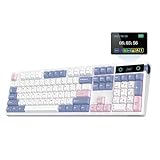
- PRO with Screen, Upgrade on Display: Featuring a sophisticated smart screen, the TH108 PRO gaming keyboard puts vital information and personalised flair right at your fingertips. With this powerful display, instantly verify the time, monitor keyboard power, or toggle RGB backlight with the volume knob doubles as screen control (FN+Knob to switch), without losing focus. Easily upload your own GIFs or pictures with the Chrome-based software on Mac or Windows computers; to flaunt the team you battle for or show off a perfectly timed meme that puts a smile on your face. With the custom screen, express your unique style that moves beyond static backlight.
- 100% Sized, 100% Spectacular Performance: Level up your setup with the TH108 PRO full-sized gaming keyboard, engineered for intense gaming sessions and demanding office tasks. Built to last, this full-sized keyboard features 104 double-shot PBT keycaps with unfading colors that withstand the test of time, and a thick body in ABS plastic that weighs over 1.1kg for un-moving stable typing. The premium build quality goes beyond the exterior, with the massive 10,000mAh battery and the lab-tested gaming chips, the TH108 PRO gaming keyboard promises 2ms super low latency in cable mode and 1k polling in convenient 2.4Ghz wireless mode, for swift and stable execution of complex in-game maneuvers.
- Long-Lasting Wireless Keyboard: Power passes the competition and ditches the charging cable with the outstanding 10000mAh battery of the TH108 PRO keyboard. Unlocking the realm of unfettered movement and sustained performance with this tri-mode wireless keyboard, without frustrating cable drag hindering swift mouse movements, for seamless transition between up to 5 paired devices under cable, 2.4Ghz and BT modes. PC, Mac laptop, or Android tablet, whichever devices you game on, the 200-hour wire-free battery life makes inconvenient mid-game recharge a worry in the past.
- Hot-Swappable Custom Keyboard: Personalise functions, sounds and feel of each keystroke as you please, with the powerful set-up of the TH108 PRO custom keyboard. Experiment the various acoustic feedback and feel of mainstream 5-pin mechanical switches with this hot-swappable keyboard; and bask in the thocky melody of Creamy Jade or the tranquil silence of Sea Salt Silent switches of ours, both factory-lubed for out-of-box perfection. Try out the intuitive web-based driver to remap, record macros, toggle backlight and sensitivity of TH108 RRO keyboard across Mac and WIN devices, for the ultimate PC peripheral that matches your gaming style and workflow.
- Acoustic Bliss with 5-Layer Padded Gasket-Mount: Crafted with a 5-layer enhancement set and a complex internal design, the TH108 PRO Gasket keyboard promises blissful switch ASMR with a soft, flexible feel. The market-tested sound-improvement formula of sandwich foam, IXPE switch pad, Sound-Enhancement PET, EPDM switch socket foam, and bottom silicone gifted TH108 the satisfying creamy sound by riding resonance and delivering exceptional comfort by cushioning shocks after each bottom-out. Treat your ears and fingers to an unparalleled level of tactile and auditory joy, as TH108 PRO accompanies your gaming victories and professional endeavors.
For desk fit, the Glyph measures 13.66 × 8.14 × 2.24 inches and weighs 2.59 pounds according to Tom’s Guide. Compare those figures with your available desk space and whether you plan to carry the board. EPOMAKER lists a silicone wrist rest in the Glyph’s box contents, along with a detachable USB-A-to-C cable, 2.4GHz receiver, three extra switches, two extra silicone stands, a switch/keycap puller and multilingual manual. The company cautions that packaging and included accessories may vary slightly. Tom’s Guide review EPOMAKER Glyph product page
The Glyph is top-mount; the G84 is gasket-mount. These describe different construction approaches, not a quality ranking. Choose based on the typing feel and sound you prefer, and avoid assuming that either mount type guarantees a particular result without comparing the board itself.
Recommended Free Tools
Who should choose the Glyph?
- Consider the Glyph if you want a compact 75% layout with tri-mode connectivity, a knob and screens, enjoy its typewriter-inspired appearance, and are comfortable with its reviewed linear stock-switch option.
- Consider a more conventional compact board if you prefer standard sculpted keycaps, want a familiar layout, or do not want a lever and displays to define the keyboard’s look and controls. The G84 is one evidence-backed 80% alternative, with Cherry-profile caps and gasket mount.
- Compare other models closely if your top priority is a specific tactile or clicky stock switch. Check the exact SKU and current manufacturer specifications rather than relying on model names alone.
EPOMAKER’s product page showed a price of $125.10, discounted from $139, when accessed on October 7, 2026. That is a dated price snapshot, not a durable recommendation; check the current price, seller, availability, regional layout and switch configuration before purchasing. EPOMAKER Glyph product page
Quick Recap
Product prices and availability are accurate as of the date/time indicated and are subject to change. Any price and availability information displayed on Amazon at the time of purchase will apply.




