Do these 3 things before closing this tab:
1Fix the driver behind crashes, sound loss and screen glitches2Repair Windows errors before they cause bigger problems3Scan for outdated or missing drivers - takes under a minuteNo—not for ordinary connections. A fully powered-off phone cannot maintain a Bluetooth link to earbuds, a car, or another device. A dark or locked screen is different: the phone may still be running, so Bluetooth can continue under operating-system and app limits. Supported iPhones have a separate, limited Find My feature that can help locate them after shutdown; it does not make ordinary Bluetooth work while the phone is off.
What “off” means for Bluetooth
When a phone is fully shut down, expect its normal Bluetooth audio, data exchange, and connection requests to stop. Bluetooth is managed by the phone’s hardware and software, and ordinary communication requires the phone to be operating. Apple’s Core Bluetooth documentation describes how apps use Bluetooth, while its archived Core Bluetooth guide explains that an app’s background or suspended state affects what Bluetooth tasks it can perform.
As an Amazon Associate I earn from qualifying purchases.
If the display is merely asleep or the phone is locked, the phone is still on. Bluetooth may remain available, though background behavior depends on the operating system, app permissions, and power management. A screen timeout is not a shutdown.
Why a powered-off iPhone may still appear in Find My
Find My network is a specialized device-finding feature, not a normal Bluetooth connection. Apple says nearby Apple devices can use Bluetooth to detect a device or accessory and report its approximate location to its owner. That relay can allow a supported iPhone to be located for a limited time after shutdown when Find My network is configured.
#1 Best Overall
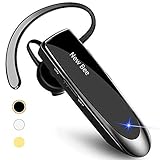
- CVC 6.0 Handsfree Talking: Employs CVC 6.0 technology for clear sound quality during calls, ensuring both you and the person on the other end can hear clearly without distortion
- Long Lasting Battery Life: Requires only 2-3 hours charge time and delivers 22 hours music time, 24 hours talk time, and 60 days standby time, meeting the needs for extended daily use
- Comfortable Wearing Design: Lightweight design at 12 grams does not cause burden to your ears, providing lasting wearing comfort for drivers or businessmen; 360 degree adjustable earbud fits both left or right ear with S/M/L ear tips included for customized fit
- Wide Compatible: Compatible with Bluetooth-enabled devices including iPhone series, Samsung, HTC, LG, SONY, PC, Laptop, iPad, iPod touch, Motorola, and other Android cell phones
- Easy to Carry and Two Device Connection: Connects to 2 devices simultaneously and allows you to hear sound from both; included case helps keep the bluetooth earpiece secure for convenient portability and storage
Apple’s iPhone user guide states a maximum of up to 24 hours after the iPhone is turned off, or up to five hours in power reserve mode. These are Apple-stated limits for supported iPhones, not guarantees for every model or circumstance. Actual availability can depend on model, configuration, operating-system version, battery state, and region. See Apple’s current guidance on Find My and location sharing and adding an iPhone to Find My.
A location report is not the same as a live connection or a precise, continuously updated position. It also does not mean you can make a powered-off iPhone ring immediately. Apple says an offline device may appear on the map, but a sound request cannot play while it is offline; the request remains pending until the device reconnects to Wi-Fi or cellular. Details are in Apple’s instructions for locating a device in Find My.
Rank #2

- Smart Digital Display: Easy-to-read digital display shows the remaining power of the charging case for the refill in time.
- High Capacity and Long-Lasting: Equipped with the 500mAh charging case to juice up the bluetooth headset for almost 72 hours of music/talking time. The single headset offer 18-23 hours of talking time.
- Design Ideas Of Mute: Add the individual mute button on the bluetooth earpiece to meet your demand for muting more simply on the cell phone call. (ONLY ALLOW TO MUTE DURING CALL ON PHONE)
- Ear Painless: Maximizing compactness of wireless headset based on ergonomics. Small and light even unobtrusive but still stable, and provide a more comfortable wearing experience.
- Ultra-Powerful Bluetooth Tech: Wireless earpiece features the updated 5.3 Bluetooth technology to quickly and stably connect devices in the 10m range.
How to enable offline finding on iPhone
- Open Settings. Tap your name, then tap Find My.
- Enable Find My iPhone. In that screen, turn on Find My iPhone and Find My network, if available.
- Check your device’s current options. Apple’s labels and feature availability can vary by iOS version, device, and country or region; follow the current settings shown on your iPhone and Apple’s setup guidance.
Apple also provides an option to temporarily disable Find My network when powering off. If you are concerned about being located, review the shutdown screen and the current Find My settings on your device.
What to expect on Android
Do not assume that an Android phone has the same powered-off finding behavior as a supported iPhone. Google’s Find Hub overview says Bluetooth and location services are required, but that guidance does not establish a universal Android capability to locate a phone after full shutdown, nor which models or time limits might support it. Check current Google guidance and the documentation for your specific phone model.
Quick Recap
Best Value
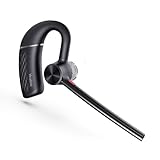
- More stable Bluetooth connection - The Bluetooth 5.3 transmission technology, providing faster one-step pairing connection speed, more stable transmission, lower power consumption and ultra-low latency listening experience . You can move freely with up to a 130ft (40 m) range. Can pair with two devices via Bluetooth at the same time.
- Ergonomic Design - BH71 headset weighs only 0.63 oz (18 g), ergonomic design and light weight ensure a secure fit and lasting comfort. Retractable ear hook and boom arm can be rotated 330° vertically and 180° horizontally. Comes with 3 different sizes of soft rubber ear tips for the ultimate comfortable fit.
- Long battery life - The BH71 Lite single ear bluetooth headset comes with a magnetic charging cable, you can take it everywhere. It's very easy to dock the headset (the magnet firmly holds it) and it starts charging.Single fully charged in 1.5 hours, enough for 10 hours of talk time.
- Hands-Free Call & Mute Function - The Yealink BH71 Lite is a excellent mono Bluetooth headset for cell phone calls,featuring physical buttons to answer/end/reject calls and adjust volume.Add the individual mute button on the wireless earpiece to meet your demand for muting more simply on the conference call.
- Clear Audio Quality - The Bluetooth earpiece are built in 4 beamforming noise canceling microphones, canceling 90% of background noise. providing clear audio for your calls on the go or on the road, not distracted by background noise. Tips: Without USB dongle&charging case. Not compatible with desk phones.
Rank #4

- Connects To: For someone that needs to take and receive calls on a mobile phone.
- Ideal For: Mobile professional who relies on mobile phone for on-the-go communication.
- Audio Performance: Crystal clear Bluetooth audio quality with triple-mic active Digital Signal Processing (DSP), & wind canceling.
- Talk Time & Roaming Range: Up to 7 hours of talk time and you can roam up to 98 feet (30 meters).
- Global Warranty & Wearing Style: 1 year warranty U.S. For global warranty visit Poly.com; light weight over the ear headset.
Rank #3

- 72H Talk Time & 2 Ways to Charge:The single-ear Bluetooth headset comes with a 500mAh charging case for all-day use. Enjoy up to 72 hours of total talk time and a full Type-C charge in about 1.5 hours. The LED power display lets you check battery level at a glance—perfect for work, driving, or travel. Charge the earpiece inside the case, or use the Type-C cable to charge it directly if the case runs out. Never miss an important call because your charging case is dead.
- Clearer Calls for Daily Use: Dual microphones work together to reduce surrounding noise and support clearer voice pickup during cell phone calls. A lengthened main mic helps keep your voice more focused, making the headset a practical choice for driving, business calls, and everyday hands-free conversations.
- Dual Device Connection & Wide Compatibility: Pair this wireless earpiece with two Bluetooth devices such as a smartphone and laptop for convenient switching during daily use. Adopt Qualcomm QCC3020 Bluetooth 5.1 chip to maintain 15m range connectivity with two devices quickly and stably. The handsfree bluetooth headset is compatible with most bluetooth devices such as iOS or Android Phone/ Computer/ PC/ Laptops and so on.
- Adjustable Single-ear Fit: A 270° rotating mic boom,180° swiveling ear hook, and S/M/L ear tips help you adjust the headset for left or right ear wear. The lightweight 15g design is ideal for driving, warehouse shifts, remote work, and customer calls, while different ear tips help you find a more secure everyday fit.
- What You Get & 3-Year Customer Support: 1*Bluetooth Earpiece; 1*500mAh Charging Case; 3*Ear Tips (Size: S/M/L ); 1*Type-C Cable (NO AC ADAPT); 1*User Manual.The headset can be charged through the case for portable power support during daily calls and work use. If there is any issue with your order, please don't worry, we will solve it for you promptly within 24 hours and get 3-year customer support services.
Product prices and availability are accurate as of the date/time indicated and are subject to change. Any price and availability information displayed on Amazon at the time of purchase will apply.




