No. The standard Xbox Wireless Controller uses replaceable AA batteries rather than a built-in rechargeable battery. Microsoft sells a rechargeable battery pack and USB-C cable separately, and compatibility depends on the controller having a USB-C port.
What battery does a standard Xbox Wireless Controller use?
The standard Xbox Wireless Controller is designed for replaceable AA batteries. Microsoft’s controller information refers to AA batteries in its testing, while its rechargeable battery is listed as a separate accessory. Microsoft’s published information does not establish that every controller box includes AA cells, so check the exact product listing or package contents for your model, bundle, and region.
As an Amazon Associate I earn from qualifying purchases.
Can you charge an Xbox controller with a USB-C cable?
A USB-C cable by itself does not recharge the standard controller’s AA batteries. For a rechargeable setup, Microsoft offers the Xbox Rechargeable Battery + USB-C Cable, also presented as the Xbox Play and Charge Kit. The pack fits inside the controller and charges through the cable; your controller must have a USB-C port. Check the controller’s port before buying, especially if you have an older model.
Charging time and estimated runtime
Microsoft says a full charge takes under four hours and estimates up to 30 hours of battery life per charge. The 30-hour figure is not a guaranteed runtime: Microsoft says battery life varies significantly with headsets, additional accessories, usage, and other factors. Its testing used preproduction units. The product page lists a release date of 10 November 2020.
#1 Best Overall

- Large Capacity Xbox Controller Battery Pack:2 pack 6200mWh rechargeable batteries provide up to 28 hours running time. Ukor xbox rechargeable battery pack is compatible with Xbox One /Xbox One X / Xbox One S / Xbox Series X|S/Xbox One Elite Wireless Controller.
- Xbox battery pack rechargeable Fast Charging, Durable Long Life: longer battery life to recharged 2000 times, 2.5 hours charging time.The charger kit for Xbox one battery support 2-battery charging simultaneously about 2.5hrs with no interruption when DC Input >5V/1A.
- Safety Design: Over-charged/over-current/over-heated/ short-circuit protection, it is safe to charge the batteries overnight.Anti-overcharged board inside the Xbox controller charger battery pack can make sure the safety for over-night charging.Saving a lots money after having this Xbox rechargeable battery pack.
- Portable & Convenient: Built-in charging cable, equipped with an extra Micro-USB port and a Type-C charging port for flexible charging options. The USB-C cable for the Xbox rechargeable battery is attached to the side of the charger, offering a convenient way to charge the battery packs. You can charge the battery pack of the Xbox controller using a regular mobile phone charger, a game console or a computer's USB port.
- LED Indicator show charging status: The battery charger has a clear LED charging indicator, when the Xbox one battery pack is charged fully, the battery charger’s indicator light is green, otherwise is red.
Microsoft says the pack can recharge while you play or afterward, including when the Xbox is in standby. Standby charging depends on the console being in that state and connected to the controller by cable.
Which Xbox controller battery option should you choose?
| Option | How it works | What to check |
|---|---|---|
| Replaceable AA batteries | Put AA cells in the controller’s battery compartment. | Check the exact package contents if you need to know whether cells are included. |
| Rechargeable AA batteries | Use rechargeable AA cells and charge them in a suitable external charger. | Confirm the cells and charger meet your needs; specific brands and performance have not been compared here. |
| Xbox Rechargeable Battery + USB-C Cable | Install Microsoft’s rechargeable pack and use the cable to charge it. | The controller needs a USB-C port. Microsoft’s charge-time and runtime figures are manufacturer specifications, with the runtime caveats above. |
Choose ordinary AA cells if you want replaceable batteries without buying a separate pack. Rechargeable AAs are another option if you already have, or plan to use, a suitable charger. Choose Microsoft’s rechargeable pack if you want to recharge the controller’s installed battery through its USB-C port while playing or afterward.
Quick Recap
Best Value

- Compatible for Xbox Controllers Original: Specially designed for Xbox Series X, X box Series S, X box One, X box One X, X box One S, X box One Elite controller. The Ni-MH Rechargeable battery pack comes with 4 battery covers, 2 for Xbox one and 2 for Xbox Series X/S. The charger and battery kit offers a high capacity and fast charging solution (Warm Tips: Not Fit for Third-Party Controllers, NOT Compatible with Xbox 360)
- 2x4800 mWh Ni-MH Controller Battery Pack for Xbox: This Ni-MH battery pack for Xbox one controller equipped 2x 4800mWh (2x 2000mAh) rechargeable batteries, only take 2.5-3 hrs to get fully charged, each battery provides up to 28+ hrs of constant playtime. 2000+ Recycle Times of Rechargeable Battery for xbox One Controllers, you can enjoy your game time for a long time. No worry about running out of batteries
- Safety Design-Reliable Battery for Xbox: Built-in smart charge protection fully protects NiMH rechargeable battery pack for xbox, ensuring safety during the charging process. No more worries for short-circuit, over-charged, over-current, over-voltage and over-heated. Even if you forget to remove the battery in time
- LED Indicates Charge Status: The Battery Charger for Xbox has 2 clear LED charging indicator showing charge status. Red light is charging, green light is fully charged/standby. Rechargeable controller battery charger for xbox will stop charging automatically when the batteries are fully charged. This Ni-MH battery pack with charger for Xbox controller is a quality accessories kit for Xbox gamers
- Fast Charging-Easy to Use: Providing 2 Charging Ways: 1) Charge the battery by USB type-C cable separately. 2) Plug the provided usb type-C cable into the battery pack inside the controller that you can continue gaming. No need to separate them from the controllers, enjoy uninterrupted gaming without worrying about running out of charge. Package: 2x 4800 mWh Ni-MH rechargeable battery pack for xbox controller, 2 Battery cover for Xbox Series X/S controller, 2 Battery cover for Xbox 1 controller, 1x USB type-c charging cable, 1x user manual
Rank #4

- 【DESIGNED FOR XBOX CONTROLLERS】: The GKHERD rechargeable battery pack is specifically designed for Xbox Series X|S and Xbox One/Xbox One S/Xbox One X/Elite controllers; The foolproof design at the top of the battery makes installation easy and convenient.(Note: This battery is only compatible with the official controller; it is not compatible with third-party controllers.)
- 【TWO CHARGING METHODS】: 1. Insert the battery into the controller and charge through the controller's Type-C USB port, allowing you to play while charging—simple and quick.; 2. Charge the battery directly through the Type-C USB port on the battery itself.
- 【2 X 6600MWH XBOX RECHARGEABLE BATTERY PACK】: Featuring a 6600mWh high-capacity lithium battery cell, it only takes 2.5 to 3 hours to fully charge, providing 15 to 18 hours of gameplay for extended battery life. The lithium battery can be recharged over 3,000 times, which is 2-3 times the lifespan of a NiMH battery.
- 【SAFETY PROTECTION & LED INDICATOR】: The GKHERD rechargeable battery has passed UL/CE/FCC certification and includes built-in protection against overcharging, overcurrent, overheating, and short circuits, ensuring worry-free overnight charging and extending battery life. The C02 battery is also equipped with an LED indicator to monitor the charging status at any time.
- 【PACKAGE CONTENTS】: The GKHERD rechargeable battery pack includes 2*6600mWh rechargeable battery and 1*Type-C USB charging cable. (The vibration motor frequency varies across different games, which affects battery life)
Rank #3
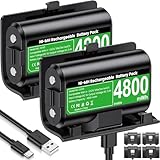
- 【Universal Compatible with Xbox One| Xbox Series X|S】Come with 2pcs 4800mWh xbox battery pack rechargeable and 4pcs xbox controller battery covers —2 covers for Xbox One/ Xbox One S / Xbox One X/ Xbox One Elite and 2 covers for Xbox Series X|S—ensuring a perfect fit for your controller. Designed exclusively for official Xbox controllers (not compatible with third-party alternatives)
- 【 Extended Playtime with High-Capacity Battery】With a quick charging time of about 2.5-3 hours, enjoy up to 10–12 hours of uninterrupted gaming with our upgraded 4800mWh rechargeable battery pack. Say goodbye to frequent battery swaps and stay in the game longer—perfect for marathon gaming sessions.
- 【Enjoy the Convenience of Two Charging Methods with Effortless Usability】 Simply plug the included USB-C cable into the battery pack inside your controller to keep gaming uninterrupted. Alternatively, charge the battery separately for added flexibility
- 【 Safe & Smart Charging with LED Indicator】 The Xbox One Series X/S controller battery pack features an LED indicator next to the charging port. Built-in overcharge protection ensures safe overnight charging, while the LED indicator shows real-time charging status: red for charging, green for full. Extend battery life with every charge, up to 2000 recharge cycles.
- 【 Save Money & Reduce Battery Waste】Stop buying disposable AA batteries. This eco-friendly rechargeable kit ideal for families, heavy gamers, and anyone looking for a cost-effective, long-term solution for Xbox controller power.
Rank #2

- Two ways to charge: while you play or direct to the battery pack
- Universal Battery Solution: Compatible with all PowerA Charging Stands and Stations
- Officially licensed for Xbox Series X|S and compatible with Xbox One and Windows
- Two-year limited warranty - visit PowerA.com/Support
How to check whether your controller supports the rechargeable pack
- Locate the port on the controller and check whether it is USB-C.
- Confirm that the accessory listing identifies the Xbox Rechargeable Battery + USB-C Cable or Play and Charge Kit as compatible with Xbox Wireless Controllers with a USB-C port.
- If you also need to know whether batteries are included with your controller, check the specific listing or package contents rather than assuming all models and bundles are the same.
Product prices and availability are accurate as of the date/time indicated and are subject to change. Any price and availability information displayed on Amazon at the time of purchase will apply.
What’s actually slowing this PC down?
Pick the symptom - the matching free tool is one click away.




