Recommended Free Tools
When one TV shows “No Signal” and your other TVs are fine, start with the cheapest checks. Set that TV to the right HDMI input, reseat the HDMI cable at both ends, and check anything sitting between the Hopper and the TV, such as a soundbar or receiver. If that doesn’t work, press SAT, then Guide, on the DISH remote and see what appears. The answer tells you whether you have a video-link problem, a receiver problem, or a satellite problem.
First, identify what the screen is actually showing
“No Signal” is the TV telling you that nothing is arriving on the selected input. It is not the same as a DISH satellite signal-loss error, which appears on screen from the receiver itself. DISH’s own troubleshooting wording covers a “black, blue, or snowy screen or ‘No Signal’ message” on the TV. Work out which of these you have, because each points to a different fix:
As an Amazon Associate I earn from qualifying purchases.
| What you see | Where to look first |
|---|---|
| TV-generated “No Signal” message | TV input/source selection and the HDMI path |
| Black, blue or snowy screen | Input, cable, receiver power, then a receiver reset |
| Hopper guide and menus appear, but a channel is missing or pixelated | The satellite or program path, not HDMI |
| No light on the receiver, or it doesn’t respond | Power and receiver recovery |
| Two TVs show the same program | A different issue: wrong TV channel, remote configuration or a shared tuner |
Step-by-step fix
- Turn on the TV and the Hopper. Check the Hopper’s front-panel light. If it’s off, press the front-panel power button and confirm the power cord is firmly connected.
- Select the correct HDMI input. Use the TV’s own remote or controls to open Input or Source. Step through the choices and pause a few seconds after each one, as DISH advises. Ports are usually labeled HDMI 1, HDMI 2 and so on. Pick the one physically plugged into the Hopper’s cable.
- Reseat the HDMI cable at both ends. Unplug and firmly re-insert it at the Hopper and at the TV. If a soundbar, AV receiver or HDMI switch sits in between, check its cables and power too, and make sure it is set to pass the Hopper’s input through.
- Use the guide as a test. Press SAT or HOME on the DISH remote, then press Guide. If the guide appears, the TV is receiving video from the receiver. In that case, look at the channel or satellite side instead. If nothing appears, carry on.
- Reset the primary receiver. Unplug its power cord for 10 seconds, then plug it back in. DISH’s no-signal guidance allows up to 10 minutes for the restart. Its receiver power article says a reset can take up to five minutes. Wait it out before trying again.
- Don’t interrupt recovery. A blinking receiver light can mean the Hopper is in recovery mode. DISH says this can take up to four hours, so repeated power cycling can get in the way.
What “only one TV” does and doesn’t tell you
If the same Hopper gives a picture on other TVs, the problem is probably in the path to this TV. That path includes the TV’s port, the cable, any device in between, and the input setting. This is a useful narrowing step, but it doesn’t prove which part has failed. The receiver’s output could still be at fault for just that connection, so report this observation to DISH if the basic checks don’t work.
Cheap tests, in order
| Test | Cost | What it checks |
|---|---|---|
| Cycle TV inputs | Free | Whether the wrong source is selected |
| Reseat the HDMI cable | Free | The physical link at both ends |
| Try another HDMI port on the TV | Free | Whether one TV port is faulty |
| Swap in a known-good HDMI cable | Low, if you don’t have a spare | Whether the cable or its connector is faulty |
| Restart the Hopper | Free | A stuck receiver state |
| Contact DISH or TV support | Varies | Escalation when the checks above fail |
DISH’s instructions focus on securing connections and don’t say every no-signal case needs a new cable. If a connector or port looks damaged, stop forcing it. A spare cable is only worth buying once the free checks have failed.
#1 Best Overall

- Designed for Dish Network & Joey Receivers – Optimized for seamless connectivity with Dish Network Hopper, Joey, and Wally receivers, ensuring the best signal transmission for your satellite TV setup.
- High-Speed 4K HDMI Performance – Supports 4K Ultra HD, 1080p Full HD, and 3D video, delivering crystal-clear picture quality for Dish Network channels and streaming content.
- Premium Quality for Reliable Signal – Gold-plated connectors and reinforced shielding provide a stable, interference-free connection between your Dish Network receiver and TV.
- Enhanced Audio & Video Compatibility – Supports HDR, Dolby TrueHD, and DTS-HD for immersive sound and vibrant visuals, perfect for Dish Network's high-definition programming.
- Durable & Flexible Design – Sturdy, tangle-free cable with high-quality construction to ensure long-lasting performance for your Dish Network setup.
If the guide shows but channels don’t
This isn’t an HDMI fault. DISH’s signal-loss guidance lists error numbers 015, 015a, 015n, 015x, 015y, 015z, 022 and 535, and notes that severe weather is a common cause. Follow DISH’s signal-loss troubleshooting for those, and don’t swap cables over a channel-specific problem.
Independent reader supportYour contribution helps us test, update, and keep practical guides available for everyone.Resolution settings
DISH says the resolution options available depend on both the receiver and the TV. If you’ve changed Hopper resolution settings, or connected a different TV, choose a resolution that TV supports. If you’re unsure, check the TV’s documentation. Guidance can differ by Hopper model and software version.
Quick Recap
Rank #4
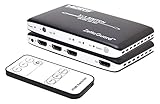
- Connects up to 3 HDMI source components to a single HDMI input for seamless transitions between gaming, television and more
- Supports up to 4K x 2K resolutions for crisp, clean, powerful displays (3D features are also supported)
- PIP (Picture in Picture) feature allows you to easily make transitions to one device to another with a push of a button
- Remotely control your HDMI switch with the infrared remote switcher without leaving the comfort of your seat
- Slim, modern design without the bulk to reduce footprint and blend in with surroundings
Rank #3

- [4K SUPPORT] This HDMI High Speed cable with Ethernet 2.0 is compatible with all HDMI versions.
- [ULTRA HD HDMI CABLE] Supports 4K resolutions at 60Hz, and has four times the number of pixels in Full HD resolutions.
- [LATEST SPECIFICATIONS] The cable is Dolby TrueHD and DTS-HD Master Audio bitstream capable, with 3D, ARC, CEC, Deep Color, and HDCP support.
- [MULTIPLATFORM COMPATIBILITY] Compatible with Apple TV (4th Generation, 4K), PS4 Pro/4/3, Roku, Nintendos Switch/Wii U, Xbox One X/S/360, Laptops, PCs, Blu-ray Players, AV Receivers, Fire TV Stick, Chromecast Ultra, LG Smart TV, Samsung 4K UHD QLED, Sony 4K UHD, Projectors, Monitors, Soundbars, DVD Players.
- [LIMITED LIFETIME WARRANTY] Join our satisfied customers with our lifetime warranty.
Rank #2

- [LATEST STANDARD ] supports all HDMI 2.0b features: 4K@60Hz, HDR, UHD, 4:4:4 color format ,48 bit/px color depth , Audio Return Channel, HDCP 2.2 and more
- [UNIVERSAL COMPATIBILITY ] tested with popular and latest devices and services including (but not limit to) Xbox, Playstation, PS3, PS4 Pro, Apple TV, Fire TV, Samsung TV, Sony TV, Netflix, Dish Hopper, Roku…
- [THE NEED FOR SPEED ] The faster the better. With high-purity OFC (Oxygen-Free Copper) conductor and Triple EMI shielding, it provides 18Gbps bandwidth, capable of transmitting 100% of the data required for 4K/ UHD. The result is crisper picture, brighter, more realistic color and greater detail than standard HD.
- [BUILT FOR HEAVY DUTY ] 3.3 Feet (1 Meter) long. Full-length woven nylon for extreme durability. It’s also pets friendly.
- [WARRANTY ] 2-Year Warranty directly from Zeskit. If it breaks we replace it. In addition, our technicians will be happy to help you with any issue when you setting up your 4K system.
When to escalate
- DISH support: if you still have a black, blue or snowy screen after the input, cable and reset steps. Mention which TVs work and which one doesn’t.
- TV manufacturer or a local TV repair service: this is a reasonable next step if the TV also fails to show its own menu, or fails with other HDMI devices. It is an inference from the symptoms, not a diagnosis DISH makes.
Product prices and availability are accurate as of the date/time indicated and are subject to change. Any price and availability information displayed on Amazon at the time of purchase will apply.




