Free tools Windows power users keep installed
One-click scans. No signup required.
To connect a Hisense TV to Wi-Fi, open Settings → Network → Network Configuration, choose Wireless, select your network, and enter its password. Other connections—such as iPhone screen mirroring, Bluetooth, Ethernet, and HDMI—depend on the TV’s model and platform.
Connect your Hisense TV to Wi-Fi
- Turn on the TV and open Settings.
- Choose Network, then Network Configuration.
- Set Connection Type to Wireless.
- Select your Wi-Fi network and enter its password.
This menu route is documented in Hisense USA’s support FAQ. Hisense TVs use different platforms, so the labels or path may vary. If you do not see these options, check the on-screen setup or the manual for your exact model.
As an Amazon Associate I earn from qualifying purchases.
Setting up a new Roku TV
Follow the TV’s guided setup and have your wireless network name and password ready. The Hisense Roku quick-start guide says activation uses a Roku account. It also notes that a Roku TV can still be used as a regular TV without connecting it to wireless internet. See the Hisense Roku TV Quick Start Guide for the models it covers.
Do these 3 things before closing this tab:
1Scan for outdated or missing drivers - takes under a minute2Repair Windows errors before they cause bigger problems3Fix the driver behind crashes, sound loss and screen glitchesMirror an iPhone on a Hisense TV
Hisense documents iPhone mirroring for supported Roku or Google TV models with AirPlay. If your model supports it:
#1 Best Overall

- DUAL BAND SUPPORT: Wireless network adapter supports 2.4G and 5G dual band, providing up to 300Mbps rate, let you enjoy a smoother network experience.
- SUPPORT OS: USB wireless adapter is suitable for 7/8/10/11 operating system, strong compatibility, can be used on a variety of computers and devices.
- COMPATIBILITY: Wireless adapter supports for TV for WIS09ABGN series, including B, C, D, E, , ES series. You can conveniently connect your TV to the network, allowing you to enjoy more online content and support some home theater systems.
- STABLE CONNECTION: Dual band wireless network adapter supports 802.11a/b/g/n protocol for more stable connection.
- EASY TO INSTALL: USB wireless network adapter can be used by simply plugging it into the USB port, no need for tedious installation procedure, convenient and fast.
- Enable AirPlay in the TV’s settings.
- On the iPhone, open Control Center and tap Screen Mirroring.
- Select the Hisense TV, then enter the passcode shown on the TV.
To stop mirroring, open Screen Mirroring in Control Center again and end the connection. If AirPlay is missing, confirm support for your exact TV model rather than assuming all Hisense TVs can mirror an iPhone this way. Hisense’s support FAQ describes the supported-platform flow.
Pair a Bluetooth device
Hisense says most models, including ULED series and Laser TV, have Bluetooth. On TVs with the documented menu, open Settings → Network → Remotes & Accessories and enable Bluetooth. Menu names and device support can vary; if the option is absent, consult the manual for your model.
Rank #2

- DUAL BAND SUPPORT: network adapter supports 2.4G and 5G dual band, providing up to 300Mbps rate, let you enjoy a smoother network experience.
- SUPPORT OS: USB adapter is suitable for 7/8/10/11 operating system, strong compatibility, can be used on a variety of computers and devices.
- COMPATIBILITY: adapter supports for TV for WIS09ABGN series, including B, C, D, E, , ES series. You can conveniently connect your for TV to the network, allowing you to enjoy more online content and support some home theater systems.
- STABLE CONNECTION: Dual band network adapter supports 802.11a/b/g/n protocol for more stable connection.
- EASY TO INSTALL: USB network adapter can be used by simply plugging it into the USB port, no need for tedious installation procedure, convenient and fast.
Use Ethernet or connect an HDMI device
Ethernet connects a TV to a router with a network cable; HDMI connects an external source, such as a media player or game console, to the TV. These require the relevant ports, which are model-specific. One Hisense Google TV specification sheet lists built-in dual-band Wi-Fi, Ethernet, Bluetooth, and HDMI ports, but that specification does not establish that every Hisense TV has them. Check your model’s specifications and rear-panel ports before choosing a cable or connection method. See the Hisense Google TV specification sheet for its listed capabilities.
If you cannot complete setup without a remote
Hisense says replacement-remote options depend on the TV model. Confirm the model number before ordering a replacement so you can check compatibility. Hisense provides this guidance in its support FAQ.
Quick Recap
Best Value
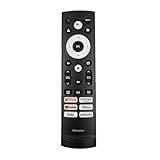
- 【Equipped 6 Hot-keys】OEM Replacement Voice Remote Control fits for Hisense UHD 4K ULED Smart Google TVs equipped with 6 Shortcut APP Keys - Netflix, Prime Video, YouTube, Disney Plus, Tubi and Peacock buttons!
- 【Applicable Model Series】This infrared remote control for Hisense Smart Google TV A4 A6 A7 A65H A6H A76 U6 U7 U8 U9 UX U6H U6K U7H U8H U67 U70 U75 S7 QD7 Series
- 【Compatible Models】32A4K 32A45K 43A6H 43A7N 43A45K 43A65K 43A65H 43A4K 50A7N 50A6H 50U6H 50A65H 50A65K 55A65H 55A65K 55A6H 55A7N 55U6N 55U7N 55U8N 55S7N 55U6K 55U7K 55U8K 55U6H 55U7H 55U8H 55U75K 55U75H 55A6G 55U6G 65U6N 65U7N 65U8N 65U6K 65U7K 65U8K 65A7N 65S7N 65A6H 65U6H 65U7H 65U8H 65A65K 65A65H 65U75K 65U75H 65U75N 65U7G 65U8G 70A6H 70A65H 75A6H 75A7N 75U7K 75U8K 75U6N 75U7N 75U8N 75U6H 75U7H 75U8H 75U6K 75A65K 75U75H 75U75K 75U75N 75A6G 85UX 85U6N 85U9N 85U7K 85U8K 85U7H 85A7N 85A7H 85A76H.
- 【EASY TO USE】No Set up or Programming Required, just install 2 new AAA alkaline batteries to get it work. (Pairing with the Google TV for Voice Control might require setup)
- 【Package Content】Package Content: 1 x IR Remote Control (Batteries and Instruction Manual are not included).
Rank #4

- 【Compatible Models】 Compatible for ERF3M90H Hisense Google Smart TV, ULED, QLED, TriChroma Mini-LED & Laser models (A6H/U8K/U7K/U6H/A65K/U75K/UX series). A4K、 U76、 A76K、 U8K 、U7K、 L9 、A65H 、L5H、 U75K、 UX、 U6K、 A65K、 U7、 A7H、 U8H 、U7H、 A6H、 U6H、 U6
- 【Compatible for Hisense TV Series+】 ERF3M90H for Hisense Google TV:32A4K、 40A4K、 43A4K、 100U76N、 75A76K、 100U8K、 85U8K、 85U7K、 120L9H-CINE120A、 100L9H-DLT100C、 70A65H、 120L5H-CINE120A、 100L5H-DLT100C、 55U75K、 65U75K、 75U75K、 85UX、 55U6K、 65U6K、 75U6K、 55U8K、 65U8K、 75U8K、 55U7K、 65U7K、 75U7K、 75A65K、 65A65K、 55A65K、 50A65K、 43A65K、 55U75H、 65U75H、 75U75H、 85A7H、 50A65H、 43A65H、 55A65H、 65A65H、 75U8H、 65U8H、 55U8H、 85U7H、 75U7H、 65U7H、 55U7H、 70A6H、 75U6H、 65U6H、 55U6H、 50U6H、 75A6H、 65A6H、 55A6H、 50A6H、 43A6H、 50U6G1、
- 【Fast Response & Wide Coverage】 Engineered for 0.2-second command activation and reliable operation up to 50 feet. Eco-friendly ABS construction withstands daily use. (Batteries not included)
- 【Voice-Activated TV Control】 Features a dedicated microphone button for voice commands. Easily search content, check information, or control menus hands-free. (Note: Requires your TV’s built-in voice assistant functionality).
- 【Quick-Launch Streaming Shortcuts】 6 dedicated shortcut keys provide instant access to top entertainment platforms. Skip menus and jump directly to your favorite content with one press.
Rank #3

- Wireless WiFi: USB WiFi adapter gives your computer a wireless WiFi connection, free from the constraints of network cables
- 2.4G Network Frequency: USB network card supports 2.4G network frequency, providing reliable WiFi performance and coverage with better penetration
- Convenient and Practical: Computer WiFi adapter provides enough bandwidth for music downloads, file sharing and multimedia applications
- Compatible System: Wireless USB WiFi adapter supports for , for 7, for 8, for 10, for Linux, Etc
- ABS Material: Wireless USB WiFi adapter is made of ABS material, which is wearable and durable, and has a long service life
Product prices and availability are accurate as of the date/time indicated and are subject to change. Any price and availability information displayed on Amazon at the time of purchase will apply.




