CNC cutting with a drag knife uses a passive blade that trails behind a pivot as the CNC gantry moves in XY. The method is best for flat, utility-knife-cuttable sheets such as vinyl, cardboard, paper, leather, and thin veneer. Correct blade offset, depth, hold-down, and spindle-off toolpaths are essential for accurate cuts.
A drag knife can turn a conventional CNC router into a useful sheet-cutting machine without a powered knife axis, but the tool is not a drop-in replacement for a router bit. The blade trails the pivot, creates sideways force, and needs compensation at corners. The following setup method focuses on predictable results rather than universal speed or thickness claims.
As an Amazon Associate I earn from qualifying purchases.
Key takeaways
- A drag knife is a passive CNC tool whose blade trails behind a pivot as the gantry moves in the XY plane.
- CNC cutting with a drag knife works best on reasonably flat, utility-knife-cuttable sheet materials such as paper, vinyl, cardboard, leather, veneer, and selected thin foams or plastics.
- Blade offset is the horizontal distance from the pivot axis to the cutting tip; incorrect offset causes inaccurate corners, distorted small features, and cuts that do not close.
- A dedicated drag-knife toolpath is required because a drag knife is not geometrically equivalent to a centered router bit; the spindle should normally remain off.
- Donek publishes model-specific approximate capacities ranging from about 1/16 inch to 1/2 inch, but those figures are not universal limits for every drag knife or material.
- A tangential or oscillating knife is usually the better choice for thick, tough, abrasive, rigid, or production-critical materials and for highly accurate internal corners.
What is CNC cutting with a drag knife?
CNC cutting with a drag knife uses a sharp, swiveling blade mounted in a CNC machine while the gantry supplies the cutting motion. The blade is not powered or actively rotated: the blade tip sits behind a pivot, trails the direction of travel like a caster, and swivels as the machine changes direction.
That simple mechanism lets a router-style CNC machine cut many flat sheet materials without using a spinning router bit. The tool is particularly useful for patterns, gaskets, packaging, decals, templates, thin laminates, and other shapes that can ordinarily be cut with a utility knife.
#1 Best Overall

- Transform Your CNC: This drag knife cuts detailed shapes in cardboard, vinyl, and leather with ease, and its standard 1/8'' shank fits just like regular bits on your CNC machine—no collet changes or extra setup required.
- Depth Control: Adjustable 5–11.75 mm cutting depth lets this drag knife cutter dial in how far the blade reaches into your material, protecting your spoilboard and improving control
- Pre-Set Offset Accuracy: The 0–8 mm adjustable blade offset is already calculated and marked with a clear etched scale, making centering your CNC drag-knife setup fast and beginner-friendly—no complex tramming or guesswork required.
- Smooth Gliding: Body crafted from 6061 aluminum and stainless steel. This all‑metal drag knife uses a shaft with dual ball bearings so it glides smoothly for sharp and round corners, bevels and detail cuts
- 10 Blades Included: Comes with 10 rust-proof carbon cutter blades. This generous blade replacement pack ensures long-lasting sharpness and consistent performance for all your crafting needs
The blade tip is intentionally offset from the pivot center. Vectric’s drag-knife documentation defines blade offset as the distance between the pivot center and cutting tip and describes a dedicated toolpath that inserts swivel moves at corners. The offset is a geometric value, not the blade’s exposed length and not a router-bit diameter.
How does a drag knife differ from a tangential knife?
A drag knife follows the direction of travel passively, while a tangential knife uses an additional drive to lift and rotate the blade into the required direction. A drag knife is mechanically simpler; a tangential knife provides more deliberate control at corners and during changes in direction.
| Criterion | Drag knife | Tangential or oscillating knife |
|---|---|---|
| Blade orientation | Controlled indirectly by the trailing blade and toolpath motion | Actively rotated; an oscillating knife can also move the blade through thicker material |
| Corner behavior | Needs offset compensation, swivel moves, overcut, or controlled repositioning | Blade can be lifted and rotated, producing more precise corner orientation |
| Mechanical complexity | Low; many models fit a conventional CNC collet or holder | Higher; requires a rotational or oscillating positioning mechanism |
| Typical advantage | Low setup complexity and economical consumables for ordinary sheet stock | Better control of thick, tough, abrasive, rigid, or detail-critical materials |
| Best fit | Paper, films, vinyl, cardboard, leather, veneer, and similar sheet materials | Applications where corner accuracy, material resistance, or production consistency is more important |
The KinetiC-NC manual describes tangential knife cutting as using an additional positioning drive to rotate the knife to the correct angle and distinguishes that process from ordinary drag cutting. Summa’s knife guide likewise explains that a tangential blade is lifted and rotated rather than dragged through a turn.
Crashes, No Sound, or Screen Glitches?
Random freezes, missing sound and display glitches usually trace back to one bad driver. Find and replace yours safely.Free scan · under a minutePC Slower Than It Used to Be?
A free scan shows the junk files, broken settings and background clutter dragging Windows down - then fixes them in one click.Free scan · Windows 10 & 11Which materials can a drag knife cut?
A drag knife is appropriate when the material is reasonably flat and can normally be cut with a utility knife. Suitable candidates include paper, cardstock, cardboard, packaging board, vinyl, films, foils, leather, gasket sheet, thin veneer, selected flexible plastics, some foams, rubber sheet, and certain composite sheet products.
Published application examples from Donek Tools include veneer, cardboard, leather, carbon-fiber prepreg laminates, and ski and snowboard base materials. Those applications describe particular tools and conditions; they do not mean that every drag knife will cut every listed material.
| Material category | Why it can suit drag cutting | What to verify first |
|---|---|---|
| Paper, cardstock, and cardboard | Low-thickness sheet stock is commonly utility-knife-cuttable | Whether the blade reaches the bottom layer without excessive backing damage |
| Vinyl, films, and foils | Thin flexible sign and packaging materials can be cut with controlled depth | Whether a kiss-cut or through-cut is needed and whether adhesive will stick to the blade |
| Leather and gasket sheet | Many grades can be cut with a sharp utility-style blade | Material compression, toughness, thickness, and the required edge quality |
| Veneer and thin plastics | Thin sheet products can be suitable when they remain flat | Splitting, cracking, stiffness, and whether the blade geometry supports the material |
| Foam, rubber, and composites | Some flexible products are knife-cuttable | Abrasiveness, elasticity, sidewall friction, and whether multiple passes are needed |
Thickness alone does not determine suitability. Tough or abrasive stock increases sidewall friction as blade engagement increases, and sideways cutting forces can push the sheet out of position. The MatEdU CNC knife materials module specifically warns about drag-knife friction and the difficulty of cutting tough or abrasive materials.
A thicker material may also require a different blade included angle, more blade exposure, a spring-loaded holder, several passes, or a different knife technology altogether. A material that is technically cuttable may still be a poor production choice if it tears, shifts, compresses, or leaves unacceptable internal corners.
How thick can a drag knife cut?
There is no universal maximum thickness for a drag knife. Capacity depends on the tool model, blade geometry, blade exposure, holder, material density and toughness, hold-down, corner detail, and whether the material is cut in one pass or several.
As model-specific examples, Donek lists its D1/D3 tools for cuts up to approximately 1/16 inch, D2/D4 tools for approximately 1/4 inch, and a larger model for approximately 1/2 inch. Donek also publishes different minimum radii and offsets for those models. These are manufacturer specifications for Donek tools, not a general rating for all CNC drag knives.
Rank #2
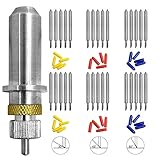
- 30 BLADES: Compatible with for Roland and most domestic and imported plotter, made from tungsten cemented carbide. Highly hardness, come with springs and blade holder base. 10 pcs for each degree.
- APPLICATION: Fine polishing process, suitable for mahogany, wood, PVC color board, MDF and other precision relief.
- 30 DEGREE: 30° blades are predominantly used for cutting very thin window tint and mylar materials.
- 45 DEGREE: 45° blades are the standard blade that comes with most vinyl cutters. They are recommended for all standard cast and calendered vinyls as well as other thin materials such as ThermoFlex Plus.
- 60 DEGREE: 60° blades are recommended for thicker materials such as reflective films, flock and twill materials and also sand-blast resist.
| Published Donek example | Approximate stated cutting depth | How to interpret it |
|---|---|---|
| D1/D3 | Up to approximately 1/16 inch | Model-specific starting range; confirm the exact current specification |
| D2/D4 | Up to approximately 1/4 inch | Model-specific range affected by stock and setup |
| Larger 1/2-inch model | Up to approximately 1/2 inch | Published tool capacity, not a guarantee of clean cuts in every material |
For thick or resistant stock, a tangential or oscillating knife may be more appropriate than simply exposing more blade. Excessive exposure increases lateral deflection, drag, corner error, and the risk of cutting into the spoilboard.
What machine compatibility does a drag knife require?
Drag-knife compatibility has two separate parts: the holder must fit the machine mechanically, and the CNC control or CAM workflow must support the tool’s motion and offset.
Mechanical fit
The holder must match the spindle, collet, tool carriage, or dedicated accessory mount. Donek offers models for 1/4-inch and 1/2-inch collets. A dedicated holder may be fixed-depth, spring-loaded, or pressure-regulated. StepCraft, for example, sells a drag-knife holder with automatic pressure regulation for its CNC machines.
Do not assume that a blade or holder from one system fits another system merely because both products are called drag knives. Summa accessories are designed for particular Summa cutter families and require the matching holder and blade system.
Motion and control support
The machine must be able to control Z moves between contours and run a toolpath that compensates for blade offset. The router spindle should normally stay off during drag-knife cutting. Vectric explicitly warns users to switch off the spindle when using its drag-knife toolpath.
A conventional router profile is not automatically safe or accurate for a drag knife. The toolpath may need swivel moves, a small lift and reposition, overcut behavior, a defined swivel depth, and a safe retract before traversing to another contour.
Quick wins for a faster PC:
Clear out junk files and repair common Windows errorsFree Scan →Scan for outdated or missing drivers - takes under a minuteDriver Scan →Repair Windows errors before they cause bigger problemsFix Now →What should you check before buying a CNC drag knife?
Choose a CNC drag knife by compatibility and intended material, not by the lowest price or a claimed maximum thickness alone.
- Collet or carriage size: Confirm whether the holder fits a 1/4-inch, 1/2-inch, or another machine interface.
- Blade system: Check the exact blade thickness, shoulder shape, included angle, holder, and replacement-part availability.
- Offset: Obtain the manufacturer’s nominal offset, then be prepared to tune it on the actual machine.
- Depth control: Determine whether the holder regulates pressure with a spring or expects fixed Z calibration.
- Material range: Match the tool to the actual thickness, toughness, abrasiveness, flexibility, and required finish.
- Minimum radius: Verify whether the tool can produce the smallest internal and external features in the design.
- CAM support: Confirm that the software or postprocessor can create drag-knife compensation and spindle-off output.
- Hold-down: Plan for a spoilboard, cutting mat, vacuum bed, adhesive sheet, or clamps outside the cutting area.
For router owners comparing a CNC drag knife, collet size, blade exposure, offset, and material capacity should be checked against the specific model before purchase. Generic marketplace tools can be useful, but a physically fitting tool is not necessarily geometrically or electrically compatible with a particular CNC system.
Donek is a named option with published model, collet, approximate depth, radius, offset, and blade information. Stupid Simple Tools also lists an SST012 Drag Knife, but detailed specifications and program availability should be verified from the current manufacturer information before selecting it.
Rank #3

- DRAG KNIFE - Stupid Simple Tools’ collapsible Drag Knife features a 2-15mm adjustable blade length with the ability to recall the position with a set screw. Easily adjust the height of your blade with the precision thumbscrew.
- HARDENED STEEL SHAFT - This Drag Knife has a ¼” hardened steel shaft. This compact design provides compatibility with all machines, big or small. The body fits any standard utility blade (HSS blade included) and the blade is encapsulated, so no more accidental paper cuts.
- CUT THROUGH ANYTHING - Our Drag Knife cuts through materials when endmills can’t. Cut through materials like wood veneer, plastic, leather, paper, cardboard, magnetic sheets, vinyl, rubber and more with this tool.
- EASY BLADE REPLACEMENT - Magnetically assisted blade replacement can be done with just one hand. The dual ball bearing shank glides smoothly without any wobble.
- BUILT TO LAST - SST’s Drag Knife is masterfully machined from 6061 aluminum and hardened steel with a hard anodized finish, designed to last a lifetime. US and International Patents Pending.
How do you set blade offset in CAM?
Set blade offset as the horizontal distance from the pivot axis to the cutting tip, then validate the value with a test pattern on the real machine and material. A wrong offset makes the blade arrive late or early at corners, so squares, triangles, circles, and small features can be visibly wrong even when the CNC axes are calibrated.
Do these 3 things before closing this tab:
1Scan for outdated or missing drivers - takes under a minute2Repair Windows errors before they cause bigger problems3Fix the driver behind crashes, sound loss and screen glitchesVectric’s documented drag-knife toolpath includes controls for blade offset, tolerance angle, cut depth, swivel depth, number of passes, vector start-point handling, feed rate, and plunge rate. The same documentation indicates that a workflow using existing vector start points assumes the blade begins parallel to the positive X axis.
Donek publishes approximate starting offsets of about 0.065 inch for D1/D3 tools, 0.16 inch for D2/D4 tools, and 0.25 inch for its 1/2-inch model. Those values are approximate manufacturer guidance and should not be copied as universal presets.
A practical offset-calibration sequence
- Install the correct holder and blade, and confirm the blade is secure and free to swivel.
- Measure or obtain the nominal offset for the exact blade and holder combination.
- Set a conservative cut depth and use scrap material of the same type and thickness as the production stock.
- Cut a square, triangle, circle, small-radius feature, and at least one internal corner.
- Inspect the top and underside of the test piece for overshoot, uncut areas, tearing, and backing damage.
- Adjust offset and swivel behavior in small increments, then repeat the test rather than changing several variables at once.
How should depth, pressure, and hold-down be set?
Set the blade to sever the intended layer while minimizing exposure below the material. A through-cut should reach the sacrificial backing only as much as necessary; a kiss-cut should remove the top layer without cutting through the liner or backing.
Spring-loaded holders use pressure and spring travel to follow uneven stock. Fixed-depth tools depend more heavily on accurate Z calibration and flat material. In either case, a warped or poorly secured sheet can produce inconsistent depth and can catch the blade during a turn.
Recommended Free Tools
Useful backing and restraint options include a sacrificial mat, spoilboard, vacuum bed, adhesive sheet, or clamps positioned outside the cutting path. Choose the hold-down method for the material: adhesive can leave residue, clamps can obstruct motion, and a vacuum bed may not hold porous stock effectively.
A pressure-regulated drag-knife holder illustrates one approach to managing contact pressure, but the correct pressure and Z settings remain specific to the holder, material, and machine. Test the underside as well as the top surface because a visually clean top cut may not have severed the bottom layer.
What feed rate and number of passes should you use?
There is no universal CNC drag-knife feed rate. Feed, plunge rate, cut depth, blade sharpness, material, holder pressure, and detail size must be tested together. Vectric provides feed-rate, plunge-rate, and pass controls but instructs users to choose values appropriate to their machine and material.
| Observed problem | Likely causes | Useful adjustment |
|---|---|---|
| Material shifts during a turn | Insufficient hold-down, excessive blade engagement, or aggressive motion | Improve restraint, reduce exposure, reduce depth per pass, or use multiple passes |
| Top layer cuts but backing remains attached | Cut depth is too shallow or stock is uneven | Increase depth carefully or flatten the material; avoid blindly increasing blade exposure |
| Spoilboard is heavily scored | Excessive depth or poor Z calibration | Raise the tool or reduce exposure after confirming the target layer still separates |
| Edges tear or adhesive collects on the blade | Blade is dull, speed is unsuitable, or material is difficult | Replace or clean the blade, test a different speed, and consider another blade angle |
| Corners overshoot or undershoot | Incorrect offset, inadequate swivel compensation, or an unsuitable minimum radius | Calibrate offset and corner behavior with test geometry |
Slower movement, a sharper blade, less exposure, and multiple passes can improve control, but excessive slowness can increase heat, tearing, or adhesive pickup in some materials. Production settings should be established with representative scrap rather than copied from a generic chart.
The Tool Desk
Outbyte Driver Updater FREEScan for outdated or missing drivers - takes under a minuteDriver Scan →Outbyte PC Repair FREEClear out junk files and repair common Windows errorsFree Scan →Rank #4
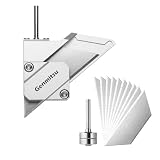
- Transform Your CNC: This drag knife cuts detailed shapes in cardboard, vinyl, and leather with ease, and its standard 1/8'' shank fits just like regular bits on your CNC machine—no collet changes or extra setup required.
- Depth Control: Adjustable 5–11.75 mm cutting depth lets this drag knife cutter dial in how far the blade reaches into your material, protecting your spoilboard and improving control
- Pe-Set Offset Accuracy: The 0–8 mm adjustable blade offset is already calculated and marked with a clear etched scale, making centering your CNC drag-knife setup fast and beginner-friendly—no complex tramming or guesswork required.
- Smooth Gliding: Body crafted from 6061 aluminum and stainless steel. This all‑metal drag knife uses a shaft with dual ball bearings so it glides smoothly for sharp and round corners, bevels and detail cuts
- 10 Blades Included: Comes with 10 rust-proof carbon cutter blades. This generous blade replacement pack ensures long-lasting sharpness and consistent performance for all your crafting needs
Why are corners difficult with a drag knife?
Corners are difficult because the blade trails behind the pivot instead of cutting directly beneath the tool center. When the gantry changes direction, the toolpath must give the blade time and space to swivel or must lift and reposition it in a controlled way.
Sharp outside corners may show a small overcut, while internal corners can remain rounded, short, or distorted. Small-radius internal corners are limited by blade offset, blade shape, material compliance, and the tool’s minimum-radius specification. Donek’s model-specific minimum radii demonstrate that model selection affects the detail the tool can produce.
For production validation, test inside and outside corners, acute angles, circles, small holes, long straight cuts, and transitions between thin and thick regions. Inspect both surfaces and measure the finished feature rather than judging only the top outline.
Which blades and consumables are compatible?
Blades are consumables, and the correct replacement depends on the holder, blade profile, included angle, material, and required detail. Blade angle alone is not enough to establish compatibility.
Free tools Windows power users keep installed
One-click scans. No signup required.
Summa’s knife guide, updated December 26, 2024, lists standard 36-degree drag blades, specialty 60-degree drag blades, and a 55-degree sandblast drag blade with different holder requirements. Summa also notes that blade depth and pressure settings vary by machine and material, and that blade life depends on material and settings.
Donek uses a specified utility-knife blade type, which may simplify replacement and reduce consumable cost compared with a proprietary blade system. A generic utility blade should not be substituted without checking thickness, shoulder geometry, included angle, and the resulting offset. A blade that fits physically can still produce incorrect geometry or fail to lock safely in the holder.
For Summa cutter owners, use the manufacturer’s compatibility information for the exact cutter family and holder. A Summa blade should not be assumed to fit a Donek or generic CNC-router holder. Readers comparing replacement drag knife blades should verify the holder and blade specifications before ordering; marketplace inventory and compatibility can change.
Independent reader supportYour contribution helps us test, update, and keep practical guides available for everyone.What accessories make drag-knife cutting more reliable?
The most useful accessories solve four practical problems: secure mounting, repeatable height, stable material, and correct toolpath generation.
What’s actually slowing this PC down?
Pick the symptom - the matching free tool is one click away.
- Compatible holder: Match the machine’s collet or carriage and determine whether fixed or pressure-regulated depth is appropriate.
- Replacement blades: Keep blades matched to the holder and material; a dull blade increases drag and tearing.
- Sacrificial cutting surface: Use a mat or spoilboard when a controlled backing surface is needed.
- Hold-down equipment: Use clamps, vacuum, adhesive, or another suitable method to prevent sideways movement.
- Height setter or gauge: Repeatable Z calibration is especially valuable for kiss-cuts and layered stock.
- CAM support: Use software or a postprocessor that understands offset compensation, swivel moves, retracts, and spindle-off operation.
A CNC cutting mat or suitable spoilboard can help protect the machine while providing a controlled backing surface, but the correct choice depends on material, vacuum or clamp strategy, and whether the job is a kiss-cut or through-cut. Do not treat a cutting mat as a substitute for secure hold-down.
Best Value
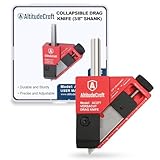
- Precision 3/8" Drag Knife: This 3/8" hardened steel drag knife offers tight tolerance, clean cuts, and a smooth glide across materials like vinyl, rubber, foam, and plastics. It’s the drag knife 3/8” users rely on for consistent results and professional-grade performance.
- Fits Most CNC Routers: This drag knife for CNC router is built for easy installation and compatibility with most CNC setups. Its universal design makes it a hassle-free upgrade for clean, precise cuts on demand.
- Adjust and Lock Blade Depth: Fine-tune the blade height and offset with the built-in set screw, then lock it in place for repeatable precision. Perfect for pros who need dependable results from their drag knife cnc.
- Durable and Smooth Operation: Made from aerospace-grade aluminum with dual ball bearings, this drag knife cutter runs smooth and lasts long—even with regular use on tougher materials.
- Quick Blade Swaps and Secure Mount: Designed for fast utility blade changes and firm mounting, our drag knife cutter of CNC systems ensures consistent performance and effortless handling. A reliable drag knife mount makes installation a breeze.
What is the correct setup procedure?
- Confirm the application. Verify that the sheet is flat enough, knife-cuttable, and within the selected tool’s model-specific range.
- Check the hardware. Match the holder to the collet or carriage and install the correct blade without assuming cross-brand compatibility.
- Prepare the work surface. Install a sacrificial backing or mat and secure the sheet so it cannot shift, fold, or catch.
- Set blade exposure. Expose only enough blade to cut the target layer. Minimize unnecessary penetration into the backing.
- Calibrate Z. Set the tool height for the holder type and material flatness; spring-loaded and fixed-depth holders require different approaches.
- Configure CAM. Enter blade offset, cut depth, swivel depth, tolerance, passes, feed, plunge, and start-point settings supported by the software.
- Disable the spindle. A router spindle should normally remain off for a drag-knife program unless the tool manufacturer explicitly specifies otherwise.
- Run an above-material test. Verify origin, axis direction, initial blade orientation, retract height, clamp clearance, and spindle state without contacting the sheet.
- Make a shallow test cut. Cut representative geometry in scrap from the same material batch.
- Inspect and tune. Check top and underside cuts, corners, feature size, movement, tearing, and backing damage before running production parts.
Never run a normal milling toolpath simply because the holder fits the router. A drag knife applies different forces and requires different geometry, clearances, and safety checks.
How do you troubleshoot a failed drag-knife cut?
Start by identifying whether the failure is geometric, mechanical, material-related, or procedural. Changing feed rate alone rarely fixes an incorrect offset, loose holder, or shifting sheet.
- Cut does not close: Check blade offset, initial blade orientation, toolpath start points, and whether the blade is swiveling at corners.
- Small holes look wrong: Confirm the tool’s minimum radius, reduce feature size expectations, and test a sharper or more suitable blade.
- Material moves: Improve hold-down and reduce sideways force by using less exposure, shallower passes, or a more conservative motion.
- Cut is incomplete underneath: Confirm material flatness and Z calibration; increase depth only enough to separate the target layer.
- Backing is damaged: Reduce blade exposure or cut depth and verify the sacrificial surface is appropriate.
- Edges are ragged: Inspect blade sharpness, included angle, material behavior, and feed choice; do not assume a slower feed is always better.
- Tool catches during rapid travel: Confirm that the blade retracts high enough, clamps are clear, and the material cannot fold into the tool.
- Blade orientation is inconsistent: Check that the holder swivels freely, the blade is installed correctly, and the CAM output matches the controller’s assumptions.
What safety precautions apply to CNC drag knives?
A drag knife is a sharp cutting tool mounted on a moving machine, so normal CNC guarding and machine-safety practices still apply. Keep hands, loose clothing, and unsecured stock outside the cutting envelope.
- Disable the router spindle before running the drag-knife program unless the manufacturer explicitly requires another mode.
- Perform an above-material dry run to confirm axes, origin, blade orientation, retract height, rapid moves, and spindle state.
- Check that clamps and hold-down hardware cannot be struck by the holder or blade.
- Keep the material flat and secured so it cannot catch, fold, or lift into the tool.
- Wear eye protection and use appropriate machine guarding.
- Stop the machine before touching the blade, clearing waste, or changing material.
The Vectric drag-knife documentation makes spindle-off operation an explicit warning. A router’s normal milling safety assumptions do not make a drag-knife program safe or correct.
Is a drag knife the right CNC cutting tool?
Choose a drag knife when the material is a reasonably flat, utility-knife-cuttable sheet and low mechanical complexity matters more than perfect corner control. Choose a tangential or oscillating knife when the material is thick, tough, abrasive, rigid, or production-critical, or when clean small internal corners are essential.
| Choose a drag knife when… | Choose another knife technology when… |
|---|---|
| The material is paper, film, vinyl, cardboard, leather, veneer, or a similar sheet | The material is too tough, abrasive, rigid, or thick for predictable passive dragging |
| Your CNC already accepts a compatible collet-mounted holder | Your work requires active blade orientation or automated pressure and rotation beyond the machine’s support |
| Low setup complexity and economical replacement blades are priorities | High-volume production consistency outweighs hardware simplicity |
| Moderate corner accuracy is acceptable | Small internal corners and acute changes of direction must be exceptionally clean |
| You can secure the sheet and validate settings with test cuts | The stock cannot remain flat or stable under sideways cutting force |
The decisive question is not whether a drag knife can physically enter the material. The decisive question is whether the blade, holder, offset compensation, depth control, and hold-down can produce the required result consistently on that material.
Frequently Asked Questions
What materials can a CNC drag knife cut?
CNC cutting with a drag knife works best on reasonably flat materials that can normally be cut with a utility knife, including paper, cardboard, vinyl, films, leather, gasket sheet, thin veneer, and selected flexible plastics or foams. Tough, abrasive, thick, or rigid materials may require a different blade or a tangential or oscillating knife.
What is blade offset on a CNC drag knife?
Blade offset is the horizontal distance from the drag-knife pivot axis to the cutting tip. CAM software uses the offset to compensate for the trailing blade; an incorrect value can cause inaccurate corners, distorted small features, and contours that do not close.
Should the CNC router spindle be on when using a drag knife?
A router spindle should normally be switched off during drag-knife cutting because the drag knife is a passive blade rather than a spinning cutter. The toolpath still needs appropriate Z lifts, retracts, swivel behavior, and offset compensation.
When should you use a tangential knife instead of a drag knife?
A drag knife is usually better for simple, economical cutting of flat sheet stock, while a tangential or oscillating knife is better for thick, tough, abrasive, rigid, production-critical materials and highly accurate internal corners. A tangential knife actively rotates the blade instead of relying on trailing geometry.
The Bottom Line
A CNC drag knife is a practical, low-complexity solution for cutting flat, utility-knife-cuttable sheet materials, but accurate results depend on the details: use a compatible holder and blade, enter the correct blade offset, keep the spindle off, secure the sheet, and validate depth, corners, and passes with scrap. Move to a tangential or oscillating knife when material resistance or corner precision exceeds what passive dragging can reliably provide.
Quick Recap
Product prices and availability are accurate as of the date/time indicated and are subject to change. Any price and availability information displayed on Amazon at the time of purchase will apply.




