Do these 3 things before closing this tab:
1Repair Windows errors before they cause bigger problems2Fix the driver behind crashes, sound loss and screen glitches3Clear out junk files and repair common Windows errorsThe CircuitPython Turbo sushi conveyor belt is a graphics-heavy animation project that uses compiled Viper functions to speed up selected code—not a switch that makes every CircuitPython program faster. Its hardware centers on a Qualia ESP32-S3 controller and a compatible RGB TTL TFT bar display, with touchscreen and larger-screen options.
Adafruit Learning System’s CircuitPython Turbo Sushi Conveyor Belt, by Liz Clark and published October 2, 2026, revisits a sushi conveyor animation that had been attempted in CircuitPython before. Clark writes, “I tried the project in CircuitPython, but it was way too slow, so I had to use Arduino with PlatformIO.” The Turbo version applies native compilation to selected performance-sensitive graphics work.
As an Amazon Associate I earn from qualifying purchases.
How does CircuitPython Turbo speed up the animation?
Turbo lets a developer write helper modules in Python using Viper decorators from MicroPython. Those modules are compiled with mpy-cross for the architecture of the target chip. The resulting .MPY file is placed in the device’s /lib directory on the CIRCUITPY drive. Functions marked with Viper become native machine code during compilation.
That approach can help with computation-heavy tasks such as graphics, where repeated math can dominate runtime. It does not make unrelated code faster automatically: only selected Viper functions receive this treatment, and the guide provides no measured speedup or benchmark figure.
#1 Best Overall

- Driver IC: SSH1106.Resolution: 128*64
- Four square holes are easy to install
- Ultra-low power consumption: full screen lit 0.08w
- The IIC address can be changed,it is convenient to use with different machines
- Supports many control chip : fully compatible with Arduino 51 series,msp430 series , stm32/2 CSR IC etc
What is a Viper function, and what are its limits?
Viper code looks like Python but follows stricter rules. The guide quotes Tim C. describing it as “their own weird flavor of Python with an extra set of rules that must be followed.” Those rules matter because Viper trades some of Python’s flexibility and safety for speed.
Types and arithmetic
In the Viper functions described by the guide, local variables and arguments must use supported types: int, uint (32-bit only), bool, ptr, ptr8, ptr16, ptr32, or object. Floats are unavailable in these functions, and a variable cannot change type. Integer arithmetic silently wraps rather than providing overflow protection.
Rank #2

- 1602 LCD screen can display 2 lines x 16 characters, with i2c serial interface, blue display.
- Built-in independent potentiometer, backlight can be adjusted through the back potentiometer.
- Power supply: 5v; I2C address: 0x27; wiring method: GND—GND, VCC—VCC, SDA—A4, SCL—A5.
- Compatible with most development boards, such as Arduino, Raspberry pi, Tinkerboard, Nano pi, Banana pi, stm32, etc.
- Widely used in: Internet of Things, school electronics projects, smart buildings, maker DIY projects, etc., can display letters, characters, numbers, real-time clock or temperature.
Memory access and mixed types
Viper’s pointer-oriented operations require care. An out-of-range index may corrupt memory or crash instead of producing the clean IndexError a Python programmer might expect. Mixing typed values with object values can also fall back to slower runtime calls, reducing the performance benefit.
- Use Viper selectively for measured, math-heavy portions such as graphics calculations.
- Keep types and index bounds explicit, and test edge cases carefully.
- Do not assume every function, or a whole application, becomes faster simply because it uses Turbo.
Which display and controller does the project use?
The guide names the Adafruit Qualia ESP32-S3 for TTL RGB-666 displays as the controller, paired with an RGB TTL TFT bar display. The display options differ in size, resolution, and touch support:
Rank #3

- Perfect for use home automation systems, educational demonstrations, or interactives art installations, providing applications across various fields
- Featuring PCB construction, this display board and integration into computer
- The ESP32S3 LED Matrixes Portals is a powerful CircuitPythons Powereds internet display, for creating dynamic visual projects with ease
- for enthusiasts, hobbyists, and maker lookings to enhances their creative projects with programmable displays
- With its standard black, the ESP32S3 seamlessly complements while offering advanced connectivitys for innovative digital displays
| Display option | Resolution | Touch | Displayed price and stock |
|---|---|---|---|
| Rectangle Bar RGB TTL TFT Display, 3.2-inch | 320×820 | Capacitive touch | $29.95; in stock when the guide page was accessed October 7, 2026 |
| Rectangle Bar RGB TTL TFT Display, 4.58-inch | 320×960 | No touchscreen | $19.95; in stock when the guide page was accessed October 7, 2026 |
Choose between the two by deciding whether capacitive touch matters and which physical screen size suits the build; the larger listed display also has the higher resolution. Check the exact RGB TTL interface and controller compatibility for the particular display listing before buying. The guide page showed the Qualia ESP32-S3 controller out of stock on October 7, 2026, so availability may differ now. Prices and inventory are snapshots, not enduring specifications.
Independent reader supportYour contribution helps us test, update, and keep practical guides available for everyone.What the guide does—and does not—establish
The guide explains the Turbo workflow, Viper constraints, and named hardware, but it does not publish a numeric performance result, a benchmark method, or a broader chip-by-chip comparison. Its practical takeaway is narrower: compiling selected Viper graphics functions can address a performance bottleneck, provided the code is written within Viper’s stricter type and memory-safety rules.
Quick Recap
Best Value
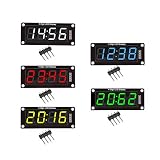
- For use library: TM1637.h.
- Digital tube 8 grey level is adjustable.
- Module connects to digital I/O on 2 pins.
- The control interface electrical level is 5V.
Rank #4
- The ESP32S3 LED Matrixes Portals is a powerful CircuitPythons Powereds internet display, for creating dynamic visual projects with ease
- Featuring PCB construction, this display board and integration into computer
- Perfect for use home automation systems, educational demonstrations, or interactives art installations, providing applications across various fields
- With its standard black, the ESP32S3 seamlessly complements while offering advanced connectivitys for innovative digital displays
- for enthusiasts, hobbyists, and maker lookings to enhances their creative projects with programmable displays
Product prices and availability are accurate as of the date/time indicated and are subject to change. Any price and availability information displayed on Amazon at the time of purchase will apply.
The Tool Desk
Outbyte PC Repair FREEClear out junk files and repair common Windows errorsFree Scan →Outbyte Driver Updater FREEScan for outdated or missing drivers - takes under a minuteDriver Scan →



