The Tool Desk
Outbyte PC Repair FREERepair Windows errors before they cause bigger problemsFix Now →Outbyte Driver Updater FREEScan for outdated or missing drivers - takes under a minuteDriver Scan →To check a JBL earbud’s battery, first connect it to the JBL Headphones app and look for a battery reading on the device screen. If the app does not show one, use the LED guide for your exact model: JBL’s case and earbud indicators differ by product, so a color or light pattern on one model may mean something different on another.
Check the battery in the JBL Headphones app
- Pair your earbuds with your phone over Bluetooth.
- Open the JBL Headphones app and select the earbuds if they appear.
- Look on the device screen for battery information. JBL documents a battery-level monitor feature in the app, but does not establish that every earbud model supports it or that every app version uses the same menu path. The display may vary by model and app version. JBL Support
The available information does not confirm that all models show separate left- and right-earbud percentages. Do not assume a number or a particular layout will appear.
As an Amazon Associate I earn from qualifying purchases.
Read the case and earbud lights for your model
Identify the model name from the case, packaging, or Bluetooth device listing. Then find that model’s quick-start guide or FAQ on JBL Support and use its LED legend. Case lights may describe the case battery, the earbuds’ charging state, or both; the meanings are not standardized across JBL products.
JBL Free and Free X
JBL’s charging information for the Free and Free X says four dots on the case indicate the case’s battery level. The earbuds have separate white rings: they light while the earbuds charge and go out when they are fully charged. The case dots and earbud rings therefore report different things. JBL Free: Charging Information
#1 Best Overall

- ▶Compatibility: This is a third-party charging case compatible with JBL Vibe Beam 2nd Gen【NOT for the 1st Generation】
- ▶Large Capacity: The charger case build-in 600mah capacity which could full charge the earbuds about 3 times. with portable size and lightweight, you can carry it very easy and charge headphone at home, in office, in car or on travel.
- ▶Tpye-C Input: The charging case with Type-C Input (5V/0.3A). And with over-charge/over-current/over-voltage protection, protecting your earbuds in all directions.
- ▶LED Indicator: The charging case indicator let know the charging case status (During charging: Red-charging case in charging; Green-charging case full charge). To know the battery percentage of the charging case from the outside Led status (Flashing Red: 0~5%; Red light on: 6~20%; Green: 21~100%)
- ▶Package includes: 1 x for Vibe Beam 2 charging case, 1 x charging cable, 1 x manual, and with sincerely after-sales services. If you have any question, please contact us online.
JBL Wave Beam 2
The Wave Beam 2 quick-start guide uses red, orange, and green to indicate low, medium, and high case battery levels. Treat this as the Wave Beam 2 legend, not a general JBL color chart. Wave Beam 2 Quick Start Guide
JBL Tune Buds 2
The Tune Buds 2 quick-start guide includes model-specific diagrams for earbud and case battery and charging states. Refer to the guide’s own diagram to interpret the lights rather than applying another model’s pattern. Tune Buds 2 Quick Start Guide
Rank #2

- ▶Compatibility: This is a third-party charging case compatible with JBL Vibe Beam 1st Gen【NOT for 2nd Generation】
- ▶Large Capacity: The charger case build-in 600mah capacity which could full charge the earbuds about 3 times. with portable size and lightweight, you can carry it very easy and charge headphone at home, in office, in car or on travel.
- ▶Tpye-C Input: The charging case with Type-C Input (5V/0.3A). And with over-charge/over-current/over-voltage protection, protecting your earbuds in all directions.
- ▶LED Indicator: The charging case indicator let know the charging case status (During charging: Red-charging case in charging; Green-charging case full charge). To know the battery percentage of the charging case from the outside Led status (Flashing Red: 0~5%; Red light on: 6~20%; Green: 21~100%)
- ▶Package includes: 1 x for Vibe Beam charging case, 1 x Type-c charging cable, 1 x manual, and with sincerely after-sales services. If you have any question, please contact us online.
Tell whether the earbuds or case are charging
Check which indicator the manual describes. An earbud light can show that the earbud is charging or fully charged, while a separate case indicator can show the case’s remaining charge. For example, on JBL Free and Free X, the white earbud rings go out at full charge; the four case dots indicate case battery level. Other models use their own legends.
If the app does not show a battery reading
- Confirm that the earbuds are paired with the phone and that the app recognizes the product.
- Check whether the exact model supports the app’s battery monitor.
- Use the model’s quick-start guide or support page to check the case and earbud indicators instead.
JBL’s support material documents the app battery monitor, including an app release-note entry about fixing it, but that does not establish a universal compatibility fix or troubleshooting sequence. If these checks do not resolve the issue, consult support for the specific model rather than relying on a reset procedure meant for another product.
Quick Recap
Best Value

- Compatible Earbuds: This charging case compatible with Vibe Beam 1st/Wave Beam1st only. 【Does not compatible with Vibe Beam 2 and Wave Beam 2】
- Large Capacity: The charging case can fully charge Vibe Beam earbuds about 2-3 times. With the charging case, you will no worry about low-power notice.
- USB C Input & Safety: The charging case only supports usb type c charging, it build-in smart chips, protect your earbuds from over-voltage, over-cureent or over-charged.
- Portable & Conventience: It is very lightweight and compact easy to carry around in your pocket, bag and very convenience to charge your earbuds at home, in office, in car or on travel.
- Package Includes: 1 x charging case for Vibe Beam, 1 x charging cable, 1 x user manual, with in time after-sales services. If you have any question, please contact us online.
Rank #4
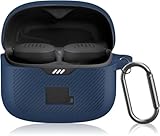
- [Compatible Device]Designed exclusively for the JBL Tune Buds, this protective case ensures a perfect fit with no gaps. JBL Tune Buds and charging case are not included.
- [Mutlti Colors]The case for JBL Tune Buds comes with several colors to choose for fitting your mood and dressing in different occasions.
- [Anti-drop Carabiner Design]The JBL Tune Buds case features a durable carabiner, allowing you to securely hang the charging case on everywhere you want. This innovative design keeps your headphones safe from accidental drops.
- [High Quality Material]Crafted from environmentally friendly silicone, the JBL Tune Buds case offers an ultra-lightweight and smooth touch experience. Its scratch-resistant and fingerprint-proof properties maintain a pristine appearance for long-term use.
- [Customer Service]Our products are checked under rigorous test.If you receive a defective product or have any questions, send us a message and we’ll get back to you faster within 24 hours.
Rank #3
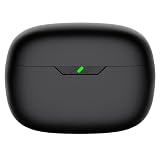
- Compatible Earbuds: This charging case compatible with Vibe Beam 2nd generation only. 【Does not compatible with Vibe Beam 1st gen】
- Large Capacity: The charging case can fully charge Vibe Beam earbuds about 2-3 times. With the charging case, you will no worry about low-power notice.
- USB C Input & Safety: The charging case only supports usb type c charging, it build-in smart chips, protect your earbuds from over-voltage, over-cureent or over-charged.
- Portable & Conventience: It is very lightweight and compact easy to carry around in your pocket, bag and very convenience to charge your earbuds at home, in office, in car or on travel.
- Package Includes: 1 x charging case for Vibe Beam 2, 1 x charging cable, 1 x user manual, with in time after-sales services. If you have any question, please contact us online.
Product prices and availability are accurate as of the date/time indicated and are subject to change. Any price and availability information displayed on Amazon at the time of purchase will apply.




