Outdated Drivers Are Slowing You Down
One free scan finds every outdated or missing driver and matches the right update for your exact hardware.Free scan · exact hardware matchPC Slower Than It Used to Be?
A free scan shows the junk files, broken settings and background clutter dragging Windows down - then fixes them in one click.Free scan · Windows 10 & 11A standard filament 3D printer is not automatically a plotter, laser engraver, or CNC mill: it moves a heated nozzle to deposit material according to a digital file. But a printer can do more when you convert its motion system for a limited task or use a machine designed for interchangeable toolheads. Here are five realistic ways to extend its role, with the key distinction between a DIY conversion and a supported machine function.
1. Convert it into a pen plotter
A pen holder can let an FFF printer move a pen across paper to draw lines or write simple labels. A configured setup could, for example, make a line-art card or diagram. This is a DIY conversion, not a normal printer mode: it needs a suitable pen mount and instructions that move the tool along a two-dimensional path.
As an Amazon Associate I earn from qualifying purchases.
A University of Lapland thesis notes that FFF printers can be converted for plotting, but are not ideal platforms because their motion characteristics differ from those of plotters (University of Lapland thesis). Treat the result as an experiment rather than assuming handwriting quality, accuracy, or speed.
Do these 3 things before closing this tab:
1Fix the driver behind crashes, sound loss and screen glitches2Clear out junk files and repair common Windows errors3Scan for outdated or missing drivers - takes under a minute2. Engrave or cut with a compatible laser module
On a compatible modular machine, a dedicated laser module can support engraving or cutting. Snapmaker documents laser functions for its Snapmaker 2.0 and Artisan systems, which use purpose-built modules rather than an ordinary filament-printing nozzle (Snapmaker 2.0; Snapmaker Artisan).
#1 Best Overall

- When you want to upgrade your Ender5 Pro Plus to core-XY kinematics, this kit has all needed parts—skips sourcing separate components, making the conversion smooth even for first-time DIY modders.
- CNC machined aluminum alloy parts ensure ultra-high precision (±0.1mm tolerance), so every component aligns perfectly, avoiding the misalignment that causes shaky core-XY movement and blurry prints.
- Core-XY design after conversion cuts print time by 30%—the Ender5 Pro Plus moves the print head faster without losing accuracy, ideal for large or time-sensitive projects.
- Tailored exclusively for Ender5 Pro Plus, it fits the printer’s original frame exactly—no drilling or cutting needed; just follow the assembly guide to finish the upgrade in a few hours.
- Durable aluminum alloy resists wear from daily core-XY movement, maintaining structural stability for years, unlike plastic conversion parts that warp or break under stress.
This is not a generic upgrade for any desktop printer. Check the manufacturer’s documentation for the exact machine, module, supported materials, setup, and safety requirements before attempting laser work; the cited product pages do not establish a universal procedure.
3. Carve or cut with a compatible CNC module
On a compatible modular machine, a dedicated CNC module can perform tool-based carving or cutting. Unlike filament printing, CNC work removes material with a cutting tool. Snapmaker documents this function for supported 2.0 and Artisan configurations (Snapmaker 2.0; Snapmaker Artisan).
Rank #2

- 【Nema17 Stepper Motor】Step angle: 1.8deg; Rated current: 1.7A; Holding torque: 0.45Nm (64 oz.in) ; Size: 40mm; Phase: 2; 1.8 ° ± 5% step angle (200 steps / rotation)
- 【UNO R3 Improvement Borad】 UNO is a Simple I/O platform based on open source code, and has a Processing/Wiring development environment similar to Java and C language, which is easy to understand, allowing you to quickly use UNC to make interesting things
- 【CNC Shield Board V3 Expansion Board】This expansion board can be used as a drive expansion board for engraving machines, 3D printers, etc.
- 【DRV8825 Stepper Motor Driver】Six different stepping modes: full, half, 1/4, 1/8, 1/16, 1/32; The adjustable potentiometer can adjust the maximum current output, so as to obtain a higher step rate.
- 【Mechanical Switches with 3-pin Cable】Under normal circumstances, the system needs to be equipped with at least 3 mechanical switches;easy to install, more common styles.
This should not be treated as a drill attachment that any printer can safely carry. Confirm that the exact machine supports the module and follow its manufacturer instructions for tooling, setup, materials, and operation.
4. Use a supported 3-in-1 system as a small fabrication workspace
A supported 3-in-1 machine can bring three different jobs into one workspace: filament printing, laser work, and CNC work. Snapmaker describes interchangeable, dedicated modules and a quick-swap workflow for its systems (Snapmaker 2.0 Modular 3-in-1 3D Printer; Snapmaker Artisan).
Rank #3
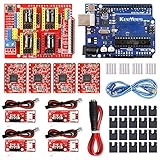
- ★ Stable performance ★ A4988 Driver Chip is low power consumption and will not be too hot during use. The performance is more stable than chip.
- ★ DC Power cable ★ The DC power cord can quickly connect to the DC power adapter and power the CNC shield board. Save time and more securer cable connection Plug and Work.
- ★ CNC Shield ★ This is the latest version of the expansion board, which can be used for engraving machines and 3D printers. It can drive 4 A4988 stepper motors.
- ★ With 20 Pcs Jumpers ★ When setting up CNC projects, jumper caps are necessary accessories. There are 20 of them in the kit, enough for most project.
- ★ Reliable technical support ★ Please visit github (github: Keeyees/KY-102) to get relevant information or can contact us on Amazon, we will send PDF Document to you.
This can suit someone who values having multiple fabrication methods in one footprint. The available documentation does not establish that a combined machine is cheaper, faster, or as capable as three dedicated machines, so weigh the convenience against the specific tasks and workspace you need.
Independent reader supportYour contribution helps us test, update, and keep practical guides available for everyone.5. Expand only after checking your exact model
Before buying a toolhead or attempting a conversion, identify the printer’s exact model and check what its manufacturer documents as supported. Snapmaker’s catalog lists modules and add-ons for supported products, but compatibility is model-specific (Snapmaker product catalog).
- If you have an ordinary FFF printer, pen plotting is the conversion supported by the evidence here; it still takes a suitable mount and configuration.
- If you want laser or CNC work, look for a purpose-built, documented module for your exact machine rather than assuming a generic printer can accept one.
- Compare the task you want to do, compatibility, setup effort, workspace, material needs, and manufacturer safety instructions before choosing a route.
For a retired printer, the question is not simply what attachment can be made to fit. It is whether the machine’s design and documentation support the new task.
Quick wins for a faster PC:
Fix the driver behind crashes, sound loss and screen glitchesFind Drivers →Repair Windows errors before they cause bigger problemsFix Now →Quick Recap
Product prices and availability are accurate as of the date/time indicated and are subject to change. Any price and availability information displayed on Amazon at the time of purchase will apply.




