No. A Verizon bill or My Verizon usage log cannot show the words in an iMessage conversation. Verizon’s records cover supported network activity, such as limited SMS/MMS usage details; iMessages use Apple’s services or an internet connection and do not appear in Verizon’s text logs.
What Verizon records show—and what they do not
| Record | What it can show | Message content? |
|---|---|---|
| Verizon usage details for supported text activity | Limited activity information, such as dates, times, counts, and sender or recipient numbers, where available | No. Verizon says, “You cannot view text message content.” |
| iMessage conversation | Not included in Verizon’s SMS/MMS text logs | No. Verizon’s bill and usage tools do not provide the conversation. |
Verizon explains the distinction in its text and data usage FAQ. Verizon-hosted support discussions also explain that iMessages are internet-based and are not listed in Verizon text logs: “How can I view iMessage text message on bill?” and a Verizon Support response about text records and internet-based messaging.
As an Amazon Associate I earn from qualifying purchases.
How to check available Verizon usage details
- On the Verizon website, sign in to My Verizon and open Usage.
- Review current usage or the Usage Snapshot. To get a monthly report, open Usage Tools and download the available usage-history report.
- In the My Verizon app, select Mobile, then scroll to Usage.
- Read any message entries as activity details only; they do not contain the text of a conversation.
Verizon’s current guidance says My Verizon usage summaries cover the previous 90 days, and monthly usage-history downloads are available for the last three months per device. These are retention periods for the usage tools, not a way to retrieve iMessages.
What’s actually slowing this PC down?
Pick the symptom - the matching free tool is one click away.
What if you need older records or cannot see a line?
Verizon says customers who need mobile usage and billing history older than 18 months should contact support. That guidance does not make older iMessage records available: iMessages are not present in Verizon’s text logs. If a line is missing from your account view, check with Verizon about your account access; its usage FAQ does not specify every account-role permission.
Quick Recap
Best Value

- MASTER YOUR FINANCES WITH EASE: Track your spending, manage your monthly bills, and budget effectively with Current’s bill paying organizer book, featuring 14 spacious pockets and 32 label stickers to keep every receipt and statement in its place
- DURABLE DESIGN FOR LONGTERM USE: Crafted with thick, high-quality paper stock, a coated cover, and a sturdy spiral bound spine, this organizer withstands daily use without tearing, making it a reliable companion for your financial journey year-round
- STAY ON TRACK WITH HELPFUL TIPS: Includes a personal finance tips section filled with practical suggestions to simplify budgeting and optimize your savings, plus large pockets to store tax documents and important bills for easy year-end reference
- CONVENIENT & FUNCTIONAL SIZE: Perfectly sized at 9" x 12", this organizer fits seamlessly into your home office setup while providing ample room for notes, receipts, and monthly tracking, making bill management both efficient and clutter free
- AMERICAN MADE EXCELLENCE: Carefully crafted in the USA, Current’s financial planners come in a variety of stunning patterns, colors, and styles to reflect your personal taste, turning a chore into an enjoyable part of your weekly routine
Rank #4

- MONTHLY ORGANIZER FOR 31 DAYS - Equipped with 31 slots for each day of the month
- USEFUL - Organizes bills, letters, cards and more
- HIGH QUALITY - Made by high quality brown wood and black wire.
- SPACE SAVER - Compact design will take less countertop space than larger units.
- MEASURES - 15.7 L x 7.5 W x 2.6 H inches.
Rank #3

- Organize and manage your household bills and finances with this simple, easy to use 7" x 9" Monthly Bill Organizer.
- Includes pocketed pages to file receipts, bills even tax information.
- This spiral bound organizer comprises of neatly organized pages for each month allowing you to plan for upcoming expenses.
- Establish good credit by recording itemized goals. Check off when you have paid your bills for peace of mind at a simple glance.
- Great for any household or small business.
Rank #2

- Keep bill straps organized, visible, and easily accessible with this clear acrylic bill strap rack designed for efficient cash handling.
- Made from durable clear acrylic with six compartments and angled dividers; measures 9-7/8" x 3" x 8" for a compact countertop fit.
- Ideal for banks, casinos, retail stores, restaurants, and cash rooms that require organized currency band storage during daily operations.
- Six-slot bill strap organizer compatible with standard currency bands and paper bill straps used in financial and retail environments.
- Commercial-grade construction built for long-term use; backed by BankSupplies’ reputation for reliable money-handling products since 1973. Avoid ammonia-based cleaners to maintain clarity.
#1 Best Overall
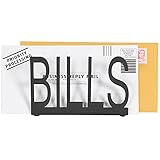
- Desktop standalone letter holder in black metal spelling B-I-L-L-S in block cutout style writing
- 6 x 4 inch size holds standard letters, postcards, documents and smaller notepads
- Durable metal construction and cushion pad on each bottom corner provides stability and prevents from sliding on desk, tabletop, or countertop surface
- Cutout design and matte black finish complements a variety of home and office decors
- Approximate Dimensions: 6 W × 2.25 D × 4 H (in inches)
Product prices and availability are accurate as of the date/time indicated and are subject to change. Any price and availability information displayed on Amazon at the time of purchase will apply.
Independent reader supportYour contribution helps us test, update, and keep practical guides available for everyone.



