Yes. A trickle charger can damage a battery if it keeps charging after the battery is full, uses the wrong voltage or charge settings, or is not designed for that battery’s chemistry. But the term “trickle charger” is used loosely: a low continuous current, a controlled float mode, and an automatic maintainer do not necessarily behave the same way. Check the battery and charger manuals before connecting one, especially if you plan to leave it attached.
How a trickle charger can damage a battery
A low charging current is not automatically harmless. If an unsuitable charger continues feeding current after the battery is full, excess energy can produce heat and gas; prolonged overcharging can permanently damage a battery. The risk also depends on whether the charger’s voltage, current, and charging mode suit the battery.
As an Amazon Associate I earn from qualifying purchases.
The consequences vary by chemistry. For lithium-ion batteries, Health Canada warns: “Do not charge your battery for longer than recommended. Overcharging can cause your battery to overheat, which can lead to fires or explosions.” Follow the battery maker’s time and charging instructions, and use a trusted, compatible charger. Health Canada’s lithium-ion battery safety guidance provides further precautions.
Do these 3 things before closing this tab:
1Clear out junk files and repair common Windows errors2Fix the driver behind crashes, sound loss and screen glitches3Repair Windows errors before they cause bigger problemsTrickle charging, float charging, and maintainers are different
Trickle charging
Trickle charging means supplying a low, continuous current. Depending on the battery and charger circuit, that current can still overcharge a full battery if the charger is not designed for indefinite connection.
#1 Best Overall
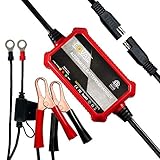
- Automatic Battery Charger & Maintainer: 1A 12V smart battery charger perfect for SLA / VRLA / GEL CELL / AGM / WET lead acid batteries. It is a battery maintainer, trickle charger, float charger, and battery desulfator, also complete 4-step charging program (Initialization, Bulk Charge, Absorption Mode, Float Mode).
- Ultra Compact & Practical: The battery charger is compact and lightweight like the phone, long enough ac cable+ dc cable 102inch long, two types of dc output cable with either the ring or alligator connectors to use. 3.9 x 2.4 x 1.25inchs, 10.5oz.
- Widely Compatible: Perfect suitable for cars, golf cars, motorcycles, scooters, lawn mowers, ATVs, UTVs, tractors, trucks, SUVs, RVs, boats, PWCs, jet skis, snowmobiles, classic cars, children's toys and more. automatically switches to float, maintenance voltage after fully charging the battery.
- Intuitive led indicators provide visual state-of-charge feedback and diagnostic information, green is power light; green with red means charging; green with yellow means fully charged.
- Multi Safety Protections: Safely charged avoid overcharge in hot climates and under-charging in cold climates. Built in circuit protection guards against reverse polarity, over-current, overload protection, over-voltage and more protection. Adopt ABS flame-retardant shell, fireproof, electric shock. Our safe and advanced charging technology automatically
Float charging
Float charging uses a controlled, reduced voltage to maintain a fully charged lead-acid battery. Battery University says a lead-acid charger should switch to float when the battery is full. The appropriate voltage and whether float charging is suitable depend on the battery maker’s instructions and conditions.
Smart chargers and maintainers
“Smart charger” and “maintainer” describe broad product categories, not guaranteed behavior. A device may use charging stages, a chemistry setting, reduced-voltage maintenance, or shutoff. For example, Minn Kota describes bulk, absorption, and float modes, while OSRAM describes an automatic long-term maintenance mode. Check the exact model’s manual to learn what it does after charging and whether that behavior is suitable for your battery. Victron’s charger safety instructions and Minn Kota’s Precision Charger guidance illustrate why settings and charging modes matter.
Does safety depend on battery chemistry?
Flooded lead-acid
A compatible charger may use float mode after charging. Follow the battery maker’s charging and maintenance instructions, and provide ventilation and keep ignition sources away when required. Equalization is not a routine setting for every battery: Minn Kota says its equalization mode is for flooded lead-acid batteries and should be used according to the battery manufacturer’s schedule.
Free tools Windows power users keep installed
One-click scans. No signup required.
AGM and gel lead-acid
Do not assume that a setting intended for one lead-acid type is suitable for every sealed lead-acid battery. Use the setting recommended for the specific battery. Victron lists flooded lead-acid, AGM, gel, and LiFePO4 modes for the referenced charger, but still directs users to confirm compatibility and settings against the battery manufacturer’s specifications.
Lithium-ion
Avoid leaving a generic or lead-acid-only trickle charger connected to a lithium-ion battery. Battery University says lithium-ion should not receive trickle charge. Instead, follow the instructions for the specific battery and use a compatible charger; lithium-ion is a broad family, so guidance for one type should not be generalized to all of them. The Fulbat manual cited below refers specifically to LiFePO4, not every lithium-ion battery. Battery University’s charger overview explains charging behavior across chemistries.
Rank #2
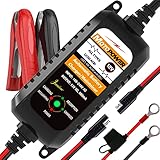
- Charger, Maintainer & Desulfator - An all-weather battery charger, battery maintainer, trickle charger, and battery desulfator. Perfect for charging and maintaining all 12-volt lead-acid, flooded or sealed maintenance free batteries (AGM and gel cell).
- Automatic Desulfation & Optimization - Automatic detection of battery sulfation problem. Applying with pulse current technology to desulfate the batteries effectively. Optimize the battery performance during charging without any manual operation.
- Energy Saving & Spark Free - Zero output in standby mode. No battery drain when connecting with the battery. Spark proof during lead connection for safety.
- Multi-level Safety Protection & Timer Set Up - Overcharge, short circuit and reverse polarity protected. Charge the battery up to 14.4V and Maintain the battery at 13.6V for long time to avoid gasing and to extend the battery life. 24-hour Timer is set up in the program to terminate the charge and enter the maintaining mode once the voltage is above 14V to ensure safety.
- Easy Operation -Just plug-in, connect to the battery and start charging or maintaining your battery. The desulfation is working automatically during the charing. No manual operation.
Can you leave a trickle charger on all the time?
Only if the battery and charger makers say that the exact combination is suitable for long-term connection, and the charger’s full-charge behavior is appropriate. Confirm the selected chemistry, voltage, supported battery capacity, and temperature limits. Also check whether the charger stops, enters a specified float or maintenance mode, or continues applying current after the battery is full. Product labels such as “smart” or “maintenance-free” do not replace the manual.
What to check before connecting a charger
- Chemistry and voltage: Match the battery’s chemistry and nominal voltage to a mode and output supported by the charger. Follow the battery maker’s precautions and recommended settings.
- Capacity and intended use: Verify that the charger supports the battery’s capacity and use case. For example, Fulbat’s 2020 Fulload 1000 manual specifies a 2–20Ah charging range and maintenance up to 40Ah. Those are limits for that product, not general recommendations for other batteries.
- Full-charge behavior: Read the manual to establish whether the charger shuts off, enters float or maintenance mode, or continues trickle charging.
- Temperature and condition: Follow the battery maker’s temperature limits. Do not charge a damaged battery; the cited manufacturer instructions also warn against charging a frozen battery.
- Safe setup: Follow the charger’s instructions for ventilation, polarity, placement, and connection. Victron’s safety instructions cover these precautions.
If a battery or charger becomes unusually hot, the battery swells or leaks, or you notice an unusual smell or other abnormal behavior, stop using it when safe to do so and contact the battery or charger maker. A maintainer should not be treated as a way to recover a weak or damaged battery.
Quick wins for a faster PC:
Repair Windows errors before they cause bigger problemsFix Now →Fix the driver behind crashes, sound loss and screen glitchesFind Drivers →How to compare battery maintainers
Compare the specifications that affect compatibility and behavior rather than relying on the product name:
- Supported battery chemistries and nominal voltages
- Supported amp-hour range and charge rate
- What happens after a full charge: float, maintenance, shutoff, or ongoing trickle
- Temperature restrictions and stated safety features
- Connection method and approval or guidance from the battery maker
As product-specific examples, OSRAM’s BATTERYcharge 904 product page describes a 4A charger for 6V/12V vehicle batteries with separate lithium and lead-acid/AGM charge cycles and automatic long-term maintenance. Fulbat’s Fulload 1000 manual gives its own chemistry, voltage, and capacity limits. Neither example establishes suitability for a particular battery; verify the current model’s manual and the battery maker’s requirements. OSRAM BATTERYcharge 904 specifications and Fulbat Fulload 1000 manual.
Quick Recap
Product prices and availability are accurate as of the date/time indicated and are subject to change. Any price and availability information displayed on Amazon at the time of purchase will apply.




