Quick wins for a faster PC:
Scan for outdated or missing drivers - takes under a minuteDriver Scan →Repair Windows errors before they cause bigger problemsFix Now →Yes—but the Action button does not automatically change its assigned function. Set it to run one Shortcut, then build the context-based choices into that Shortcut. For actions that should happen without a button press, use a separate personal automation in Shortcuts.
How the Action button handles different situations
The Action button has one selected function. If you assign it a Shortcut, pressing and holding the button runs that Shortcut; the Shortcut can then use actions and decision logic to choose what to do. For example, a workflow might branch according to a context signal that is available to it, but the exact setup depends on the signal, the actions you need, and what your iPhone and apps support. Apple describes how to run shortcuts with the Action button and create a custom shortcut.
As an Amazon Associate I earn from qualifying purchases.
Assign a Shortcut to the Action button
- In the Shortcuts app, create a custom shortcut and add the actions you want. Run it in Shortcuts to test the workflow.
- Add decision logic for the situations you want to handle. Confirm that the context signal and actions you plan to use are available on your iOS version and in the relevant apps.
- Open Settings > Action Button, swipe to Shortcut, tap Choose a Shortcut, and select your shortcut. Apple’s interface and setup guidance is in Use and customize the Action button on iPhone.
- Press and hold the Action button to run the selected shortcut.
When a personal automation is a better fit
If you want something to happen when you arrive somewhere, at a particular time, open an app, connect to Wi-Fi or Bluetooth, or change a setting such as Focus, create a personal automation in Shortcuts and choose the relevant trigger. These automations respond to their own events; Apple’s documentation does not say they change the Action button’s assignment. See Apple’s guides to creating a personal automation and adding automations to Shortcuts.
The Tool Desk
Outbyte PC Repair FREERepair Windows errors before they cause bigger problemsFix Now →Outbyte Driver Updater FREEScan for outdated or missing drivers - takes under a minuteDriver Scan →Some personal automations can run automatically, while some actions need additional configuration or interaction. Check the trigger and each action’s requirements before relying on a workflow to run unattended.
#1 Best Overall

- Camera Control Button Coverage: TAURI's New phone case incorporates a built-in, highly responsive camera control button that seamlessly integrates with the original button functionalities. The ergonomic design allows for smooth, effortless actions—Click, Press, Swipe in one go—for quick and precise adjustments
- Super Magnetic Attraction: TAURI for iPhone 16 Case is embedded with 38 N52 magnets, boasting a magnetic attraction strength of up to 18N. Compared to the official magnetic case, its magnetic strength is increased by more than 50%. Moreover, it is compatible with all magnetic accessories and third-party Qi-certified wireless chargers, ensuring faster and easier charging. Let you enjoy a smarter and more effortless living experience
- 360° Full Protection: This TAURI for iPhone 16 case comes with high-quality 9H tempered glass screen protectors, effectively preventing scratches and cracks. The ultra-thin design ensures sensitive touch, making you feel as nothing on screen
- Military-grade Protection: The Clear for iPhone 16 Case is drop-tested and certified, featuring four built-in corner airbags to absorb impact, protecting your phone from accidental drops, bumps, and scratches
- Slim Design & Comfortable Grip: The Case for iPhone 16 is designed to be slim and lightweight, making it easy to carry and use with one hand. The processed TPU frame provides a delicate touch and a non-slip grip for added comfort
Check compatibility and availability
Apple identifies iPhone 15 Pro or later as supported for the Action button. The button replaces the Ring/Silent switch on supported models. Available assignments and individual features can depend on the model, software, region, or eligibility, so check Settings > Action Button on your iPhone to see the options it offers. If your phone does not have an Action button, this setup is not available on that device.
Quick Recap
Rank #4

- ✔️ Rounded Action Button ▶ Easily find the action button when it's in your pocket, in the dark, or when you're running. No more wrong presses on the buttons when you are not looking.
- ✔️ Masterfully Crafted Brushed Aluminum Buttons ▶ Upgraded with premium aluminum buttons featuring a refined brushed finish—crisp, clicky, and highly tactile for confident presses that feel as good as they look.
- ✔️ Textured ▶ Stone textured that looks as good as it feels. Say goodbye to smudges, and fingerprints.
- ✔️ Precise Fit ▶ Redesigned for a clean, secure fit that hugs your iPhone comfortably, with improved side coverage for a seamless, premium look in hand.
- ✔️ Curvy Bumpers and Rounded Edges ▶ Engineered to match the natural curve of your hand, giving you more comfort, better grip, and a smoother feel.
Rank #3
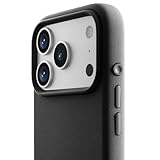
- ✔️ Rounded Action Button ▶ Easily find the action button when it's in your pocket, in the dark, or when you're running. No more wrong presses on the buttons when you are not looking.
- ✔️ Masterfully Crafted Brushed Aluminum Buttons ▶ Upgraded with premium aluminum buttons featuring a refined brushed finish—crisp, clicky, and highly tactile for confident presses that feel as good as they look.
- ✔️ Textured ▶ Stone textured that looks as good as it feels. Say goodbye to smudges, and fingerprints.
- ✔️ Precise Fit ▶ Redesigned for a clean, secure fit that hugs your iPhone comfortably, with improved side coverage for a seamless, premium look in hand.
- ✔️ Curvy Bumpers and Rounded Edges ▶ Engineered to match the natural curve of your hand, giving you more comfort, better grip, and a smoother feel.
Rank #2
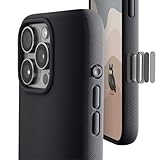
- ✔️ Rounded Action Button ▶ Easily find the action button when it's in your pocket, in the dark, or when you're running. No more wrong presses on the buttons when you are not looking.
- ✔️Built-in Camera Control Button ▶ Covered camera control button protects against scratches and drops. Swipes, clicks, light-presses, and double light-presses work seamlessly with the device.
- ✔️ Tactile and Clicky Buttons ▶ We at tineeOWL believe that button quality is the most important aspect of a good quality case. We hate mushy and stiff buttons too!
- ✔️ Grippy ▶ Grip dots at the sides add extra grip. A good balance of grip without picking up lint when you pull it out of your pockets.
- ✔️ Textured ▶ Stone textured case looks great and feels great. Say goodbye to smudges, and fingerprints.
Product prices and availability are accurate as of the date/time indicated and are subject to change. Any price and availability information displayed on Amazon at the time of purchase will apply.




