Not reliably on its own. A correctly specified, compatible, undamaged cable or adapter that is fully seated and routed without strain can reduce particular connection risks. But the reviewed sources do not establish that any adapter or custom power distributor prevents melting in all GPU and power-supply combinations. Choose parts approved for your exact hardware, install them carefully, and treat warning signs as a reason to shut down—not as something a different adapter automatically fixes.
What a different adapter can—and cannot—do
A power adapter changes how power travels from the PSU to the graphics card. It can help when it is designed for the exact GPU and PSU, has suitable electrical ratings, and is installed correctly. It can also add connection points that must be seated securely. A custom distributor or splitter is not a proven cure: the reviewed sources do not establish a broadly compatible distributor that eliminates connector-melting risk.
As an Amazon Associate I earn from qualifying purchases.
There is no universal modular PSU cable standard that makes a cable from one PSU interchangeable with another. Confirm compatibility with the exact PSU model and GPU documentation; do not rely on a connector that merely fits.
Why 12V-2×6 is an improvement, not a guarantee
PCI-SIG’s August 31, 2023 engineering change notice says the 12V-2×6 connector, defined in CEM 5.1, replaces 12VHPWR. ASUS describes the revised geometry as power pins 0.25 mm longer and sense pins 1.5 mm shorter than 12VHPWR: the power contacts are intended to seat before the sense contacts engage. That changes insertion detection and addresses the risk of a partial connection; it does not establish that overheating or damage is impossible. PCI-SIG’s connector update and MSI’s comparison discuss the change and backward compatibility.
#1 Best Overall
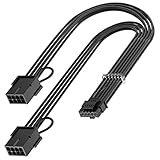
- 【16Pin GPU Power Cable for RTX 4070Ti】PCIE 5.0 16 Pin with dual 8 Pin Connector, this psu extension cable is mainly designed for Geforce RTX 4070Ti GPU which has the 16 Pin connector. Please Noted: This 16Pin sleeved modular cable is only suitable for 16pin GeForce RTX 4070 4070Ti 4070 Super Series GPU.
- 【Better Protect Your Graphic Cards】Made of alloy copper and tinned material, the plug terminals of the graphics card cable can bring more stable and higher currents with no heat on the plug and cable, which can avoid Graphic Card overheating due to the adapter is bent too much or frequently loose or connect. With 2X8Pin connector, the gpu extension cable can support 400W to 450W output, peak power up to 450 Watt.
- 【Stable Voltage Transmission with 16AWG Tinned Copper Wire】Using with the upgraded 16AWG tinned copper wire, this PCIE 5.0 extension cable can ensure more stable voltage transmission and higher power output, up to 450W. Unlike the original thick and stiff power cord, this GPU extension cable adopts the high-density flexible protective sleeve and nylon braided fiber.
- 【Neat and Space Saving】With the length of 14 inches, the 2x8 Pin psu extension cable enable you to have more room to create a more neat and tidy computer system for those tight or smaller cases. The included 4 transparent cable comb acrylic clips can help you better mange the extension cord for a clean look of your computer system.
- 【Warm Tips before your Purchase】Your package will include 1 Pack 16pin(12+4) to 2x8pin PCIE 5.0 12VHPWR adapter sleeved extension cable(13 Inch-Black). As a newborn brand, we care customer most.Provide high quality products and prompt customer service is our goal. If you receive any defective chargers or have any other problems of our products, please feel free to contact us.
ASUS says its ROG Equalizer cable supports 17 A per wire, compared with 9.2 A per wire for standard 12V-2×6 cables. ASUS also reports that, in an intentionally extreme current-imbalance test, a modified standard cable reached 146°C while its ROG Equalizer cable reached around 74°C. ASUS separately reports a ten-day test at 55°C ambient and a constant 600 W load, with cable temperature under 105°C, the cable material-rated threshold it cites. These are ASUS product claims and test results, not independent comparative validation or a prediction of what will happen in a particular PC. ASUS’s article describes the claims.
Compare the power-path options
| Option | What it can offer | Checks and limits |
|---|---|---|
| GPU-bundled multi-plug adapter | Can connect compatible existing PSU cables to a GPU that supports the included adapter. NVIDIA says to connect the PSU’s original output connectors and cables directly to its included adapter. | Use the specified number and type of PSU leads; fully seat every connection. Each additional interface is another connection to verify. NVIDIA’s adapter guidance applies to the RTX 40 Series, not every GPU. |
| Native PSU cable | Can simplify the power path when the exact PSU and GPU support it. | Verify the cable is approved for the precise PSU model and GPU. A native-looking plug is not proof of modular-cable compatibility. |
| 12V-2×6 rather than 12VHPWR | Revised pin geometry improves insertion detection and targets partial-connection risk. | It does not guarantee zero risk; compatibility and correct seating still matter. |
| Aftermarket reinforced cable | May offer different construction or ratings; ASUS reports higher current capacity for its ROG Equalizer product. | Check exact compatibility, ratings, physical fit, strain relief and warranty. The cited thermal comparison is vendor-reported, not independent proof that an aftermarket cable prevents melting. |
| Custom distributor or splitter | Could change the connection arrangement if specifically engineered and approved for the hardware. | No reviewed source establishes a generic distributor as a safe or effective fix. Do not use one without reliable ratings and documentation for the exact PSU and GPU. |
Install and route the cable carefully
For RTX 40 Series adapter guidance, NVIDIA says RTX 4090 and RTX 4080 16GB installations require at least three 8-pin connectors or a PCIe Gen 5 connector rated at 450 W or greater. NVIDIA notes that power supplies typically provide up to two 8-pin PCIe connectors per output cable and recommends at least 36 mm (1.4 inches) of clearance above the card for cable bend and airflow. These are RTX 40 Series-specific instructions; use the documentation for other GPUs and PSUs.
Rank #2

- 【12VHPWR Cable Extension】It is Conversion Cable, NOT Modular Cable. 16pin(12+4) female to connect the male port of PSU 12VHPWR output cable; Dual 8 pin(6+2) male connector for graphics card PCIe port.
- 【PSUs Compatibility】Works with all PSUs which come with original 12VHPWR/12V-2X6 output PCIe cable, e.g. Corsair SF1000L/ TX1000/ 850/ 750 ATX3, Corsair HX1000i/1200i/1500i ATX3.1; Seasonic CORE GX650/750/850 ATX3, Seasonic FOCUS GX750/GX850/GX1000 ATX3.
- 【Dual 8 pin(6+2) male for GPU】Works with GPUs with PCIe 8Pin/6Pin Male connector such as RTX 3060/3070/3070 Ti/3080/4060/4070. *NOTE: NOT Compatible with GPU with 12+4 pin connector like RTX 4070 TI (Super), RTX 5070.
- 【Parameter】This 12VHPWR Conversion Cable is 6.8 in/17cm long. The cable with 16AWG Copper wire supports up to 600W output and ensures stable transmission capability.
NVIDIA’s RTX 40 Series specifications list a 450 W TGP and 850 W minimum recommended PSU for RTX 4090; 320 W TGP and 750 W minimum for RTX 4080 16GB; and a 700 W minimum recommended PSU for RTX 4080 12GB. These figures apply to those named models, not as general PSU rules. Consult NVIDIA’s RTX 40 Series power guidance and the exact GPU and PSU manuals.
PC Slower Than It Used to Be?
A free scan shows the junk files, broken settings and background clutter dragging Windows down - then fixes them in one click.Free scan · Windows 10 & 11Outdated Drivers Are Slowing You Down
One free scan finds every outdated or missing driver and matches the right update for your exact hardware.Free scan · exact hardware match- Use the correct cable arrangement. Follow the GPU maker’s instructions for the included adapter or supported native cable. For NVIDIA’s included RTX 40 Series adapter, connect the PSU’s original output connectors and cables directly to the adapter.
- Seat every connection fully. ASUS support advises checking for a distinct click and no visible gap. Secure both ends of a bundled adapter; do not leave any plug partly inserted.
- Keep the cable unstressed. Avoid a sharp bend or sideways pressure at the connector. For NVIDIA RTX 40 Series adapter installations, maintain the stated 36 mm clearance above the card.
- Confirm PSU capacity and compatibility. Check the GPU’s specific PSU recommendation and the PSU maker’s approved cable list or documentation. Do not substitute a generic modular PSU cable.
- Inspect before powering on. Look for bent or damaged pins, dirt, deformation, or signs of heat. Do not reuse a damaged cable or connector.
What to do if you see a warning or damage
ASUS’s Power Detector+ support instructions say to shut down and unplug the system before inspection. If the cable or connector appears bent, deformed, overheated, or otherwise abnormal, stop using it and replace the affected cable; do not keep testing a suspect connection. The guidance is specific to ASUS’s support procedure and does not replace the manuals for other hardware.
Rank #3

- 【Designed for 40 Series Graphics Card with 16 Pin connector】JOYJOM PCIE 5.0 Series 3x8 Pin to 16 Pin 12+4Pin sleeved extension cable is designed for RTX 3090 Ti 4070 Ti 4090 4080 40xx Series Gracphis Cards. Please check the orientation of your GPU before purchase.
- 【90 Degree 16Pin 12+4Pin Male for GPU】There are 2 Directions of the connector, please check your gpu interface and our picture to choose correct Way(Type A or Type B), this is Type A
- 【16AWG 600W 12VHPWR PCIE 5.0】Made by standard tinned copper wire, supports up to 600W output. The plug terminals of the graphics card cable are made of alloy copper and tinned material, which can bring stable and higher currents
- 【Note】 This extension cable requires 2 unoccupied 8-pin PCI-e ports on your power supply to properly function. it won't work if Connect fewer than TWO connectors to your power supply
- 【Package Include】1x 16 Pin to 2x8Pin Type A Power Adapter 15CM
On supported ASUS hardware, Power Detector+ can show a red warning if a pin reads 0 A or exceeds 9.2 A. ASUS says a persistent alert may indicate internal damage, poor contact, abnormal impedance, uneven pressure, or bending near the connector. Those are ASUS’s alert conditions and troubleshooting context—not universal connector safety thresholds. Follow ASUS’s Power Detector+ troubleshooting steps: shut down and unplug, inspect the connections and GPU socket, confirm full insertion and PSU capacity, and try a known-good compatible cable or component only if available. Contact service if the warning persists. An alert can prompt investigation; it is not a guarantee that a problem will be detected before damage.
Quick Recap
Best Value

- - Perfect Compatibility - Specially designed for RTX 40 series graphics cards, perfectly compatible with RTX 4090, 4080, 4070Ti and other mainstream 16Pin 12VHPWR GPUs.
- - Standard Interface Specification - Input: GPU 8Pin port; Output: 12VHPWR 16Pin (12PIN+4PIN) port, perfectly match the power supply needs of RTX40 series graphics cards.
- - Stable Power Supply - Adopts 14AWG high-purity tinned copper wire core. Features excellent conductivity, ensures stable and safe power transmission for long-term GPU operation.
- - Durable & Premium Build - Integrated injection molding connector design prevents loosening and falling off. High-density braided mesh tube and PVC outer skin make the wire wear-resistant, bend-resistant and super durable.
- - Easy to Use - 15cm proper length meets daily installation needs. Plug and play without complicated operation. The braided design keeps internal chassis wiring tidy and beautiful.
Rank #4
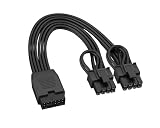
- Non-modular 16Pin(12+4) female to dual 8Pin(6+2) male PCIe extension cable. Converts PSU 12VHPWR / 12V‑2x6 output to standard PCIe power for graphics cards.
- Works with Type 3 / Type 4 / Type 5 ATX 3.0 & 3.1 PSUs Compatible with Seasonic, Corsair, PHANTEKS and more native 12VHPWR output cables.
- Easy to install with excellent cable management. Ideal for Type‑4 PSU builds, no extra tools or adapters required.
- High-temperature resistant materials reduce overheating risk. Ensures safe, reliable power for high‑performance GPUs and gaming systems.
- Supports PCIe 5.0 Gen 5 up to 600W. Built with 16AWG tinned copper wire (300V 10A) for stable power delivery and long‑term durability.
How to choose a replacement
- Start with the exact PSU and GPU model numbers, then confirm that the cable or adapter is explicitly supported for both.
- Prefer manufacturer-approved parts with clear electrical ratings and installation instructions over a generic splitter or distributor.
- Compare the number of connection interfaces, cable routing and strain relief, seating verification, warranty terms, and any independent validation. Vendor-reported test results should be treated as claims from that manufacturer.
- If the existing PSU cannot meet the GPU maker’s requirements or lacks a supported cable option, consider a compatible PSU rather than trying to compensate with an undocumented distributor.
Product prices and availability are accurate as of the date/time indicated and are subject to change. Any price and availability information displayed on Amazon at the time of purchase will apply.




