Yes. A 4GB graphics card can still run some PC games: official minimum requirements include 4GB cards for titles such as GTA V Enhanced and Madden NFL 26. But that number does not promise smooth performance, high settings, or compatibility with every new release. Check the exact GPU model against the game’s current minimum and recommended requirements.
What 4GB VRAM does—and does not—tell you
Video memory (VRAM) holds graphics data such as textures and shaders. Having enough helps a game use detailed assets smoothly, but VRAM capacity is only one part of compatibility. A card’s exact model matters, as do the game’s CPU, system-memory, graphics API, storage, and operating-system requirements.
As an Amazon Associate I earn from qualifying purchases.
Minimum requirements are not performance guarantees. A game may launch on a card listed at minimum while requiring lower settings or other visual compromises. Recommended requirements are a separate, higher target; meeting the minimum does not mean a card can deliver the recommended experience.
Recommended Free Tools
Games whose published requirements include 4GB GPUs
These are publisher-listed specifications, not results from comparable performance tests.
#1 Best Overall

- Chipset: NVIDIA GeForce GT 1030
- Video Memory: 4GB DDR4
- Boost Clock: 1430 MHz
- Memory Interface: 64-bit
- Output: DisplayPort x 1 (v1.4a) / HDMI 2.0b x 1
| Game | Published minimum graphics requirement | Published recommended graphics requirement |
|---|---|---|
| GTA V Enhanced | NVIDIA GeForce GTX 1630 (4GB VRAM) or AMD Radeon RX 6400 (4GB VRAM) | NVIDIA GeForce RTX 3060 (8GB VRAM) or AMD Radeon RX 6600 XT (8GB VRAM) |
| Madden NFL 26 | AMD Radeon RX 570 (4GB) or NVIDIA GeForce GTX 1050 Ti (4GB) | AMD Radeon RX 6600 XT (8GB) or NVIDIA GeForce RTX 3060 (8GB) |
| Baldur’s Gate 3 (Windows) | NVIDIA GeForce GTX 970 or AMD Radeon RX 480 with 4GB or more VRAM | NVIDIA GeForce RTX 2060 Super or AMD Radeon RX 5700 XT with 8GB or more VRAM |
Rockstar’s GTA V PC requirements page was updated December 10, 2025, and warns that downloadable content and programming changes can alter requirements. Check its current GTA V PC system requirements before deciding. EA lists the Madden NFL 26 PC requirements, and Larian lists the Baldur’s Gate 3 system requirements; the latter also requires an SSD.
What to expect when you only meet the minimum
Larian explicitly cautions that its minimum specification means players may need to make quality concessions. Its advice for low frame rates is to open video options and try a lower graphics preset. That is a useful expectation-setting example, not a guarantee that lowering settings will resolve every performance problem.
Rank #2

- 【4GB VRAM for Smooth Multitasking】: Equipped with 4GB DDR3 memory and a 128-bit bus width, this GT 740 provides a significant performance boost over standard 2GB models. It ensures smooth 1080P video playback and lag-free performance for office multitasking and basic graphic design.
- 【Triple Display Versatility (HDMI+DVI+VGA)】: Features a comprehensive output interface including HDMI, DVI, and VGA ports. Connect to modern monitors or legacy projectors without needing expensive adapters. Ideal for setting up a dual-monitor workstation to increase productivity.
- 【The Perfect Legacy PC Upgrade】: An excellent, cost-effective solution for reviving older desktop PCs. This card supports DirectX 12 (11_0) and is fully compatible with Windows 11/10/7, making it the go-to choice for upgrading from integrated graphics to a dedicated GPU.
- 【Low Power & Plug-and-Play】: Designed for high efficiency, this graphics card draws all its power directly from the PCIe slot with no external power connector required. It is compatible with standard power supplies, making installation quick and hassle-free.
- 【Quiet & Reliable Cooling System】: Built with an optimized heatsink and a low-noise cooling fan that maintains stable temperatures even during extended use. Perfect for building a Quiet Office PC or a dedicated HTPC for the living room.
The listed recommended graphics requirements for all three examples call for 8GB cards. This illustrates the gap between a game’s minimum compatibility target and its recommended tier; it does not prove that every 4GB card performs the same way or that every game needs 8GB.
How to check whether your 4GB GPU can run a game
- Identify the precise graphics card. Check the device’s system information or manufacturer specifications. Record the full model, VRAM amount, and whether it is a laptop or desktop GPU. Do not assume that cards sharing a product-family name have the same memory configuration.
- Open the game publisher’s current requirements page. Compare your exact model with the minimum graphics requirement first, then the recommended requirement. A VRAM match by itself is not enough if the named GPU, CPU, memory, operating system, API, or storage requirement differs.
- Decide what experience you want. If your card only meets minimum, plan to try lower graphics settings and treat frame rate and visual quality as uncertain unless there is a benchmark for your exact hardware and settings.
- Recheck before buying or upgrading. Requirements can change, and a card’s capacity alone does not establish its overall speed. Compare the named GPU models and your full system against the games you actually intend to play.
AMD describes its Game Explorer compatibility labels as distinguishing systems that meet recommended requirements from those that meet minimum requirements but may have lower performance and visual quality. The feature applies to games it lists, so it is a workflow aid rather than a universal or necessarily current compatibility database. AMD also advises checking the publisher’s website for non-Steam games. See its Game Explorer and Upgrade Advisor documentation.
Rank #3

- Powered by NVIDIA GeForce GT 730, 28nm GK208 chipset process with 902MHz core frequency, integrated with 4096MB DDR3 memory and 64-bit bus width
- More stable performance, compatible with Win11, can automatically install new driver
- Support NVIDIA Surround technology for 4 screens output by dual HDMI and VGA / DP. HDMI Max Resolution-2560x1600, VGA Max Resolution-2048x1536, DP Max Resolution-2560x1600
- Support DirectX 12, OpenGL 4.6, CUDA, OpenCL, DirectCompute and DirectML
- Original half height bracket matches with the low profile brackets make the Glorto GeForce GT 730 graphics card fit well with all PC tower, small form factor and HTPC(except micro form factor)
Don’t confuse GPU names or variants
A laptop GPU and a desktop GPU with a similar name should not be treated as interchangeable. Memory configurations can differ even within a product family: NVIDIA’s desktop RTX 3050 family page lists 8GB and 6GB configurations, not a 4GB desktop variant. For a laptop or any less common SKU, verify the precise device-maker specification rather than inferring VRAM from the family name. NVIDIA’s RTX 3050 family specifications are one example of why checking the specific configuration matters.
Independent reader supportYour contribution helps us test, update, and keep practical guides available for everyone.What the published requirements cannot tell you
These specifications establish that certain 4GB GPU models are listed at minimum for particular games. They do not establish a frame rate, settings target, or apples-to-apples comparison between cards. No comparable benchmark figures are available here, so an FPS prediction for your system would be unjustified.
Rank #4
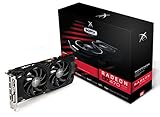
- Powerful Graphics Performance: Features the AMD Radeon RX 470 GPU with 4GB DDR5 memory, delivering smooth gaming experiences and excellent performance for modern titles at 1080p resolution with high graphics settings
- Enhanced Clock Speed: Operates at an impressive 1226MHz core clock speed, providing fast rendering capabilities and responsive gameplay for demanding applications and graphics-intensive tasks
- Triple X Cooling: Equipped with XFX's signature Triple X cooling system featuring a red fan design that efficiently dissipates heat while maintaining optimal operating temperatures during extended gaming sessions
- High-Speed Memory: Utilizes DDR5 video memory technology with 4GB capacity, ensuring rapid data transfer rates and seamless texture loading for enhanced visual quality and reduced stuttering
- Multiple Display Support: Supports multiple monitor configurations allowing you to expand your workspace or create immersive multi-screen gaming setups with ease
AMD explains that VRAM stores textures, shaders, and other graphics assets, but its higher-memory examples are tied to particular games, settings, resolutions, hardware, and test dates. Those results should not be generalized into a universal rule for 4GB cards. See AMD’s explanation of VRAM for gaming for its vendor-specific discussion.
Quick wins for a faster PC:
Repair Windows errors before they cause bigger problemsFix Now →Fix the driver behind crashes, sound loss and screen glitchesFind Drivers →Quick Recap
Best Value

- Robust 4GB Memory & Quad Display Ready: Equipped with 4GB of fast GDDR5 memory to smoothly handle daily graphics tasks. Features four built-in HDMI ports, enabling a seamless quad-monitor setup directly out of the box—perfect for multi-tasking offices, digital signage, or trading desks.
- Plug-and-Play Installation & Wide Compatibility: Utilizes a standard PCI Express interface for broad compatibility with most desktop PCs. Offers straightforward plug-and-play installation and stable driver support for modern Windows and Linux operating systems, ensuring a hassle-free setup.
- Quiet, Cool & Compact Design: Engineered with a silent fan and efficient cooling system for near-silent operation, making it ideal for noise-sensitive environments. Its low-profile design fits easily into small form factor cases, with both half-height and full-height brackets included for flexible installation.
- Enhanced Multimedia & Everyday Performance: Delivers smooth 1080P video playback and supports hardware-accelerated decoding, offering an excellent experience for home theater PCs (HTPC). Provides capable performance for everyday applications, multimedia tasks.
- Complete Package & Reliable Support: Includes the graphics card, both low-profile and standard brackets, a quick start guide, and screwdriver, which make it simple and quick setup process.
Product prices and availability are accurate as of the date/time indicated and are subject to change. Any price and availability information displayed on Amazon at the time of purchase will apply.




