Darb divides assistive vision into two jobs that run at different speeds. A local “Reflex” engine looks for immediate obstacles, barriers and drops, while a cloud “Comprehension” engine sends keyframes to Google Vertex AI (Gemini) and returns spoken scene descriptions. According to the project’s author, Abdulrahman Haramain, the local engine can interrupt and override the cloud engine as soon as it detects a hazard. This article is based on his first-person account, published on DEV Community on 29 September 2026. The performance numbers in it are his own reported project figures, not results from an independent benchmark, and the post does not describe Darb as a tested or validated mobility aid.
How the work is divided
The design rests on a simple split: the component that must react quickly does very little, and the component that can afford to be slow does the interpretive work. The author describes the two engines this way.

As an Amazon Associate I earn from qualifying purchases.
| Aspect | Reflex engine (local) | Comprehension engine (cloud) |
|---|---|---|
| Where it runs | On the client, using MediaPipe and TensorFlow Lite models | In the cloud, through Google Vertex AI (Gemini), fed with keyframes |
| Job | Identify immediate obstacles, barriers or drops | Produce a semantic description of the scene and turn it into audio |
| Reported speed | “30+ FPS” (author-reported) | “About 1 to 3 seconds” per description, depending on network conditions (author-reported) |
| Dependence on a network connection | None in the design, since inference runs locally | Required, because each description is a cloud round trip |
| Depth of output | Narrow, immediate cues | Broader context about what the scene contains |
Why the author split the engines
The author frames the design around a latency vs. context trade-off. A cloud model can describe a scene in richer detail, but every description arrives after a network round trip and a model call. A local model responds fast enough for obstacle cues, but it has no need, and in this design no room, for long descriptions. Splitting the work lets each path do the part it handles well, instead of forcing one pipeline to satisfy both timing and depth.
What’s actually slowing this PC down?
Pick the symptom - the matching free tool is one click away.
The author poses the broader question as “Have you guys messed around with hybrid edge/cloud ML setups?” Darb is his answer for a single assistive-vision use case. Nothing in the post suggests the split is the only workable pattern, and the comparison axes he lists (response time, network dependence, offline availability and depth of interpretation) are the dimensions he used to reason about the design, not a controlled comparison of alternatives.
#1 Best Overall

- WE CREATE WEARABLE ASSISTIVE ARTIFICIAL INTELLIGENCE (AI) DEVICES THAT CHANGES LIVES - With OrCam MyEye, you will finally be able to enjoy the morning paper, read the books you love, and even get back to work. Recognising the faces of your loved ones and shopping independently will become second nature. Please note: OrCam MyEye will enable you to access visual information, audibly. It will not Improve eyesight
- OrCam MyEye is a lightweight smart camera that attaches to virtually any glasses frame. Using Artificial Intelligence technology, it instantly and discreetly reads printed and digital text aloud from any surface, recognises faces, products, money notes and more, all in real-time
- TENS OF THOUSANDS OF USERS WORLDWIDE - OrCam MyEye is used in over 40 countries and 20 languages. The world’s most advanced, yet intuitive, the wearable assistive device is improving lives at all ages
- Named one of TIME Magazine’s top 100 inventions of 2019, and featured on Dr. Phil and STEVE, this intuitive device is operated by using simple hand gestures and has more than 20 voice-activated commands (voice commands available on English version only). It can be used with any level of vision loss and does not require an internet connection
- Free OrCam online video tutorials and user support. When purchasing, the language installed on the device is dependent on the region you are purchasing from. If you would like a different language, please contact us
How the reflex engine overrides the cloud
The most consequential part of the design is the coordination layer. The author calls it “The Glue” and describes it in one sentence:
“I wrote custom state-management hooks so the “Reflex” engine can instantly interrupt and override the “Comprehension” engine if it spots a hazard while the cloud is still ‘thinking.’”
Rank #2
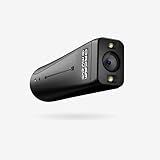
- WE INNOVATE WITH LIFE-CHANGING WEARABLE AI TECHNOLOGY - OrCam MyEye 2 Pro opens new doors, allowing you to relish reading the morning newspaper, immerse yourself in beloved books, and return to your professional life. Identifying the faces of family and friends and navigating shopping solo will effortlessly become part of your routine. Bear in mind: OrCam MyEye facilitates audible access to visual content; it does not enhance visual acuity.
- ORCAM MYEYE IS A COMPACT, INTELLIGENT CAMERA designed to clip onto almost any eyewear frame. It utilizes Artificial Intelligence to instantly and quietly vocalize text from any printed or digital surface, identify faces, products, currency bills, and more, all in real-time
- GLOBAL REACH WITH THOUSANDS OF USERS - OrCam MyEye 2 Pro boasts tens of thousands of users across more than 40 countries and is available in 20 languages. OrCam MyEye 2 Pro stands out as the leading edge, yet effortlessly operable, wearable assistive tool, making a positive impact on individuals of every age group.
- RECOGNIZED as one of TIME Magazine's top 100 inventions in 2019 and highlighted on Dr. Phil and STEVE, this intuitive gadget is controlled through easy hand movements and comes with over 20 voice-activated commands (available solely in the English version). Suitable for any degree of vision impairment, it operates independently of an internet connection.
- FULL ACCESS OrCam's online video guides and customer support at no cost. The language preset on the device at the time of purchase will vary based on the region of purchase. Should you require a different language, please reach out to us.
In practical terms, the sequence he describes runs like this:
- The client captures frames and sends selected keyframes to the cloud engine for scene comprehension.
- While that request is pending, the local engine keeps processing live frames for obstacles, barriers and drops.
- If the local engine flags a hazard, the state-management hooks interrupt the cloud path, so its eventual description does not take precedence over the hazard cue.
- The cloud description is handled as context, and the hazard cue takes priority in the audio output.
The author lists React and Next.js among the core technologies but does not explain how the hooks connect to the front end, so the exact implementation is not documented in the post. The override logic is the part most worth scrutinising, because a design that relies on one engine interrupting another depends on that handoff working under real timing and failure conditions, and the post does not show that testing.
Rank #3

- 【AI Voice Assistant & Real-Time Translation】 Transform your Smart Glasses into an intelligent companion. With built-in ChatGPT, you can ask questions, set reminders, or enjoy seamless real-time translation in over 100 languages—turning your Smart Glasses into a must-have tool for international travel, business meetings, and learning on the go.
- 【HD Camera & Photo Capture】 Never miss a moment with these Smart Glasses featuring a discreet camera. Capture crisp 1080P HD video and clear audio recording hands-free; Take photos and record videos hands-free anytime perfect for vlogging, documenting conferences, or recording outdoor adventures.
- 【Open-Ear Bluetooth Audio & Music Playback】 Experience premium sound while staying aware of your surroundings. These Bluetooth Smart Glasses deliver high-quality music playback and crystal-clear calls through open-ear speakers, making them ideal for driving, cycling, or daily commuting.
- 【AI Real-Time Translation】 HBVV Smart Glasses support translation in over 165 languages and offer comprehensive translation solutions for a variety of scenarios, including real-time translation mode, glasses-to-phone mode, and photo translation via the app. Whether for international business communication or travel, they instantly break down language barriers.
- 【Object Recognition & Smart App Control】 Go beyond recording with intelligent Smart Glasses that recognize what you see. Connect to the companion app for easy setup, file management, and feature control. Identify landmarks, plants, products, Significantly improve daily work efficiency —Perfect for travel and exploration, and for a smart lifestyle.
What the reported figures do and do not tell you
The author gives two numbers. The local engine runs at “30+ FPS.” Cloud scene descriptions take “about one to three seconds,” depending on network conditions. Both are his own figures from a 2026 project account.
Neither figure comes with a measurement method. The post does not name the device, camera resolution, model versions, network type, number of trials or how the timing was taken. The frame rate describes how quickly frames are processed, which is a different thing from how reliably an obstacle is detected. The one-to-three-second range describes how long a description takes to arrive, which says nothing about whether the description is accurate or complete. Readers should treat both numbers as a description of the author’s system in his environment, not as a performance specification they can expect elsewhere.
Rank #4

- SHARP PHOTOS & STABLE HANDS-FREE VIDEO: The 4K camera glasses capture crisp 13MP photos and smooth first-person video with a single tap or voice command. Built-in ELS stabilization reduces shake while walking, cycling, traveling, or recording daily moments. Designed for effortless hands-free capture, these AI camera glasses let you record life naturally from your perspective
- LOOK AT ANYTHING, ASK ANYTHING — Simply say “FunSeek” to activate your AI assistant. Instantly identify objects, landmarks, menus, signs, and more through the built-in camera, then receive answers directly through your glasses. From note-taking and meeting summaries to travel assistance and everyday questions, FunSeek helps you stay informed, productive, and connected—completely hands-free
- REAL-TIME TRANSLATION IN 6 MODES: Hear live translations during conversations, meetings, and phone calls without pulling out your phone. The Smart glasses support simultaneous interpretation, two-way talk, photo translate, and more. Useful for travel, international business, and any time language gets in the way
- OPEN-EAR AUDIO & TRIPLE-MIC NOISE REDUCTION FOR CLEAR CALLS: Open-ear speakers deliver immersive audio while keeping you aware of your surroundings, suitable for walking, commuting, workouts, and everyday wear. Triple-mic noise reduction helps reduce wind and background noise for clearer calls, voice commands, music, podcasts, and AI responses on the go
- BLUE LIGHT LENSES, WI-FI SYNC & ALL-DAY COMFORT: The AI glasses with camera and blue light lenses help reduce eye strain during screen time, comfortable for all-day wear. IP65-rated protection helps resist sweat and rain, while built-in Wi-Fi quickly transfers photos and videos to your phone. Lightweight at 45g and comfortable, the 4K video camera glasses are designed for work, travel, and everyday adventures
What the account does not establish
The post describes an architecture and a project. It does not establish the following:
- Clinical validation, or any study with visually impaired users.
- That Darb prevents collisions or reliably detects drops and barriers.
- That Darb is suitable as a standalone mobility aid, or as a replacement for a cane, guide dog or orientation training.
- Supported phones, cameras, audio devices or wearable hardware, and the minimum requirements for any of them.
- Model versions, test conditions or any independent safety evaluation.
- The Outstanding Completion Award at Kuwait Codes 2026, which the author reports but which is not independently confirmed in the post.
If you are weighing a similar split
Anyone considering a dual-engine design for a safety-relevant task can use the author’s architecture as a starting checklist. These are design questions, not results from testing Darb:
Best Value
- Define the fast path’s job narrowly. A local model that only flags a small set of hazards is easier to measure and reason about than one that also tries to describe scenes.
- Decide what happens to a late cloud answer. Under the author’s design, a stale description is overridden by a hazard cue. Your design should state explicitly whether a late description is discarded, queued or still spoken.
- Measure end to end on target hardware. Record capture-to-audio latency, not just model frame rate, and state the device, network and trial count with every figure.
- Test the handoff under failure. Check what happens when the network drops mid-request, when the cloud returns after the hazard has passed, and when both engines report conflicting information.
- Keep the claims proportionate. A prototype’s speed and architecture are not evidence of detection accuracy or user safety, and those need separate evaluation with the people who will depend on the system.
Darb is a clear example of how to separate fast local cues from slower cloud interpretation. What it demonstrates is the architecture and the author’s own timing figures. Whether that architecture keeps users safe is a question the published account leaves open.
Quick Recap
Product prices and availability are accurate as of the date/time indicated and are subject to change. Any price and availability information displayed on Amazon at the time of purchase will apply.




