Free tools Windows power users keep installed
One-click scans. No signup required.
Build Snake by storing the board and snake in grid coordinates, moving the game forward in timed steps, and redrawing a canvas from the current state. Use requestAnimationFrame() to draw in sync with browser repaint—not as the game clock—so the snake’s speed does not depend on a display’s refresh rate.
What you’ll build
This implementation uses a 20-by-20 logical grid drawn on a 400-by-400 canvas. The snake moves one cell per game step; food adds a segment and one point; touching a wall or the snake ends the game. Arrow keys change direction, and Enter starts or restarts. These are chosen game rules, not rules defined by browser APIs.
As an Amazon Associate I earn from qualifying purchases.
Keep cell coordinates as integers and convert them to pixels only while drawing. Separating the logical board from the canvas size makes movement and collision checks straightforward.
Set up the canvas and game state
Save the following as index.html, then open it in a browser. The HTML provides a canvas and status text; the script owns the game state, input, updates, and drawing.
#1 Best Overall
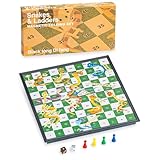
- This is an old Indian board game, 2+ players; suitable for fun of all ages; the playing field has numbered grid squares; the purpose of the game is to roll the dice, with the help or hindrance of ladders and snakes respectively
- Portable and foldable board: The complete set measures 9.6 x 8.3 x 0.9 inches (24.5 x 24.5 x 2.4 cm) and weighs 0.4 kg (0.86 lb); store the chess pieces and dice in the box
- Our powerful magnets can hold all your game parts in place. Even if you accidentally bump into it, your snake ladder board game will stay still.
- The magnetic characteristics of the board and pieces mean that your game will remain as it is Complete accessories: The set comes with four different red, green, yellow and blue chess pieces and a pair of dice
<!doctype html>
<html lang="en">
<meta charset="utf-8">
<meta name="viewport" content="width=device-width, initial-scale=1">
<title>Snake</title>
<style>
  body { font: 16px system-ui, sans-serif; text-align: center; }
  canvas { display: block; margin: 1rem auto; border: 1px solid #555; width: min(90vw, 400px); height: auto; }
</style>
<h1>Snake</h1>
<p id="status" aria-live="polite">Press Enter to start. Use the arrow keys to turn.</p>
<canvas id="board" width="400" height="400" aria-label="Snake game board"></canvas>
<script>
const canvas = document.querySelector("#board");
const ctx = canvas.getContext("2d");
const status = document.querySelector("#status");
const cells = 20;
const cellSize = canvas.width / cells;
const stepMs = 120;

let snake, direction, pendingDirection, food, score, running, gameOver;
let lastTime = 0;
let accumulator = 0;

function placeFood() {
  const empty = [];
  for (let y = 0; y < cells; y++) {
    for (let x = 0; x < cells; x++) {
      if (!snake.some(part => part.x === x && part.y === y)) empty.push({ x, y });
    }
  }
  return empty.length ? empty[Math.floor(Math.random() * empty.length)] : null;
}

function startGame() {
  snake = [{ x: 10, y: 10 }, { x: 9, y: 10 }, { x: 8, y: 10 }];
  direction = { x: 1, y: 0 };
  pendingDirection = direction;
  score = 0;
  food = placeFood();
  running = true;
  gameOver = false;
  accumulator = 0;
  status.textContent = "Score: 0";
  draw();
}

function queueTurn(x, y) {
  if (!running || (x === -direction.x && y === -direction.y)) return;
  pendingDirection = { x, y };
}

document.addEventListener("keydown", event => {
  const turns = {
    ArrowUp: [0, -1], ArrowDown: [0, 1],
    ArrowLeft: [-1, 0], ArrowRight: [1, 0]
  };
  if (turns[event.key]) {
    event.preventDefault();
    queueTurn(...turns[event.key]);
  } else if (event.key === "Enter" && !running) {
    startGame();
  }
});

function step() {
  direction = pendingDirection;
  const head = { x: snake[0].x + direction.x, y: snake[0].y + direction.y };
  const eating = food && head.x === food.x && head.y === food.y;
  const hitsWall = head.x < 0 || head.x >= cells || head.y < 0 || head.y >= cells;
  // If not eating, the tail leaves this step, so entering its old cell is allowed.
  const bodyToCheck = eating ? snake : snake.slice(0, -1);
  const hitsBody = bodyToCheck.some(part => part.x === head.x && part.y === head.y);
  if (hitsWall || hitsBody) {
    running = false;
    gameOver = true;
    status.textContent = `Game over. Score: ${score}. Press Enter to restart.`;
    return;
  }
  snake.unshift(head);
  if (eating) {
    score++;
    food = placeFood();
    if (!food) {
      running = false;
      status.textContent = `You filled the board! Score: ${score}. Press Enter to play again.`;
    } else {
      status.textContent = `Score: ${score}`;
    }
  } else {
    snake.pop();
  }
}

function draw() {
  ctx.fillStyle = "#111";
  ctx.fillRect(0, 0, canvas.width, canvas.height);
  ctx.fillStyle = "#4ade80";
  for (const part of snake) {
    ctx.fillRect(part.x * cellSize + 1, part.y * cellSize + 1, cellSize - 2, cellSize - 2);
  }
  if (food) {
    ctx.fillStyle = "#fb7185";
    ctx.fillRect(food.x * cellSize + 1, food.y * cellSize + 1, cellSize - 2, cellSize - 2);
  }
}

function frame(timestamp) {
  if (!lastTime) lastTime = timestamp;
  const elapsed = Math.min(timestamp - lastTime, stepMs);
  lastTime = timestamp;
  if (running) {
    accumulator += elapsed;
    while (accumulator >= stepMs && running) {
      step();
      accumulator -= stepMs;
    }
  }
  draw();
  requestAnimationFrame(frame);
}

startGame();
running = false;
status.textContent = "Press Enter to start. Use the arrow keys to turn.";
requestAnimationFrame(frame);
</script>
</html>
How the timed loop works
requestAnimationFrame() asks the browser to call a one-shot callback before a repaint; the callback schedules the next frame to continue animation. Its rate generally follows the display refresh rate, which may vary. MDN gives 60, 75, 120, and 144 Hz as examples, not a promise about any particular device. MDN warns that animation progress should use the callback timestamp or another time source rather than assuming a fixed number of frames per second. See MDN’s requestAnimationFrame() reference.
The loop accumulates elapsed milliseconds and calls step() only when 120 milliseconds have built up. That value is this example’s chosen game interval, not a browser requirement. Drawing can happen at every repaint, while snake movement remains on its own discrete cadence.
Rank #2

- 【CLASSIC SNAKES AND LADDERS】The board features the classic Snakes and Ladders design, with bright and colorful illustrations that are sure to delight players of all ages. A board game for 2 to 6 players - throw the dice and move along the board, they can climb ladders and advance toward the winning spot or lose their place and ride the snakes back down. It is an exciting family game.
- 【NO READING REQUIRED】 This is a great game for children who haven't learned how to read yet. The numbers on the gameboard give preschoolers all they need to know!
- 【SAFE AND DURABLE】This Snakes and Ladders is made from superior pine, which is tough and dense, well-constructed and feels smooth.The wood is certified by the Forest Stewardship Council (FSC) and meets universal sustainability standards. All the materials pass the toy safe test of EN71 (European Toy Safety Standard) and ASTM (American Toy Safety Standard)
- 【SKILL DEVELOPMENT】This snakes and ladders board game is an educational toy that develops fine motor skills, colour recognition, hand-eye coordination, basic numeracy and problem solving skills.
- 【WONDERFUL GIFT CHOICE】This Snakes and Ladders will be a nice gift for your friends and a whole family of all ages on every occasion. It is a good gift choice for kids and adults on birthdays, Christmas, Halloween, Thanksgiving, and other festivals.
The elapsed time is capped at one game interval per callback. Browsers commonly pause animation callbacks in background tabs and hidden iframes; without a cap or reset, returning after a long pause could trigger a burst of movement. This example effectively discards the excess hidden time instead of catching up.
How movement, turns, and collisions are handled
Queue turns to prevent instant reversal
Keyboard events set pendingDirection; the next game step applies that direction. The reversal check compares the requested direction with the current one, so a player cannot turn directly back into the neck. The queued input model also limits direction changes to game steps rather than making each key event move the snake.
Rank #3

- 【ColorGo SNAKES AND LADDERS】Hailing from ancient India, this classic world-renowned travel game is a delightful engaging activity for kids of all ages. Go forward or backward, experience surprise when you find the bottom of the stairs or the head of snakes. Our magnetic snakes and ladders board game keeps you engrossed from start to finish
- 【HIGH-QUALITY CONSTRUCTION】 The chess board and game pieces are crafted from superior quality HIPS plastic maintaining longevity. It includes 1 Playing Board, 2 Dice and 4 Pawns
- 【PERFECT MAGNETISM】The chess board every individual pieces have a magnetic attraction to the 100-square playing field; light magnetism would make it stable to play while not hard to move the pieces while playing in windy weather, outdoors or travelling
- 【PROTABLE AND FOLDABLE DESIGN】Open size of snake games board is 9.76*9.76*0.77 Inches, while folded size is 9.76*4.88*1.54 Inches. This perfectly sized snakes and ladders board is small enough to travel with, but also large enough to play comfortably
- 【EXQUISITE GIFT】Novel style - suitable for home, company, school, journey, bus or picnic. The rules are simple enough and no reading required to play. ColorGo's well-desigined color box packaging is very suitable as a gift for your family,friends and everyone you care about
Check collisions before changing the body
Each step calculates the next head cell first. A wall hit or an occupied body cell ends the game before the snake is updated. The body check excludes the last segment when the snake is not eating, because that tail cell vacates as part of the same move. When the head eats food, the tail does not move away, so the full body is checked.
Place food only on an empty cell
placeFood() collects unoccupied grid cells and chooses one at random, avoiding overlap with the snake. If the snake fills every cell, there is no legal food position; the game displays a win message instead of trying to choose from an empty list.
Rank #4

- Classic game set: Ludo game on the front, snake and ladder game on the back. A very classic game that can be owned simultaneously.
- Solid wood craftsmanship manufacturing: This double-sided game board is made of bamboo, with a smooth and clean surface, clear and perfectly printed board patterns, making it a game board worth cherishing.
- Idea Ideal Family Game: The board size is 11.82 inches (30 centimeters), suitable for 2-4 players to start the game simultaneously in the Ludo and Snake Ladder games, equipped with 2 dice and 4 colored chess pieces (a total of 20 pieces).
- Chessboard design: The chessboard is slotted for easy storage of chess pieces, and a specially designed cloth bag is used to protect the chessboard. At the end of the game, it is convenient to store the game set.
- Provide Ludo Board Game+Snakes&Ladders game tutorial cards. For your satisfaction, please feel free to contact us if you have any dissatisfaction or questions. The entire set weighs 2.03lbs (0.92kg) .
Why redraw the canvas
The canvas is one drawing surface, not a collection of independently movable snake-segment elements. Each call to draw() clears the previous picture and paints the current state. Keeping this rendering function separate from step() makes it easier to reason about movement and collision rules independently. MDN explains the canvas drawing approach in its drawing graphics learning material and basic canvas animations guide.
The Tool Desk
Outbyte Driver Updater FREEFix the driver behind crashes, sound loss and screen glitchesFind Drivers →Outbyte PC Repair FREEClear out junk files and repair common Windows errorsFree Scan →Quick Recap
Change the rules or presentation
- Change board size: adjust
cellsand the canvaswidth/heighttogether. The sample assumes a square canvas with equal-sized cells. - Change speed: lower
stepMsto move faster or raise it to move more slowly. The value controls game progression, not drawing frequency. - Use wraparound walls: replace the wall-failure condition with coordinate wrapping, such as
(head.x + cells) % cells, and apply it before collision checks. That is a design choice rather than a browser convention. - Increase speed as the score rises: derive the step interval from score, but keep it above zero and account for the changed interval in the accumulator logic.
Check the game when something goes wrong
- The snake moves too quickly on one screen: make sure movement occurs in the elapsed-time accumulator, not once per animation callback.
- A turn appears to do nothing: the requested turn may be a reversal, or the event may arrive after the game has stopped. Start with Enter after game over.
- Food appears under the snake: verify placement checks every segment after growth and does not select from an empty set.
- The snake collides with its departing tail: check the body slice used during collision detection; exclude the tail only when the current move is not eating.
- The game jumps after switching back to its tab: retain a capped elapsed interval or reset the timing accumulator on visibility changes so hidden time does not become a long catch-up sequence.
Product prices and availability are accurate as of the date/time indicated and are subject to change. Any price and availability information displayed on Amazon at the time of purchase will apply.




