For US shoppers aiming to spend under $200, the strongest choice depends on whether you want a more capable 1440p picture or the lowest-cost route to high-refresh gaming. The AOC Q27G3XMN stands out in RTINGS’ current budget guide for its 1440p mini-LED picture, while the Dell SE2426HGS is a smaller 1080p alternative. PC Gamer’s sub-$200 roundup adds three 1440p high-refresh options. Prices and stock change, so treat its cited prices as dated snapshots and check the exact model listing before buying.
How these five budget gaming monitors were selected
This guide is for the US market and uses a $200 ceiling, matching the directly comparable coverage available in 2026. The recommendations reflect two different editorial approaches: RTINGS names a best budget pick and a lower-cost 1080p option, while PC Gamer identifies 1440p models whose observed prices fell below $200. These are attributed recommendations, not a single controlled comparison across all five monitors.
As an Amazon Associate I earn from qualifying purchases.
The picks balance resolution, refresh rate, panel type, and documented image trade-offs. A higher refresh-rate figure alone does not establish response behavior or overall picture quality. Before ordering, verify the precise model suffix, current price, availability, ports, and stand adjustments on the live listing; the available coverage does not establish those details consistently for every model.
What’s actually slowing this PC down?
Pick the symptom - the matching free tool is one click away.
Five budget gaming monitor picks
| Monitor | Size and resolution | Panel and refresh rate | Why consider it | Price evidence |
|---|---|---|---|---|
| AOC Q27G3XMN | 27-inch, 2560 × 1440 | VA LCD, up to 180 Hz | RTINGS’ best budget pick, with mini-LED backlighting and local dimming; it reports black smearing in dark scenes. | RTINGS’ guide links to a retailer listing; a current price is not established here. |
| Dell SE2426HGS | 24-inch, 1080p | RTINGS says its refresh rate is higher than the LG 24GS65F-B; a numerical rate is not given in the cited summary. | A smaller, lower-resolution option for shoppers prioritizing a tighter spend over the AOC’s picture quality. RTINGS notes lower contrast and no local dimming. | A current model-level price is not established here. |
| Acer Nitro KG271U N3bmiipx | 27-inch, 1440p | IPS, 180 Hz | A high-refresh 1440p IPS option in PC Gamer’s under-$200 roundup. | PC Gamer observed $159.99 on Amazon US in its article; this is a dated snapshot, not a live quote. |
| Gigabyte GS27QCA | 27-inch, 1440p | VA, 180 Hz | A high-refresh 1440p VA alternative in PC Gamer’s roundup. | PC Gamer observed $129.99 at Newegg; this is a dated snapshot, not a live quote. |
| LG 27GS60QC-B UltraGear | 27-inch, 1440p | VA, 180 Hz | Another 1440p VA option listed by PC Gamer. | PC Gamer observed $159.99 on Amazon US; this is a dated snapshot, not a live quote. |
Which resolution fits your gaming setup?
Choose 1440p if your graphics card can keep up
At 27 inches, 1440p offers more pixels than 1080p, but rendering a game at that resolution puts more load on the graphics card. The monitor’s maximum refresh rate is not a promise that your PC will produce that many frames per second. Check how your graphics card performs in the games and settings you actually use, and decide whether you would rather lower graphics settings or frame rate to gain the sharper image.
#1 Best Overall

- - 24’’ 200Hz gaming monitor fast 1ms FreeSync for gaming, business, entertainment
- - Response time: MPRT 1ms, FreeSync tech, 110%sRGB color gamut, Contrast Ratio 4000:1, Brightness 300Nits, HDR, Over Drive, Anti-flicker, Low blue light,Anti-glare
- - Multiple Ports: HDMI & DP 1.4 Ports(up to 200Hz), 1 HDMI cable included, Audio Jack (no built-in speakers)
- - VESA mount (75x75mm), -5°to 15°Tilt , 178°wide Viewing Angle, Cable Managed, CrossHair /Timer/ Blacklevel Adjust/RTS /FPS /RACING
- - Warranty: Money-back and free replacement within 30 days, 1-year quality warranty and lifetime technical support.
The AOC adds mini-LED backlighting and local dimming, features RTINGS credits with stronger dark-scene contrast and brighter highlights than typical low-cost displays. Its trade-off is black smearing in dark scenes, as RTINGS notes. The Acer, Gigabyte, and LG picks offer 1440p at 180 Hz, but the cited roundup does not provide a like-for-like lab assessment of their motion clarity or HDR performance.
Choose 1080p for a lower-cost, less demanding route
The Dell SE2426HGS is the compact 24-inch choice here. RTINGS positions it for buyers who do not need the AOC’s picture quality and notes its lower contrast and lack of local dimming. A 1080p display can also be a more practical pairing for a graphics card that struggles to sustain high frame rates at 1440p.
Rank #2

- Quality Visuals: The KG251Q 24.5" monitor with 1920 x 1080 Full HD resolution in a 16:9 aspect ratio presents stunning, high-quality images with excellent detail. The zero-frame design does away with the thick frames found on conventional monitors freeing up precious screen space.
- AMD FreeSync Premium Technology: Say “goodbye” to stuttering and tearing. With AMD FreeSync Premium, the monitor’s frames are synced with the graphics card’s frames, which eliminates screen tearing and provides the smoothest gaming experience.
- 200Hz Refresh Rate: The 200Hz refresh rate speeds up the frames per second to deliver an ultra-smooth 2D motion scene. With a rapid refresh rate of 200Hz, Acer Monitors shorten the time it takes for frame rendering, lower input lag and provide gamers an excellent in-game experience.
- Responsive!!: Up to 0.5ms GTG (Gray to Gray) response time enhanced gamers’ in-game experience. No matter if the fast-moving action or any dramatic transitions will be rendered smoothly without the annoying effects of smearing or ghosting with KG251Q Gaming Monitor
- ZeroFrame Design: With a Nitro KG251Q monitor, you’ll want to see as much of the display as possible. Get more real estate with the near bezel-less design, allowing you to see more and do more. The ZeroFrame design lets you place multiple monitors next to each other for a seamless, almost uninterrupted view.
What to check before you buy
- Exact model: Match the full model name and suffix on the product listing to the recommendation; similarly named monitor variants can differ.
- Current price and stock: PC Gamer’s cited prices are article-time observations, not guaranteed current offers. Confirm the final price and availability at checkout.
- Connections: Check that the monitor has the ports needed for your PC or console and supports the resolution and refresh rate over the connection you plan to use.
- Ergonomics: Confirm the stand adjustments suit your desk and seating position. Verify VESA compatibility before purchasing a separate mount.
- Image trade-offs: The AOC has a documented dark-scene smearing caveat; for the other PC Gamer picks, the available comparisons do not establish equivalent motion testing.
Sources and price context
RTINGS’ budget recommendations were updated through August 28, 2026, and its under-$200 guide carries an October 5, 2026 update note. PC Gamer’s under-$200 1440p roundup was published around August 2026; its retailer prices may have changed. See RTINGS’ budget gaming monitor guide, RTINGS’ under-$200 monitor guide, and PC Gamer’s 1440p monitors under $200 roundup.
Do these 3 things before closing this tab:
1Fix the driver behind crashes, sound loss and screen glitches2Repair Windows errors before they cause bigger problems3Scan for outdated or missing drivers - takes under a minuteQuick Recap
Rank #4

- 27” 240Hz 1500R Curved FHD 1080P Gaming Monitor for Game Play.
- Prioritizes Gaming Performance: Up to 240Hz high refresh rate, more immersive 1500R Curvature, FreeSync, MPRT 1ms Response Time, Black Level adjustment(shadow booster), Game Modes Preset, Crosshair.
- Cinematic Color Accuracy: 130% sRGB & DCI-P3 95% color gamut, 4000:1 contrast ratio, 300nits brightness, HDR, Anti-flicker; Anti-Glare.
- Plug & Play Design: HDMI & DP1.4 & Audio Jack(No built-in speakers), durable metal stand, tilt -5°~15, VESA 100*100mm compatible.
- Warranty: Money-back and free replacement within 30 days, 1-year quality warranty and lifetime technical support. Pls contact SANSUI service support first if any product problem.
Rank #3
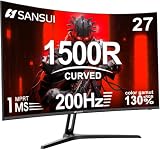
- 27" 200Hz 1500R curved Fast VA full HD gaming monitor 1ms for gaming, business, entertainment
- Display: 1500R curvature: more immersive & natural visual design for human eyes,MPRT 1ms response time, FreeSync, 130%sRGB color gamut, contrast ratio 3000:1, brightness 300nits, Delta E<2, HDR, over drive, anti-flicker, anti-glare
- Ports: DP 1.2 (up to 180Hz)&HDMI 1.4(up to 180Hz), 2x2W speakers built-in, audio jack(1 HDMI cable included). Plug & Play: continuously and automatically detect and switch input signals
- VESA mount (100x100mm), 5°to 15°tilt , 178° wide viewing angle, CrossHair /Timer/ Shadow Booster(blacklevel adjust)/RTS /FPS /RACING
- Warranty: Money-back and free replacement within 30 days, 1-year quality warranty and lifetime technical support. Pls contact SANSUI service support first if any product problem.
Product prices and availability are accurate as of the date/time indicated and are subject to change. Any price and availability information displayed on Amazon at the time of purchase will apply.




