If your Brother printer is not showing up, first check whether it is missing from your computer’s printer list or only from Brother iPrint&Scan, then identify whether it connects by Wi‑Fi, Ethernet, or USB. Check the printer for power or error messages before changing settings. A printer that appears but says Offline or Paused usually needs queue or connection troubleshooting—not initial discovery setup.
First identify what is missing
Check whether the printer is absent from the operating system’s printer settings, absent only from Brother iPrint&Scan, or listed but marked Offline or Paused. Also note whether the connection is Wi‑Fi, wired Ethernet, or USB; Brother’s iPrint&Scan troubleshooting separates its guidance by connection type. Make sure the printer is on, awake, and not displaying an error before proceeding. Brother’s USB troubleshooting FAQ covers checking machine status, while its iPrint&Scan discovery guidance branches by connection.
As an Amazon Associate I earn from qualifying purchases.
Fix a Brother printer not found on Wi‑Fi or Ethernet
Confirm the printer joined the intended network
Having internet access on the computer does not prove the printer can be reached. Check the printer’s WLAN report or network configuration for its connection status and IP information, then confirm that the computer and printer are intended to be on the same network. Use the instructions for your exact model to print or view network details; menu names and button sequences vary. Brother’s Mac Wi‑Fi troubleshooting and Windows wireless troubleshooting provide model-specific routes.
Quick wins for a faster PC:
Scan for outdated or missing drivers - takes under a minuteDriver Scan →Repair Windows errors before they cause bigger problemsFix Now →Fix the driver behind crashes, sound loss and screen glitchesFind Drivers →Improve the wireless path
If the printer is connected but difficult to reach, move it closer to the router and reduce obstructions where practical. Brother’s Mac guidance recommends fewer obstacles and shorter distance. Restart devices only as directed for the exact model; the cited Brother workflow says to allow at least five minutes for the printer to rejoin after its prescribed restart sequence. Do not assume a particular Wi‑Fi band, encryption setting, static IP, firewall exception, or factory reset is required: those are not universal fixes established for an unspecified model.
#1 Best Overall

- Ideal Printer Scanner Cable: UGREEN USB 2.0 printer cable is ideal for connecting your scanner, printer, server, hard drive, camera, piano, and other USB b devices to a laptop, computer (Mac/PC), or other USB-enabled devices for data transfer.
- High-Speed Transfer: Up to 480 Mbps transfers data speed for USB 2.0 devices, the USB Type B cable is backward compliant with full-speed USB 1.1 (12 Mbps) and low-speed USB 1.0 (1.5 Mbps). Compared with a WIFI connection, this USB B Cable provides a more stable data transmission and offers a more efficient work way for you.
- Wide Compatibility: This Printer Cable compatible with HP deskjet 2540 / 3630, HP officejet 5740, HP Envy 4527 / 4520 / 4523 / 5540, HP photosmart 7520 / 5520 / 5510, Canon MG5750 / MG3550 / MG7550, Epson XP225 / XP245 / XP425, Brother DCP-L2520DW, Lexmark MX310DN, Dell C2665DNF, Samsung Xpress SL-C1860FW, Oki ML1120 / 511DN, Schiit Modi 2 Uber, Yamaha digital piano, DAC, etc.
- Premium Quality: Corrosion-resistant gold-plated connectors and foil/braid shielding make the SB 2.0 Male to USB B Male cable cord more long-term performance (without noise or signal loss).
- Plug and Play, No Driver Required. What You Get: a USB 2.0 printer cable. Important Note: This printer USB cable has a USB 2.0 Type B Interface, not USB 3.0 Type B.
Repair Windows wireless setup
For a wireless printer on Windows, Brother’s Network Connection Repair Tool may restore wireless printing and update the printer’s IP address in the driver. Use it where available for your model. Brother’s Windows Wi‑Fi instructions explain the applicable repair path.
Remove and re-add a printer that is connected but missing from macOS
If network status is confirmed but the printer is not in the Mac printer list, Brother recommends removing it and adding it again in the applicable setup workflow. Follow the procedure for your model and macOS version in Brother’s Mac connection guide.
Rank #2
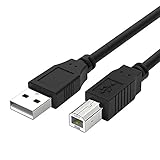
- Compatible with Brother HL-L2380DW,HLL2390DW,HLL2395DW,HL-L2350DW,HL-L6200DW,HL-L5200DW,HL-L3230CDW,HL-L2300D,HL-L2320D,HL-L3290CDW,HL-L8360CDW printer cable cord.
- usb a to usb b printer cable is ideal for connecting your keyboard, mouse, scanner, hard drive, printer, server, camera and more, to a laptop, computer (Mac/PC) or other USB-enabled device.
- Hi-speed transfer Up to 480 Mbps transfers data speed for USB 2.0 devices, the printer cable is backwards compliant with full-speed USB 1.1 and low-speed USB 1.0.
- Corrosion-resistant gold-plated connectors and foil shielding make the printer scanner cable cords more long-term performance without noise or signal loss.
- 10 Feet(3m) USB 2.0 Type-A Male to Type-B Male Connection Cable
Check USB connections and cable compatibility
USB troubleshooting applies only when the printer is connected to the computer by cable; it will not resolve a Wi‑Fi discovery problem. Try these checks in order:
What’s actually slowing this PC down?
Pick the symptom - the matching free tool is one click away.
- Reseat the cable at both the computer and the printer, using the printer port marked USB.
- Connect directly to the computer rather than through a USB hub.
- Try another computer USB port, then a compatible cable if needed.
- Check the computer’s printer settings and confirm the correct Brother driver or software is installed.
For HL-L2350DW and the related models covered by its USB FAQ, Brother specifies a USB 2.0 interface cable no longer than 2.0 meters (6 feet). Connector types depend on the printer and computer, so check both ports and the exact model’s documentation before replacing a cable. See Brother’s USB FAQ for that limited model scope.
Rank #3

- IN THE BOX: (1) 10-foot high-speed multi-shielded USB 2.0 A-Male to B-Male cable
- DEVICE COMPATIBLE: Connects mice, keyboards, and speed-critical devices, such as external hard drives, printers, and cameras to a computer
- ULTRA FAST SPEED: Full 2.0 USB capability with 480 Mbps transfer speed
- DURABLE DESIGN: Corrosion-resistant, gold-plated connectors for optimal signal clarity and shielding to protect against noise, minimizing interference for a clear signal
Allow local-network access to iPrint&Scan on macOS 15 or later
If the printer is available through the computer’s system settings but Brother iPrint&Scan cannot find it, check the app’s local-network permission. On macOS 15 or later, open System Settings > Privacy & Security > Local Network and allow Brother iPrint&Scan. Make sure the app is current, then follow the matching Wi‑Fi, wired, or USB instructions for the printer model if discovery still fails. Brother’s iPrint&Scan FAQ describes discovery by connection type.
Handle Offline, Paused, or stuck print jobs separately
If the printer appears in settings but is Offline or Paused, discovery has already succeeded at least at the system-list level. Check that you selected the intended printer, clear stuck jobs, and verify the underlying USB or network connection. For a wireless Windows setup, use Brother’s Network Connection Repair Tool where available. Reinstall the correct Brother driver package only if those checks do not resolve the issue. Brother’s Offline or Paused guidance provides additional model-specific steps.
Rank #4

- USB 2.0 Printer Cable Overview*** 1.USB-A to USB-B 2.0 Port 2.Durable: Features gold-plated connectors 3.Widely Compatible: Works with various USB B printers and devices 4.Plug and Play: Offers more stability than Wi-Fi 5.Long Length: 6/10 Feet
- High-Speed Connectivity: Connect your printer, scanner, or external hard drive to your computer with this high-quality USB A to USB B cable. Designed for fast and reliable data transfer, this cable ensures a stable connection between your devices.
- Universal Compatibility: The USB 2.0 printer cable is compatible with a wide range of devices, including printers, scanners, servers, hard drives, cameras, electronic pianos, MIDI keyboards, microphones, DAC decoders, and other peripherals that use a USB B port. It easily connects to laptops, computers, PCs, or other USB-enabled devices for data transfer.
- Durable and Reliable: Built with a robust, flexible PVC jacket and corrosion-resistant gold-plated connectors, this printer cable is designed for long-lasting use. The durable construction minimizes interference and signal loss, ensuring smooth and consistent data transmission.
- Plug and Play: Easy to use, simply plug the USB A end into your computer and the USB B end into your printer—no drivers or software installation is required. It's more stable than a Wi-Fi wireless connection.
Choose the connection path that fits your setup
Before switching between USB and network, check whether your exact model supports the connection you want. A network connection may suit multiple computers or mobile devices; USB can help isolate whether a network problem is involved, but only when the printer and computer have compatible ports and the cable is suitable. If the printer works from one computer but not another, focus on the affected computer’s setup, permissions, driver, or queue. These are troubleshooting distinctions, not a manufacturer ranking.
The Tool Desk
Outbyte Driver Updater FREEScan for outdated or missing drivers - takes under a minuteDriver Scan →Outbyte PC Repair FREEClear out junk files and repair common Windows errorsFree Scan →Use instructions for your exact Brother model
Wireless menus, restart steps, driver packages, and supported connections differ by model. Select the printer’s exact model and country on Brother Support to find its current manual, downloads, and connection FAQs before using button combinations, resets, or advanced network settings.
Quick Recap
Best Value

- High Speed Transfer : Up to 480 Mbps transfers data speed for USB 2.0 devices, the printer cable is backwards compliant with full-speed USB 1.1 (12 Mbps) and low-speed USB 1.0 (1.5 Mbps).
- Universal Printer Cable : Sweguard USB 2.0 Printer Cable is ideal for connecting your scanner, printer, server, camera such as HP, Canon, Lexmark, Epson, Dell, Xerox , Samsung and other usb b devices to a laptop, computer (Mac/PC) or other USB-enabled device.
- Gold-plated Connectors :Constructed with corrosion-resistant, gold-plated connectors for optimal signal clarity and shielding to minimize interference.
- Nylon Tangle-free Design : Tangle-free Nylon Braided Design, this USB 2.0 Printer Cord is far more dependable than others in its price range. Premium nylon braided cable adds additional durability and tangle free.
- What You’ll Get : - 1*pack Printer Cable,24/7 Friendly Customer Service,18 months warranty.Once there’s any questions,please feel free to contact us.Thanks!
Product prices and availability are accurate as of the date/time indicated and are subject to change. Any price and availability information displayed on Amazon at the time of purchase will apply.




